
Product Overview
This manual provides detailed instructions for the installation, operation, and maintenance of your Erinice Replacement Brush Roller kit for Shark Navigator Lift-Away Upright Vacuums. This kit is designed to restore the cleaning performance of your vacuum by replacing worn or damaged brush rollers, belts, and wheels.

Figure 1: Complete Erinice Replacement Brush Roller Kit components.
The kit includes one brush roller, two black belts, one pair of wheels, and one cleaning brush. These components are essential for maintaining optimal vacuum suction and effective dirt and hair removal from carpets and hard floors.
Compatibility
The Erinice Replacement Brush Roller is specifically designed for a wide range of Shark Navigator Lift-Away Upright Vacuum models. Please verify your vacuum model number against the list below to ensure compatibility.
- Compatible Models: NV350, NV350_26, NV351, NV352, NV353, NV355, NV356, NV356E, NV357, NV358, NV360, NV356E, NV370, NV370_26, NV22, NV22l, NV22LWM, NV26 series, NV41, NV42, NV60, NV70, NV71, NV80, NV90, UV420, UV440.
- Replaces Part #: 1135FC.
- NOT Compatible With: NV500 and NV520 series, NV680 and NV650 series, NV750 and NV752 series.
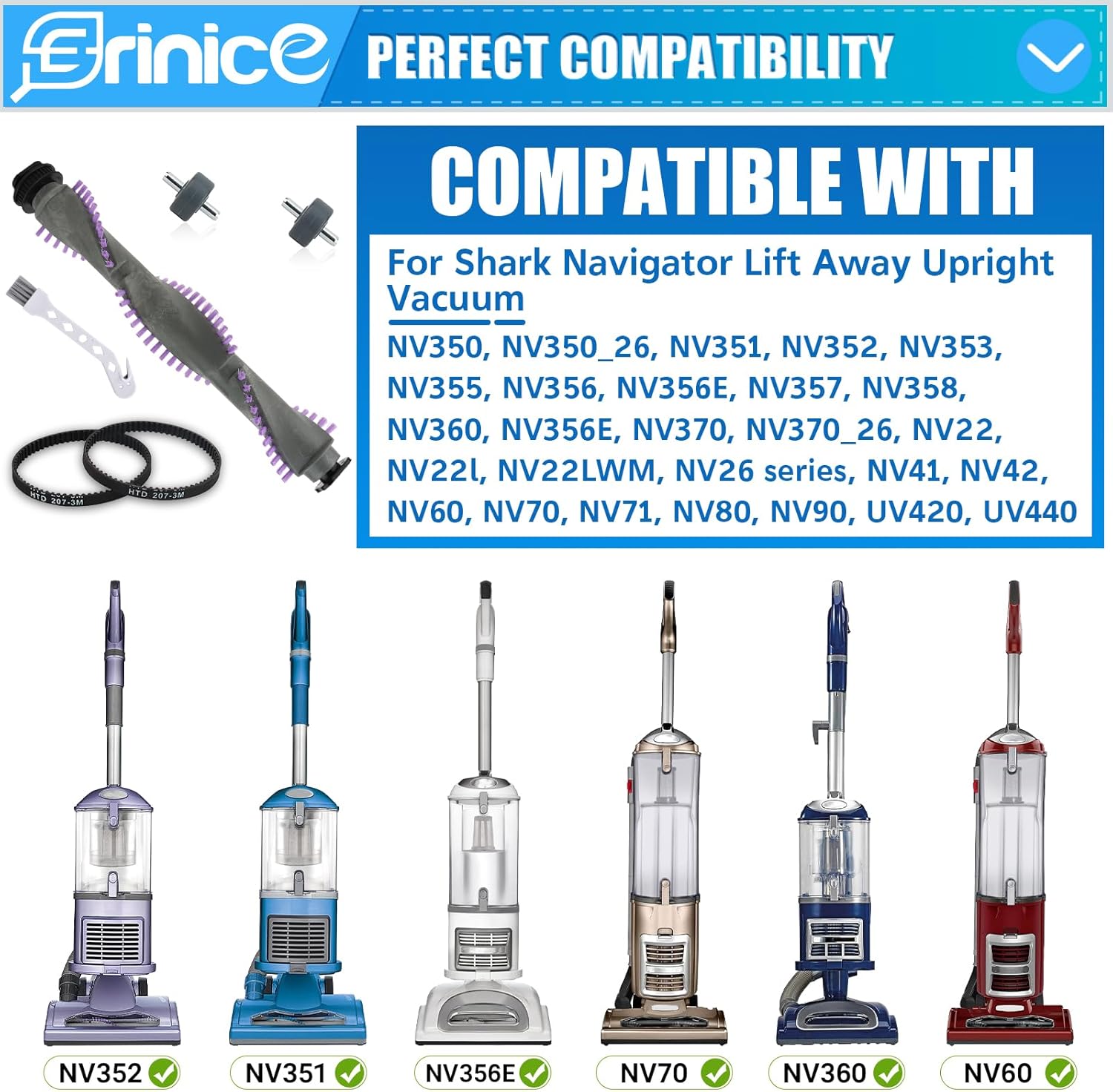
Figure 2: Visual representation of compatible Shark Navigator vacuum models.
Setup and Installation
Replacing the brush roller, belts, and wheels requires careful attention. Please follow these steps precisely. A screwdriver is required for this process (not included in the package).
- Prepare the Vacuum: Unplug your Shark Navigator vacuum from the power outlet before beginning any maintenance or installation. Lay the vacuum flat on a clean, stable surface with the brush roll housing facing upwards.
- Access the Brush Roller Housing: Locate the screws securing the brush roller housing cover. There are typically two hidden screws under the small wheels. You will need to remove these wheels to access the screws.
- Remove Old Components: Carefully remove the screws and lift the housing cover. Detach the old brush roller and belts. If replacing wheels, use a screwdriver to gently pry out the old wheels.
- Install New Wheels (if applicable): If replacing the wheels, align the new wheels with their slots and press them firmly into place until they click.
- Install New Belts: Place the new belts around the motor shaft and the brush roller. Ensure the belts are properly seated and not twisted.
- Install New Brush Roller: Carefully insert the new brush roller into its designated position within the housing, ensuring the ends align with the slots and the belts are correctly tensioned around it.
- Reassemble: Replace the brush roller housing cover and secure it with the screws. Ensure all components are properly aligned before tightening.
- Test: Plug in the vacuum and test its operation to ensure the new brush roller spins freely and the vacuum functions correctly.

Figure 3: Steps for replacing the vacuum wheels.
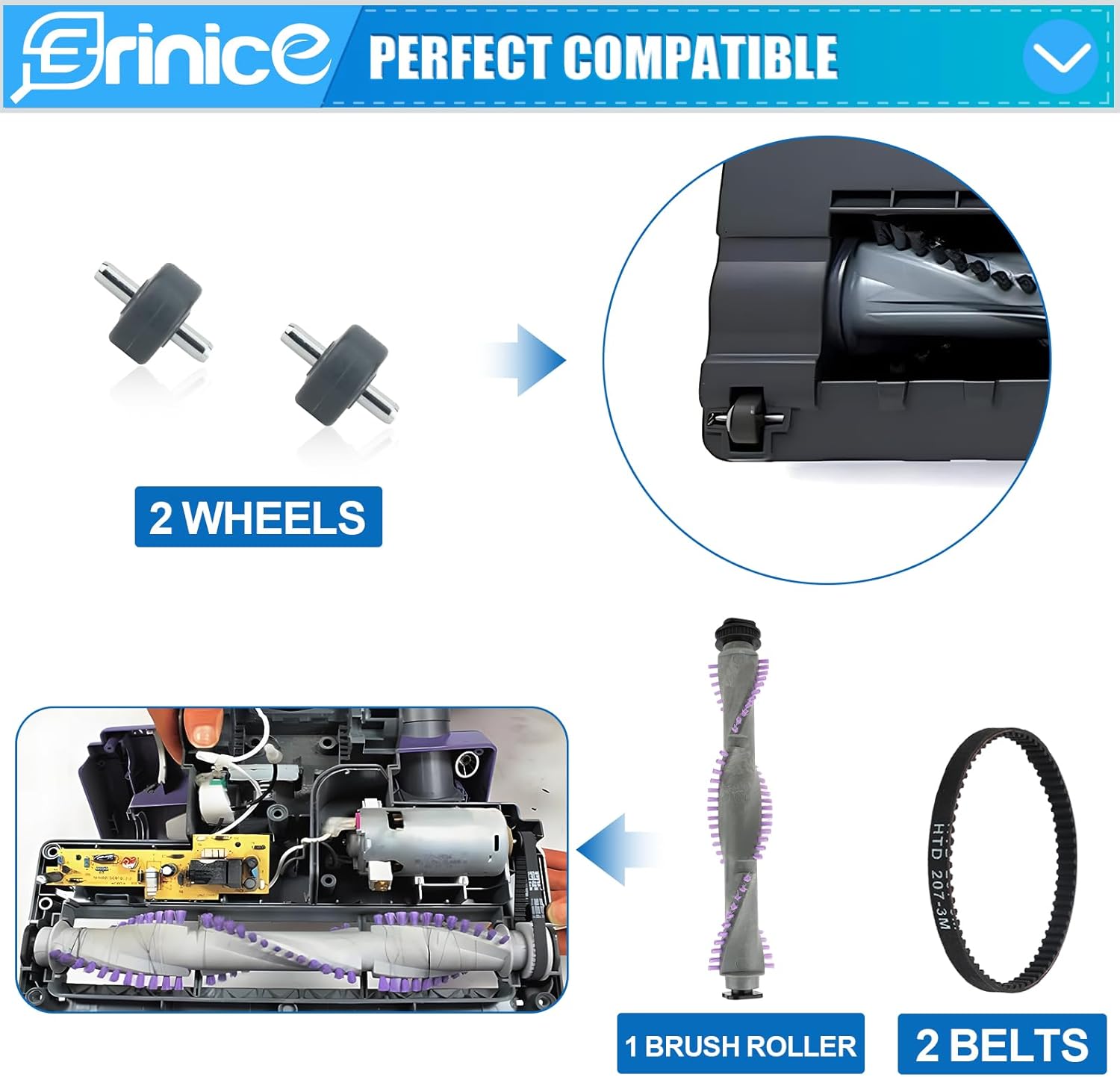
Figure 4: Overview of brush roller and belt replacement.
The disassembly and reassembly process may take a few minutes. Patience is key to successful installation.
Operating Benefits
With the new Erinice brush roller, your Shark Navigator vacuum will experience improved cleaning efficiency. The high-quality bristles are designed to effectively pick up dirt, debris, and pet hair from various surfaces, enhancing the overall suction strength and leaving your carpets and floors looking refreshed.

Figure 5: Enhanced cleaning performance with the new brush roller.
Maintenance
To ensure the longevity and optimal performance of your new brush roller, regular maintenance is recommended:
- Regular Cleaning: Periodically inspect the brush roller for tangled hair, strings, or debris. Use the included cleaning brush or scissors to carefully remove any obstructions.
- Washable Components: The brush roller can be washed with water if necessary. Ensure it is completely dry before reinstalling it into the vacuum.
- Belt Inspection: Check the belts for signs of wear, stretching, or damage. Replace them if they appear worn to maintain proper brush roller rotation.
Troubleshooting
If you encounter issues after installing the replacement parts, consider the following:
- Brush Roller Not Spinning:
- Ensure the vacuum is unplugged.
- Check if the belts are properly installed and not broken or slipped off the motor shaft or brush roller.
- Inspect the brush roller for any obstructions (e.g., tangled hair) preventing it from rotating freely.
- Verify that the brush roller is correctly seated in its housing.
- Poor Suction:
- Confirm the brush roller is spinning correctly.
- Check other vacuum components such as filters and hoses for clogs or damage.
- Parts Don't Fit:
- Double-check your vacuum's model number against the compatibility list in this manual. This kit is not universally compatible with all Shark vacuum models.
- Ensure you have removed all original components and are installing the new parts in the correct orientation.
Specifications
| Feature | Detail |
|---|---|
| Product Name | Replacement Brush Roller Kit |
| Brand | Erinice |
| Compatible Vacuum Models | Shark Navigator Lift-Away Upright Vacuums (NV22, NV22L, NV26, NV42, NV70, NV80, NV350, NV355, NV356, NV356E, NV360, UV440 series, and more as listed in Compatibility section) |
| Replaces Part Number | 1135FC |
| Package Contents | 1 x Brush Roller, 2 x Belts, 1 Pair x Wheels, 1 x Cleaning Brush |
| Brush Roller Length | Approximately 10.94 inches (27.7 cm) |
| Belt Dimensions | HTD 207-3M, approximately 2.5 inches (6.35 cm) diameter |
| Wheel Dimensions | Approximately 0.51 inches (12.9 mm) diameter, 0.28 inches (7.12 mm) width, 0.7 inches (18 mm) axle length |
| Material | High-quality bristles and durable materials |
| Item Weight | 7.7 ounces |
| Package Dimensions | 11.57 x 2.2 x 1.77 inches |

Figure 6: Precise dimensions of the replacement components.
Customer Support
For any quality issues or further assistance, please contact the Erinice customer service team. We are committed to resolving any problems you may encounter to ensure your satisfaction.
Note: This product is a replacement part and not manufactured by Shark.