
1. Introduction
This manual provides detailed instructions for the safe and efficient operation of your ERICAT Coin Counter Machine. Please read this manual thoroughly before using the device to ensure proper functionality and to prevent damage. Keep this manual for future reference.
2. Safety Instructions
- Ensure the power supply matches the machine's requirements (110V-220V).
- Do not operate the machine in excessively humid or dusty environments.
- Keep hands and foreign objects away from the coin hopper and sorting mechanisms during operation.
- Unplug the machine from the power outlet before cleaning or performing any maintenance.
- Do not attempt to disassemble or repair the machine yourself, except for specified cleaning procedures. Contact qualified service personnel for repairs.
- Place the machine on a stable, level surface to prevent tipping.
3. Product Overview
The ERICAT Coin Counter Machine is designed for efficient counting and sorting of coins. It features an LED display, a simplified control panel, and a high-capacity hopper.
3.1 Components and Control Panel

Figure 1: Main unit with control panel and coin output slots. Labels indicate functions for C (Clean/Return to Home), SET (Set Batch), BATCH (Turn to Batch mode), PRINT (Print Breakdown), START/STOP (Start Counting), and number buttons (0-9) for batch selection.
- Hopper: Top-loading area for coins. Capacity: 300-500 units.
- Coin Bins/Receiving Slots: Individual slots at the bottom for sorted coins. Capacity: 80-150 units each.
- LED Display: Shows coin count, value, and batch settings.
- Control Panel Buttons:
- PRINT: Initiates printing of the coin breakdown (if connected to a compatible printer).
- SET: Used to set the desired batch quantity.
- C (Clean/Return to Home): Clears the current counting result or returns to the main display.
- BATCH: Toggles between Free Counting mode and Preset Counting (Batch) mode.
- START/STOP: Starts or stops the coin counting process.
- 0-9 Number Buttons: Used to input specific batch numbers.
3.2 Hopper and Coin Bins
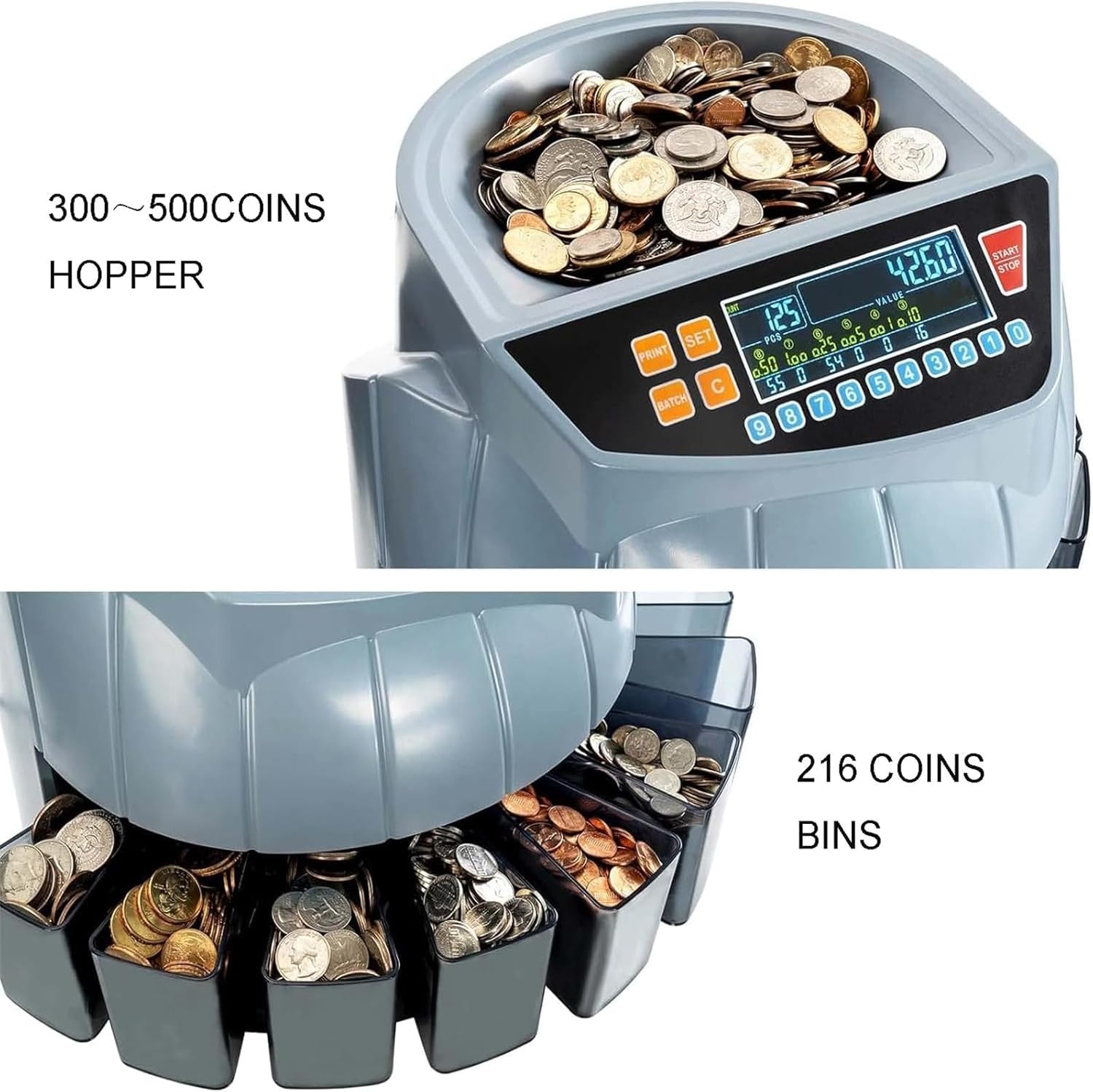
Figure 2: Top view of the coin counter showing the large hopper for coin input and the individual bins for sorted coins at the bottom. The hopper can hold 300-500 coins, and the machine sorts at a speed of 216 coins per minute.
3.3 Accessories
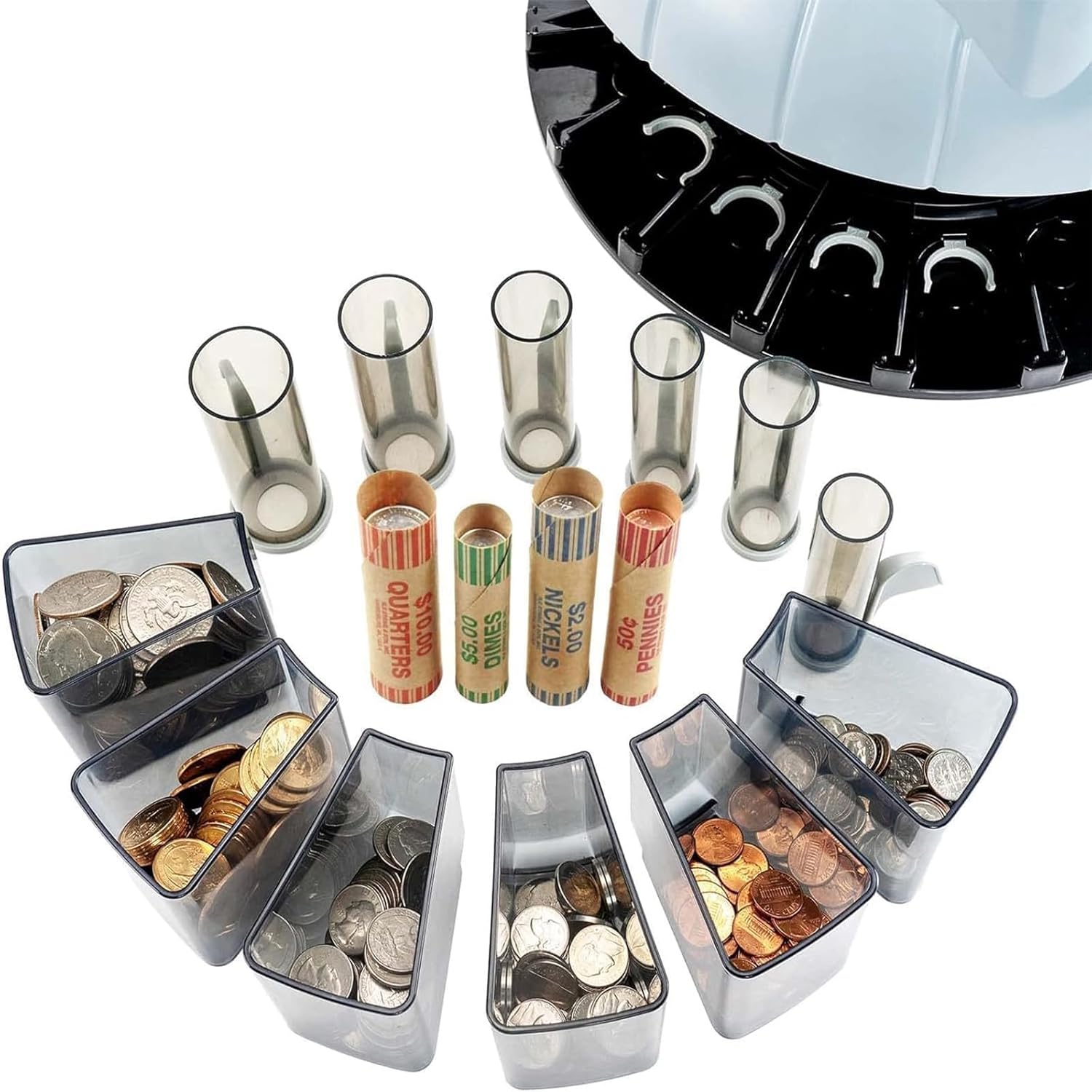
Figure 3: Example of coin wrappers and collection boxes that can be used with the machine for organizing sorted coins by denomination.
4. Setup
- Unpacking: Carefully remove the coin counter from its packaging. Retain all packaging materials for future transport or storage.
- Placement: Place the machine on a stable, flat, and dry surface. Ensure there is adequate space around the machine for operation and coin collection.
- Install Coin Bins: Insert the provided coin collection bins into their respective slots at the base of the machine. Ensure they are securely seated.
- Power Connection: Connect the power cord to the machine's power input and then plug it into a grounded electrical outlet (110V-220V).
- Initial Power On: Press the power switch (usually located on the back or side of the machine) to turn on the device. The LED display should illuminate.
5. Operating Instructions
5.1 Free Counting Mode
- Ensure the machine is powered on.
- If the machine is in Batch mode, press the BATCH button to switch to Free Counting mode. The display will indicate free counting.
- Place a quantity of unsorted coins into the hopper. Do not overfill the hopper.
- Press the START/STOP button to begin counting. The machine will sort and count the coins, displaying the total count and value on the LED screen.
- Coins will be deposited into their respective denomination bins.
- To stop counting at any time, press the START/STOP button again.
- To clear the current count and value, press the C button.
5.2 Preset Counting (Batch) Mode
- Ensure the machine is powered on.
- Press the BATCH button to enter Preset Counting mode.
- Press the SET button. The batch preset number display will become active.
- Use the 0-9 number buttons to enter your desired batch quantity for each denomination. For example, to set a batch of 25 for quarters, select quarters and input "25".
- Press SET again to confirm the batch settings.
- Place coins into the hopper.
- Press the START/STOP button. The machine will count and sort coins until the preset quantity for each denomination is reached, then it will pause automatically.
- Remove the batched coins from the bins and press START/STOP to resume counting for the next batch or remaining coins.
- To clear the current count and value, press the C button.
5.3 Reading the LED Display

Figure 4: Detailed view of the LED display showing the total count (PCS) and total value (VALUE), along with individual denomination counts and values. The display also shows the batch preset numbers.
The LED display provides real-time information:
- COUNT (PCS): Displays the total number of coins counted.
- VALUE: Displays the total monetary value of the counted coins.
- Denomination Breakdown: Shows the count and value for each specific coin denomination.
- Batch Preset Number Display: (3 Digits LED) Shows the set batch quantity.
- Counting Number Display: (4 Digits LED) Shows the current count during operation.
6. Maintenance
6.1 General Cleaning
- Before Cleaning: Always unplug the machine from the power outlet.
- Exterior: Wipe the exterior surfaces with a soft, dry cloth. For stubborn dirt, use a slightly damp cloth and then dry thoroughly. Do not use abrasive cleaners or solvents.
- Hopper and Bins: Regularly empty and clean the coin hopper and collection bins to prevent dust and debris buildup.
6.2 Clearing Foreign Objects and Jams
- The machine features a built-in cleaning coin sensor designed to detect and help remove foreign bodies.
- If a coin jam occurs or an abnormal coin is detected, the machine may stop. Carefully remove any jammed coins or foreign objects from the hopper and sorting path.
- For deeper access, the coin counter can be opened by removing approximately 3 screws. Refer to the machine's physical markings for screw locations. Exercise caution when opening the unit.
- After clearing, ensure all covers are securely reattached before resuming operation.
7. Troubleshooting
| Problem | Possible Cause | Solution |
|---|---|---|
| Machine does not power on. | Power cord not connected; power switch off; no power from outlet. | Check power cord connection; ensure power switch is on; test outlet with another device. |
| Coins not counting or sorting correctly. | Coin jam; foreign object in sorting path; dirty sensors; incorrect coin type. | Clear any coin jams; remove foreign objects; clean coin sensors; ensure only supported coins are used. |
| Machine stops unexpectedly. | Coin jam; hopper empty in Free Counting mode; batch quantity reached in Preset mode. | Clear jams; refill hopper; remove batched coins and resume. |
| Display shows an error code. | Internal malfunction or specific operational issue. | Note the error code and refer to the manufacturer's support or contact customer service. Try restarting the machine. |
8. Specifications
| Product Name | Coin Counting Machine |
| Brand | ERICAT |
| Model | B0CNJT4Q91 |
| Ambient Temperature | 0℃ - 40℃ (32°F - 104°F) |
| Ambient Humidity | 25% - 80% |
| Hopper Capacity | 300 - 500 Units |
| Each Receiving Slot Capacity | 80 - 150 Units |
| Batch Preset Number Display | 3 Digits LED |
| Counting Number Display | 4 Digits LED |
| Power Source | 110V-220V |
| Power Consumption | 45W (Max) |
| Dimensions (L×W×H) | 355MM × 330MM × 266MM |
| Counting Speed | 216 units/Min |