
1. Introduction
This manual provides essential information for the proper installation, operation, maintenance, and troubleshooting of the BAYDE 1756-L73 Logix 5573 Processor. This processor is designed for industrial automation applications, offering 8MB of memory for robust control solutions. Please read this manual thoroughly before attempting any procedures to ensure safe and efficient use.
2. Product Overview
The BAYDE 1756-L73 is a high-performance ControlLogix processor, featuring 8MB of user memory. It is designed to integrate seamlessly into ControlLogix systems, providing reliable control and data processing capabilities for complex industrial processes.
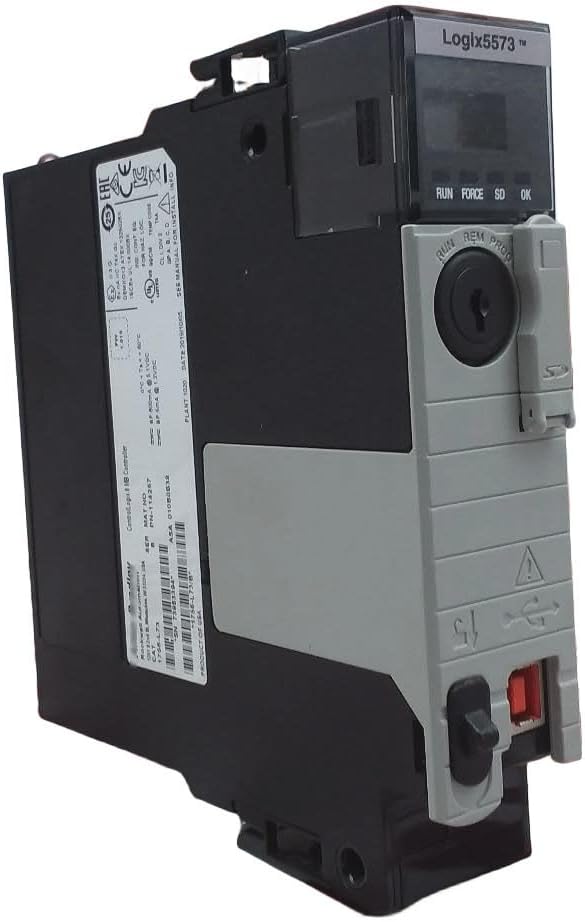
Image 2.1: Front and side view of the BAYDE 1756-L73 Logix 5573 Processor. This image displays the processor's physical form factor, including its front panel with status indicators and a key switch, and its side casing.

Image 2.2: Rear view of the BAYDE 1756-L73 Logix 5573 Processor. The rear panel features a detailed product label, including serial number, part number (PN-114257), and various compliance markings such as CE, EAC, and UL. The label also indicates the product is a ControlLogix 8 MB Controller.
3. Setup and Installation
Installation of the 1756-L73 processor should only be performed by qualified personnel familiar with industrial control systems and electrical safety procedures. Ensure all power is disconnected before installation.
3.1. Safety Precautions
- Always disconnect power to the ControlLogix chassis before installing or removing any modules.
- Follow all local and national electrical codes.
- Wear appropriate personal protective equipment (PPE).
- Ensure proper grounding of the chassis.
3.2. Installation Steps
- Verify the ControlLogix chassis is powered off.
- Locate an available slot in the ControlLogix chassis. The processor typically occupies the leftmost slot (slot 0) but can be installed in any available slot.
- Align the processor with the guides in the chassis slot.
- Push the processor firmly into the slot until it is fully seated and the locking mechanism engages.
- Secure the processor using the module locking tabs, if present.
- Connect necessary communication cables (e.g., USB for initial configuration) to the processor's front panel ports.
- Apply power to the ControlLogix chassis.
4. Operating Instructions
Once installed and powered, the processor's operational status can be monitored via its front panel indicators and key switch.
4.1. Key Switch Positions
- RUN: The processor executes the user program.
- REM (Remote): The processor can be placed in RUN, PROGRAM, or FAULT mode via software.
- PROG (Program): The processor is in program mode, allowing program edits and downloads.
4.2. Status Indicators
- RUN: Indicates the processor is in RUN mode.
- FORCE: Illuminates when I/O forces are active.
- SD (Secure Digital): Indicates activity or status of the SD card (if installed).
- OK: A green light indicates normal operation. A red light or flashing indicates a fault.
5. Maintenance
The BAYDE 1756-L73 processor is designed for minimal maintenance. However, periodic checks can help ensure long-term reliability.
- Environmental Control: Ensure the operating environment adheres to specified temperature and humidity ranges.
- Dust and Debris: Keep the processor and chassis free from dust and debris. Use compressed air for cleaning if necessary, ensuring power is off.
- Connections: Periodically check all cable connections for tightness and integrity.
- Firmware Updates: Refer to the manufacturer's documentation for recommended firmware update procedures.
6. Troubleshooting
This section provides basic troubleshooting steps for common issues. For complex problems, consult a qualified technician or contact support.
- Processor Not Responding:
- Check power supply to the chassis.
- Verify the processor is fully seated in its slot.
- Observe the OK status indicator. If red or flashing, a fault has occurred.
- Fault Indication (Red OK LED):
- Cycle power to the chassis.
- Connect to the processor via programming software to view fault codes and diagnostic messages.
- Ensure the program is valid and free of errors.
- Communication Issues:
- Verify communication cable connections.
- Check network settings and IP addresses.
- Ensure communication modules are correctly configured and functioning.
7. Specifications
Key technical specifications for the BAYDE 1756-L73 Logix 5573 Processor 8MB:
| Specification | Value |
|---|---|
| Model Number | 1756-L73 |
| Brand | BAYDE |
| CPU Manufacturer | BAYDE |
| Cache Size | 8 MB |
| Processor Count | 1 |
| Date First Available | May 6, 2023 |
| ASIN | B0CNG14VGY |
8. Warranty and Support
BAYDE ensures the quality of its products. All products are original and new, produced by the brand's original factory. For any specific model requirements or technical assistance, please consult your supplier or the manufacturer's official support channels.
For additional product information, you may refer to resources such as rok.auto/1756-L73, which may provide details related to specific serial numbers or product variants like 1756-L73/B.
9. Packaging and Compliance Information
The product packaging includes important compliance and recycling information.

Image 9.1: Close-up of the product label on the packaging box. This label displays the model number (1756-L73), serial number (SN 311182435), firmware version (FW 1.010), part number (PN-114257), and manufacturing details including 'PRODUCT OF SINGAPORE' and date (2023/05/06). It also shows various regulatory compliance marks (CE, EAC, UKCA, KCC).

Image 9.2: Packaging recycling symbols. This image shows the recycling symbol for paper and cardboard (PAP 20), along with a production code (PN-235030) and a manufacturing date (05/23), indicating the packaging materials and production timeline.