1. Safety Information
Please read this manual carefully before using your new HAAM refrigerator. Keep it for future reference. This appliance is intended for household use only.
- Electrical Safety: Ensure the appliance is connected to a properly grounded outlet. Do not use extension cords or adapters.
- Ventilation: Allow adequate space around the refrigerator for proper ventilation to prevent overheating.
- Handling: Use caution when moving the appliance to avoid injury or damage. It is heavy and requires at least two people.
- Flammable Materials: Do not store explosive substances or highly flammable materials inside the refrigerator.
- Child Safety: Keep children away from the appliance, especially when the doors are open. Old refrigerators can be dangerous for children.
- Maintenance: Disconnect the power supply before cleaning or performing any maintenance.
2. Product Overview
The HAAM HM910SSD-O23INV is a modern side-by-side refrigerator designed for efficient food storage. It features separate compartments for refrigeration and freezing, offering convenient access and organization.

Figure 2.1: Exterior view of the HAAM Side by Side Refrigerator. This image shows the sleek silver finish and the integrated control panel on the freezer door.

Figure 2.2: Interior view of the HAAM Side by Side Refrigerator with doors open. This image displays the spacious shelves, door bins, and crisper drawers in both the refrigerator and freezer compartments.
3. Setup
3.1 Unpacking
- Remove all packaging materials, including foam and adhesive tape.
- Inspect the refrigerator for any damage. Report any damage to your retailer immediately.
- Keep packaging materials out of reach of children.
3.2 Placement
- Choose a location with a firm, level floor that can support the weight of the refrigerator when fully loaded.
- Ensure there is adequate space around the appliance for proper air circulation (at least 10 cm at the back and sides, 30 cm at the top).
- Avoid direct sunlight or proximity to heat sources (e.g., oven, radiator) to ensure optimal performance and energy efficiency.
3.3 Leveling
- Adjust the leveling feet at the bottom front of the refrigerator to ensure it is stable and level.
- A level appliance helps prevent vibrations and ensures proper door sealing.
3.4 Electrical Connection
- Plug the refrigerator into a dedicated, grounded electrical outlet.
- Do not use multi-plugs or extension cords.
3.5 Initial Operation
- After plugging in, allow the refrigerator to stand for at least 2-4 hours before loading food. This allows the refrigerant to settle.
- Run the appliance empty for a few hours to allow it to reach its operating temperatures.
4. Operating Instructions
4.1 Control Panel
The refrigerator features an intuitive control panel, typically located on the exterior of the freezer door. This panel allows you to adjust temperature settings and access various functions.
4.2 Temperature Settings
- Refrigerator Compartment: The recommended temperature for the refrigerator compartment is typically between 2°C and 5°C (35°F and 41°F).
- Freezer Compartment: The recommended temperature for the freezer compartment is -18°C (0°F) or lower.
- Adjust temperatures using the control panel buttons. Refer to the display for current settings.
4.3 Storage Recommendations
- Store fresh foods in the refrigerator compartment. Use crisper drawers for fruits and vegetables.
- Wrap or cover foods to prevent drying out and odor transfer.
- Store frozen foods in the freezer compartment. Do not refreeze thawed foods.
5. Maintenance
5.1 Cleaning the Interior
- Unplug the refrigerator before cleaning.
- Clean the interior regularly with a solution of mild detergent and warm water.
- Wipe dry thoroughly to prevent odors and mold growth.
- Remove and clean shelves, drawers, and door bins as needed.
5.2 Cleaning the Exterior
- Wipe the exterior surfaces with a soft cloth dampened with mild detergent.
- For stainless steel finishes, use a specialized stainless steel cleaner.
- Clean the door gaskets regularly to ensure a tight seal.
5.3 Defrosting
This HAAM refrigerator features a Frost Free defrost system, which automatically prevents ice buildup in the freezer compartment. Manual defrosting is generally not required.
5.4 Power Outage
- During a power outage, keep the refrigerator doors closed to maintain internal temperatures for as long as possible.
- Avoid opening the doors unnecessarily.
6. Troubleshooting
Before contacting service, please check the following common issues and solutions:
| Problem | Possible Cause | Solution |
|---|---|---|
| Refrigerator not cooling | Power cord unplugged; temperature setting too high; door not closed properly; poor ventilation. | Check power connection; adjust temperature; ensure doors are sealed; clear obstructions around the appliance. |
| Unusual noises | Appliance not level; items vibrating inside; compressor noise (normal). | Level the refrigerator; rearrange items; normal operating sounds are expected. |
| Water on floor | Drain tube blocked; door not sealed properly. | Clear the drain tube; check door gaskets for proper seal. |
| Doors do not close completely | Appliance not level; food packages obstructing; door gaskets dirty or damaged. | Level the refrigerator; rearrange food; clean or replace door gaskets. |
7. Specifications
Key technical specifications for the HAAM HM910SSD-O23INV refrigerator:
| Feature | Specification |
|---|---|
| Brand | HAAM |
| Model | HM910SSD-O23INV |
| Configuration | Side-by-Side |
| Total Capacity | 18.4 Cubic Feet (521 Liters) |
| Freezer Capacity | 6.3 Cubic Feet (177 Liters) |
| Refrigerator Capacity | 12.1 Cubic Feet (344 Liters) |
| Dimensions (H x W x D) | 122 cm x 91 cm x 67 cm |
| Colour | Silver |
| Defrost System | Frost Free |
| Number of Doors | 2 |
| Finish Type | Matte |
| Installation Type | Freestanding |
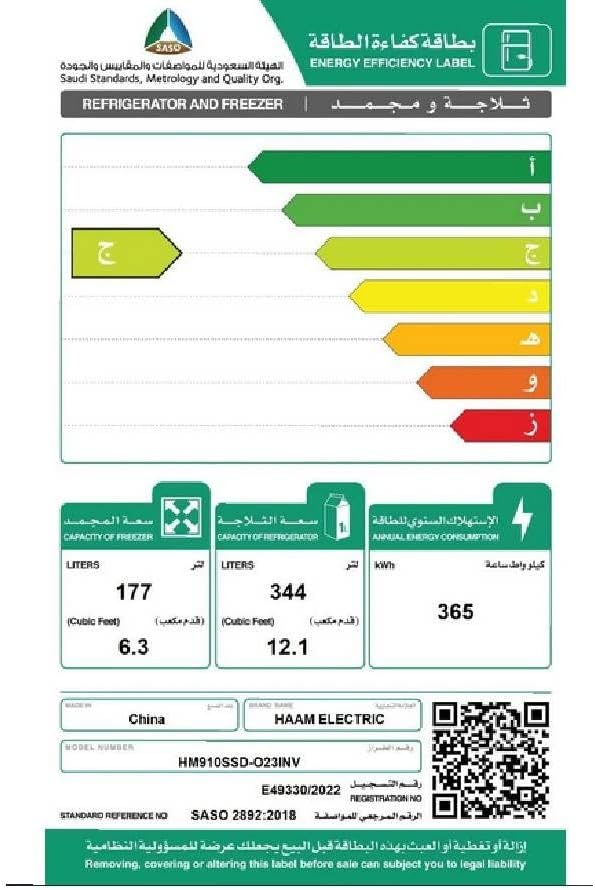
Figure 7.1: Energy Efficiency Label for HAAM Refrigerator Model HM910SSD-O23INV. This label provides details on energy consumption and capacity.
For more information on energy efficiency certification, visit: Saudi Standards, Metrology and Quality Org.
8. Warranty and Support
For warranty information, please refer to the warranty card provided with your purchase or contact your retailer. In case of technical issues or for customer support, please reach out to HAAM customer service or your authorized service center. Always have your model number (HM910SSD-O23INV) and purchase date available when contacting support.