
Shkalacar OBT1293509048946YM
Shkalacar Keyless Entry Car Alarm System with Push-to-Start and Remote Start
Model: OBT1293509048946YM
Introduction
This manual provides essential instructions for the installation, operation, and maintenance of your Shkalacar Keyless Entry Car Alarm System. This system integrates a push-to-start ignition, keyless entry, remote start, and anti-theft features designed to enhance vehicle convenience and security. Please read this manual thoroughly before installation and use to ensure proper function and safety.
Safety Information
Professional installation is highly recommended for this product due to its electrical nature and connection to vehicle systems. Incorrect installation can lead to vehicle damage, electrical malfunction, or personal injury. Always disconnect the vehicle's battery before beginning any electrical work. Ensure all wiring is properly insulated and secured to prevent short circuits or interference.
Package Contents
Verify that all components listed below are present in your package:
- 1 x Main Control Host
- 2 x Remote Control Handles (with CR2032 batteries included)
- 1 x Engine Start Button
- 2 x Sensing Antennas
- 1 x Start Harness
- 1 x Detection Harness
- 1 x Restore Button
- 1 x User Manual (this document)

Figure 1: Complete package contents of the Shkalacar Keyless Entry Car Alarm System.
Specifications
| Brand | Shkalacar |
| Model Number | OBT1293509048946YM |
| Compatible Devices | Cars, SUVs |
| Working Voltage | 12 V |
| Quiescent Current | Less than 10mA |
| Working Frequency | 433MHz |
| Remote Control Battery | 1 x CR2032 button battery, 3V 240mAh (included) |
| Includes Remote | Yes |
Setup and Installation
Installation of the Shkalacar Keyless Entry Car Alarm System requires knowledge of automotive electrical systems. It is strongly recommended to have this system installed by a qualified professional. The following provides a general overview; refer to the detailed wiring diagram included in your package for specific connections.

Figure 2: Main Control Unit with connection ports.
Key Installation Steps (General):
- Disconnect Battery: Before starting, disconnect the negative terminal of your vehicle's battery.
- Mount Main Control Unit: Securely mount the main control unit in a hidden, dry location within the vehicle's interior.
- Connect Wiring Harnesses: Connect the Start Harness and Detection Harness to the main control unit and then to the appropriate vehicle wiring (ignition, power, ground, door triggers, etc.) as per the detailed wiring diagram.
- Install Engine Start Button: Replace the existing ignition key cylinder with the new engine start button. Ensure it is securely fitted.
- Install Sensing Antennas: Position the two sensing antennas in locations that allow for optimal signal reception for keyless entry, typically near the vehicle's exterior.
- Connect Restore Button: Install the restore button in an accessible but discreet location for emergency use.
- Reconnect Battery: Once all connections are made and verified, reconnect the vehicle's battery.
- System Pairing/Programming: Follow the specific instructions in the included manual for pairing the remote controls with the main unit and programming any necessary vehicle-specific settings.

Figure 3: Engine Start/Stop Button.
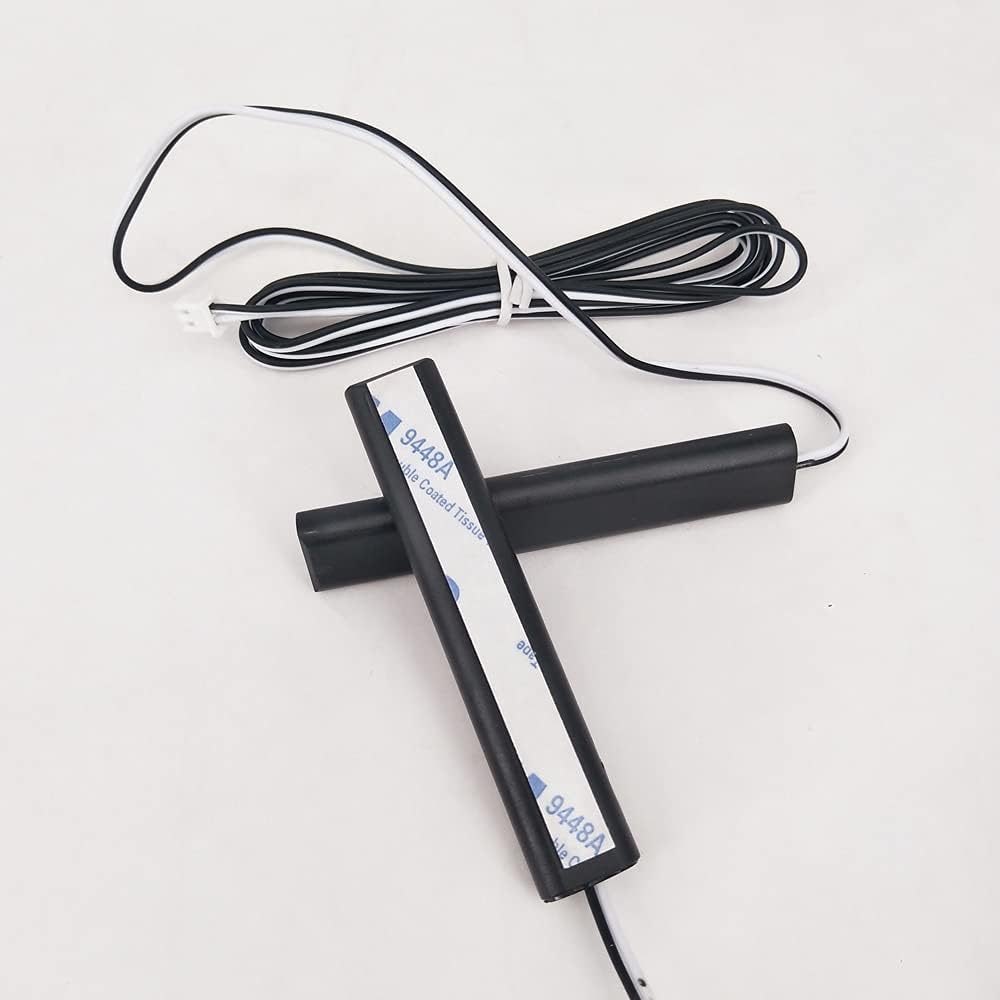
Figure 4: Sensing Antennas.
Operating Instructions
Once installed, your Shkalacar system offers several convenient features:
1. Keyless Entry (Automatic Sensor Switch Lock)
- When you approach your vehicle with the remote control handle within approximately 2 meters, the system will automatically unlock the doors.
- When you move away from your vehicle with the remote control handle, the system will automatically lock the doors.

Figure 5: Remote Control Handles.
2. Push-to-Start/Stop Engine
- To Start: With the remote control handle inside the vehicle, press the brake pedal and then press the "ENGINE START STOP" button. The engine will start.
- To Stop: With the vehicle stationary, press the brake pedal and then press the "ENGINE START STOP" button. The engine will turn off.
- Accessory Mode: Without pressing the brake, press the "ENGINE START STOP" button once for ACC mode, press again for ON mode, and a third time to turn off.
3. Remote Start/Flameout
- To Remote Start: Press and hold the remote start button on your remote control handle (refer to your remote's specific button layout). The vehicle will start and run for a preset duration (typically 10 minutes) before automatically shutting off.
- To Remote Stop: While the engine is running via remote start, press and hold the remote stop button on your remote control handle. The engine will turn off.
- This feature is useful for pre-cooling or pre-heating your vehicle.
4. Anti-Theft and Identity Function
- The system incorporates an identity function, meaning the vehicle cannot be started normally without the presence of the authorized remote control handle.
- If an attempt is made to start the vehicle without the remote, the anti-theft system will activate.
Maintenance
The Shkalacar Keyless Entry Car Alarm System is designed for low maintenance. Follow these guidelines to ensure longevity:
- Remote Control Batteries: The remote control handles use CR2032 button batteries. Replace them when the remote's range decreases or it becomes unresponsive.
- Keep Dry: Avoid exposing the main control unit and remote controls to water or excessive moisture.
- Cleanliness: Keep the components free from dust and debris. Use a soft, dry cloth for cleaning.
- Professional Checks: Periodically, have your vehicle's electrical system checked by a professional, especially if you notice any unusual behavior from the system.
Troubleshooting
If you encounter issues with your Shkalacar system, consider the following common solutions:
- System Not Responding:
- Check the remote control battery.
- Ensure the remote control is within range of the vehicle.
- Verify all wiring connections are secure (professional inspection recommended).
- Keyless Entry Not Working:
- Ensure the remote control is present and its battery is charged.
- Check for any obstructions or strong electromagnetic interference near the sensing antennas.
- Engine Not Starting via Push Button:
- Confirm the remote control is inside the vehicle.
- Ensure the brake pedal is fully depressed.
- Check vehicle battery health.
- Remote Start Fails:
- Verify the vehicle doors are closed and locked.
- Ensure the hood is closed.
- Check if the vehicle is in neutral (for manual transmissions, if applicable and properly configured).
If problems persist, contact a qualified automotive technician or the manufacturer's support.
Warranty and Support
For warranty information, please refer to the documentation provided at the time of purchase or contact Shkalacar customer support directly. Keep your proof of purchase for any warranty claims.
For technical assistance or further inquiries, please visit the official Shkalacar website or contact their customer service department. Contact details are typically found on the product packaging or the manufacturer's website.
no relevant documents
Ask a question about this manual
Ask about setup, troubleshooting, compatibility, parts, safety, or missing instructions. Manuals+ will review the question and use this page’s manual context to help answer it.