
X-Sense XS01-WX, SC07-WX
X-Sense Smart Smoke Detector XS01-WX & Smart Combination Alarm SC07-WX User Manual
Models: XS01-WX, SC07-WX
1. Introduction
This user manual provides essential information for the installation, operation, and maintenance of your X-Sense Smart Smoke Detector (XS01-WX) and Smart Combination Alarm (SC07-WX). These devices are designed to enhance your home safety by providing real-time alerts for smoke and carbon monoxide (SC07-WX only) directly to your smartphone via the X-Sense Home Security App.
2. Important Safety Information
- Read All Instructions: Before installation and operation, carefully read and understand all instructions provided in this manual.
- Proper Placement: Install alarms in accordance with local codes and regulations. Refer to the installation section for recommended placement.
- Regular Testing: Test your alarms weekly to ensure proper operation.
- Battery Replacement: Replace batteries immediately when a low battery warning is indicated.
- Do Not Paint: Never paint over the alarm. Paint can clog the sensing chambers and prevent the alarm from operating properly.
- Do Not Disassemble: Do not attempt to disassemble or repair the alarm yourself. Refer all servicing to qualified personnel.
- Emergency Response: In case of an alarm, evacuate the premises immediately and call emergency services.
3. Package Contents
- 1 x X-Sense Smart Smoke Detector (XS01-WX)
- 1 x X-Sense Smart Combination Alarm (SC07-WX)
- 2 x Mounting Brackets
- 4 x Screws
- 4 x Anchor Plugs
- 1 x User Manual
4. Product Overview
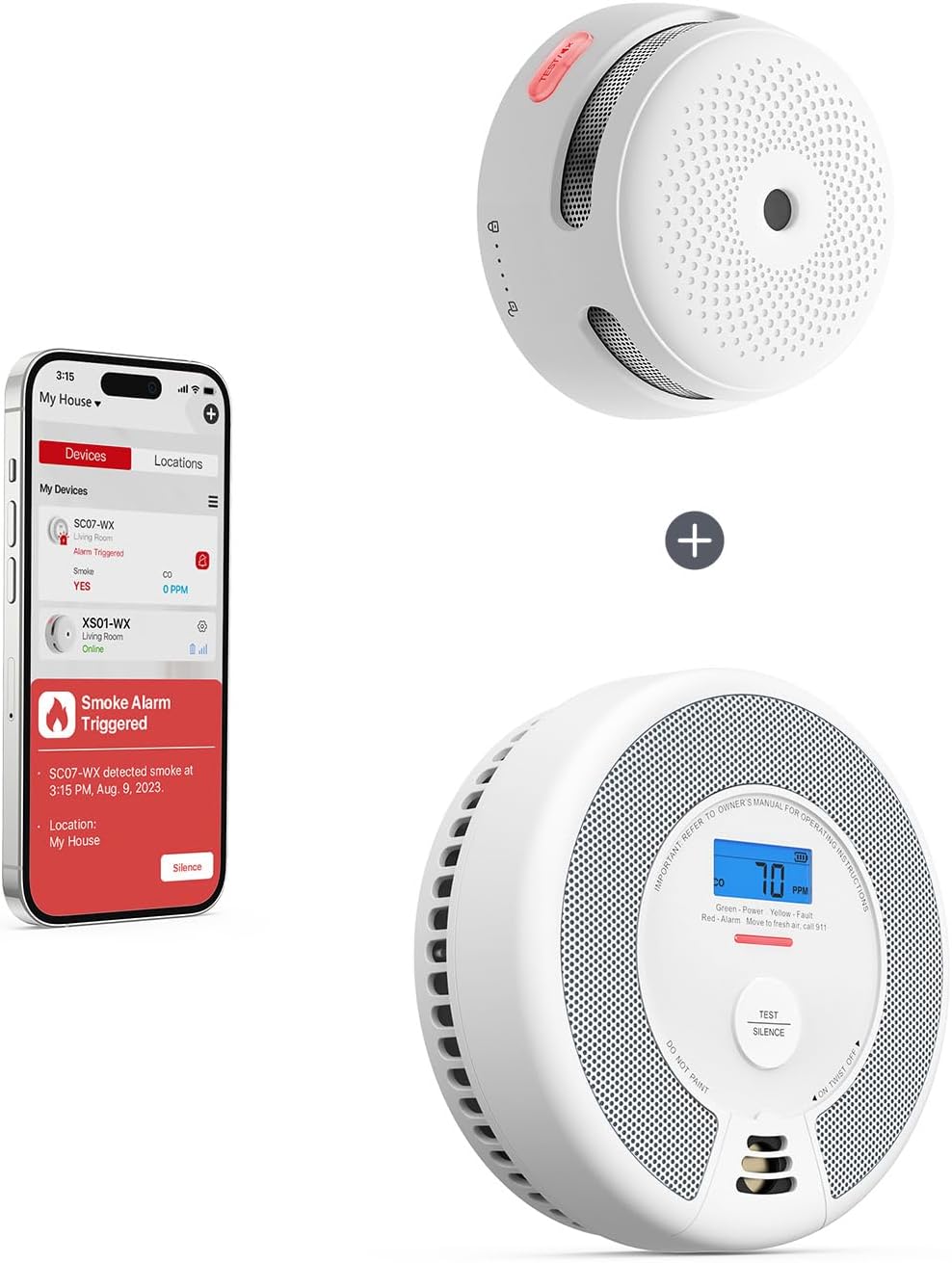
Image: The X-Sense XS01-WX smart smoke detector (top right) and the SC07-WX smart combination alarm (bottom right) are shown alongside a smartphone displaying the X-Sense Home Security app interface, which indicates a smoke alarm has been triggered.
4.1 X-Sense Smart Smoke Detector (XS01-WX)

Image: The compact X-Sense XS01-WX smoke detector is displayed next to a smartphone showing the X-Sense app, indicating an active smoke alarm and providing options to close or silence the alert.
The XS01-WX is a compact smart smoke detector designed for early smoke detection. It features a photoelectric sensor for reliable smoke sensing and connects to your home Wi-Fi for app notifications.
- Test/Silence Button: Used to test the alarm and silence false alarms.
- LED Indicator: Displays the alarm's status (normal operation, alarm, fault, low battery).
- Buzzer: Emits loud alarm sounds.
4.2 X-Sense Smart Combination Alarm (SC07-WX)

Image: The X-Sense SC07-WX combination smoke and carbon monoxide alarm, featuring a digital display showing CO levels, is presented alongside a smartphone displaying the X-Sense app, which indicates a smoke alarm has been triggered.
The SC07-WX is a 2-in-1 smart alarm that combines photoelectric smoke and Figaro electrochemical CO sensors. It provides comprehensive protection against both smoke and carbon monoxide, with a digital display for CO levels and app connectivity.
- Test/Silence Button: Used to test the alarm and silence false alarms.
- Digital Display: Shows current carbon monoxide (CO) concentration in parts per million (PPM).
- LED Indicator: Displays the alarm's status (normal operation, alarm, fault, low battery).
- Buzzer: Emits loud alarm sounds.
5. Setup and Installation
5.1 Mounting Your Alarms
Choose a suitable location for each alarm. For smoke alarms, install on every level of your home, inside bedrooms, and outside sleeping areas. For CO alarms, install near sleeping areas and on every level of the home. Avoid installing near vents, windows, or in dusty/humid areas.
- Using the mounting bracket as a template, mark two drill holes on the wall or ceiling.
- Drill holes and insert the anchor plugs.
- Attach the mounting bracket using the provided screws.
- Align the alarm with the mounting bracket and twist clockwise to secure it.
- Test the alarm after installation.
5.2 App Download and Connection
To utilize the smart features of your alarms, download the X-Sense Home Security app.
- Scan the QR code on the product packaging or search for "X-Sense Home Security" in the App Store (iOS) or Google Play Store (Android).
- Download and install the app.
- Open the app and create an account or log in.
- Follow the in-app instructions to add your XS01-WX and SC07-WX devices. Ensure your smartphone is connected to a 2.4 GHz Wi-Fi network during setup.
5.3 Wi-Fi Connection
The alarms connect to your home Wi-Fi network (2.4 GHz only) directly, without the need for a separate hub. During the app setup process, you will be prompted to connect each device to your Wi-Fi network. Ensure your Wi-Fi signal is strong in the installation area.
6. Operation
6.1 Testing Your Alarms
It is crucial to test your alarms weekly to ensure they are functioning correctly.
- Press and hold the Test/Silence button on the alarm until you hear a loud siren.
- The LED indicator will flash rapidly.
- Release the button. The alarm should stop sounding.
- Check the X-Sense Home Security app to confirm that a test notification was received.
6.2 Understanding Notifications

Image: A smartphone screen displays various real-time notifications from the X-Sense app, including a smoke alarm being off, a low battery warning, and a CO alarm precaution, demonstrating the app's alert capabilities.
Your X-Sense smart alarms provide various notifications both audibly/visually on the device and through the X-Sense Home Security app.
- Smoke Alarm: Loud intermittent beeps from the device, red LED flashes, and a push notification on your app.
- CO Alarm (SC07-WX only): Loud intermittent beeps from the device, red LED flashes, CO concentration displayed on the screen, and a push notification on your app.
- Low Battery: A chirp from the device every 60 seconds, yellow LED flashes, and a low battery notification on your app.
- Malfunction: A chirp from the device every 60 seconds, yellow LED flashes, and a malfunction notification on your app.
6.3 Silence Feature
The silence feature allows you to temporarily quiet the alarm during a non-emergency event (e.g., cooking smoke). This feature is available for both smoke and CO alarms.
- Press the Test/Silence button on the alarm.
- The alarm will silence for approximately 9 minutes for smoke and 4 minutes for CO.
- The LED indicator will continue to flash every 5 seconds during the silence period.
- If the smoke or CO concentration remains high after the silence period, the alarm will reactivate.
6.4 Device Sharing

Image: A man observes his smartphone, which displays the X-Sense app's device sharing feature, illustrating how multiple family members or trusted individuals can be added to monitor the home's safety devices.
The X-Sense Home Security app allows you to share access to your devices with family members or trusted individuals, ensuring everyone can monitor the safety of your home.
- Open the X-Sense Home Security app.
- Navigate to the device settings or sharing option.
- Follow the prompts to invite other users via their X-Sense account email.
- Shared users will receive notifications and can view the status of the alarms.
6.5 Optional 24/7 Professional Monitoring Service

Image: A red fire truck is depicted driving on a road, representing the availability of an optional 24/7 professional fire dispatch service that can be integrated with the X-Sense smart alarms.
X-Sense offers an optional 24/7 professional monitoring service for enhanced security. This service can automatically dispatch emergency services in the event of an alarm, providing an additional layer of protection. For more information and to subscribe, please refer to the X-Sense Home Security app or the official X-Sense website.
7. Maintenance
7.1 Battery Replacement
Both the XS01-WX and SC07-WX alarms are powered by non-replaceable 10-year sealed lithium batteries. When the battery is low, the alarm will chirp every 60 seconds and send a low battery notification to your app. The entire unit must be replaced when the battery reaches its end of life.
7.2 Cleaning Your Alarms
Dust and debris can accumulate on the alarm and affect its performance. Clean your alarms regularly.
- Gently vacuum the alarm cover using the soft brush attachment of your vacuum cleaner.
- Do not use water, cleaning solutions, or solvents, as these can damage the unit.
- Do not paint the alarm.
7.3 Regular Testing
As mentioned in Section 6.1, test your alarms weekly to ensure they are functioning correctly. This is a critical step in maintaining your home's safety.
8. Troubleshooting
| Problem | Possible Cause | Solution |
|---|---|---|
| Alarm chirps every 60 seconds. | Low battery. | The battery is sealed for 10 years. Replace the entire alarm unit. |
| Alarm sounds frequently without apparent reason. | Dust, high humidity, or cooking fumes. | Clean the alarm. Relocate if near cooking areas or high humidity. Use silence feature for temporary nuisances. |
| Alarm does not respond to test button. | Unit malfunction or end of life. | Ensure the unit is properly twisted onto the mounting bracket. If still unresponsive, replace the alarm. |
| Cannot connect to Wi-Fi/App. | Incorrect Wi-Fi password, 5 GHz network, weak signal. | Ensure you are on a 2.4 GHz Wi-Fi network. Double-check password. Move alarm closer to router or use a Wi-Fi extender. Reset alarm and try pairing again. |
| SC07-WX displays "Err". | Sensor malfunction. | The unit has a fault. Replace the alarm. |
9. Specifications
9.1 X-Sense Smart Smoke Detector (XS01-WX)
| Feature | Specification |
|---|---|
| Power Source | Built-in Lithium Battery (Sealed) |
| Sensor Type | Photoelectric |
| Alarm Volume | ≥ 85 dB at 10 ft (3 m) |
| Operating Temperature | 40–100°F (4.4–37.8°C) |
| Operating Humidity | ≤ 95% RH (non-condensing) |
| Wi-Fi Frequency | 2.4 GHz |
| Dimensions | 3.1 in (80 mm) diameter |
9.2 X-Sense Smart Combination Alarm (SC07-WX)
| Feature | Specification |
|---|---|
| Power Source | Built-in Lithium Battery (Sealed) |
| Sensor Type | Photoelectric (Smoke), Electrochemical (CO) |
| Alarm Volume | ≥ 85 dB at 10 ft (3 m) |
| Operating Temperature | 40–100°F (4.4–37.8°C) |
| Operating Humidity | ≤ 95% RH (non-condensing) |
| CO Sensitivity | 50 ppm @ 60-90 min; 100 ppm @ 10-50 min; 300 ppm @ 3 min |
| Wi-Fi Frequency | 2.4 GHz |
10. Warranty and Customer Support
X-Sense provides a limited warranty for its products. For detailed warranty information, please refer to the warranty card included with your product or visit the official X-Sense website. If you encounter any issues or have questions regarding your X-Sense Smart Smoke Detector or Smart Combination Alarm, please contact X-Sense customer support through the app or their official website for assistance.
Website: www.x-sense.com
Email: support@x-sense.com