
1. Introduction
The BSEED N020-120V-30A Surge Protector is a heavy-duty voltage regulator designed to protect your valuable home appliances from electrical fluctuations. It safeguards against high and low voltage, brownouts, spikes, instant surges, power failures, and load shedding. This device is suitable for a wide range of appliances, including refrigerators, air conditioners, TVs, computers, and other household electronics operating at 120V and up to 30A (3600W).
2. Safety Instructions
Please read and understand all safety instructions before installing or operating this surge protector. Failure to follow these instructions may result in electric shock, fire, or damage to the product or connected appliances.
- Electrical Hazard: Ensure the power supply is disconnected before installation or making any adjustments.
- Correct Wiring: Always ensure the correct polarity of the cables (phase, neutral, grounding) during connection. Refer to the connection diagram for proper wiring.
- Rated Capacity: Do not exceed the maximum current capacity of 30 Amps or 3600 Watts. Overloading can cause damage and fire hazards.
- Indoor Use Only: This device is intended for indoor use in dry locations. Do not expose to water or excessive humidity.
- Secure Connections: Ensure all wire connections are tight and secure to prevent arcing or overheating.
- Professional Installation: If you are unsure about the installation process, consult a qualified electrician.

3. Product Overview and Features
3.1 Key Components and Indicators
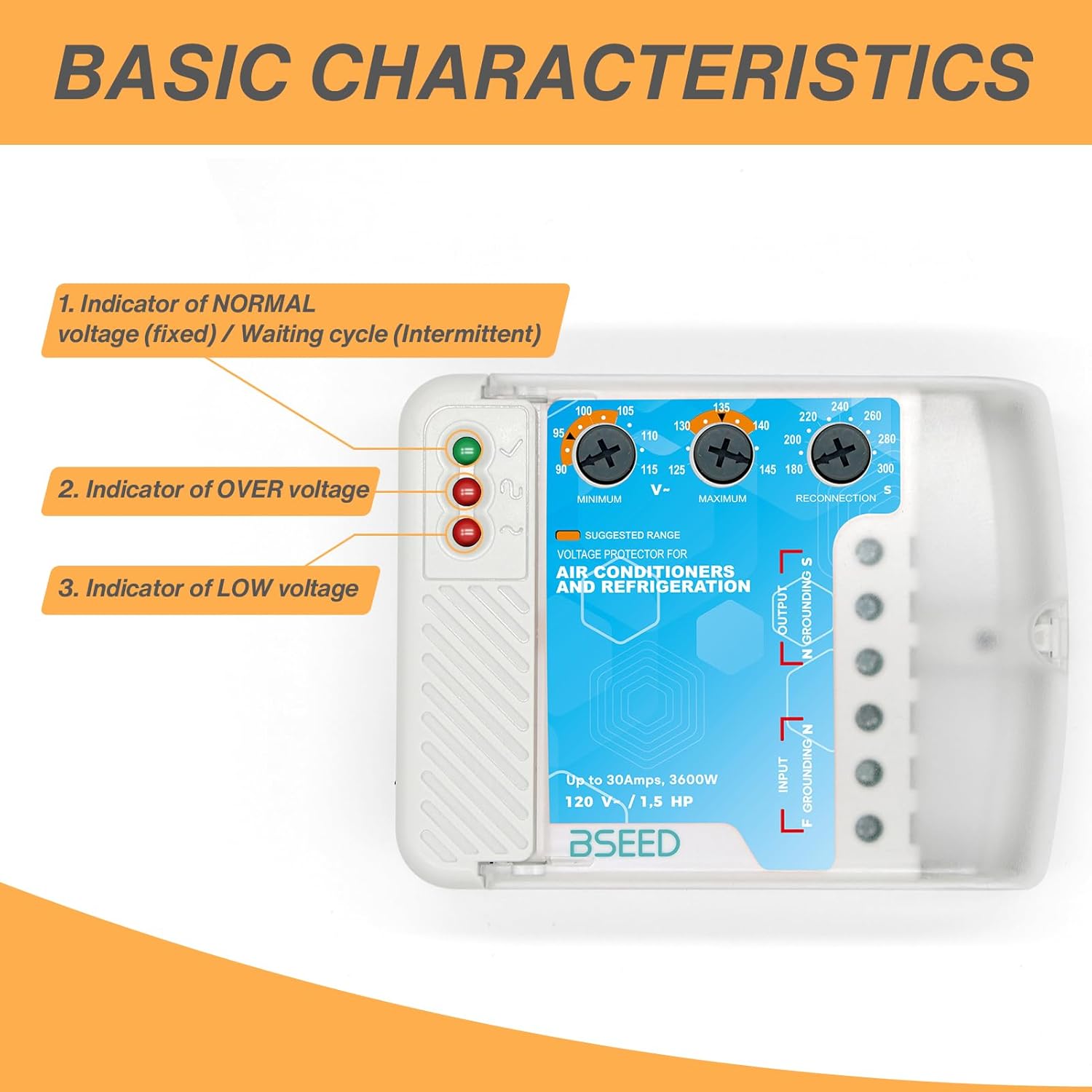
- Indicator of NORMAL voltage (Green): Illuminates when the voltage is within the safe operating range.
- Indicator of OVER voltage (Orange): Illuminates when the input voltage exceeds the set maximum threshold.
- Indicator of LOW voltage (Red): Illuminates when the input voltage drops below the set minimum threshold.
- Adjustable Voltage Settings: Dials for setting minimum (Under Voltage Cut-off) and maximum (Over Voltage Cut-off) voltage thresholds.
- Adjustable Reconnection Delay: Dial for setting the waiting time before power is reconnected after a voltage event.
3.2 Advanced Features
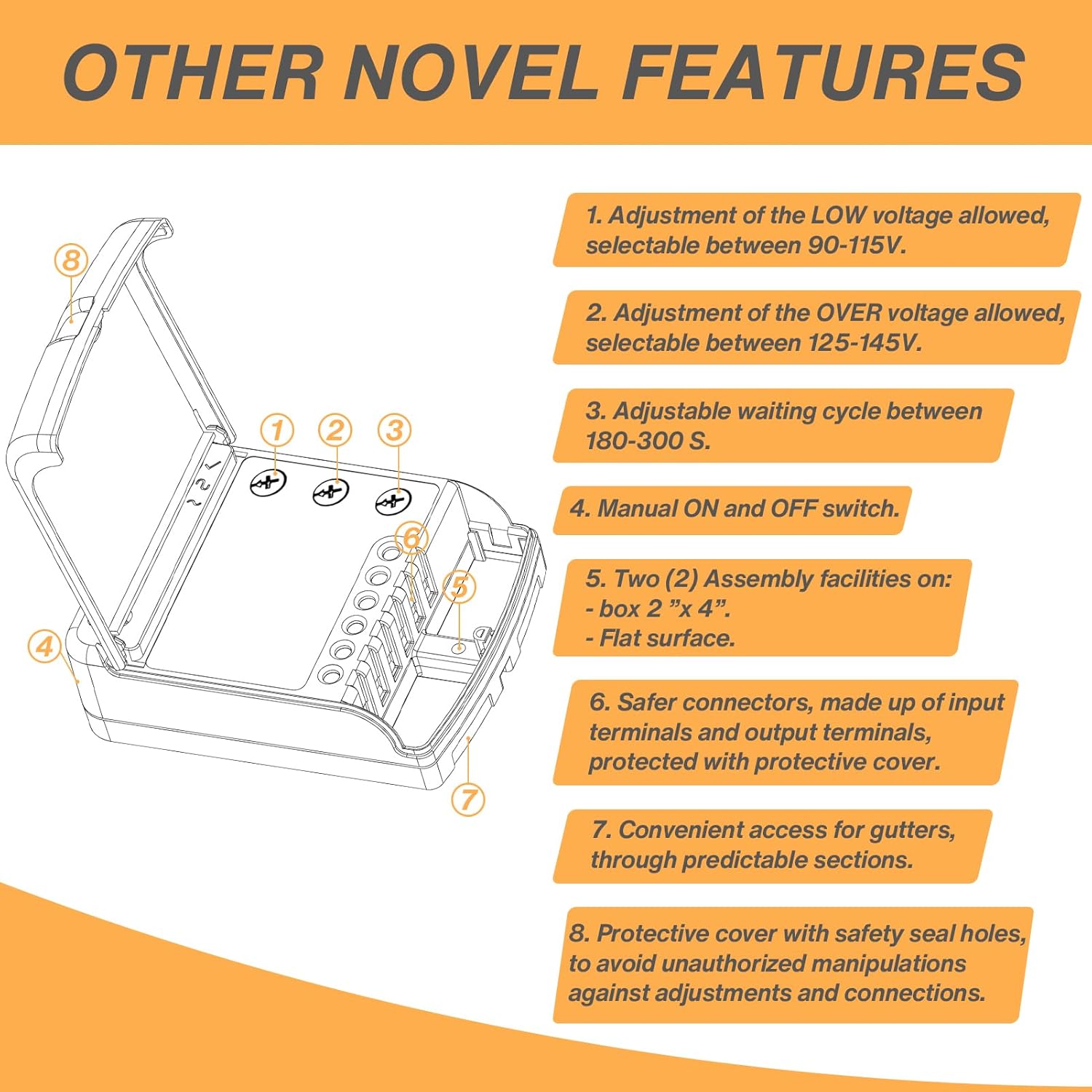
- Adjustable LOW voltage allowed: Selectable between 90V and 115V.
- Adjustable OVER voltage allowed: Selectable between 125V and 145V.
- Adjustable waiting cycle: Between 180-300 seconds (3 to 5 minutes).
- Manual ON and OFF switch: For convenient control.
- Assembly facilities: Two (2) options for mounting on a 2"x4" box or a flat surface.
- Safer connectors: Input and output terminals are protected with a cover.
- Convenient access for gutters: Through predictable sections.
- Protective cover with safety seal holes: To prevent unauthorized manipulation of adjustments and connections.
3.3 Product Dimensions
4. Installation
4.1 Wiring Diagram
Refer to Figure 2.1 (Connection Diagram) in the Safety Instructions section for detailed wiring instructions. Ensure all connections are made correctly, matching phase (L), neutral (N), and grounding (G) wires from your electric supply to the protector's input terminals, and then from the protector's output terminals to your appliance.
4.2 Mounting
The surge protector can be mounted in two ways:
- On a 2"x4" electrical box: Use the designated assembly facilities on the device.
- On a flat surface: Secure the device using appropriate screws through the provided mounting holes.
4.3 Initial Setup and Adjustments
Before connecting your appliance, you can adjust the voltage cut-off points and the delay time:
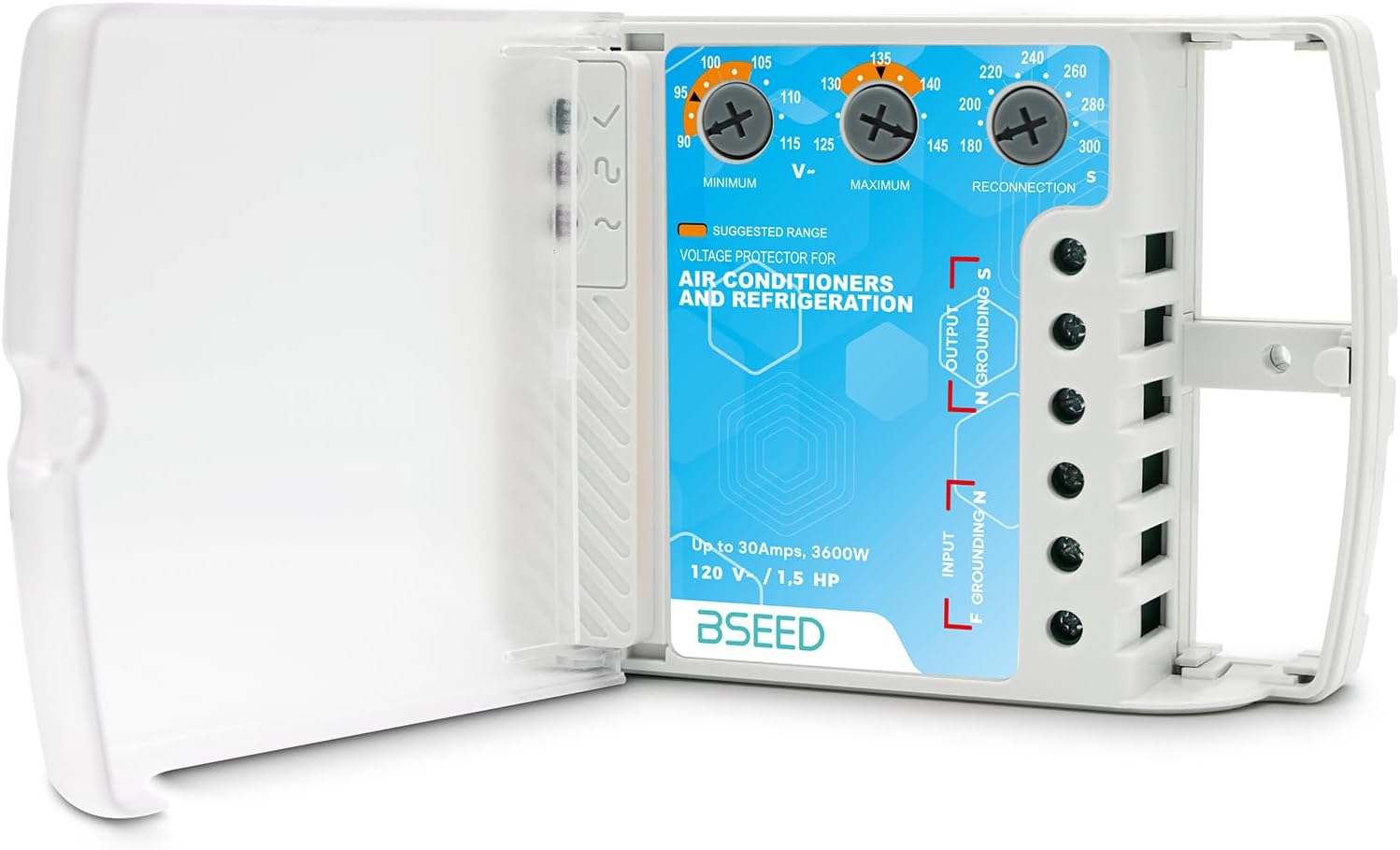
- Under Voltage Cut-off: Use the 'MINIMUM V-' dial to set the lowest acceptable voltage between 90V and 115V.
- Over Voltage Cut-off: Use the 'MAXIMUM V+' dial to set the highest acceptable voltage between 125V and 145V.
- Reconnection Delay: Use the 'RECONNECTION S' dial to set the waiting period (3 to 5 minutes) before power is restored after a voltage event.
It is recommended to set these values according to the specifications of the appliance you intend to protect and your local power grid stability.
5. Operation
5.1 Powering On
After proper installation and adjustment:
- Ensure the manual ON/OFF switch is in the 'ON' position.
- Apply power to the surge protector.
- The device will initiate a delay cycle (3 to 5 minutes, as set). During this time, the indicator lights may show a waiting state.
- Once the delay period is complete and the voltage is stable within the set parameters, the green 'NORMAL' indicator light will turn on, and power will be supplied to your connected appliance.
5.2 Indicator Lights
- Green Light (NORMAL): Indicates that the voltage is stable and within the safe operating range, and power is being supplied to the appliance.
- Orange Light (OVER VOLTAGE): Indicates that the input voltage is too high. The protector has cut off power to safeguard the appliance. Power will be restored after the voltage normalizes and the delay cycle completes.
- Red Light (LOW VOLTAGE): Indicates that the input voltage is too low. The protector has cut off power to safeguard the appliance. Power will be restored after the voltage normalizes and the delay cycle completes.
5.3 Typical Applications

6. Maintenance
The BSEED N020-120V-30A Surge Protector requires minimal maintenance. Follow these guidelines to ensure optimal performance and longevity:
- Cleaning: Periodically wipe the exterior of the device with a soft, dry cloth. Do not use liquid cleaners or solvents.
- Connection Check: Annually inspect all wiring connections to ensure they remain tight and free from corrosion.
- Environmental Conditions: Ensure the device is kept in a dry, well-ventilated area, away from direct sunlight, heat sources, and corrosive environments.
- Protective Cover: Keep the protective cover securely closed to prevent dust and unauthorized access to internal components.
7. Troubleshooting
If you encounter issues with your surge protector, refer to the following common problems and solutions:
| Problem | Possible Cause | Solution |
|---|---|---|
| Appliance does not power on after connecting. | 1. Surge protector is in delay cycle. 2. Input voltage is outside safe range. 3. Manual switch is OFF. 4. Loose wiring connection. | 1. Wait for the set delay time (3-5 minutes). 2. Check indicator lights (Orange for Over, Red for Low). Wait for voltage to normalize. 3. Ensure the manual ON/OFF switch is in the 'ON' position. 4. Disconnect power and check all wiring connections for tightness. |
| Orange (Over Voltage) or Red (Low Voltage) light remains on. | Persistent unstable voltage from the power supply. | The protector is functioning as intended by cutting off power. If the issue persists, contact your electricity provider or a qualified electrician to check your home's electrical system. |
| Device appears to be non-functional. | Internal fault or severe damage. | Disconnect from power immediately. Do not attempt to repair. Contact BSEED customer support for assistance. |
8. Technical Specifications
| Specification | Value |
|---|---|
| Brand | BSEED |
| Model Number | N020-120-1P |
| Voltage | 120V AC |
| Maximum Current | 30 Amps |
| Maximum Power | 3600 Watts |
| Under Voltage Cut-off Range | Adjustable 90V - 115V |
| Over Voltage Cut-off Range | Adjustable 125V - 145V |
| Reconnection Delay Time | Adjustable 3 - 5 minutes (180-300 seconds) |
| Number of Outlets | 1 |
| Plug Type | Type B - 3 pin (North American) |
| Compatible Devices | Air Conditioner, Computer, House Electric Appliances, Refrigerator, Television |
| Enclosure Material | Aluminum, Copper, Polycarbonate, Rubber |
| Special Features | Adjustable Voltage, Surge Protection, Manual ON/OFF Switch |
9. Contact and Support
For further assistance, technical support, or warranty inquiries, please contact BSEED customer service through the retailer where the product was purchased or visit the official BSEED website.
Manufacturer: BSEED
