1. Product Overview
The Samsung Galaxy Z Flip5 is a foldable smartphone designed for portability and advanced functionality. It features a compact design when folded, expanding to a full-sized smartphone display when unfolded. This device is a renewed US Version with 256GB storage in Mint color, unlocked for use with various carriers.
Key Features:
- Dynamic AMOLED 2X Main Screen: A 6.7-inch display with an adaptive 1-120 Hz refresh rate for smooth visuals.
- Flex Window Cover Screen: A 3.4-inch external display for quick access to widgets, notifications, and controls without unfolding.
- Powerful Performance: Equipped with a Snapdragon 8 Gen 2 "for Galaxy" chip and 8 GB RAM for efficient multitasking and demanding applications.
- Versatile Camera System: Dual 12MP rear lenses (wide with OIS, ultra-wide) and a 10MP selfie camera, supporting Flex Mode for unique shooting angles.
- Durable Design: Features IPX8 water resistance, Armor Aluminum frame, and Gorilla Glass Victus 2 for enhanced durability.
- Flexible Charging: Supports 25W wired fast charging, 15W wireless charging, and Wireless PowerShare.
2. Device Layout and Components
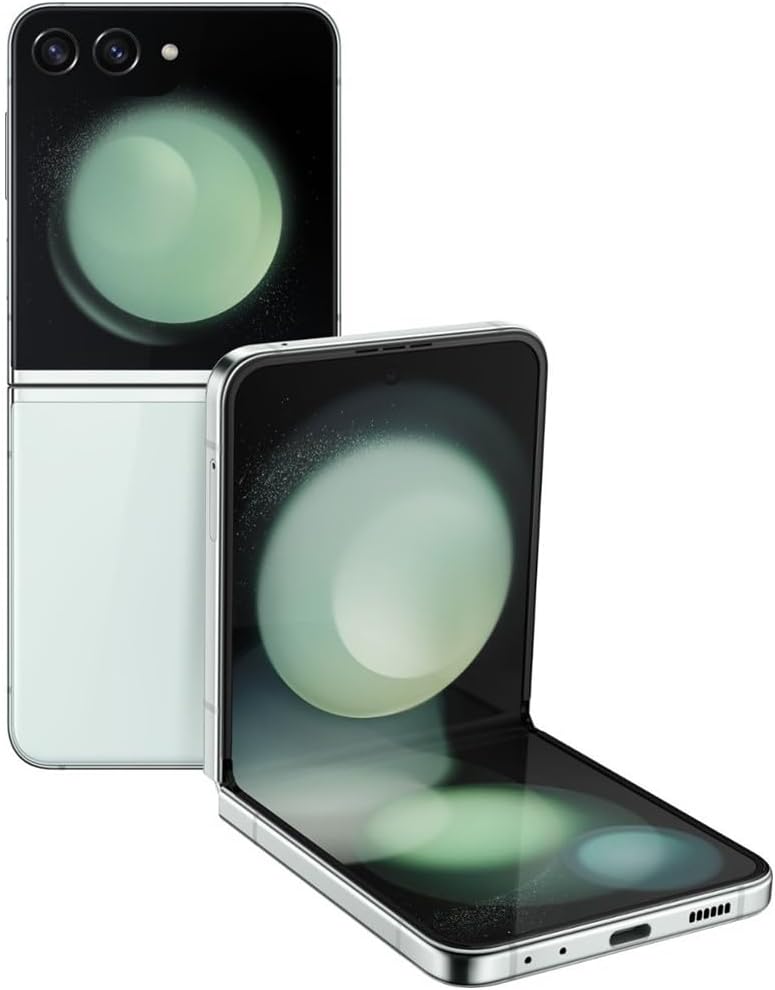
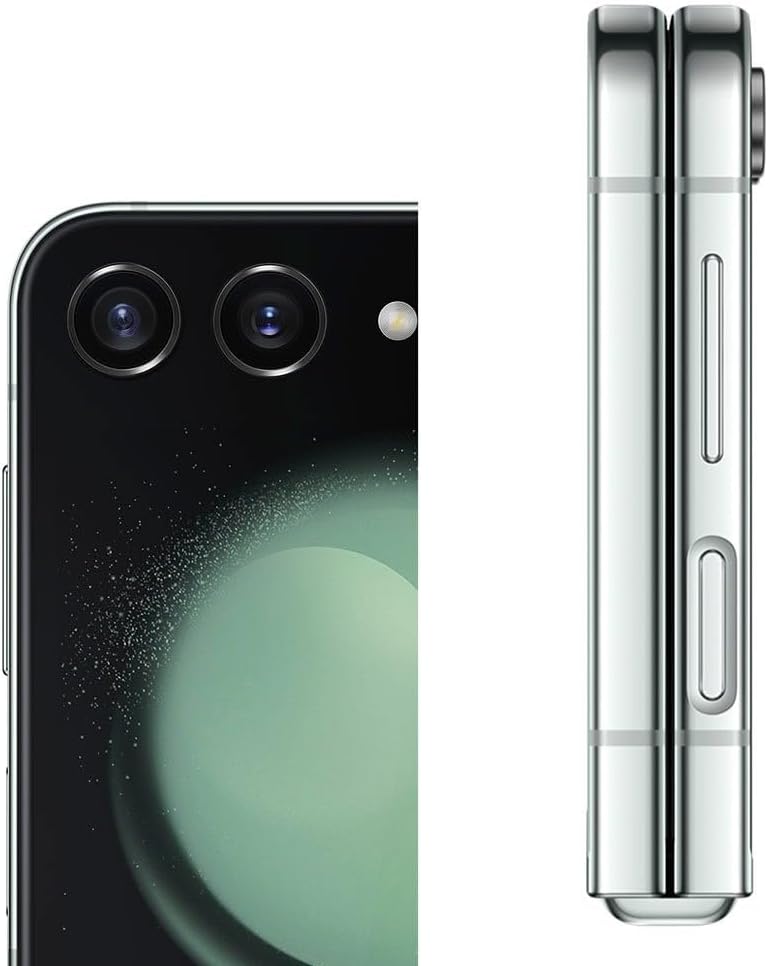

Physical Components:
- Main Display: The large, foldable internal screen.
- Cover Screen (Flex Window): The smaller external screen visible when the phone is folded.
- Rear Cameras: Two lenses located on the top half of the device when folded.
- Front Camera: A single lens located on the main display.
- Power/Side Key: Typically on the right side, often integrated with a fingerprint sensor.
- Volume Buttons: Located near the Power/Side Key.
- USB-C Port: For charging and data transfer, located at the bottom.
- SIM Card Slot: For inserting your Nano-SIM card.
3. Setup Guide
3.1 Unboxing and Initial Inspection
Carefully remove your Samsung Galaxy Z Flip5 from its packaging. Inspect the device for any visible damage. As a renewed product, minor cosmetic imperfections may be present, but the device should be fully functional.
3.2 Inserting the SIM Card
- Locate the SIM card tray on the side of your device.
- Insert the SIM ejection tool (if provided, or a small paperclip) into the small hole on the tray.
- Gently push until the tray ejects.
- Place your Nano-SIM card onto the tray with the gold contacts facing down.
- Carefully reinsert the tray into the device.
3.3 Powering On and Initial Configuration
- Press and hold the Power/Side Key until the Samsung logo appears.
- Follow the on-screen prompts to select your language, connect to Wi-Fi, and set up your Google account.
- Configure security features such as fingerprint recognition or a PIN/password.
- Transfer data from your old device if desired, using Samsung Smart Switch or Google's data transfer tools.
4. Operating Your Device
4.1 Using the Main Display
The 6.7-inch Dynamic AMOLED 2X main display offers a vibrant and smooth user experience with its 120 Hz adaptive refresh rate. Interact with applications, browse the web, and consume media as you would on any standard smartphone.
4.2 Utilizing the Flex Window (Cover Screen)
When the device is folded, the 3.4-inch Flex Window provides quick access to essential functions. Swipe left or right to navigate through customizable widgets, check notifications, control music playback, and even take quick selfies using the rear cameras.
4.3 Flex Mode
Flex Mode allows the device to be partially folded, enabling hands-free usage for various tasks. This is particularly useful for video calls, watching content, or taking photos and videos from unique angles without needing a tripod.
4.4 Camera Operation
The Galaxy Z Flip5 features a dual 12MP rear camera system (wide with Optical Image Stabilization and ultra-wide) and a 10MP front-facing camera. Open the Camera app and select your desired mode (Photo, Video, Portrait, etc.). Use the Flex Window for quick selfies or to preview shots when the phone is folded.
4.5 Charging Your Device
Connect the USB-C cable to the device's charging port and to a compatible 25W fast charger for optimal wired charging speeds. The device also supports 15W wireless charging and Wireless PowerShare, allowing you to charge other compatible devices by placing them on the back of your folded Z Flip5.
5. Maintenance and Durability
5.1 Device Care
- Screen Protection: The main screen is designed to be durable, but avoid pressing hard on it with sharp objects. Do not remove the protective film on the main screen.
- Cleaning: Use a soft, lint-free cloth to clean the screen and body. Avoid harsh chemicals or abrasive materials.
- Temperature: Avoid exposing the device to extreme temperatures, direct sunlight for prolonged periods, or very humid environments.
- Water Resistance: The device is rated IPX8 for water resistance, meaning it can withstand immersion in up to 1.5 meters of fresh water for up to 30 minutes. It is not dust resistant. Avoid exposing it to salt water, chlorinated water, or other liquids.
- Magnets: Keep the device away from credit cards, medical devices, and other items sensitive to magnets, as it contains magnets.
5.2 Hinge Care
The hinge mechanism is a critical component of your foldable device. Avoid applying excessive force when folding or unfolding. Ensure no foreign objects are caught in the hinge when closing the device.
6. Troubleshooting
If you encounter issues with your Galaxy Z Flip5, try the following basic troubleshooting steps before seeking professional assistance:
- Device Not Responding: Press and hold the Power/Side Key and Volume Down button simultaneously for more than 7 seconds to restart the device.
- Charging Issues: Ensure the charging cable and adapter are securely connected and undamaged. Try a different charger or outlet.
- App Malfunctions: Close and reopen the app. If the issue persists, clear the app's cache and data in Settings > Apps.
- Network Connectivity: Toggle Airplane Mode on and off. Restart your device. Check your SIM card is correctly inserted.
- Screen Issues: If the main screen shows lines or discoloration, ensure no foreign objects are trapped in the hinge. If the issue persists, contact support.
7. Specifications
| Feature | Detail |
|---|---|
| Model Name | Galaxy Z Flip5 |
| Main Display | 6.7 Inches Dynamic AMOLED 2X, 120 Hz Refresh Rate, 1080 x 2640 Resolution |
| Cover Display | 3.4 Inches Super AMOLED, 720 x 748 Resolution |
| Processor | Snapdragon 8 Gen 2 "for Galaxy" (3.36 GHz CPU Speed) |
| RAM | 8 GB |
| Storage | 256 GB (as per current product) |
| Rear Camera | 12MP Wide (OIS) + 12MP Ultra-wide |
| Front Camera | 10MP |
| Battery Capacity | 3700 Milliamp Hours |
| Charging | 25W Wired Fast Charging, 15W Wireless Charging, Wireless PowerShare |
| Operating System | Android |
| Water Resistance | IPX8 (up to 1.5m for 30 mins in fresh water) |
| Dimensions (folded) | 6.5 x 2.83 x 0.27 inches (unfolded dimensions not explicitly given, but this is the product dimension) |
| Weight | 6.6 ounces (approx. 187g) |
8. Warranty and Support
8.1 Renewed Product Information
This Samsung Galaxy Z Flip5 is an Amazon Renewed product. Amazon Renewed products are fully functional and come with generic or original accessories and packaging. They are backed by the Amazon Renewed Guarantee.
8.2 Amazon Renewed Guarantee
Your renewed device is covered by a 90-day refund or replacement policy from the date of purchase. For any issues within this period, please refer to the Amazon Renewed Guarantee details or contact Amazon customer service.
8.3 Manufacturer Support
For additional support, software updates, or detailed product information, please visit the official Samsung support website or contact Samsung customer service. Keep your device's serial number handy for faster assistance.
For more information, visit Samsung Support.