
Bell+Howell 2595
Bell+Howell Socket Air Wireless Ceiling Fan Light User Manual
Model: 2595
Product Overview
The Bell+Howell Socket Air is an innovative wireless ceiling fan and LED light combination designed to provide both illumination and air circulation from a single standard light socket. This unit offers adjustable light settings, multiple fan speeds, and RGB color options, all controllable via an included remote.
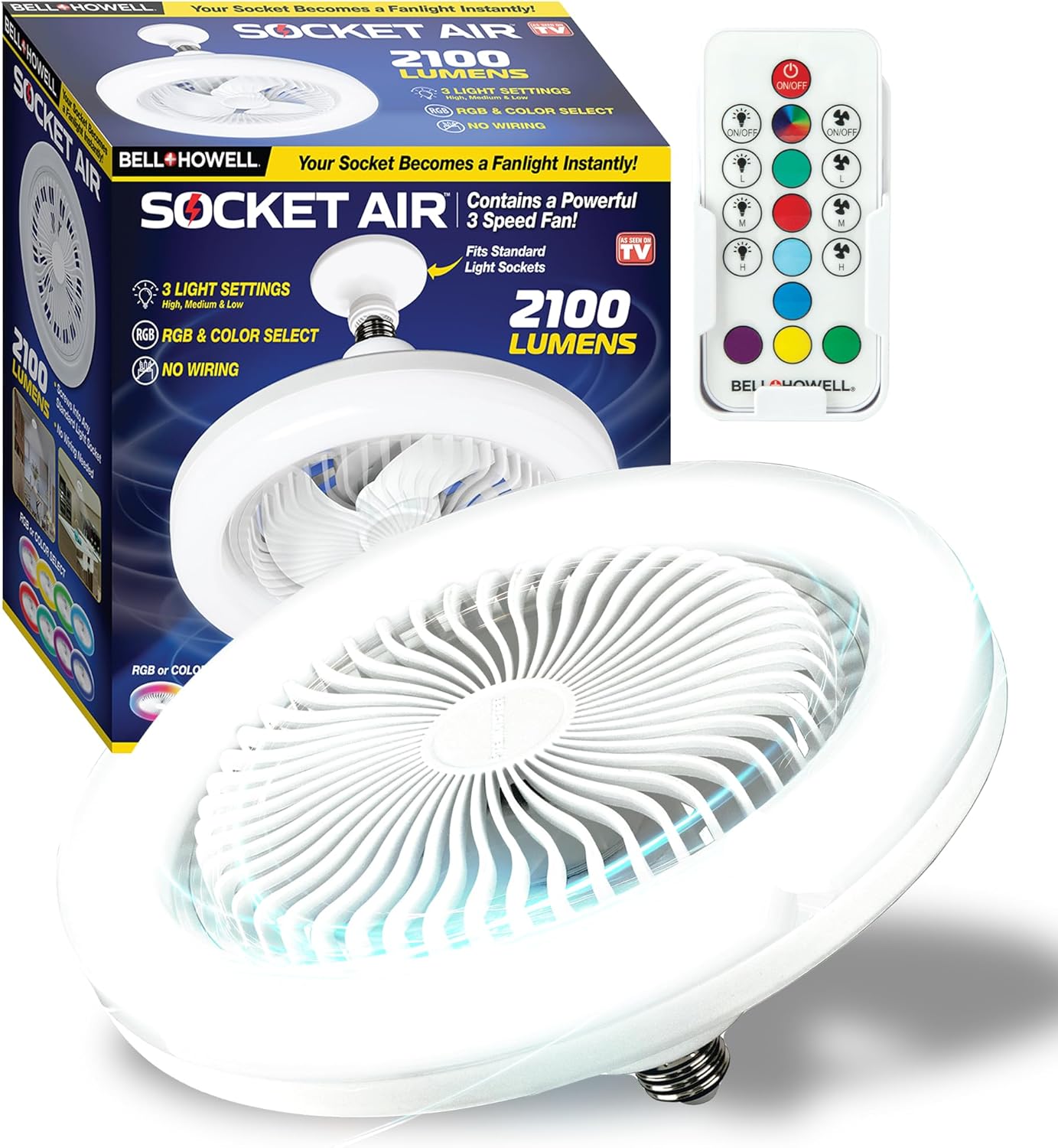
Image: The Bell+Howell Socket Air unit, its packaging, and the remote control. This device combines a ceiling fan and an LED light, fitting into standard light sockets.
Key Features:
- Integrated Fan and Light: Combines a powerful fan with a super bright 2100 Lumens LED light in one unit.
- Easy Installation: Screws directly into any standard E26/E27 light bulb socket, no electrician or tools required.
- Remote Control Operation: Full control over light brightness, fan speed, and RGB colors independently.
- Adjustable Settings: Features 3 light settings (low, medium, high), 3 fan speeds (low, medium, high), and multiple RGB color choices.
- Energy Efficient: 6500 Kelvin LED light provides cool illumination without excess heat, designed for energy saving.
Safety Information
Please read all safety instructions carefully before installation and use. Failure to follow these instructions may result in electric shock, fire, or serious injury.
- Ensure the power supply to the light socket is turned off at the circuit breaker before installation.
- Do not use this device with dimmer switches unless specifically stated as compatible.
- This product is designed for indoor use only.
- Do not insert fingers or any objects into the fan blades while the unit is operating.
- Keep the unit away from water or excessive moisture.
- Do not attempt to disassemble or repair the unit yourself. Contact qualified service personnel for assistance.
Package Contents
- Bell+Howell Socket Air Wireless Ceiling Fan Light Unit
- Remote Control
- Extender (for deeper sockets)
Setup
The Bell+Howell Socket Air is designed for quick and easy installation without the need for an electrician or special tools. It fits into standard E26/E27 light bulb sockets.
Installation Steps:
- Turn off Power: Before beginning installation, ensure the power to the light fixture is completely turned off at the circuit breaker.
- Remove Existing Bulb: Carefully unscrew and remove the existing light bulb from the socket.
- Screw in Socket Air: Screw the Bell+Howell Socket Air unit directly into the E26/E27 light bulb socket. If the socket is deeper, use the included extender to ensure a secure fit.
- Restore Power: Once the unit is securely installed, turn the power back on at the circuit breaker.

Image: A person demonstrating the simple screw-in installation of the Bell+Howell Socket Air into a standard light bulb socket. No special tools or wiring are needed.

Image: An infographic highlighting the smart and versatile features of the Socket Air, including its compact design, bright LED, cooling breeze, and remote control capabilities.
Operating Instructions
The Bell+Howell Socket Air is controlled using the included remote. Ensure the remote has working batteries (not included, typically 2x AAA).
Remote Control Functions:

Image: A close-up view of the remote control, detailing its buttons for power, light control, fan speed adjustments, and RGB color selection.
- ON/OFF Button: Press to turn the entire unit (light and fan) on or off.
- Light Power ON/OFF: Independently controls the light function.
- Light Brightness (L, M, H): Adjusts the LED light to Low, Medium, or High brightness settings.
- Fan Power ON/OFF: Independently controls the fan function.
- Fan Speed (L, M, H): Adjusts the fan speed to Low (Gentle Breeze), Medium (Natural Wind), or High (Refreshing Coolness).
- RGB Color Selection: Cycles through various RGB color options for the light.

Image: A visual representation of the three fan speed settings: Low for a gentle breeze, Medium for natural wind, and High for refreshing coolness.

Image: A series of images demonstrating the three illumination settings (Low, Medium, High) of the Socket Air light, along with the light-off state.
Using Light and Fan Together or Separately:
The remote allows you to operate the light and fan functions independently. You can have the fan on with the light off, the light on with the fan off, or both operating simultaneously.

Image: A collage showcasing the versatility of the Bell+Howell Socket Air, illustrating its use in various spaces such as living rooms, offices, kitchens, bedrooms, garages, laundry rooms, and workshops.
Official Product Videos:
Video: An official product video titled "Socket Air Light" demonstrating the features and functionality of the Bell+Howell Socket Air unit.
Video: An official product overview video titled "Socket Air Product Overview" providing a comprehensive look at the Bell+Howell Socket Air.
Maintenance
To ensure optimal performance and longevity of your Bell+Howell Socket Air, follow these simple maintenance guidelines:
- Cleaning: Disconnect power before cleaning. Use a soft, dry cloth to wipe down the exterior of the unit. Do not use abrasive cleaners or solvents.
- Dust Removal: Periodically, gently wipe the fan blades and light surface to remove accumulated dust.
- Storage: If storing the unit for an extended period, ensure it is clean and dry. Store in a cool, dry place away from direct sunlight.
Troubleshooting
If you encounter issues with your Bell+Howell Socket Air, refer to the following common problems and solutions:
| Problem | Possible Cause | Solution |
|---|---|---|
| Unit does not turn on. | No power to the socket; Unit not screwed in properly; Remote batteries dead. | Check circuit breaker; Ensure unit is securely screwed into socket; Replace remote batteries. |
| Fan is not spinning. | Fan function not activated on remote; Obstruction in fan blades. | Press fan ON/OFF button on remote; Turn off power and check for obstructions. |
| Light is not working. | Light function not activated on remote. | Press light ON/OFF button on remote. |
| Remote is not responding. | Dead batteries; Remote out of range; Interference. | Replace remote batteries; Ensure remote is within operating range; Remove potential sources of interference. |
| Fan is noisy. | Loose installation; Obstruction. | Ensure unit is tightly screwed in; Check for any obstructions. |
Specifications
| Feature | Detail |
|---|---|
| Brand | Bell+Howell |
| Model Name | Socket fan |
| Item Model Number | 2595 |
| Color | White |
| Product Dimensions | 10.1"D x 10.1"W x 5.1"H |
| Item Weight | 1.72 pounds |
| Power Source | AC, DC |
| Voltage | 110-120 Volts (AC) |
| Wattage | 100 Watts (Light), 4.1 Watts (Fan) |
| Light Type | LED |
| Light Output | 2100 Lumens |
| Color Temperature | 6500K |
| Number of Blades | 3 |
| Fan Speeds | 3 (Low, Medium, High) |
| Max Rotations | Up to 2,200 Rotations per Minute |
| Control Method | Remote |
| Connector Type | E26/E27 light bulb socket |
| Blade Material | Plastic |
| Indoor/Outdoor Usage | Indoor |
| UPC | 080313023088 |
Warranty and Support
For warranty information and customer support, please refer to the documentation included with your purchase or contact Bell+Howell customer service directly. Keep your proof of purchase for warranty claims.
This product is from a small business brand. Your support is appreciated.