
Introduction
This Hama Universal Remote Control is designed specifically for LG TVs, offering a comprehensive replacement solution. It features a learning mode to transfer functions from your original remote, pre-set codes for most LG televisions, and adjustable codes for less common models. The remote includes a smart button for app menu control, ergonomic main buttons for volume and program selection, and self-luminous keys for improved visibility in low light. Its Easy Mode function allows for restricting the remote's functionality, making it ideal for elderly users or in hotel environments. With an infrared range of up to 10 meters, a function LED, and power-saving features, this remote is a versatile and user-friendly option. It also retains learned functions during battery changes.
Setup
1. Battery Installation
The remote control requires two AAA batteries (included). To install them:
- Open the battery compartment cover on the back of the remote control.
- Insert the two AAA batteries, ensuring correct polarity (+ and -).
- Close the battery compartment cover securely.

Image: Hama Universal Remote Control with two AAA batteries, showing the required battery type.
2. Initial Programming
The remote control comes with pre-set codes for most LG TVs. In most cases, it will work immediately after battery installation. If not, you can use the learning function or try adjustable codes.
- Pre-set Codes: For most LG TVs, the remote should function out of the box.
- Learning Function: Refer to the "Learning Function" section under Operating for detailed instructions on transferring functions from your original remote.
- Adjustable Codes: A code list is provided in the included instruction manual for less common models.
Operating Instructions
This section details the primary functions and special features of your Hama Universal Remote Control.
Key Functions Overview

Image: Full view of the Hama Universal Remote Control.
- Power Button (●): Located at the top, used to turn the TV on or off.
- Numeric Keypad (0-9): For direct channel selection.
- Volume Control (+/-): Adjusts the sound volume.
- Channel Up/Down (P+/-): Changes TV channels.
- Navigation Pad (Up, Down, Left, Right, OK): Used for menu navigation and selection.
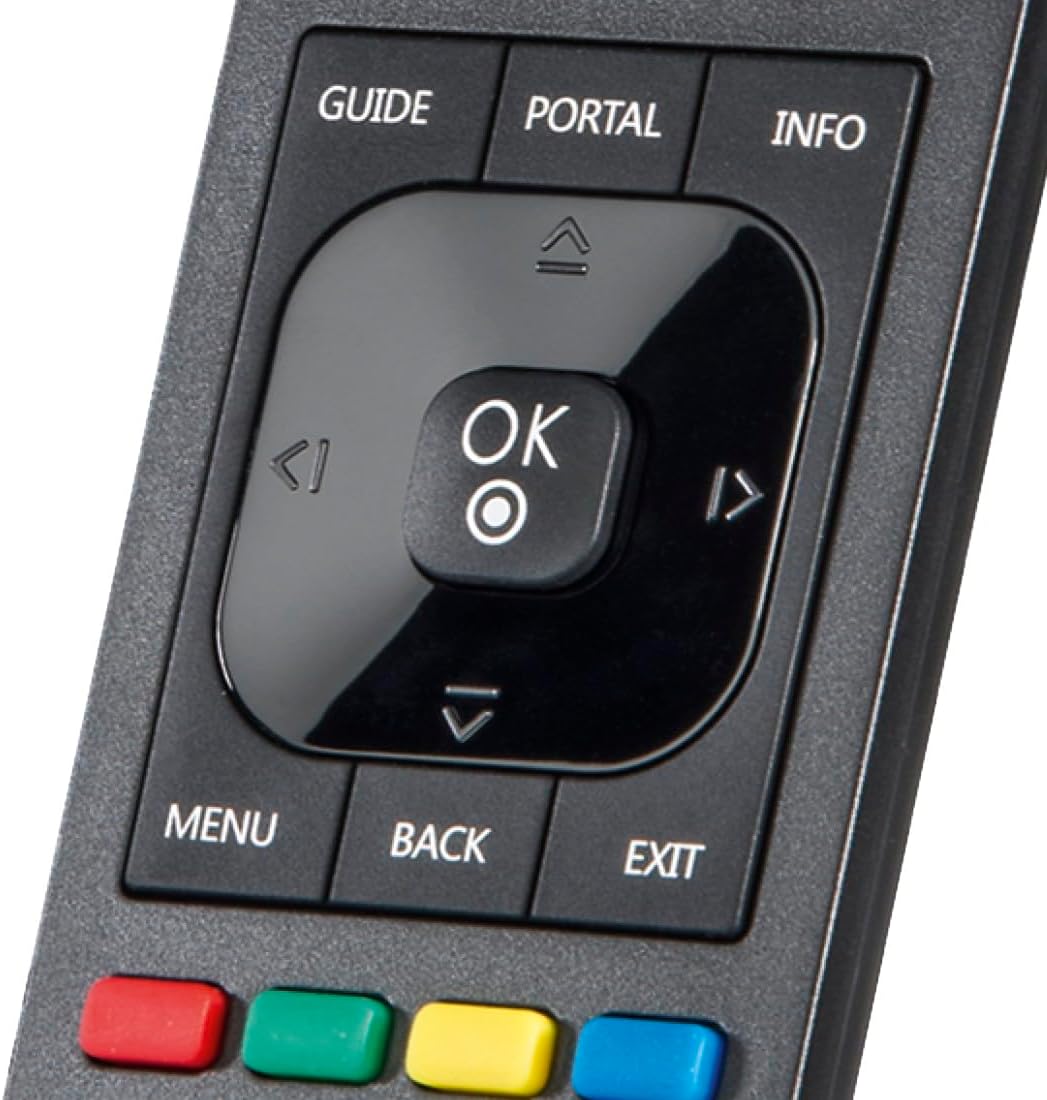
Image: Close-up of the central navigation and OK buttons.
- Smart Button: Accesses the app menu on your LG TV.
- Luminous Keys: Certain keys are designed to glow in the dark after exposure to light.
- Manufacturer-Specific Keys: Dedicated buttons for specific LG TV functions.
Easy Mode Function
The Easy Mode function allows you to restrict the remote's functionality, preventing accidental changes to settings. This feature is particularly useful for elderly users or in environments like hotels where simplified control is desired. Consult the detailed instruction manual provided with the product for activation and deactivation steps of the Easy Mode.
Learning Function
The learning function enables you to transfer specific button functions from your original LG TV remote control to this universal remote. This is useful for any functions not covered by the pre-set codes or if you prefer a specific button layout.
- Place both the original remote and the Hama universal remote on a flat surface, facing each other, with their infrared emitters aligned.
- Activate the learning mode on the Hama remote (refer to the included manual for the specific key combination).
- Press the button on the Hama remote you wish to program.
- Press the corresponding button on your original remote. The Hama remote's function LED will indicate successful learning.
- Repeat for all desired buttons.
- Exit learning mode.
The learned functions are stored in the remote's memory and will be retained even when batteries are changed.
Maintenance
Cleaning
To clean the remote control, use a soft, dry cloth. Do not use abrasive cleaners or solvents, as these can damage the surface or internal components.
Battery Replacement
When the remote control's performance degrades or the function LED no longer illuminates, it's time to replace the batteries. Follow the battery installation steps outlined in the "Setup" section. Always replace both batteries simultaneously with new AAA batteries.
Troubleshooting
| Problem | Possible Cause | Solution |
|---|---|---|
| Remote control does not work. | Batteries are dead or incorrectly inserted. Remote is not programmed correctly. Obstruction between remote and TV. | Check battery polarity and replace if necessary. Ensure direct line of sight to TV's IR receiver. Reprogram the remote using pre-set codes or the learning function. |
| Luminous keys do not glow. | Insufficient light exposure to charge phosphorescent material. | Expose the remote's keys to bright light (e.g., room light, sunlight) for a period to allow them to charge. The glow is temporary and depends on prior light absorption. |
| Some functions do not work. | Remote not fully compatible or specific function not learned. | Use the learning function to transfer missing functions from your original remote. Check the included code list for alternative codes. |
Specifications
| Brand | Hama |
| Model Number | 00221061 |
| Product Dimensions | 21.6 x 8.4 x 2.4 cm |
| Weight | 190 Grams |
| Batteries | 2 AAA batteries (included) |
| Connectivity Technology | Infrared |
| Maximum Range | 10 Meters |
| Number of Keys | 52 |
| Compatible Devices | LG TVs (via pre-set codes); Learning function allows compatibility with other IR devices like Stereo systems, Streaming devices, DVD/Blu-ray players. |
| Color | Black |
| Special Features | Universal, Pre-programmed, Learning Function, Luminous Keys, Easy Mode |
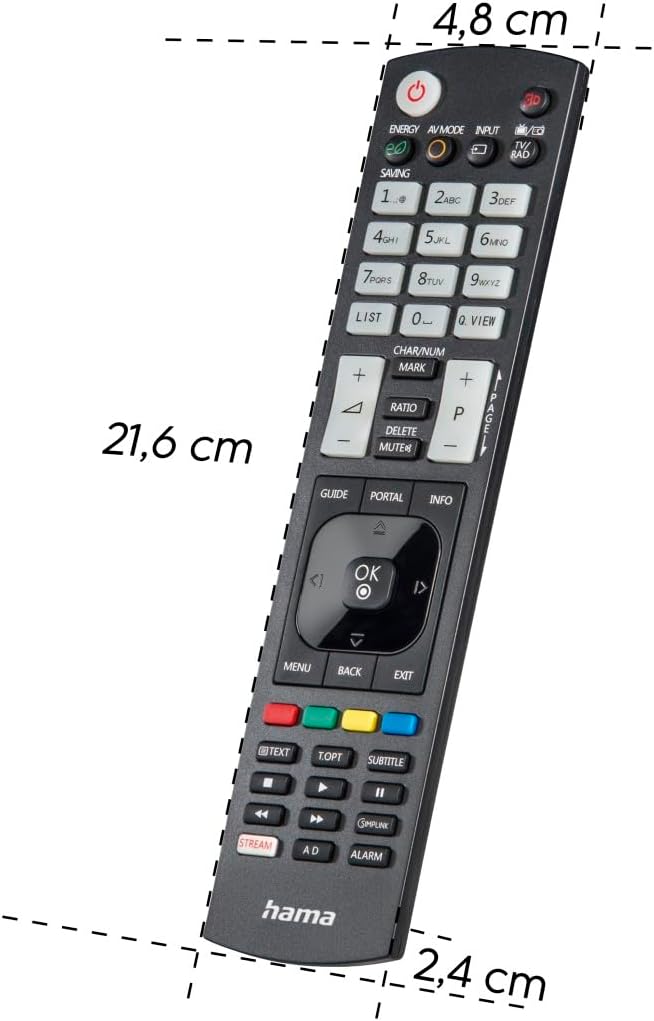
Image: Dimensions of the Hama Universal Remote Control.
Warranty and Support
For warranty information and technical support, please refer to the documentation included with your purchase or visit the official Hama website. Hama products typically come with a manufacturer's warranty covering defects in materials and workmanship.
Online Resources: For additional support, FAQs, and updated information, please visit the Hama official website or contact their customer service department.