
FPUSFPQTZ-XY3606
User Manual: XYH3606 DC DC Voltage Regulator Stabilizer
Model: FPUSFPQTZ-XY3606 | Brand: Generic
1. Introduction
The XYH3606 is a versatile DC-DC voltage regulator stabilizer, functioning as both a boost and buck converter. It provides an adjustable regulated laboratory power supply module with a wide output range of 0-36V and up to 6A. This device is designed for precise voltage and current control in various applications.

Figure 1: XYH3606 DC DC Voltage Regulator Stabilizer with its accompanying remote control. The main unit features a digital display and a rotary encoder.
This manual provides detailed instructions for the setup, operation, and maintenance of your XYH3606 module.
2. Key Features
- Full-view 1.8" LCD Large Screen: High-resolution display for clear and comprehensive information.
- Full Digital Keyboard Adjustment: Enables convenient and precise control of settings.
- Four-way Screen Rotation: The display supports rotation to accommodate different installation orientations, ensuring optimal viewing.
- Intelligent Silent Temperature Control Fan: The cooling fan automatically activates when the temperature exceeds 50 degrees Celsius or the current exceeds 2A, ensuring efficient heat dissipation and quiet operation.
- Remote Control Capability: Allows for convenient adjustment and operation from a distance.
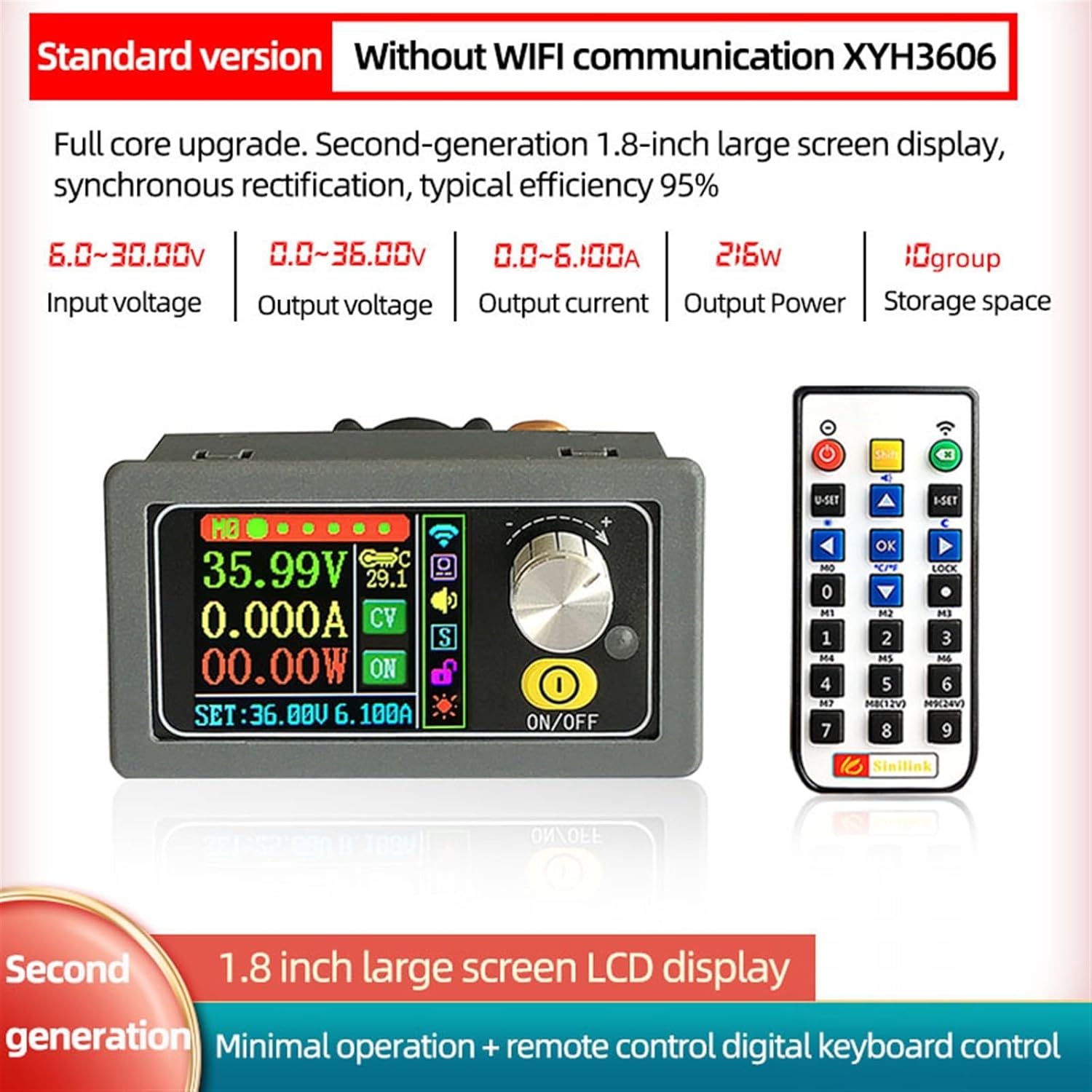
Figure 2: Overview of XYH3606 standard version features, highlighting input voltage (6.0-30.00V), output voltage (0.0-36.00V), output current (0.0-6.100A), output power (216W), and 10 storage groups.
3. Technical Specifications
| Parameter | Value |
|---|---|
| Input Voltage | DC 6-30V |
| Output Voltage | DC 0-36V |
| Output Current | 0-6A |
| Output Power | 0-216W |
| Storage Space | 10 groups |
| Output Current Limit | 12A max. |
| Voltage Resolution | 0.01V |
| Current Resolution | 0.001A |
| Display | 1.8" LCD |
| Item Model Number | FPUSFPQTZ-XY3606 |
| Package Dimensions | 1.18 x 0.79 x 0.39 inches |
| Item Weight | 1.1 Pounds |
4. Product Structure and Components
The XYH3606 module is designed with a focus on industrial quality and minimalist operation. Key components are clearly laid out for ease of use and integration.
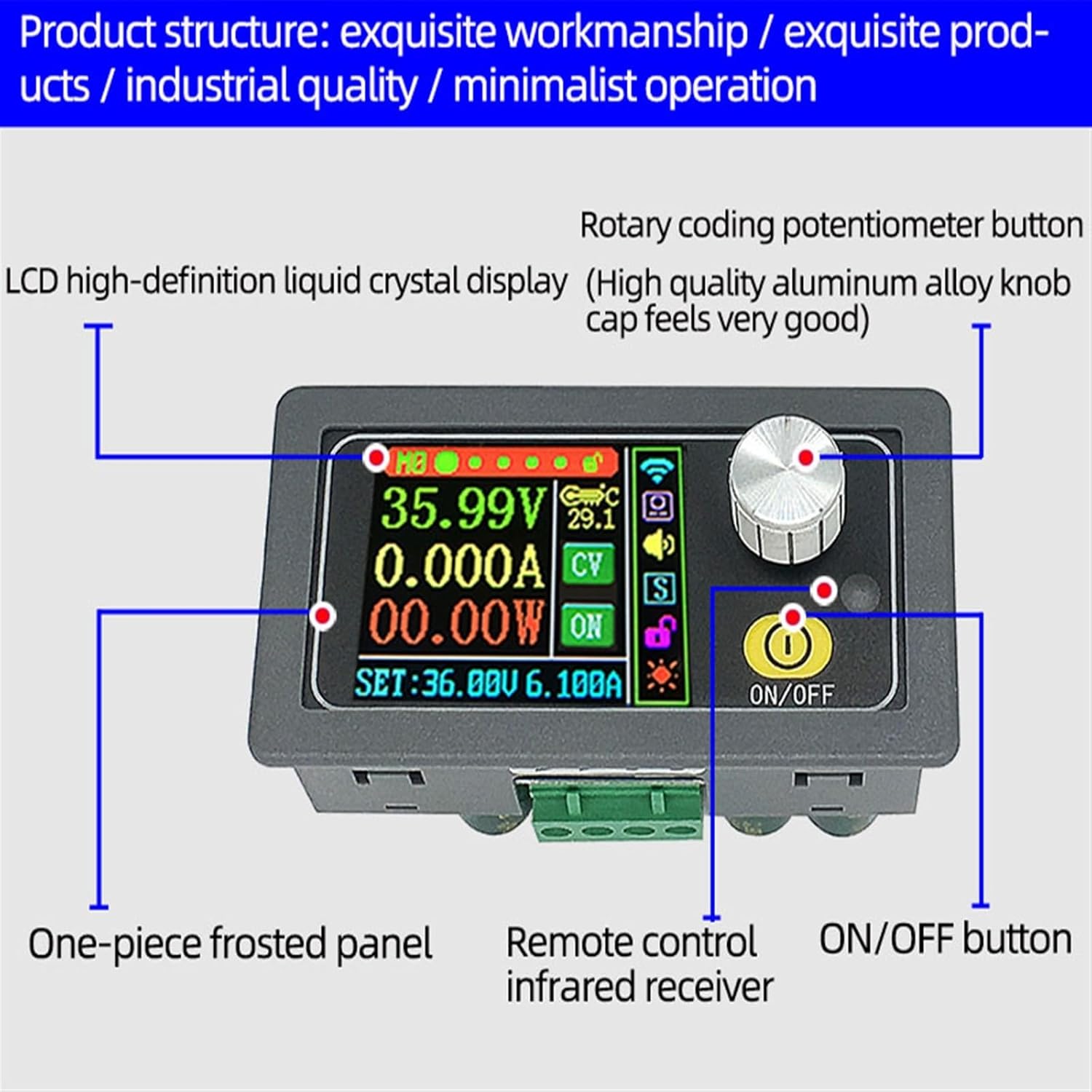
Figure 3: Detailed view of the XYH3606 product structure, labeling the LCD high-definition liquid crystal display, rotary coding potentiometer button, one-piece frosted panel, remote control infrared receiver, and ON/OFF button.
- LCD High-Definition Liquid Crystal Display: The main interface for displaying voltage, current, power, and settings.
- Rotary Coding Potentiometer Button: A high-quality aluminum alloy knob used for adjusting parameters and navigating menus.
- One-piece Frosted Panel: Provides a durable and aesthetically pleasing front surface.
- Remote Control Infrared Receiver: Allows the module to receive commands from the included remote control.
- ON/OFF Button: Controls the power state of the module.
5. Setup and Installation
Before operating the XYH3606, ensure proper physical installation and electrical connections.
5.1 Physical Dimensions and Opening Size
The module is designed for integration into various enclosures. Refer to the dimensions below for precise fitting.

Figure 4: Product dimensions (79mm width, 42mm height, 22mm depth) and recommended opening size for panel mounting (78mm width, 39mm height, 12mm depth for the display section, 71.3mm for the main body).
- Module Dimensions: Approximately 79mm (W) x 42mm (H) x 22mm (D).
- Recommended Opening Size: For panel mounting, an opening of approximately 78mm (W) x 39mm (H) is recommended. Ensure sufficient depth for the module's body.
5.2 Electrical Connections
Connect the input power supply (DC 6-30V) to the designated input terminals. Connect your load to the output terminals. Observe polarity carefully to prevent damage to the module or connected devices.
Note: Always ensure the input voltage is within the specified range (DC 6-30V) and that the output current does not exceed 6A for continuous operation. The maximum current limit is 12A.
6. Operating Instructions
6.1 Basic Operation
- Power On/Off: Press the ON/OFF button on the front panel to power the module on or off.
- Adjusting Voltage/Current: Use the rotary coding potentiometer button to adjust the output voltage and current settings. The digital keyboard on the remote control can also be used for precise input.
- Monitoring Display: The 1.8" LCD displays real-time output voltage, current, and power.
6.2 Screen Rotation
The display supports four-way rotation, allowing for flexible installation and optimal viewing angles.

Figure 5: The screen supports four-way rotation. To rotate the screen, long press the ON/OFF button for 2 seconds. This allows the module to be installed in various orientations while maintaining an ideal viewing angle.
To rotate the screen, long press the ON/OFF button for 2 seconds. The display will cycle through its four orientations.
6.3 Remote Control Operation
The included remote control provides a convenient way to operate the module, especially when it's installed in a hard-to-reach location.

Figure 6: The remote control features a full numeric keypad, making operation simple and efficient. It allows for large-range adjustments and small-range fine-tuning.
Use the numeric keypad on the remote control to directly input desired voltage and current values. Refer to the remote control's specific button functions for detailed operations (e.g., U-SET for voltage setting, I-SET for current setting, OK to confirm, arrow keys for navigation).
7. Maintenance
To ensure the longevity and optimal performance of your XYH3606 module, follow these general maintenance guidelines:
- Keep Clean: Regularly wipe the module with a soft, dry cloth to remove dust and debris. Avoid using abrasive cleaners or solvents.
- Environmental Conditions: Operate and store the module in a dry environment, away from direct sunlight, extreme temperatures, and high humidity.
- Ventilation: Ensure that the ventilation openings are not obstructed, especially around the intelligent temperature control fan, to allow for proper airflow and heat dissipation.
- Connection Integrity: Periodically check all electrical connections to ensure they are secure and free from corrosion.
8. Troubleshooting
If you encounter issues with your XYH3606 module, consider the following common troubleshooting steps:
- No Power/Display:
- Check if the input power supply is connected correctly and providing the specified voltage (DC 6-30V).
- Ensure the ON/OFF button has been pressed to power on the device.
- No Output Voltage/Current:
- Verify that the output is enabled (check the display for an "ON" indicator).
- Ensure the output terminals are correctly connected to the load.
- Check if the set voltage or current limits are too low.
- Fan Not Running:
- The fan is intelligent and only activates when the internal temperature exceeds 50°C or the output current exceeds 2A. If conditions are below these thresholds, the fan will not run.
- Ensure ventilation is not blocked.
- Remote Control Not Responding:
- Check the battery in the remote control.
- Ensure there is no obstruction between the remote control and the module's infrared receiver.
If problems persist after following these steps, please contact the seller or manufacturer for further assistance.
9. Warranty and Support
Specific warranty information for the XYH3606 DC DC Voltage Regulator Stabilizer is not provided in this manual. Please refer to the product packaging, the seller's website, or contact the manufacturer directly for details regarding warranty coverage and support services.
For technical support or inquiries, please reach out to the vendor from whom you purchased the product or the manufacturer, Lifyn2.
Ask a question about this manual
Ask about setup, troubleshooting, compatibility, parts, safety, or missing instructions. Manuals+ will review the question and use this page’s manual context to help answer it.