
1. Introduction
This user manual provides detailed instructions for the installation, operation, and maintenance of your Fragcare RAD2000 Car Radar Detector. Please read this manual thoroughly before using the device to ensure proper functionality and safety.
2. Product Overview
The Fragcare RAD2000 is a multi-band radar detector designed to alert drivers to various speed measurement signals, including X-band, K-band, Ka-band, and laser. It features language switching, city/highway modes, and mute functions for enhanced user experience.
2.1 Key Features
- Multi-band radar detection covering X-band, K-band, Ka-band, and laser.
- Built-in language switching between English and Russian.
- Strong anti-interference performance.
- Switchable City/Highway detection modes.
- Support for mute and auto-mute functions.
- 360-degree signal reception for comprehensive detection.
2.2 Package Contents
- 1 x Fragcare RAD2000 Car Radar Detector
- (Other accessories such as power cable and mounting bracket are typically included but not explicitly detailed in the product description.)
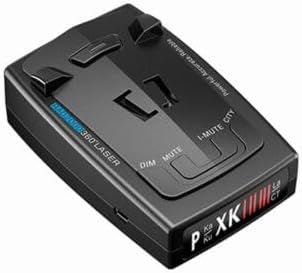
Figure 2.1: Front view of the Fragcare RAD2000 Car Radar Detector, showing the display and control buttons.

Figure 2.2: Angled view of the Fragcare RAD2000 Car Radar Detector, highlighting its compact design.

Figure 2.3: Back view of the Fragcare RAD2000 Car Radar Detector, showing the power input and mounting points.
3. Setup
Follow these steps to set up your RAD2000 Car Radar Detector:
- Mounting: Choose a location on your vehicle's dashboard or windshield that provides a clear view of the road ahead and behind, ensuring the detector's sensors are unobstructed. Use the provided mounting bracket (if applicable) to secure the device.
- Power Connection: Connect the provided 12V DC power cable to the detector's power input port. Plug the other end of the cable into your vehicle's 12V accessory outlet (cigarette lighter socket).
- Initial Power On: Once connected, the device should power on automatically with your vehicle's ignition. Observe the display for initial boot-up sequence.
4. Operating Instructions
The RAD2000 offers several modes and functions to optimize its performance based on your driving environment.
4.1 Power On/Off
The device powers on automatically when connected to a 12V power source and the vehicle's ignition is on. To turn off, simply disconnect the power cable or turn off your vehicle's ignition.
4.2 Mode Switching (City/Highway)
Press the CITY button to toggle between City mode and Highway mode.
- City Mode: This mode has lower sensitivity, designed for urban environments where there are many interference sources. It helps reduce false alerts.
- Highway Mode: This mode offers the highest sensitivity, recommended for open road driving to detect signals from a greater distance.
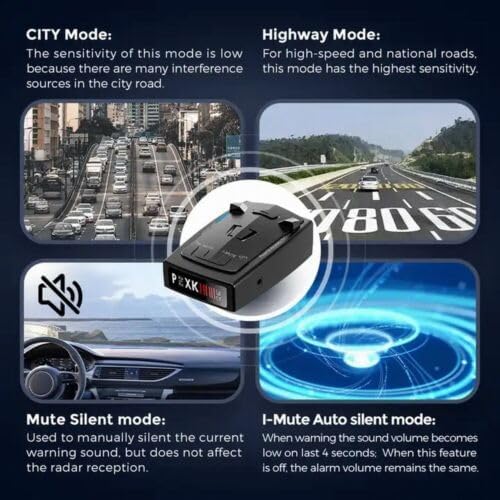
Figure 4.1: Visual representation of City, Highway, Mute, and I-Mute modes and their functions.
4.3 Mute Functions
The RAD2000 includes manual and automatic mute features:
- Mute Mode: Press the MUTE button to manually silence the current warning sound. This does not affect the radar reception.
- Automatic Mute (I-MUTE): This feature automatically lowers the warning sound volume when the alarm has been active for approximately 4 seconds. To enable or disable this feature, use the I-MUTE quick switch. When disabled, the alarm volume remains constant.
4.4 Language Switching
The device supports language switching between English and Russian. Refer to the device's on-screen prompts or specific button combinations (not detailed in product description) to change the language setting.
4.5 Signal Detection
The RAD2000 detects various radar and laser bands, providing alerts when signals are detected. The display will indicate the type of band detected (X, K, Ka, Laser).
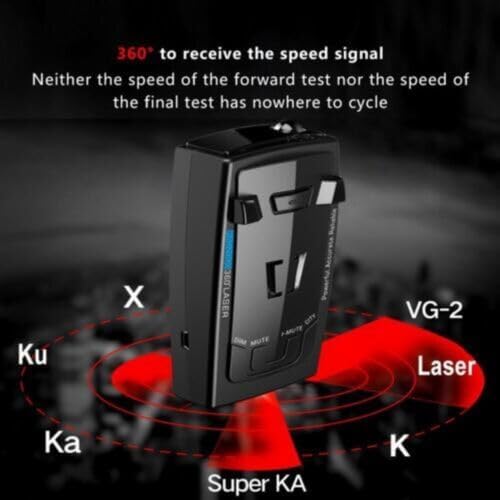
Figure 4.2: Illustration of the 360-degree detection capability for various radar and laser bands (X, Ku, Ka, K, Super KA, Laser, VG-2).
5. Specifications
| Feature | Detail |
|---|---|
| Brand | Fragcare |
| Model | RAD2000 |
| Material | ABS |
| Color | Black |
| Working Voltage | DC 12V |
| Dimensions (L x W x H) | 103 x 65 x 28 mm (4.06 x 2.56 x 1.1 inches) |
| Weight | 6 ounces |
| Display Type | Integrated LCD/LED |
| X-band Range | 10.525GHz ± 100MHz |
| K-band Range | 24.125GHz ± 175MHz |
| Ka-band Range | 34.700GHz ± 1300MHz, 35.100GHz ± 1300MHz |
| Laser Laser | 904nm ± 33MHz |
| Strelka Pulse Duration | - 30ns |
| Pulse Cycle | - 25us |
| Compatible Devices | Passenger cars |
| UPC | 750319273960 |
6. Troubleshooting
| Problem | Possible Cause | Solution |
|---|---|---|
| Device does not power on. | No power from 12V outlet; loose connection; faulty power cable. | Check 12V outlet for power (test with another device). Ensure power cable is securely connected to both the detector and the vehicle's outlet. Try a different 12V outlet if available. |
| Frequent false alerts in city. | Operating in Highway mode in an urban area; interference from other devices. | Switch to City mode using the CITY button. Ensure the device is not too close to other electronic devices that might cause interference. |
| No detection of known radar sources. | Device obstructed; incorrect mode; faulty unit. | Ensure the detector has a clear line of sight to the front and rear. Switch to Highway mode for maximum sensitivity. If problem persists, contact customer support. |
| Audio alerts are too loud/quiet. | Volume setting; I-MUTE feature enabled/disabled. | Adjust the volume (if a volume control is present, not specified in product info). Check the status of the I-MUTE feature and toggle it if necessary. |
7. Maintenance
- Cleaning: Use a soft, dry cloth to clean the exterior of the detector. Do not use abrasive cleaners or solvents.
- Storage: When not in use for extended periods, store the device in a cool, dry place away from direct sunlight and extreme temperatures.
- Avoid Liquids: Do not expose the device to water or other liquids.
- Handle with Care: Avoid dropping the device or subjecting it to strong impacts.
8. Warranty and Support
For warranty information and technical support, please refer to the documentation provided with your purchase or contact Fragcare customer service. Keep your proof of purchase for warranty claims.
Manufacturer: HKSUNKIN