
1. Introduction
This user manual provides detailed instructions for the setup, operation, and maintenance of your ECOWITT Wi-Fi Weather Station Kit. This kit includes the WS69 outdoor sensor array and the WS3800 7.5-inch large LCD display console, designed to provide comprehensive weather data for your home or garden.
Please read this manual thoroughly before operating your device to ensure proper functionality and longevity.
2. Product Overview and Components
The ECOWITT Wi-Fi Weather Station Kit consists of two primary components:
- WS69 Outdoor Sensor Array: This multi-functional sensor measures various outdoor weather parameters.
- WS3800 7.5'' LCD Display Console: This indoor unit displays collected weather data and acts as an IoT-supported gateway.

Image: The ECOWITT WS3800BU-Kit, featuring the WS69 outdoor sensor array and the WS3800 indoor LCD display console.
2.1. WS69 Wireless Outdoor Sensor Array
The WS69 outdoor sensor array is equipped with a Thermo-hygrometer, Rain Gauge, Wind Speed Sensor, Wind Direction Sensors, Light and UV sensor, and a Solar panel. It can be powered by 2 AA batteries (not included) or solar energy, offering flexible power options. It provides wireless transmission up to 100m/33ft with a reporting interval of 16 seconds.

Image: Detailed view of the WS69 outdoor sensor array, highlighting its solar panel and battery compartment.
2.2. WS3800 7.5'' LCD IoT-Supported Console
The WS3800 console features a 7.5-inch LCD display and includes built-in indoor temperature, humidity, and barometric pressure sensors. It supports connection to a 2.4 GHz Wi-Fi network, allowing data viewing from anywhere via phone, tablet, or computer browser. The console functions as both a Wi-Fi gateway for Ecowitt sensors and an IoT gateway for pairing with up to 16 Ecowitt IoT devices (e.g., WFC01 watering timer, AC1100 smart outlet plug, sold separately).

Image: Close-up of the WS3800 LCD display, illustrating the various weather data points and control buttons.
3. Setup
3.1. Powering the Units
- WS69 Outdoor Sensor Array: Insert 2 AA batteries (not included) into the battery compartment. The integrated solar panel will supplement power.
- WS3800 Display Console: Connect the provided DC 5V 1A power cord. For backup, 3 AA batteries (not included) can be inserted.
3.2. Mounting the WS69 Outdoor Sensor
The WS69 sensor is designed for easy mounting. Choose an open location outdoors, free from obstructions, to ensure accurate readings for wind, rain, and light. The wireless transmission range is up to 100m/33ft, allowing flexible placement.
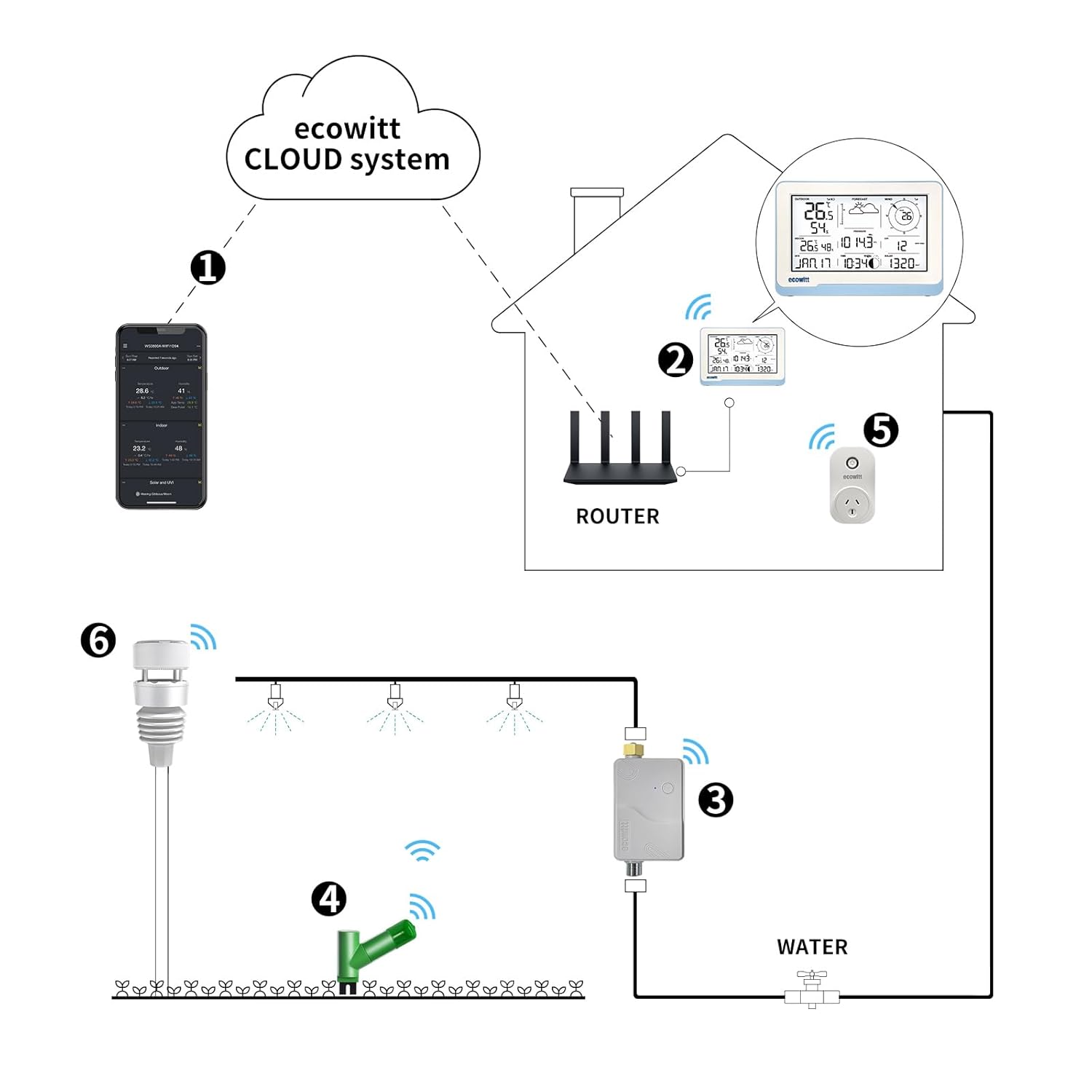
Image: Illustration of the 100M/328ft wireless transmission range and the solar power capability of the WS69 outdoor sensor.
3.3. Wi-Fi Configuration
To connect your WS3800 console to your Wi-Fi network (2.4 GHz only), you have two options:
- Ecowitt APP: Download the Ecowitt app and follow the in-app instructions for Wi-Fi setup.
- Web Page (192.168.4.1): Access the console's web interface via a browser by entering the specified IP address. Detailed steps are provided in the full WS3800 user manual.

Image: Data flow diagram showing the WS69 transmitting to the WS3800 console, which then connects to a 2.4GHz router for cloud data upload.
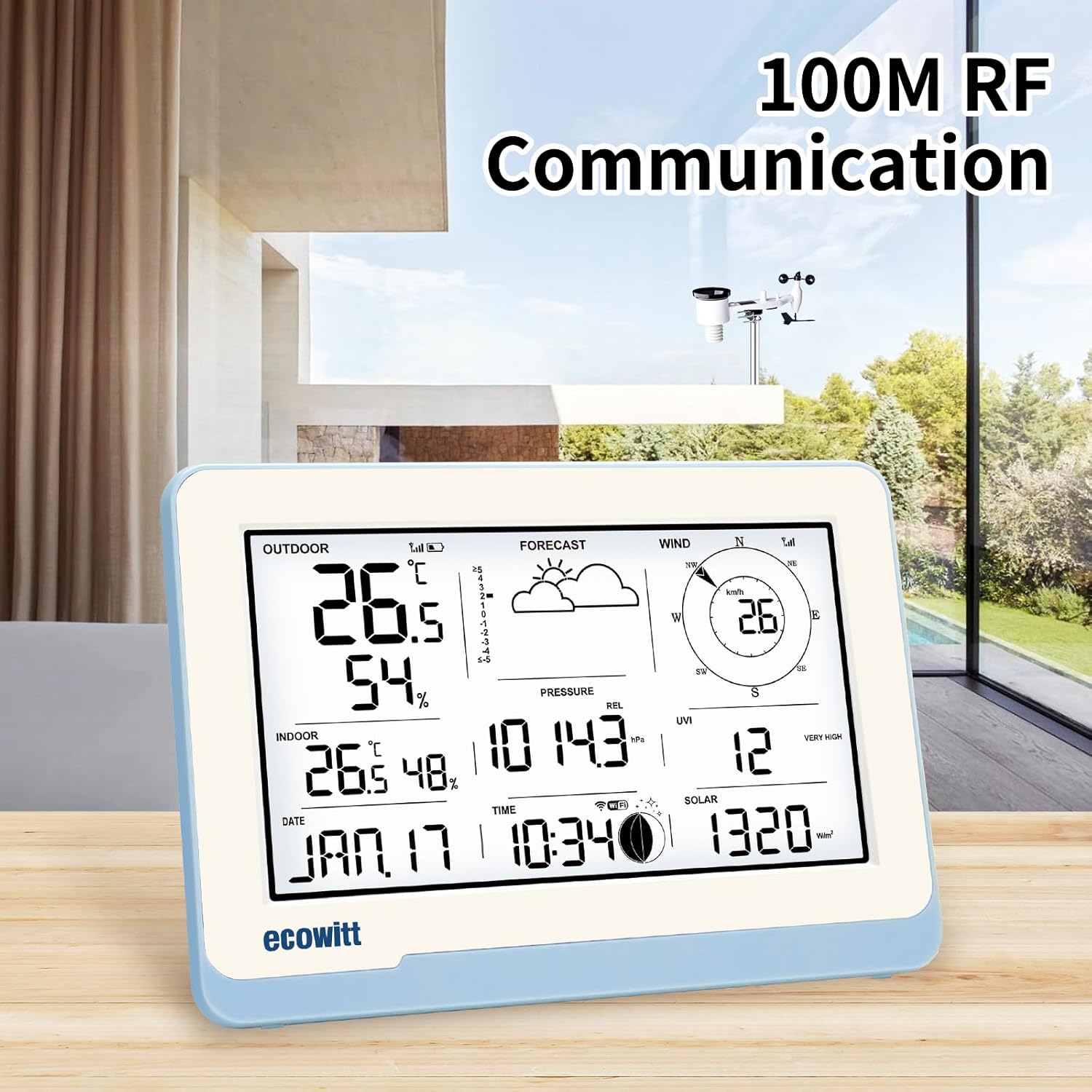
Image: The Ecowitt Cloud system illustrating how the WS3800 integrates with various IoT devices and the cloud.
4. Operation
4.1. Displayed Sensor Data
The WS3800 console displays a wide range of weather data, including:
- Outdoor temperature and humidity
- Indoor temperature and humidity
- Absolute and relative barometric pressure
- Rainfall data
- Wind speed and direction
- Light and UV levels
- Time, Date, and Moon phase
- Weather forecast icons

Image: The WS3800 console demonstrating its 100M RF communication capability within a home environment.
4.2. Sensor Data Display Priority
If multiple compatible sensors are connected, the WS3800 console prioritizes data display as follows:
- Outdoor Temperature and Humidity: WN32 > WS90 > WS80 > WS69
- Wind Speed/Direction: WS90 > WS80 > WS68 > WS69
5. Sensor Compatibility
The WS3800 display console can pair with various Ecowitt sensors (sold separately) to expand its monitoring capabilities. Some sensor data can be displayed directly on the console, while others are uploaded exclusively to the cloud server.
5.1. Sensor Data Displayed on WS3800
- WS90 outdoor compact sensor array (temperature, humidity, light, UV, wind speed/direction, rainfall)
- WS80 ultrasonic anemometer sensor (outdoor temperature, humidity, light, UV, wind speed/direction, rainfall)
- WS68 anemometer sensor (light, UV, wind speed/direction)
- WH40 rain gauge sensor (rainfall)
- WN32 outdoor thermo-hygrometer sensor (outdoor temperature and humidity)
- WN32P indoor thermo-hygrometer-barometric pressure sensor (indoor temperature, humidity, and pressure)
- WH45/WH46 air quality sensor (CO2, PM1.0, PM2.5, PM4.0, PM10, temperature and humidity)
- WN31/WN30/WN36 sensors (temperature and humidity, pool temperature)
- WFC01 smart water timer
- AC1100 smart plug
5.2. Sensor Data Uploaded Only to Cloud
- WH57 lightning detector sensor
- WH41/WH43 PM2.5 detector sensors
- WH55 water leak detector sensors
- WH51/WH51L soil moisture sensors
- WN34L/WN34D/WN34S sensors (soil/liquid temperature)
- WN35 leaf wetness sensors

Image: A comprehensive table outlining the compatibility of various Ecowitt sensors with the WS3800 console, indicating whether data is displayed directly or uploaded to the cloud.
6. Data Upload and Connectivity
Once connected to your Wi-Fi network, the WS3800 can upload data to various online weather station servers, allowing you to view your data remotely and contribute to global weather networks.
6.1. Supported Platforms
The WS3800 supports uploading data to the following platforms:
- ecowitt.net
- wunderground.com
- weathercloud.net
- wow.metoffice.gov.uk
- Customized servers

Image: Various online weather platforms supported by Ecowitt for data upload and viewing.

Image: Data transmission path from the WS69 sensor to the WS3800 console and onward to various cloud weather services.
6.2. RF Frequency
The system operates on an RF frequency of 915 MHz for communication between the outdoor sensor and the indoor console.
7. Maintenance
To ensure optimal performance and accuracy of your weather station, regular maintenance is recommended:
- Clean Sensors: Periodically clean the rain collector, wind cups, and wind vane to remove debris that may affect readings.
- Check Batteries: Replace batteries in the outdoor sensor array as needed, especially before winter months.
- Clear Obstructions: Ensure the outdoor sensor array remains free from any physical obstructions that could impede wind flow or rain collection.
- Console Cleaning: Wipe the display console with a soft, dry cloth. Avoid abrasive cleaners.
8. Troubleshooting
If you encounter issues with your ECOWITT Weather Station, consider the following common troubleshooting steps:
- No Data Displayed: Check that both the outdoor sensor and indoor console have power. Ensure they are within the 100m/33ft transmission range and that there are no major obstructions. Re-pair the sensors if necessary.
- Wi-Fi Connectivity Issues: Confirm your router is operating on a 2.4 GHz frequency. If you have a dual-band router, temporarily disable the 5 GHz band during initial setup. Ensure correct Wi-Fi password entry.
- Inaccurate Rain Readings: Ensure the rain collector is level and free of debris. Note that tilting the sensor during installation or maintenance may register false rain data that cannot be reset from the console.
- Console Buttons Unresponsive: Check power supply. If using batteries, ensure they are fresh and correctly inserted.
For more detailed troubleshooting, refer to the comprehensive user manual available on the ECOWITT website or contact customer support.
9. Specifications
| Feature | Detail |
|---|---|
| Model Number | WS3800-Kit |
| Brand | ECOWITT |
| Parcel Dimensions | 44.4 x 26.5 x 16.9 cm; 1.96 kg |
| Date First Available | Feb. 8 2024 |
| Manufacturer | ECOWITT |
| Recommended Uses | Garden, Home |
| Specific Uses | Humidity, Rain Rate, Temperature, Wind Direction/Speed |
| Power Source | Indoor Unit: DC 5V 1A (Powered Cord Included) or 3 AA Batteries for Backup (Batteries NOT Included); Outdoor Unit: 2 AA Batteries (Batteries NOT Included) or Solar Power |
| Special Feature | 7.5 Inch Large LCD Display, Adjustable Brightness, Alarm, IoT-Supported Console |
| RF Frequency | 915 MHz |
10. Warranty and Support
For information regarding product warranty, please refer to the official ECOWITT website or the documentation included with your purchase. ECOWITT provides customer support for technical assistance and inquiries.
You can typically find support resources, FAQs, and contact information on the manufacturer's official website:
Always ensure you are consulting the most current version of the user manual and support documentation.