Product Overview
This manual provides instructions for the replacement infrared (IR) remote control compatible with various Onkyo Multi-Room HiFi CD Hi-Fi Receiver Systems, including models CS-N775D, CR-N575D, CR-N775D, CR-N775-B, and CR-N775-S. This remote is designed to function as a direct replacement for your original remote control.
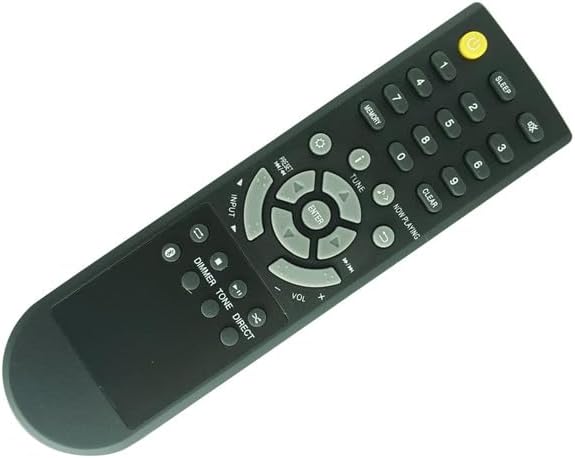
Image: Front view of the replacement remote control, showing the power button, numeric keypad, navigation buttons, volume controls, and various function buttons.
Important Notes
- This is an infrared (IR) replacement remote control.
- Ensure your original remote control matches the appearance of this replacement remote for full compatibility.
- Functionality may vary slightly depending on your specific Onkyo receiver model.
- No programming is required for this remote control.
Setup
Battery Installation
The remote control requires 2 AAA batteries (not included).
- Locate the battery compartment on the back of the remote control.
- Slide the battery compartment cover downwards or in the direction indicated by an arrow to open it.
- Insert two AAA batteries, ensuring the positive (+) and negative (-) terminals align correctly with the markings inside the compartment.
- Replace the battery compartment cover by sliding it back into place until it clicks securely.

Image: Rear view of the remote control with the battery cover detached, revealing the two AAA battery slots.

Image: Rear view of the remote control with the battery cover securely closed.
Operating Instructions
This remote control operates on infrared (IR) signals. Ensure there is a clear line of sight between the remote control and your Onkyo receiver system.
Basic Functions
- Power Button (●): Press to turn the receiver system on or off.
- Numeric Keypad (0-9): Used for direct input of track numbers, radio station frequencies, or other numerical selections.
- Volume Control (VOL +/-): Adjusts the master volume level of the receiver.
- Input: Cycles through available audio input sources (e.g., CD, Tuner, Bluetooth, Network).
- Navigation Buttons (Up, Down, Left, Right, ENTER): Used to navigate menus and confirm selections on the receiver's display.
- Play/Pause (►⏸): Controls playback for media sources.
- Skip/Fast Forward/Rewind (◀◀, ►►): Skips tracks or fast forwards/rewinds within a track.
Advanced Functions
- MEMORY: Stores radio station presets.
- PRESET +/-: Navigates through stored radio station presets.
- TUNE +/-: Manually tunes radio frequencies.
- NOW PLAYING: Displays current track information.
- CLEAR: Clears input or selections.
- DIMMER: Adjusts the brightness of the receiver's display.
- TONE: Accesses tone control settings (bass/treble).
- DIRECT: Activates direct sound mode, bypassing tone controls for pure audio.
- SLEEP: Sets a sleep timer for automatic power off.
Maintenance
- Cleaning: Wipe the remote control with a soft, dry cloth. Do not use liquid cleaners or abrasive materials.
- Battery Replacement: Replace batteries when the remote's response becomes sluggish or it stops functioning. Always replace both batteries at the same time with new ones of the same type.
- Storage: If the remote control will not be used for an extended period, remove the batteries to prevent leakage and damage.
Troubleshooting
| Problem | Possible Cause | Solution |
|---|---|---|
| Remote not responding | Dead or low batteries | Replace batteries with new AAA batteries. |
| Remote not responding | No clear line of sight to receiver | Ensure no obstructions between remote and receiver's IR sensor. Point remote directly at the receiver. |
| Some functions not working | Remote not fully compatible with specific receiver model | Verify your receiver model is listed as compatible. Some advanced functions may not be supported by all models. |
| Buttons are sticky or unresponsive | Dirt or debris under buttons | Clean the remote control as described in the Maintenance section. |
Specifications
- Product Type: Replacement Infrared (IR) Remote Control
- Compatible Devices: Onkyo Multi-Room HiFi CD Hi-Fi Receiver Systems (e.g., CS-N775D, CR-N575D, CR-N775D, CR-N775-B, CR-N775-S)
- Power Source: 2 x AAA Batteries (not included)
- Color: Black
- Special Feature: Ergonomic design, direct replacement functionality.
Warranty and Support
For warranty information or technical support, please refer to the documentation provided with your original Onkyo receiver system or contact the seller of this replacement remote control directly.
As per the product listing, "No Manual included, Any doubts, message us freely first pls !"
Seller: Easytry123


