
1. Product Overview
This manual provides detailed instructions for the installation, operation, and maintenance of your UUTouIoI Android 12 7-inch Car Stereo. This head unit features a 4-core CPU, 2GB RAM, 64GB ROM, a 1080P IPS HD display, and supports Wireless/Wired CarPlay and Android Auto, GPS navigation, Wi-Fi, and Bluetooth connectivity.

Image 1: Front view of the UUTouIoI 7-inch Android 12 Car Stereo, showing the main interface with app icons for Phone, Music, Maps, Messages, Car, Podcasts, and Audiobooks. Below the main screen, separate images illustrate the CarPlay and Android Auto interfaces on a smartphone.
1.1 Key Features
- Operating System: Android 12 with 4-core CPU, 2GB RAM, 64GB ROM.
- Display: 7-inch 1080P IPS HD Touchscreen.
- Smartphone Integration: Supports Wireless/Wired CarPlay and Android Auto.
- Navigation: Built-in GPS for online and offline maps.
- Connectivity: Wi-Fi hotspot, Bluetooth (phonebook, hands-free calling), USB input.
- Audio: EQ audio, FM RDS radio, music playback.
- Video: 1080P HD video playback, split-screen functionality.
- Control: Steering wheel control compatibility.
- Compatibility: Designed for various Volkswagen, Skoda, and Seat models.
2. Package Contents
Verify that all items listed below are included in your package. If any items are missing or damaged, please contact customer support.
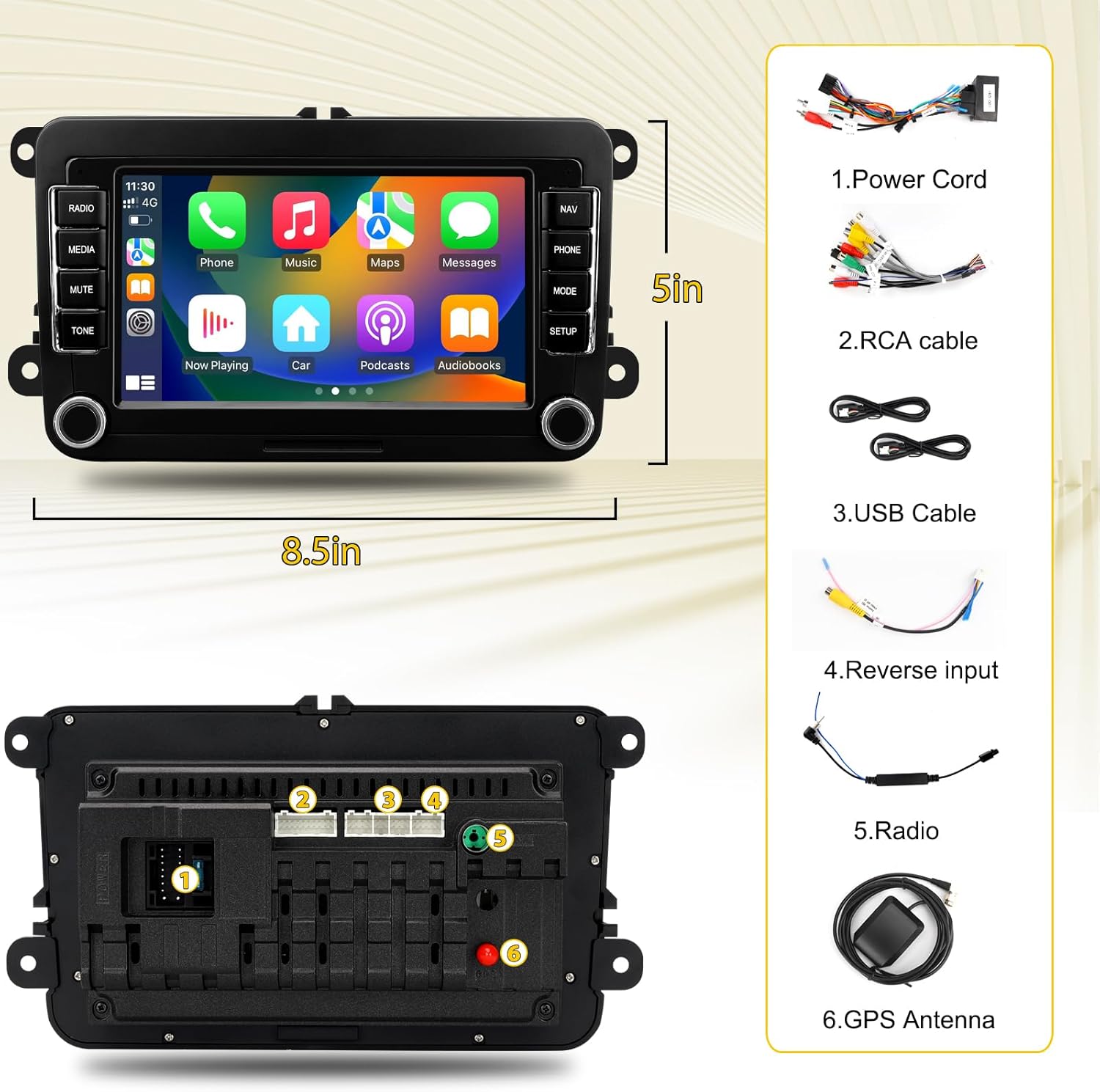
Image 2: A visual representation of the car stereo's dimensions (8.5 inches wide, 5 inches high) and a list of included accessories: 1. Power Cord, 2. RCA cable, 3. USB Cable, 4. Reverse input, 5. Radio antenna, 6. GPS Antenna.
- UUTouIoI 7-inch Car Stereo Head Unit
- Power Cord (specific to Volkswagen models)
- RCA Cable
- USB Cable
- Reverse Input Cable (for optional rear view camera, not included)
- Radio Antenna
- GPS Antenna
- 36-pin and 40-pin harnesses (choose the appropriate one for your vehicle)
3. Installation Guide
Professional installation is recommended. Ensure the vehicle's power is disconnected before beginning installation. Refer to your vehicle's specific disassembly instructions for removing the factory radio.
3.1 Vehicle Compatibility
This car stereo is compatible with various Volkswagen, Skoda, and Seat models. Please verify your vehicle's compatibility before installation.

Image 3: A detailed chart indicating compatible Volkswagen models (e.g., Amarok, Golf, Passat, Jetta, Tiguan), Skoda models (e.g., Octavia, Fabia, Yeti), and Seat models (e.g., Altea, Leon, Toledo) with their respective year ranges for the 7-inch car stereo.
3.2 Wiring Connections
Connect the provided harnesses and cables to the corresponding ports on the car stereo and your vehicle's wiring system. Ensure secure connections to prevent signal loss or malfunction.
- Power Cord: Connect to the vehicle's power supply.
- RCA Cable: For audio/video input/output connections.
- USB Cable: For data transfer and wired CarPlay/Android Auto.
- Reverse Input Cable: Connect for rear view camera functionality (camera sold separately).
- Radio Antenna: Connect for FM/AM radio reception.
- GPS Antenna: Mount in a location with clear sky view for optimal GPS signal.

Image 4: Illustration of the 36-pin and 40-pin wiring harnesses included with the car stereo. Key connections are labeled: A for ACC wire, C for Canbus, and D for Canbus power cable. Users should select the correct harness based on their car model.
Note: The car stereo comes with both 36-pin and 40-pin harnesses. Select the appropriate harness for your specific car model.
3.3 Initial Power-On and Setup
After installation, power on the vehicle and the car stereo. The system will boot into the Android 12 operating system. Follow any on-screen prompts for initial setup.
Video 1: A demonstration of the UUTouIoI car stereo's interface and various settings, including FM Radio, Music playback, DSP Sound adjustments, Video playback, and system settings like Network & Internet, Apps & Notifications, Storage, Location, Accounts, Accessibility, System, and Car Settings. It also shows the process for steering wheel learning and touch learning.
4. Operating Instructions
4.1 User Interface Navigation
The 7-inch touchscreen provides access to all functions. Swipe left or right to navigate between home screens. Tap icons to launch applications.
4.2 Wireless/Wired CarPlay and Android Auto
Connect your compatible smartphone via Bluetooth for wireless or USB for wired CarPlay/Android Auto. This allows access to navigation, phone contacts, messages, and music directly from the car stereo display.

Image 5: The car stereo screen displaying both Android Auto and CarPlay interfaces, highlighting the unit's compatibility with both smartphone integration platforms.

Image 6: This image illustrates the flexibility of connecting smartphones to the car stereo, offering both wireless Bluetooth and wired USB connection options for features like CarPlay and Android Auto.
4.3 GPS Navigation
The unit supports both online and offline navigation. Pre-loaded maps are available, and additional maps can be downloaded via the app store when connected to Wi-Fi.

Image 7: The car stereo screen showing a GPS navigation map with a highlighted route and multiple numbered points of interest, demonstrating its navigation capabilities.

Image 8: This image highlights the car stereo's online and offline GPS navigation features, showing the map interface along with icons for different navigation applications.
4.4 Bluetooth Connectivity
Pair your phone via Bluetooth for hands-free calling and audio streaming. Access your phonebook directly from the stereo.

Image 9: The car stereo screen showing a Bluetooth call interface with a dial pad and a separate view of music playback, emphasizing hands-free communication and audio streaming.
4.5 Wi-Fi Hotspot Internet
Connect the car stereo to a Wi-Fi hotspot to access online features, download apps, and browse the internet.

Image 10: The car stereo screen showing a web browser interface, surrounded by icons of popular online applications, illustrating the Wi-Fi hotspot connectivity feature.
4.6 FM Radio
Tune into your favorite FM radio stations. The unit supports RDS for enhanced radio information.

Image 11: The car stereo screen showing the FM radio interface, displaying the current frequency and preset options, emphasizing the built-in radio functionality.
4.7 Steering Wheel Control Learning
To enable steering wheel controls, navigate to the Car Settings menu. Select "SWC Type" and follow the on-screen instructions for "Learning Type" to map your vehicle's steering wheel buttons to the stereo functions.
Refer to Video 1 (above) for a visual guide on "Steer wheel learning" and "Touch learning" within the settings.
5. Maintenance
To ensure optimal performance and longevity of your car stereo, follow these maintenance guidelines:
- Cleaning: Use a soft, dry cloth to clean the screen and exterior. Avoid abrasive cleaners or solvents.
- Software Updates: Periodically check for available software updates through the system settings to ensure you have the latest features and bug fixes.
- Temperature: Avoid exposing the unit to extreme temperatures.
- Connections: Ensure all cables and connections remain secure.
6. Troubleshooting
If you encounter issues with your UUTouIoI car stereo, refer to the following common troubleshooting steps:
- No Power:
- Check all power connections and fuses.
- Ensure the vehicle's ignition is on.
- No Sound:
- Verify volume settings are not muted or too low.
- Check speaker wire connections.
- Ensure the correct audio source is selected.
- GPS Signal Issues:
- Ensure the GPS antenna is properly installed and has a clear view of the sky.
- Check for obstructions that might block the signal.
- CarPlay/Android Auto Not Connecting:
- Ensure Bluetooth is enabled on your phone and the stereo.
- For wired connection, try a different USB cable.
- Restart both your phone and the car stereo.
- Check phone settings for CarPlay/Android Auto permissions.
- Touchscreen Unresponsive:
- Perform a soft reset by pressing the reset button (if available) or turning the vehicle off and on.
- Ensure the screen is clean and free of debris.
If these steps do not resolve the issue, please contact UUTouIoI customer support for further assistance.
7. Specifications
| Feature | Specification |
|---|---|
| Operating System | Android 12 |
| Display Size | 7 Inches |
| Display Resolution | 1080P HD IPS |
| Processor | 4-core CPU |
| RAM | 2GB |
| ROM | 64GB |
| Connectivity | Bluetooth, USB, Wi-Fi |
| Special Features | Wireless/Wired CarPlay, Android Auto, GPS Navigation, Touchscreen, FM RDS Radio, Steering Wheel Control |
| Audio Output Mode | Stereo |
| Mounting Type | Dashboard Mount |
| Item Weight | 1.3 pounds |
| Package Dimensions | 11.46 x 9.53 x 4.02 inches |
8. Warranty and Support
Your UUTouIoI car stereo comes with a 1-year warranty from the date of purchase. Additionally, a 60-day hassle-free money-back policy is provided.
For technical support, warranty claims, or any questions regarding your product, please refer to the contact information provided with your purchase documentation or visit the official UUTouIoI website.