
1. Introduction
The SunSun CPF-2500 Pond Bio Pressure Filter is designed to maintain a healthy and clear aquatic environment for your pond. This system integrates high-performance bio-mechanical filtration with advanced 13-watt UV technology to effectively remove dissolved and solid waste, inhibit algae growth, and ensure a stable biological balance. This manual provides essential information for the safe and efficient installation, operation, and maintenance of your pond filter system.
2. Safety Information
Please read and understand all safety instructions before operating this product. Failure to follow these instructions may result in electric shock, fire, or serious injury.
- Electrical Safety: Ensure the power outlet is properly grounded and protected by a Ground Fault Circuit Interrupter (GFCI). Do not operate the unit with a damaged cord or plug. Keep all electrical connections dry.
- UVC Safety: The integrated UVC lamp emits ultraviolet radiation. Direct exposure to UVC light can cause severe eye and skin damage. Never operate the UVC lamp outside of its housing or look directly at the UVC light. Disconnect power before performing any maintenance involving the UVC unit.
- Water Immersion: The pump is designed for submersible use. The filter unit is designed to be placed at the pond edge, potentially partially buried. Ensure all connections are watertight.
- Children and Pets: Keep the unit and its electrical components out of reach of children and pets.
3. Package Contents
Carefully unpack all components and ensure everything listed below is present and undamaged. If any items are missing or damaged, contact your retailer.
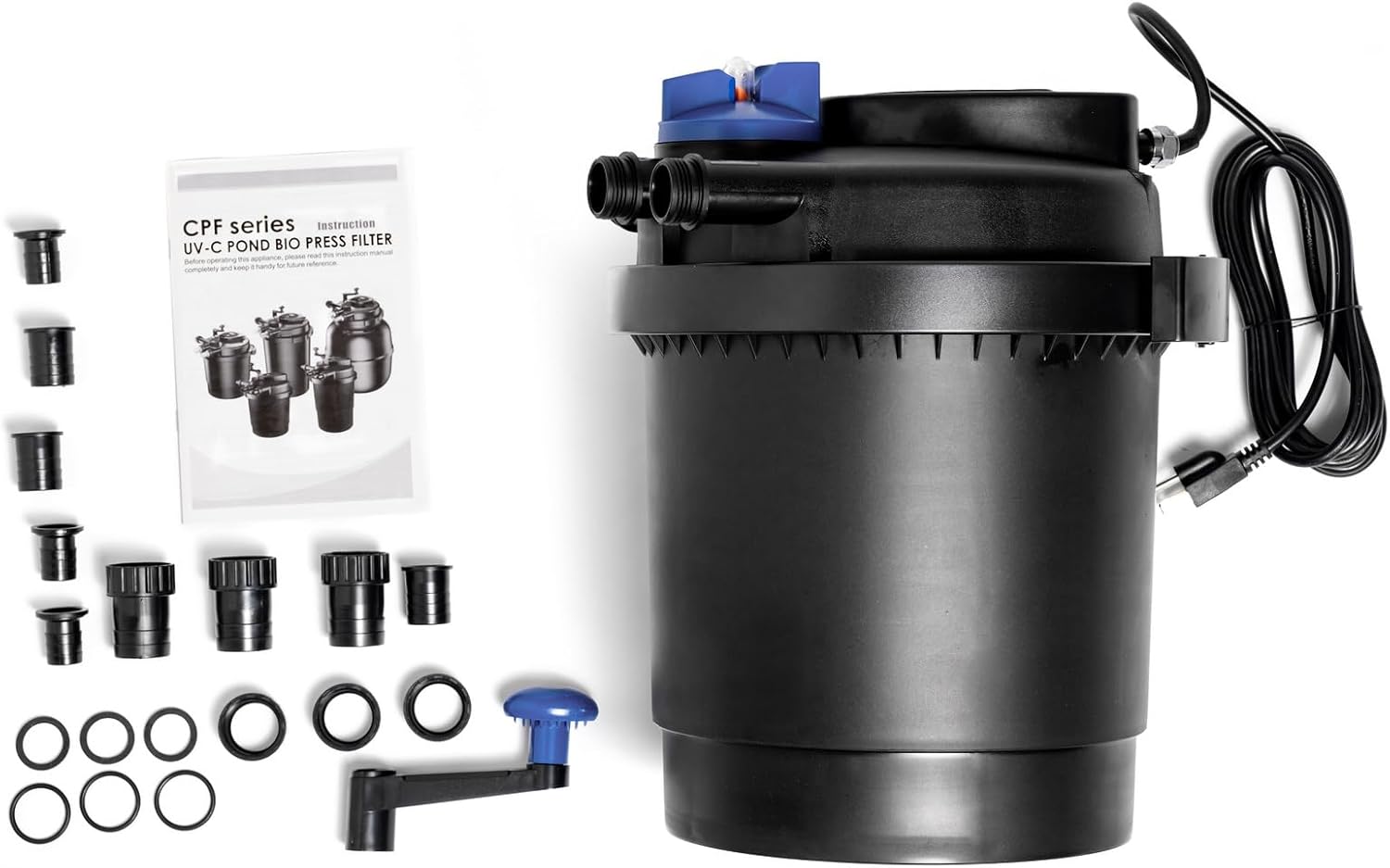
Figure 1: All components included in the package.
- CPF-2500 Pond Bio Pressure Filter Unit
- 720 GPH Fountain Pump
- Hose Adapters (3/4", 1 1/4")
- Sealing Rings
- Instruction Manual
4. Specifications
| Model Number | CPF2500PUMP1 |
| Brand | SunSun |
| Maximum Output | Approx. 1600 GPH (Gallons Per Hour) |
| Inlet / Outlet Hose Adapter | 3/4", 1 1/4" |
| Voltage | 110-120V 60Hz |
| UVC Power | 13W |
| Suitable for Ponds (Small Fish/Koi) | Up to approx. 900 Gallons |
| Suitable for Decorative Ponds | Up to approx. 1600 Gallons |
| Pump Max Flow | 720 GPH |
| Pump Power | 55W 120V 0.9A 60Hz |
| Pump Max Head | 9.2 ft |
| Product Dimensions (Pump) | 4.25"L x 3"W x 5"H |
| Material | Stainless Steel (Pump) |
5. Setup Instructions
Follow these steps to properly set up your SunSun CPF-2500 Pond Bio Pressure Filter system:
- Positioning the Filter: The pressure pond filter is designed to be placed at the edge of your pond, and can be partially buried to conceal the unit. Ensure the top cover, which contains all connections and technology, remains accessible for operation and maintenance.
- Installing the Pump: Place the included 720 GPH fountain pump into the pond. The pump will draw water from the pond and send it to the filter.
- Connecting Hoses:
- Connect a suitable hose (not included) from the pump's outlet to the filter's inlet. Use the appropriate hose adapter (3/4" or 1 1/4") for a secure fit.
- Connect another hose (not included) from the filter's outlet to direct the filtered water back into the pond, or to a higher-located waterfall.
- Electrical Connection: Plug the pump and filter (UVC unit) into a properly grounded GFCI-protected electrical outlet. Ensure all electrical connections are dry and secure.
- Initial Start-up: Once all connections are secure and the unit is positioned, turn on the power. Water should begin flowing from the pump, through the filter, and back into the pond.

Figure 2: Main filter unit with connections.

Figure 3: Included 720 GPH fountain pump.
6. Operating Principles
The CPF-2500 filter operates through a combination of mechanical, biological, and UVC filtration to ensure clear and healthy pond water.
- Mechanical Filtration: Pond water is pumped into the filter, where coarse and fine filter sponges trap floating particles and dirt.
- Biological Filtration: Within the filter, microorganisms accumulate on the biological media, breaking down harmful ammonia and nitrites into less toxic nitrates, thus improving water quality and creating a stable biological balance.
- UVC Clarification: An integrated 13-watt UVC unit exposes the water to ultraviolet radiation. This alters the protein structure of single-celled algae, causing them to clump together. These larger clumps are then easily removed by the mechanical filtration, preventing green water.
The continuous circulation and multi-stage filtration ensure that your pond remains clear and provides a healthy environment for its inhabitants.
7. Maintenance
Regular maintenance is crucial for the optimal performance and longevity of your pond filter. The CPF-2500 features a simple quick-handle cleaning system for easy maintenance.
7.1. Backwash Cleaning (Quick Clean System)
This system allows for cleaning the filter sponges without opening the unit, reducing the frequency of full disassembly.
- Prepare for Backwash: Ensure the pump is running. Locate the blue handle on the top of the filter unit. This handle controls the backwash function.
- Engage Backwash: Rotate the blue handle to the "Backwash" position. This diverts the water flow to flush out accumulated debris.
- Crank the Handle: Use the crank handle on the side of the filter to agitate the filter sponges. This helps dislodge trapped dirt and waste. Continue cranking until the water flowing out of the backwash outlet appears clear. The initial discharge will likely be dirty and discolored.
- Return to Filtration: Once the water runs clear, return the blue handle to the "Filter" position. The unit will resume normal filtration.

Figure 4: Filter top with backwash handle.
7.2. Full Filter Cleaning
Periodically, a more thorough cleaning of the filter media may be required.
- Disconnect Power: Always unplug the pump and filter (UVC unit) from the power source before performing any internal cleaning.
- Open the Filter: Loosen the clamps or locking mechanisms around the filter lid. Carefully lift the lid to access the internal filter sponges and media.
- Clean Filter Media: Remove the filter sponges and rinse them thoroughly with pond water (not tap water, as chlorine can kill beneficial bacteria) until clean. Inspect other biological media and rinse if necessary.
- Inspect UVC Lamp: Check the UVC lamp and quartz sleeve for any damage or excessive buildup. Clean the quartz sleeve gently with a soft cloth. Replace the UVC lamp annually or as recommended by the manufacturer, even if it appears to be working, as its UV output diminishes over time.
- Reassemble: Place all cleaned filter media back into the unit, ensuring proper orientation. Secure the lid clamps tightly to prevent leaks.
- Reconnect Power: Plug the unit back into the GFCI-protected outlet.
7.3. Pump Maintenance
Regularly inspect the pump for debris accumulation around the impeller. Disconnect power, remove the pump from the pond, and clean any blockages to maintain optimal flow.
8. Troubleshooting
If you encounter issues with your pond filter, refer to the following common problems and solutions:
- No Water Flow:
- Check if the pump is plugged in and receiving power.
- Inspect the pump impeller for blockages.
- Ensure hoses are not kinked or obstructed.
- Green Pond Water (Despite Filter Operation):
- The UVC lamp may need replacement (typically annually).
- The filter sponges may be clogged and require backwash or full cleaning.
- The pond may be overstocked with fish or receiving excessive sunlight/nutrients.
- Leaking from Filter:
- Ensure the filter lid is properly seated and clamps are securely fastened.
- Check all hose connections for tightness and proper sealing.
- Inspect O-rings and gaskets for damage and replace if necessary.
9. Warranty and Support
For warranty information, technical support, or to purchase replacement parts, please refer to the contact information provided with your product packaging or visit the official SunSun website. Keep your proof of purchase for warranty claims.