
1. Introduction
Thank you for choosing the Wengart WG03-1 AC230V Floor Heating Thermostat. This digital programmable thermostat is designed to provide comfortable and energy-efficient control over your floor heating system. Featuring a large touchscreen display and weekly programming capabilities, it ensures optimal room temperature while helping to reduce energy consumption. This manual provides detailed instructions for installation, operation, and maintenance to ensure safe and effective use of your thermostat.
2. Product Overview
The Wengart WG03-1 thermostat is a versatile device for controlling water-based floor heating systems. It offers a range of features to enhance user experience and energy efficiency.
Key Features:
- Programmable Weekly Schedule: Offers 6 daily events for weekdays and 2 for weekends, with flexible 5+2, 6+1, or 7-day programming options.
- Large Touchscreen Display: Clear LCD shows room temperature, set temperature, heating status, and current time.
- Temperature Calibration: Allows adjustment of measured temperature by up to 0.5°C for accuracy.
- Child Lock Function: Prevents unauthorized changes to settings.
- Anti-Freezing Function: Protects your system from freezing.
- Power-off Memory: Retains settings in case of power interruption.
- Multiple Sensor Modes: Supports various sensor configurations.
Display Analysis:
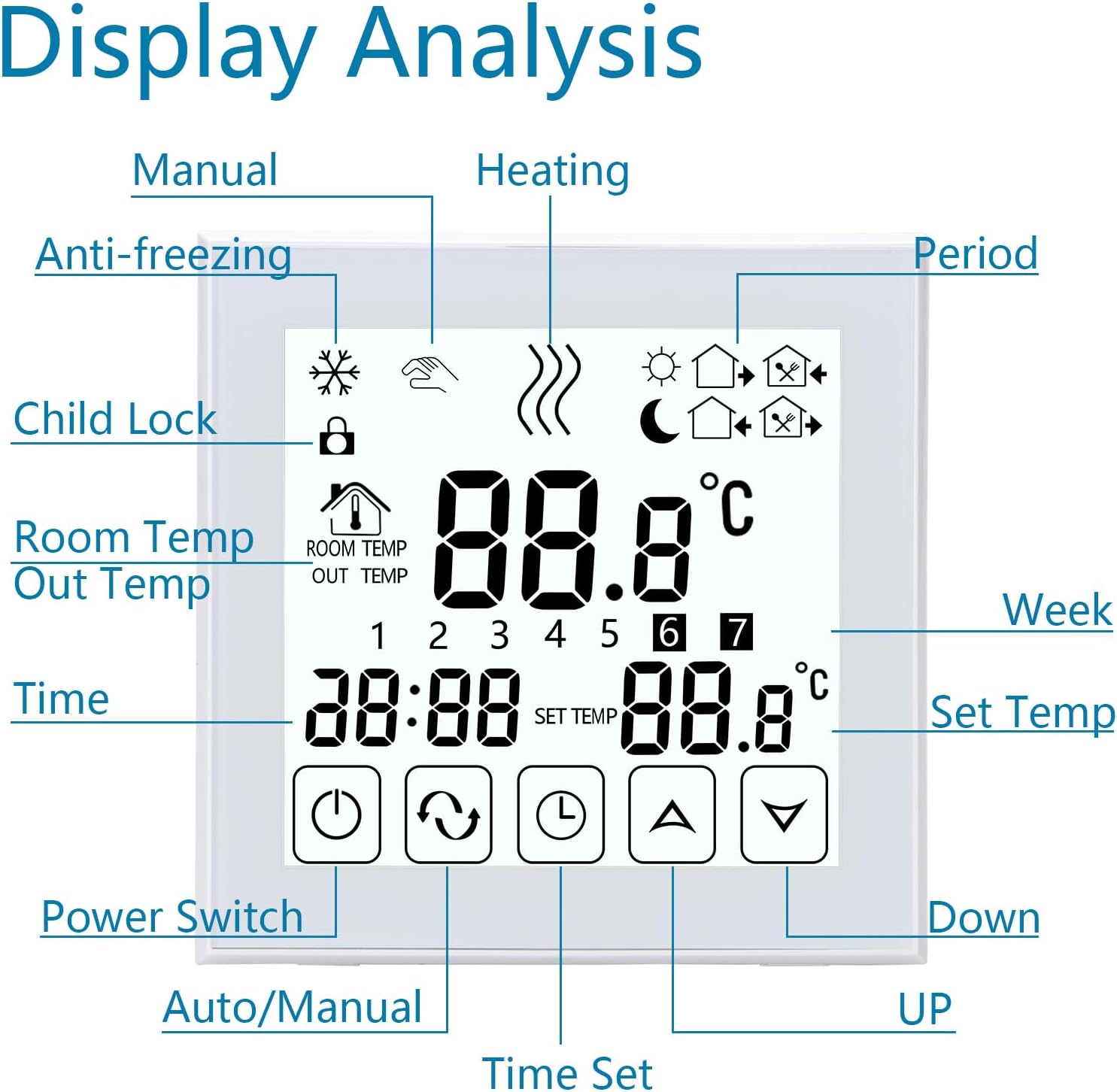
Image: Detailed view of the thermostat's touchscreen display, indicating various icons and their functions such as Manual mode, Heating status, Anti-freezing, Child Lock, Room Temperature, Time, Set Temperature, Power Switch, Auto/Manual toggle, Time Set, and Up/Down buttons.
3. Safety Information
Please read this section carefully before installation and operation to prevent personal injury or damage to the device.
- Electrical Safety: Installation must be performed by a qualified electrician in accordance with local electrical codes and regulations. Always turn off the main power supply before beginning any installation or maintenance work.
- Voltage: Ensure the power supply voltage matches the thermostat's operating voltage (AC 90-240V, 50/60Hz).
- Wiring: Use appropriate wire gauges (2 x 1.5 mm² or 1 x 2.5 mm²) for connections. Incorrect wiring can cause malfunction or fire.
- Environment: Do not install the thermostat in areas with excessive moisture, direct sunlight, or extreme temperatures.
- Disassembly: Do not attempt to disassemble or repair the thermostat yourself. Contact qualified personnel for service.
4. Setup
4.1. Installation
The thermostat is designed for flush mounting in a standard 86x86mm or European 60mm round box.
- Turn off Main Power: Before starting, ensure the main power supply to the heating system is completely switched off.
- Remove Front Display: Gently detach the front display screen part from the installation panel. Use a screwdriver if necessary to carefully pry it open.
- Connect Wiring: Refer to the wiring diagram (Section 4.2) to connect the electrical lines to the appropriate terminals on the installation panel.
- Fix Installation Panel: Secure the installation panel into the wall box using screws. Ensure it is firmly mounted.
- Insert Display Screen: Carefully insert the front display screen part back into the fixed installation panel until it clicks into place.
- Installation Finished: Once the display is secured, the physical installation is complete. You may now restore power to the system.
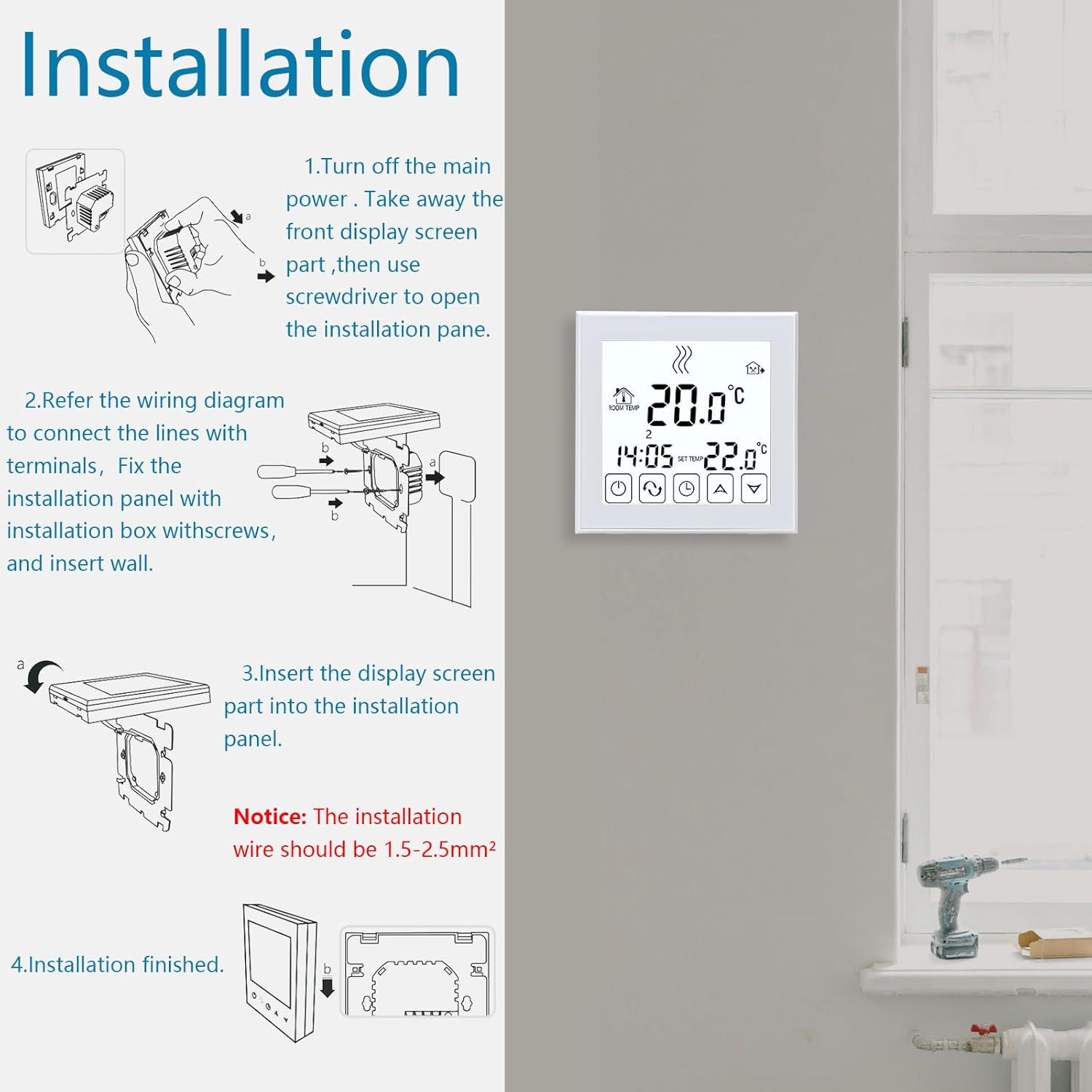
Image: Step-by-step visual guide for installing the Wengart WG03-1 thermostat, showing how to separate the display, connect wires, mount the back panel, and reattach the display. A note indicates that the installation wire should be 1.5-2.5mm².
4.2. Wiring Diagram
Proper wiring is crucial for the thermostat's functionality and safety. Always consult a qualified electrician if you are unsure.

Image: Detailed wiring diagram for the Wengart WG03-1 thermostat, showing connections for AC230V power (N, L), Normally Closed (1, 2), Normally Open (3, 4) heating actuators, and the NTC sensor (5, 6). The diagram illustrates how to connect the thermostat to the floor heating system.
- Terminals 1 & 2: Normally Closed (NC) output for heating actuators.
- Terminals 3 & 4: Normally Open (NO) output for heating actuators.
- Terminals N & L: AC230V power input.
- Terminals 5 & 6: NTC temperature sensor input.
- Wire Size: Use cables of 2 x 1.5 mm² or 1 x 2.5 mm² for connections.
5. Operating Instructions
This section guides you through the basic and advanced functions of your thermostat.
5.1. Basic Operation
- Power On/Off: Press the ⏻ (Power) button to turn the thermostat on or off.
- Adjusting Temperature: Use the ▲ (Up) and ▼ (Down) buttons to adjust the desired set temperature.
- Mode Selection: Press the ↻ (Auto/Manual) button to switch between Manual mode and Program mode.
- Setting Time: Press the 🕒 (Time Set) button to enter time setting mode. Use ▲ and ▼ to adjust, then press 🕒 again to confirm.
5.2. Weekly Programming
The thermostat allows you to set a personalized weekly heating schedule with 6 fixed periods for weekdays and 2 for weekends. You can choose between 5+2 days, 6+1 days, or 7 days programming.

Image: Illustration of the Wengart WG03-1 thermostat's programming interface, showing a sample weekly schedule table with periods, default times, and default temperatures for weekdays and weekends. The image also depicts the thermostat adjusting temperature based on the preset program when a user leaves the room.
- In Program mode, press and hold the 🕒 (Time Set) button to enter programming settings.
- Use ▲ and ▼ to adjust the time and temperature for each period (P1-P6 for weekdays, P1-P2 for weekends).
- Press 🕒 to move to the next setting.
- Once all periods are set, the thermostat will automatically follow the programmed schedule.
5.3. Advanced Functions
- Child Lock: To activate/deactivate, press and hold the ▲ and ▼ buttons simultaneously for a few seconds until the lock icon appears/disappears.
- Temperature Calibration: If the displayed room temperature differs from the actual temperature, you can calibrate it. Refer to the advanced settings menu (usually accessed by holding specific buttons when powered off, then powering on) for calibration options. The thermostat allows for a 0.5°C adjustment.
- Anti-Freezing: This function automatically activates heating if the room temperature drops below a preset minimum (e.g., 5°C) to prevent pipes from freezing. This is typically an automatic background function.
6. Maintenance
To ensure the longevity and optimal performance of your Wengart WG03-1 thermostat, follow these simple maintenance guidelines:
- Cleaning: Wipe the thermostat's screen and casing with a soft, dry cloth. Do not use abrasive cleaners, solvents, or chemical sprays, as these can damage the surface or internal components.
- Avoid Liquids: Do not allow any liquids to enter the thermostat, as this can cause electrical short circuits and damage.
- Regular Checks: Periodically check the thermostat for any visible damage or loose connections. If any issues are found, contact a qualified technician.
- Power Off for Extended Absence: If you plan to be away for an extended period, you may consider turning off the heating system at the main power supply, especially if the anti-freezing function is not critical for your specific setup.
7. Troubleshooting
If you encounter issues with your thermostat, refer to the following common problems and solutions:
- Thermostat Not Powering On:
- Check if the main power supply to the heating system is on.
- Verify that the wiring connections are secure and correct according to the wiring diagram.
- Heating Not Activating:
- Ensure the thermostat is in heating mode (not off or in a different mode).
- Check if the set temperature is higher than the current room temperature.
- Verify that the programming schedule is correctly set and active.
- Inspect the heating actuators for proper function.
- Incorrect Temperature Reading:
- Ensure the NTC sensor is properly connected and not damaged.
- Use the temperature calibration function to adjust the reading if necessary.
- Screen Unresponsive:
- Check if the Child Lock function is active (a lock icon will be displayed). Deactivate it if so.
- Try turning the thermostat off and on again at the main power supply to reset it.
If the problem persists after attempting these solutions, please contact customer support or a qualified technician.
8. Specifications
Technical details for the Wengart WG03-1 Floor Heating Thermostat:
| Operating Voltage | AC 90~240V, 50/60Hz |
| Power Consumption | 2 W |
| Load Current | ≤3A (Water Heating) |
| Set Temperature Range | 5 ~ 70 ℃ (Adjustable to 20-70 ℃) |
| Switching Differential | 0.5 ~ 5 ℃ adjustable (Factory setting ±1 ℃) |
| Ambient Temperature Range | -5 ~ 50 °C |
| Temperature Display Accuracy | ±0.5 °C |
| Temperature Control Accuracy | ±0.5 °C |
| Measurement Range | 1 ~ 70 °C |
| Buttons | Capacitive Touch Buttons |
| Internal Sensor | NTC 10k @ 25℃ |
| Protection Class | IP20 |
| Housing Material | Inflammable Polycarbonate |
| Cable Terminal | 2 x 1.5 mm² or 1 x 2.5 mm² |
| Output | Switching Relay |
| Dimensions (L x W x H) | 86 x 86 x 27 mm (3.38 x 3.38 x 1.06 inches) |
| Weight | 234 g (0.52 lbs) |
| Installation Hole Distance | 60 mm |
| Installation Method | Wall Mounted (Flush Mount) |
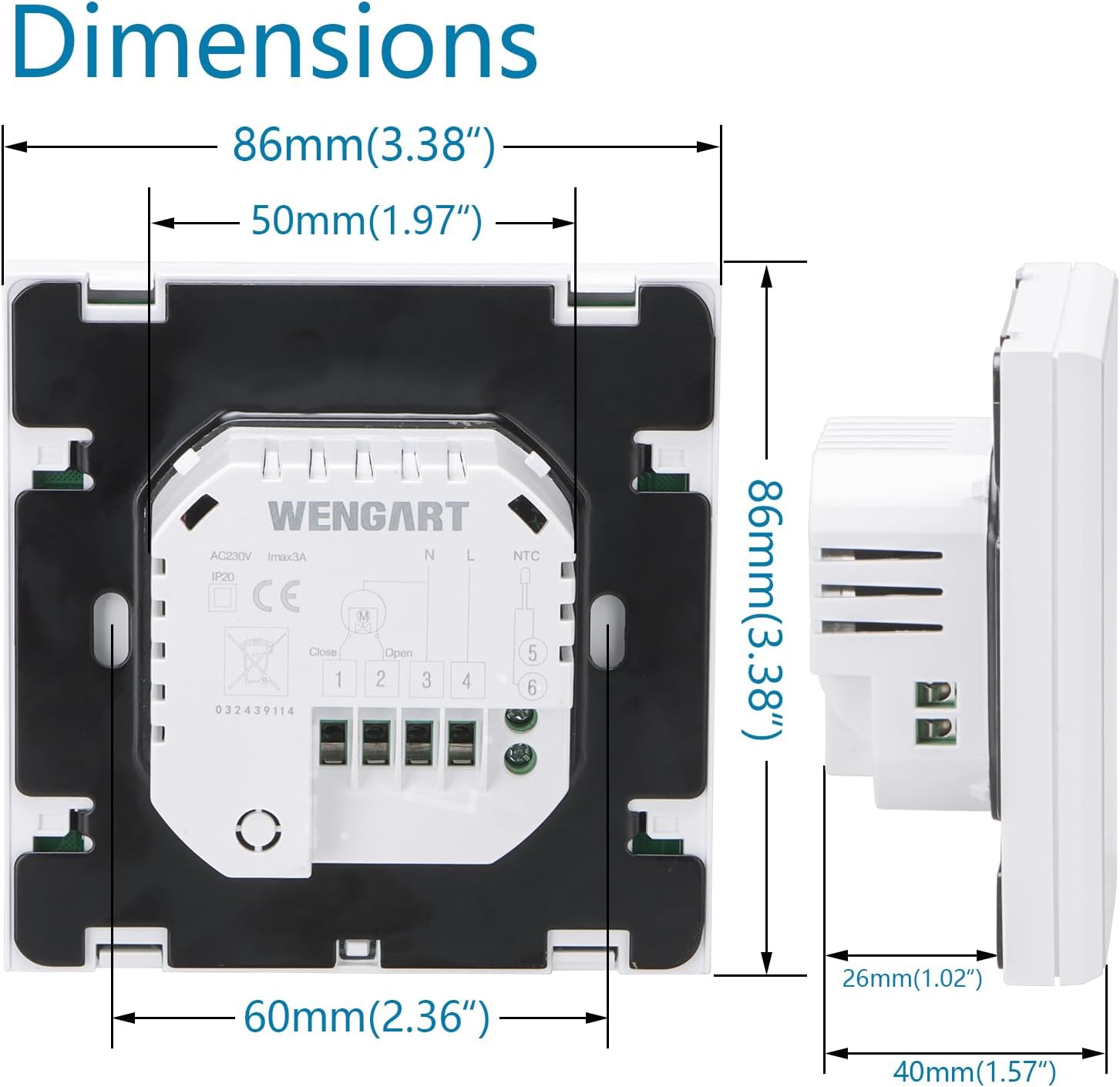
Image: Technical drawing illustrating the dimensions of the Wengart WG03-1 thermostat, including its front face (86mm x 86mm) and depth (40mm total, 26mm embedded), and the 60mm installation hole distance.
9. Warranty and Support
For warranty information, technical support, or service inquiries regarding your Wengart WG03-1 thermostat, please refer to the warranty card included with your product or contact the retailer/manufacturer directly. Keep your purchase receipt as proof of purchase.


