
Product Overview
This manual provides instructions for the AMERLIFE Queen Size Platform Bed Frame, designed with integrated LED lighting, a PU leather headboard, and a convenient charging station. This bed frame offers a modern aesthetic with practical features for your bedroom.
Key features include:
- Integrated LED lighting with multiple colors, modes, brightness, and speed adjustments via wire control.
- Built-in charging station with AC outlets and USB ports.
- Two-tier storage headboard for easy access to essentials.
- 13-inch under-bed clearance for additional storage and simplified cleaning.
- Sturdy metal slat system, eliminating the need for a box spring and supporting up to 900 lbs.
- Durable PU leather upholstery on the headboard and footboard.
Safety Information
Please read and understand all safety instructions before assembly and use. Failure to follow these instructions may result in injury or damage to the product.
- Maximum Weight Capacity: The bed frame is designed to support a maximum weight of 900 lbs (408 kg). Do not exceed this limit.
- Assembly: Assembly requires two adults. Ensure all components are securely fastened before use.
- Electrical Safety: When using the charging station, ensure all devices are compatible with the provided voltage and current. Do not overload the outlets. Keep liquids away from electrical components.
- Children: Keep small parts and packaging materials away from children during assembly.
- Placement: Place the bed frame on a level surface. Avoid placing it near heat sources or in direct sunlight for prolonged periods.
Package Contents
Before beginning assembly, verify that all parts are present and undamaged. Refer to the included parts list in your physical manual for detailed component identification.
- Headboard (with integrated LED and charging station)
- Footboard
- Side Rails
- Metal Slats
- Support Legs
- Assembly Hardware (screws, bolts, wrench)
- Power Cord for LED and Charging Station
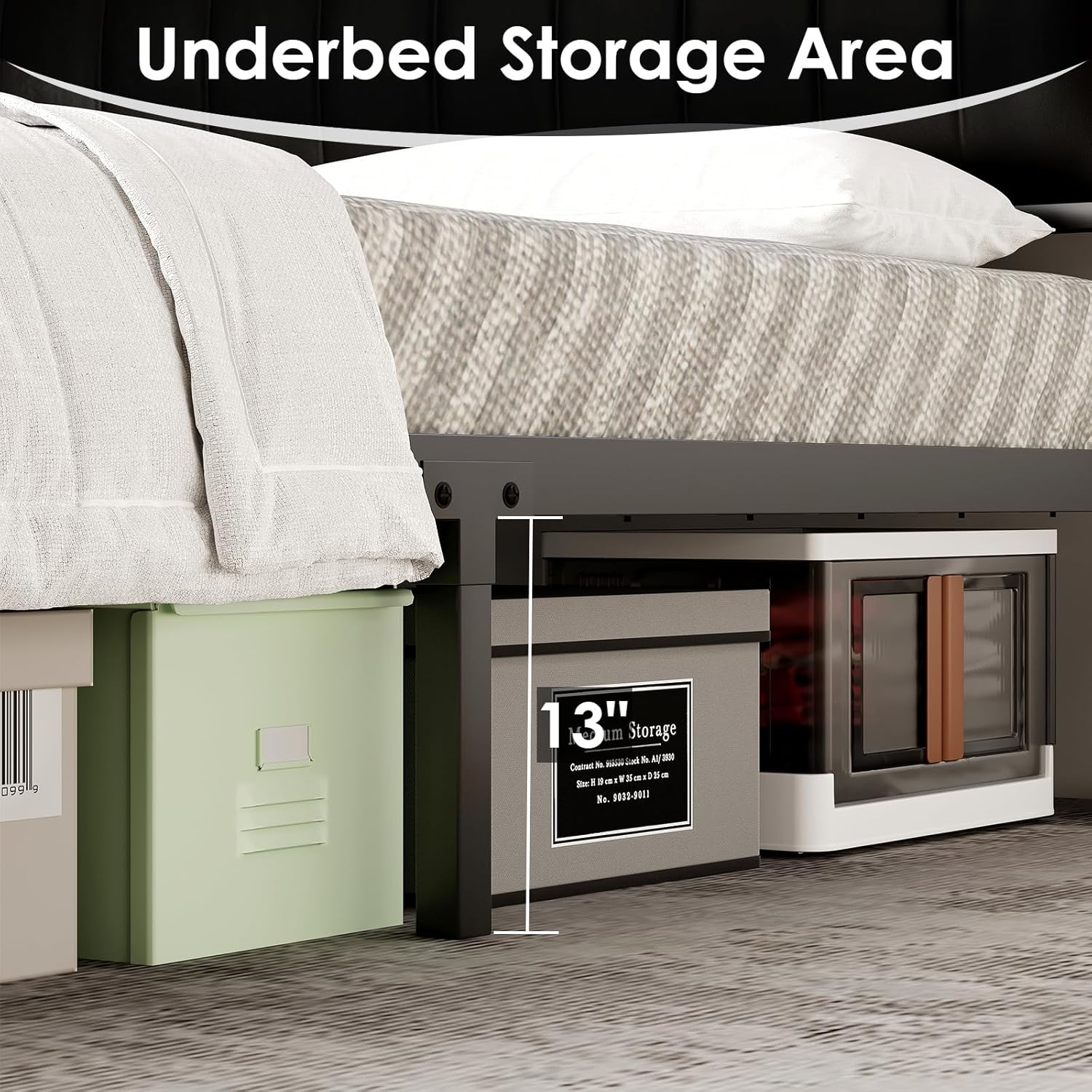
Image: Illustration showing various components of the bed frame, including the headboard, footboard, side rails, and metal slats, along with assembly hardware.
Assembly Instructions
Assembly of this bed frame typically requires two adults and takes approximately 40 minutes. Follow the step-by-step instructions provided in your physical assembly guide. Ensure all connections are tight before use.
- Unpack all components and lay them out on a clean, soft surface to prevent scratches.
- Attach the side rails to the headboard and footboard using the provided hardware. Do not fully tighten screws until all major components are connected.
- Install the center support beam and support legs.
- Place the metal slats onto the frame and secure them according to the instructions.
- Once all parts are in place, tighten all screws and bolts securely.
- Connect the power cord for the LED lights and charging station.

Image: Diagram illustrating that the product requires multi-step self-assembly with tools, recommends two-person assembly, and notes that in-home installation is not included. It also includes a color disclaimer.
Operating Instructions
LED Lighting System
The integrated LED lighting system offers customizable ambiance for your room. It is controlled via a wired remote.
- Power On/Off: Use the designated button on the wire control to turn the LED lights on or off.
- Color Selection: Cycle through over 20 color options using the color selection button.
- Dynamic Modes: Choose from 19 dynamic modes to create various lighting effects.
- Brightness Adjustment: Adjust the light intensity to your preference with 5 brightness levels.
- Speed Control: Modify the speed of dynamic lighting effects with 5 speed settings.

Image: A bed frame with its headboard LED lights illuminated in various colors, showcasing the 20+ colors, 19 dynamic modes, 5 speed settings, and 5 brightness levels controlled by a wired remote.
Charging Station
The headboard features a built-in charging station to conveniently power your electronic devices.
- AC Outlets: Two 110V/12A AC outlets are provided for standard electrical devices.
- USB Ports: Two 5V/3A USB ports are available for charging smartphones, tablets, and other USB-powered devices.
- Usage: Simply plug your devices into the appropriate ports. Ensure the bed frame's power cord is connected to a wall outlet.

Image: A close-up view of the bed frame's headboard, highlighting the integrated charging station with two AC outlets and two USB ports, along with the illuminated LED light strip. A tablet and a small speaker are shown charging.
Storage Headboard and Under-Bed Space
The bed frame includes a two-tier storage headboard and ample under-bed space for organization.
- Headboard Shelves: Utilize the two tiers on the headboard to store books, glasses, remote controls, or other small items.
- Under-Bed Clearance: The 13-inch clearance beneath the bed allows for storage of boxes, suitcases, or for easy access for robotic vacuum cleaners.

Image: A view of the bed frame from the side, illustrating the 13-inch under-bed storage space with storage bins and suitcases placed underneath.
Product Video
Video: An official product video demonstrating the features of the AMERLIFE bed frame, including the PU leather design, 2-tier storage headboard, LED lighting, and under-bed storage space.
Maintenance
Proper maintenance will extend the life and appearance of your bed frame.
- Cleaning the Frame: Wipe metal and engineered wood surfaces with a soft, damp cloth. Avoid harsh chemicals or abrasive cleaners.
- Cleaning PU Leather: For the PU leather headboard and footboard, wipe with a soft, slightly damp cloth. For tougher stains, use a mild soap solution and wipe dry immediately. Do not use excessive water or harsh cleaning agents.
- Hardware Check: Periodically check all bolts and screws to ensure they remain tight. Retighten as necessary to maintain stability.
- Electrical Components: Keep the charging station and LED lights free from dust. Do not attempt to repair electrical components yourself; contact qualified personnel if issues arise.
Troubleshooting
If you encounter any issues with your bed frame, refer to the following common solutions:
| Problem | Possible Cause | Solution |
|---|---|---|
| Bed frame is wobbly or noisy. | Loose hardware. Uneven floor. | Ensure all bolts and screws are securely tightened. Move the bed to a level surface or use shims under legs if necessary. |
| LED lights are not working. | Power cord not connected. Faulty connection. | Check if the power cord is securely plugged into both the bed frame and a working wall outlet. Verify the wire control is properly connected. |
| Charging station not providing power. | Power cord not connected. Overloaded circuit. | Ensure the bed frame's power cord is plugged in. Check if the wall outlet is functional. Reduce the number of devices plugged into the charging station. |
| Mattress sinking between slats. | Incorrect mattress size. Damaged slats. | Ensure your mattress is the correct Queen size (88"L x 62.4"W). Inspect slats for damage and replace if necessary. |
Specifications
| Feature | Detail |
|---|---|
| Model Number | BMB009 |
| Size | Queen |
| Product Dimensions (L x W x H) | 88"L x 62.4"W x 37"H |
| Material | Engineered Wood, Faux Leather, Metal |
| Color | Black |
| Maximum Weight Capacity | 900 lbs |
| Under-Bed Clearance | 13 inches |
| Recommended Mattress Height | 8" - 12" (No Box Spring Needed) |
| Charging Station | 2 AC Outlets (110V/12A), 2 USB Ports (5V/3A) |
| LED Features | 20+ Colors, 19 Dynamic Modes, 5 Speed, 5 Brightness (Wire Control) |
| Assembly Time | Approx. 40 minutes (2 adults) |
| Item Weight | 65 Pounds |
| UPC | 714855757483 |

Image: A diagram illustrating the overall dimensions of the Queen size bed frame, including length, width, height, and under-bed clearance.

Image: A diagram recommending an 8-12 inch mattress height for optimal fit with the bed frame, showing both mattress-only and mattress with box spring options (though box spring is not needed).
Warranty Information
For detailed warranty information, please refer to the warranty card included with your product packaging or contact AMERLIFE customer support directly. Warranty terms typically cover manufacturing defects under normal use.
Customer Support
If you have any questions, require assistance with assembly, or need to report missing/damaged parts, please contact AMERLIFE customer support. Contact information can typically be found on the product packaging, the seller's website, or through your purchase platform.
For online purchases, you may also contact the seller directly through your order history.


