
1. Product Overview
The HainoTeko Germany RW-44 Smart Watch is a versatile wearable device designed for both Android and iOS users. It features a round AMOLED display, offering vibrant colors and high contrast. Key functionalities include smart notifications, Bluetooth calling, health monitoring, and wireless charging. The watch comes with three interchangeable straps to suit various styles.

Figure 1: HainoTeko Germany RW-44 Smart Watch with Stainless Steel, Leather, and Silicone Straps.
2. Setup Guide
2.1. Package Contents
Before proceeding, ensure all items are present in the package:
- HainoTeko Germany RW-44 Smart Watch
- Stainless Steel Strap
- Leather Strap
- Silicone Strap
- Wireless Charger
- User Manual (this document)
2.2. Initial Charging
For optimal performance, fully charge the smart watch before first use. The RW-44 supports wireless charging.
- Place the smart watch onto the wireless charging pad. Ensure the watch is centered on the pad for proper contact.
- Connect the wireless charger to a compatible USB power adapter (not included) and plug it into a power source.
- The watch display will indicate charging status. A full charge may take approximately 4 hours.

Figure 2: Wireless Charging of the RW-44 Smart Watch.
2.3. Powering On/Off
- To Power On: Press and hold the side button until the HainoTeko logo appears on the screen.
- To Power Off: Press and hold the side button, then select "Power Off" from the options on the screen.
2.4. Pairing with Your Smartphone
The RW-44 Smart Watch is compatible with both Android and iOS devices. Follow these steps to pair your watch:
- Download the official HainoTeko companion app from your smartphone's app store (Google Play Store for Android, Apple App Store for iOS).
- Ensure Bluetooth is enabled on your smartphone.
- Open the HainoTeko app and follow the on-screen instructions to add a new device.
- On your smart watch, navigate to the Bluetooth settings or pairing mode (refer to the watch interface for specific steps).
- Select the RW-44 from the list of available devices in the app on your smartphone.
- Confirm the pairing request on both your smartphone and the smart watch.
Once paired, the watch will synchronize data and notifications with your smartphone.
3. Operating Instructions
3.1. Basic Navigation
- Touchscreen: Swipe left, right, up, or down to navigate through menus and widgets. Tap to select items.
- Side Button: Press to return to the home screen or wake the display. Press and hold for power options or to access specific functions (customizable).
- Rotating Crown: Rotate the crown to scroll through lists or adjust settings. Press it to confirm selections.
3.2. Smart Notifications
After successful pairing, the RW-44 can display notifications from your smartphone.
- Ensure notification permissions are granted to the HainoTeko app on your smartphone.
- Incoming calls, messages, and app alerts will appear on the watch screen.
- You can dismiss notifications directly from the watch.
3.3. Bluetooth Calling
The RW-44 allows you to make and receive calls directly from your wrist, thanks to its built-in speaker and microphone.
- Receiving Calls: When a call comes in, the watch will display the caller ID. Tap the green icon to answer or the red icon to reject.
- Making Calls: Access the dialer or contact list on your watch to initiate a call.

Figure 3: Bluetooth Calling feature on the RW-44 Smart Watch.
3.4. Health Monitoring
The RW-44 includes various health tracking features:
- Heart Rate Monitor: Measures your heart rate throughout the day.
- Blood Pressure Monitor: Provides estimated blood pressure readings.
- Blood Oxygen (SpO2) Monitor: Measures blood oxygen saturation levels.
- Pedometer: Tracks your steps, distance, and calories burned.
Access these features through the watch's health menu or the companion app. Note: Health monitoring features are for general wellness and fitness purposes only and are not intended for medical diagnosis or treatment.
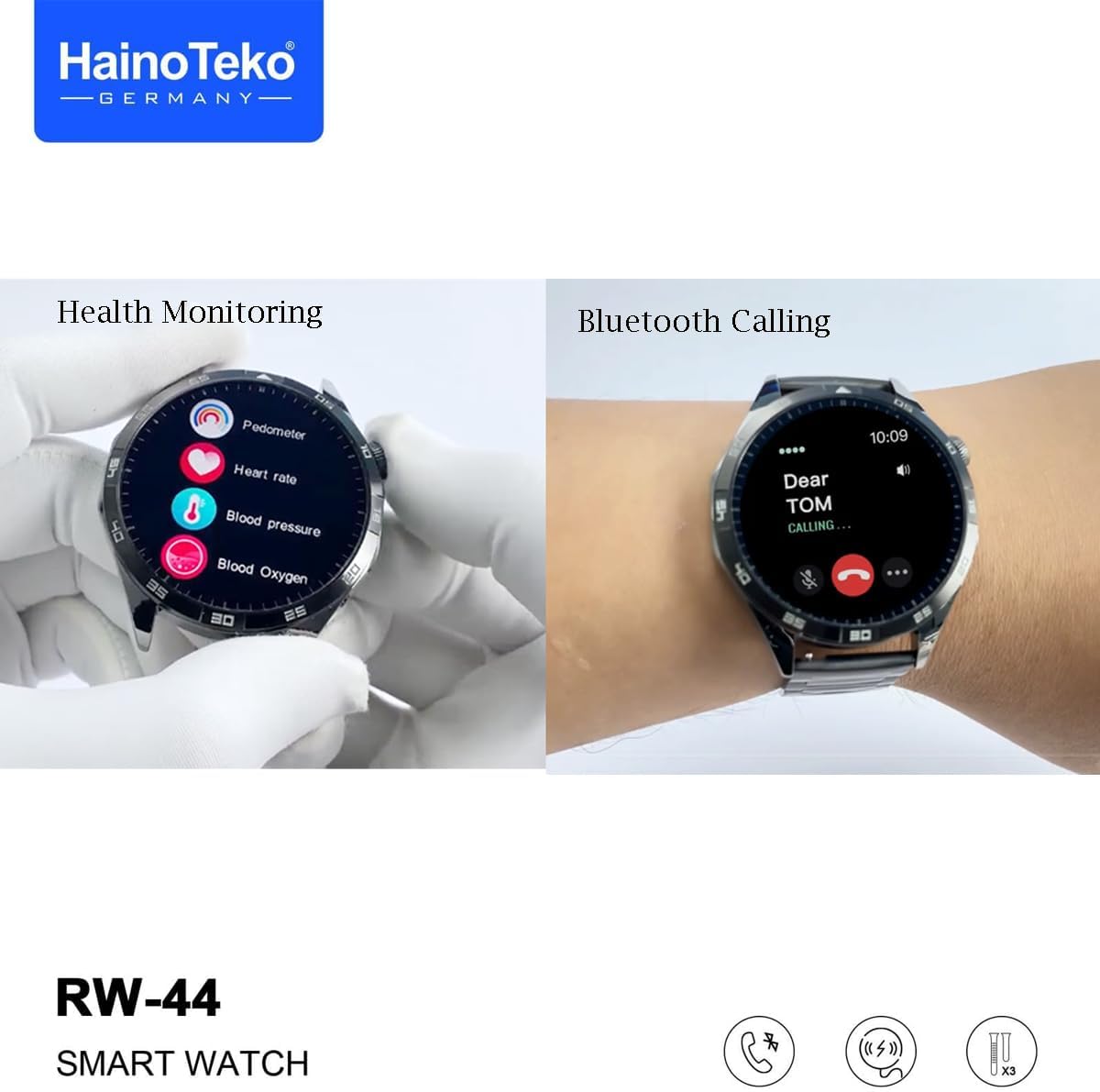
Figure 4: Health Monitoring and Bluetooth Calling features.
3.5. Customization
- Watch Faces: The RW-44 offers multiple built-in watch faces. You can change them directly on the watch or through the companion app.
- Interchangeable Straps: The watch comes with stainless steel, leather, and silicone straps. To change a strap, locate the quick-release pins on the underside of the strap and gently slide them to detach. Attach a new strap by aligning the pins with the watch lugs and securing them.

Figure 5: Multiple Dial Faces available for the RW-44 Smart Watch.
4. Maintenance
4.1. Cleaning Your Smart Watch
Regular cleaning helps maintain the appearance and functionality of your watch.
- Wipe the watch screen and body with a soft, lint-free cloth. If necessary, slightly dampen the cloth with water.
- Avoid using harsh chemicals, abrasive materials, or strong detergents, as these can damage the watch's finish or internal components.
- For straps, clean according to their material type (e.g., leather cleaner for leather straps, mild soap and water for silicone).
4.2. Battery Care
To prolong battery life:
- Avoid extreme temperatures (very hot or very cold).
- Do not leave the watch fully discharged for extended periods.
- Charge the watch regularly, but avoid overcharging for prolonged times.
4.3. Water Resistance
The RW-44 Smart Watch is rated IP68 for water resistance. This means it is protected against dust ingress and can withstand immersion in water up to 1.5 meters for up to 30 minutes. However, it is important to note the following:
- IP68 rating does not imply full waterproofing for all activities.
- Avoid exposing the watch to hot water, steam, or high-pressure water jets (e.g., showers, saunas, hot tubs).
- Do not wear the watch during diving, snorkeling, or high-speed water sports.
- If the watch gets wet, dry it thoroughly before charging or operating buttons.
- Water resistance is not a permanent condition and may decrease over time with normal wear and tear.
5. Troubleshooting
| Problem | Possible Cause | Solution |
|---|---|---|
| Watch does not power on. | Low or depleted battery. | Charge the watch using the wireless charger for at least 30 minutes. |
| Cannot pair with smartphone. | Bluetooth is off, app not installed, or watch not in pairing mode. | Ensure Bluetooth is active on your phone. Install the HainoTeko app. Put the watch in pairing mode and try again. Restart both devices. |
| No notifications received. | App permissions not granted, app not running in background, or watch disconnected. | Check notification permissions for the HainoTeko app on your phone. Ensure the app is running. Reconnect the watch via Bluetooth. |
| Inaccurate health data. | Improper fit, sensor obstruction, or movement during measurement. | Ensure the watch is snug on your wrist. Clean the sensor area. Remain still during measurements. Remember these are for general wellness. |
| Short battery life. | Frequent use of power-intensive features, high screen brightness, or old battery. | Reduce screen brightness, limit continuous health monitoring, or disable unnecessary features. Ensure proper charging habits. |
If problems persist, consider performing a factory reset on your watch (refer to the watch settings menu) or contact customer support.
6. Product Specifications
| Feature | Detail |
|---|---|
| Brand | HainoTeko Germany |
| Model Number | RW-44 |
| Display Type | Round AMOLED |
| Screen Size | 44 mm |
| Operating System | Watch OS |
| Memory Storage Capacity | 30 MB |
| Battery Capacity | 200 mAh |
| Connectivity Technology | Wi-Fi, Bluetooth |
| Wireless Communication Standard | Bluetooth |
| GPS | No GPS |
| Special Features | Notifications, Bluetooth Calling, Health Monitoring (Heart Rate, Blood Pressure, Blood Oxygen, Pedometer), Wireless Charging, Interchangeable Straps |
| Water Protection Rating | IP68 |
| Product Dimensions | 16 x 5 x 0.5 cm; 300 Grams |
7. Warranty and Support
7.1. Warranty Information
The HainoTeko Germany RW-44 Smart Watch comes with a standard manufacturer's warranty. Please refer to the warranty card included in your product packaging for specific terms, conditions, and duration. Keep your proof of purchase for warranty claims.
7.2. Customer Support
For technical assistance, troubleshooting, or warranty inquiries, please contact HainoTeko Germany customer support. Contact details can typically be found on the official HainoTeko website or on the product packaging.
Before contacting support, please have your product model (RW-44) and purchase information ready.