
1. Introduction
Thank you for choosing the Hetyue Kids Walkie Talkies. This 2-pack of long-range walkie talkies is designed for children aged 3-12, offering a fun and safe way to communicate. Featuring a backlit LCD, built-in flashlight, and a range of up to 3 miles in open conditions, these walkie talkies are perfect for indoor and outdoor adventures. This manual provides essential information for setup, operation, and maintenance to ensure optimal performance and enjoyment.
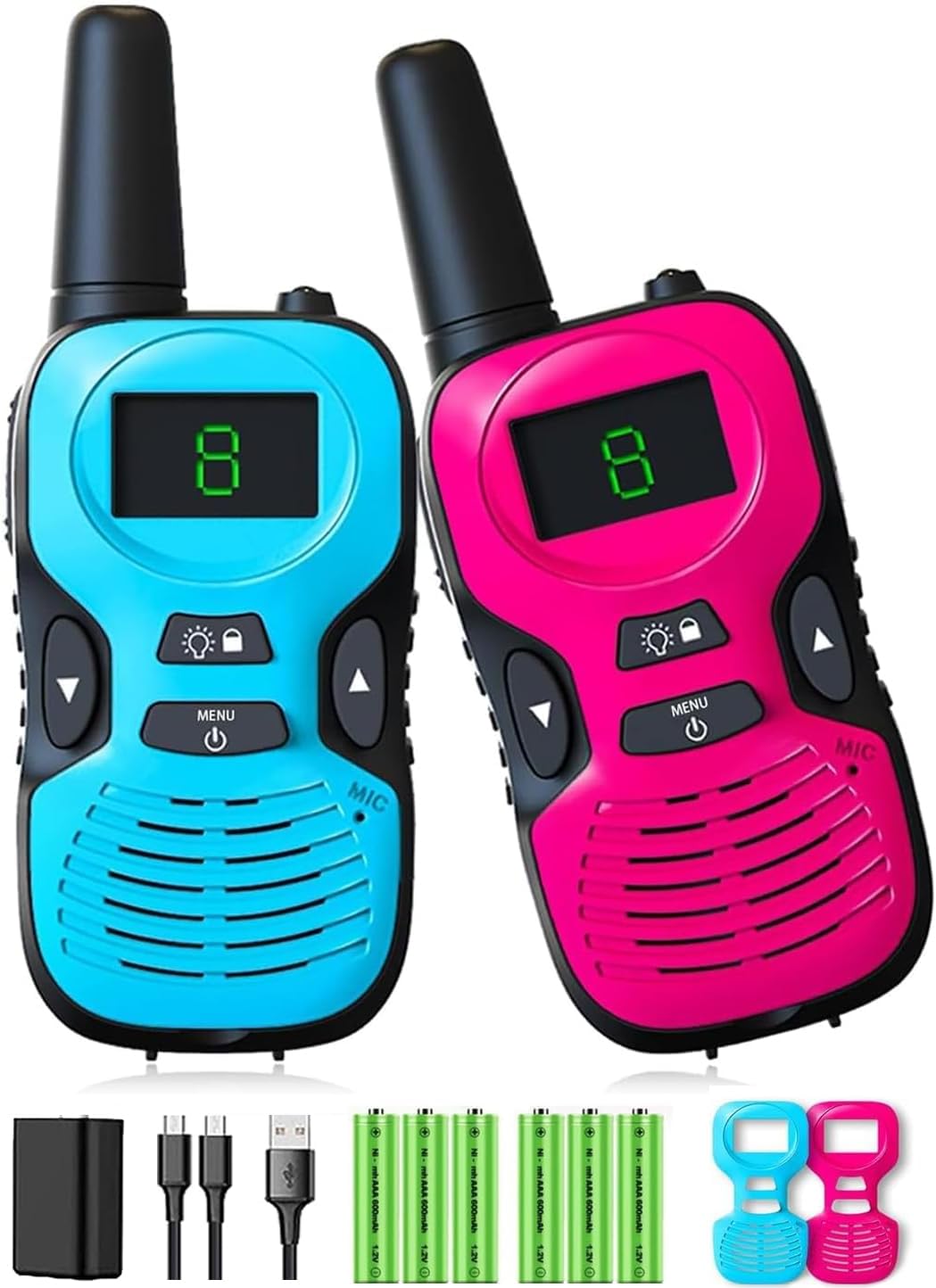
Figure 1: Hetyue Kids Walkie Talkies (2 Pack)
2. Product Overview
Familiarize yourself with the components and controls of your Hetyue Walkie Talkie:

Figure 2: Walkie Talkie Component Diagram
- Antenna: For transmitting and receiving signals.
- Flashlight: Built-in light source for visibility in low-light conditions.
- LED Display: Shows channel number, battery status, and other indicators.
- Lamp / Lock Button: Activates the flashlight and locks/unlocks the keypad.
- Up/Down Buttons: Adjust channel, volume, and navigate menu options.
- Power / Menu Button: Turns the unit on/off and accesses the menu settings.
- MIC (Microphone): For speaking into the walkie talkie.
- Speaker: For hearing incoming transmissions.
- PTT (Push-to-Talk) Button: Located on the side, press and hold to transmit.
- Belt Clip: For attaching the walkie talkie to clothing.
- Lanyard Loop: For attaching a lanyard (included).
3. Package Contents
Your Hetyue Kids Walkie Talkies package includes:
- 2 x Hetyue Kids Walkie Talkies
- 2 x Replaceable Shells (colors may vary)
- 2 x Lanyards
- 1 x User Manual
- (Note: 3 AAA batteries per walkie talkie are required and not included.)
4. Setup
4.1 Battery Installation
- Locate the battery compartment on the back of the walkie talkie.
- Open the battery compartment cover.
- Insert 3 AAA batteries into the compartment, ensuring correct polarity (+/-).
- Close the battery compartment cover securely.
4.2 Power On/Off
- To power on, press and hold the Power / Menu button until the LCD screen illuminates.
- To power off, press and hold the Power / Menu button until the LCD screen turns off.
5. Operating Instructions
5.1 Channel Selection
Your walkie talkies operate on 10 available channels. For communication, both walkie talkies must be set to the same channel.
- Press the Power / Menu button once to enter channel selection mode. The current channel number will flash on the LCD.
- Use the Up or Down buttons to select your desired channel (1-10).
- Press the Power / Menu button again to confirm your selection and exit channel selection mode.
5.2 Transmitting and Receiving
- To transmit, press and hold the PTT (Push-to-Talk) button located on the side of the walkie talkie. Speak clearly into the microphone.
- Release the PTT button to stop transmitting and listen for a response.
- Ensure both walkie talkies are on the same channel for successful communication.

Figure 3: Ultra Long Distance Communication
5.3 Volume Adjustment
The volume can be adjusted to three levels: high, medium, and low.
- While not in menu mode, use the Up or Down buttons to cycle through the volume levels.
5.4 Key Lock Function
To prevent accidental channel changes or power off, you can lock the keypad.
- Press and hold the Lamp / Lock button for a few seconds to lock the keypad. A lock icon will appear on the LCD.
- Repeat the action to unlock the keypad.
5.5 Flashlight Function
The built-in flashlight provides a convenient light source.
- Press the Lamp / Lock button once to turn the flashlight on.
- Press it again to turn the flashlight off.

Figure 4: Flashlight in Use
5.6 Voice Activated Transmission (VOX)
VOX allows for hands-free operation by transmitting when your voice is detected.
- Consult the full manual for detailed instructions on activating and adjusting VOX sensitivity.
5.7 Automatic Squelch
The automatic squelch feature reduces interference and ensures clear sound quality by muting weak signals or background noise.
5.8 Channel Scanning/Monitoring
Use the channel scanning feature to easily find available channels or monitor activity on different channels.
- Consult the full manual for detailed instructions on initiating channel scan or monitor functions.
6. Maintenance
- Cleaning: Wipe the walkie talkies with a soft, damp cloth. Do not use harsh chemicals or abrasive cleaners.
- Battery Care: Remove batteries if the walkie talkies will not be used for an extended period to prevent leakage.
- Storage: Store in a cool, dry place away from direct sunlight and extreme temperatures.
- Durability: While designed to be robust, avoid dropping or subjecting the units to excessive force.

Figure 5: Product Durability and Detail
7. Troubleshooting
| Problem | Possible Cause | Solution |
|---|---|---|
| No power | Batteries are dead or incorrectly installed. | Replace batteries or check polarity. |
| Cannot communicate with other walkie talkie | Different channels, out of range, or low battery. | Ensure both units are on the same channel. Move closer. Replace batteries. |
| Poor sound quality / Static | Interference, out of range, or low battery. | Move to a clearer area. Move closer. Replace batteries. |
| Keypad is unresponsive | Keypad lock is activated. | Press and hold the Lamp / Lock button to unlock. |
8. Specifications
| Feature | Detail |
|---|---|
| Model Number | Q81 |
| Brand | Hetyue |
| Number of Channels | 10 |
| Frequency Range | 400-512 MHz |
| Talking Range Maximum | 3 Miles (open conditions) |
| Power Source | 3 AAA batteries (per unit) |
| Voltage | 4.5 Volts |
| Item Weight | 2.1 ounces (per unit) |
| Product Dimensions | 1.2 x 1.77 x 4.72 inches |
| Water Resistance Level | Not Water Resistant |
| Manufacturer | Shenzhen Freetalker Industry Co., Ltd |
9. Warranty and Support
Your Hetyue Kids Walkie Talkies come with a 30 Day Manufacturer Warranty from the date of purchase. This warranty covers manufacturing defects. Please retain your proof of purchase for any warranty claims.
For technical support, troubleshooting assistance, or warranty inquiries, please contact the manufacturer directly. Contact information can typically be found on the product packaging or the manufacturer's official website.