
Atotalof DQ-R40
Atotalof Party Lights Instruction Manual
Model: DQ-R40
1. Introduction
The Atotalof DQ-R40 Party Light is an advanced lighting solution designed to enhance any event with dazzling visual effects. Featuring multiple RGBW LEDs and laser patterns, this device offers versatile lighting modes including sound activation, auto-cycling, and strobe effects, all controllable via a convenient remote.
Crafted with a durable aluminum alloy casing and equipped with a cooling fan, the DQ-R40 ensures reliable and long-lasting performance. Its compact size and adjustable stand provide both portability and flexible placement options for various indoor and outdoor settings.
2. What's in the Box
Please verify that all components are present upon unpacking:
- 1 x Atotalof DQ-R40 Party Light Unit
- 1 x Remote Control (requires 1 C battery, included)
- 1 x USB Power Cable (2-meter)
- 1 x Adjustable Stand/Mounting Bracket (pre-installed)
- 1 x User Manual (this document)
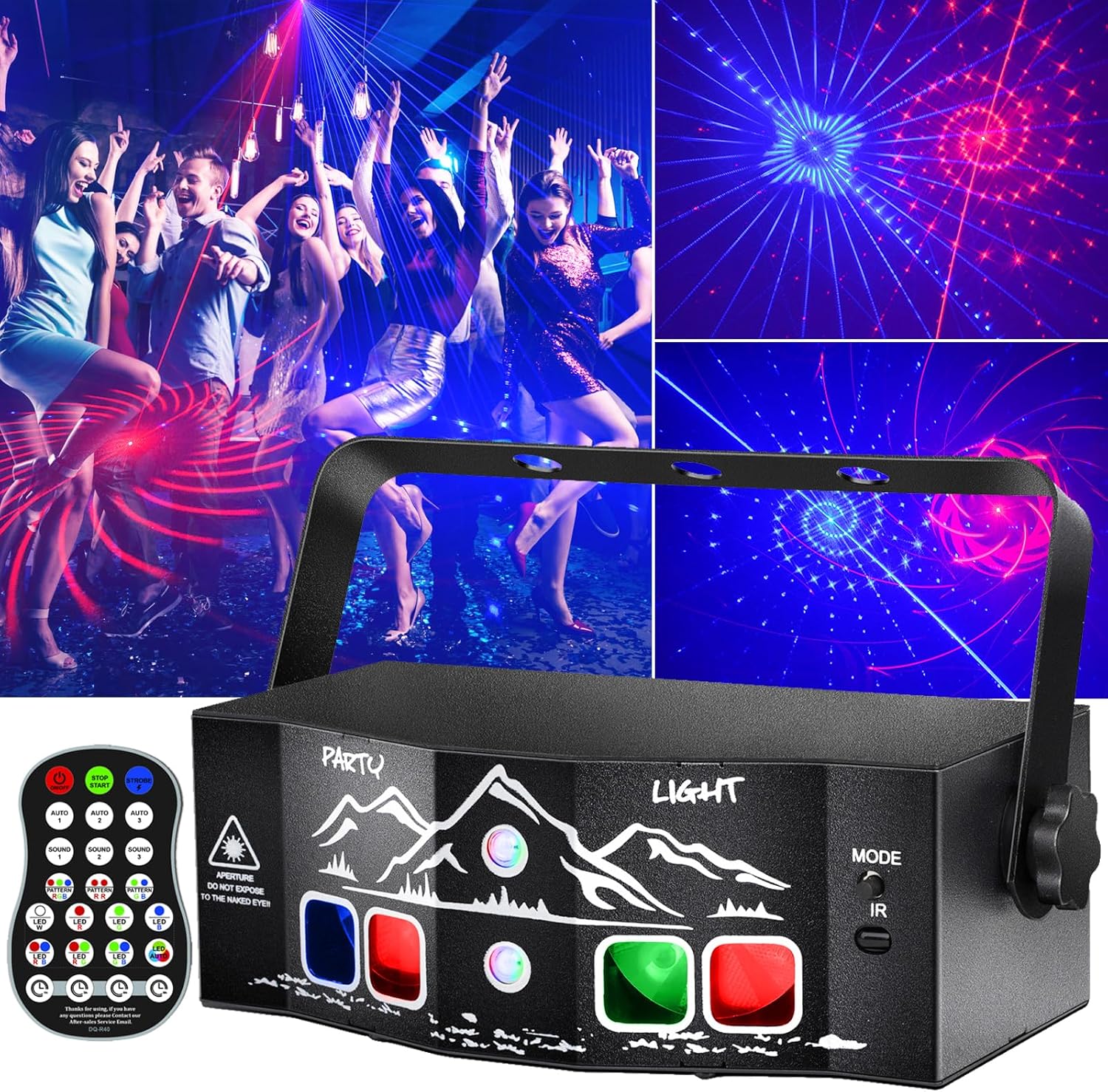
Figure 1: Atotalof DQ-R40 Party Light and included remote control.
3. Key Features
- Multiple Lighting Effects: The DQ-R40 offers 6-eye dazzling RGBW stage lights with wide-angle panoramic flash, projecting a mesmerizing palette of RGBW background colors, astonishing beams, and dynamic patterns.
- Effortless Control: Tailor your party's mood with the included remote control. Features include sound-activated mode, flash mode, and various lighting settings that sync harmoniously with music.
- Plug-and-Play Convenience: Equipped with a 2-meter USB cable, the unit can be powered by any USB-enabled device such as a power bank or computer, allowing for quick setup indoors or outdoors.
- Durable and Portable Design: Constructed with a premium aluminum alloy casing and a built-in cooling fan for extended lifespan (over 50,000 hours per LED bead). Its compact size and adjustable stand ensure easy portability and flexible mounting.
- Versatile Application: Ideal for a wide range of events and decorations, including birthday parties, family gatherings, weddings, clubs, and home entertainment.

Figure 2: Examples of dynamic light patterns.

Figure 3: Overview of control features.
4. Setup Guide
4.1 Mounting and Placement
The DQ-R40 comes with a pre-installed adjustable stand/mounting bracket. This allows for flexible placement:
- Tabletop: Place the unit on any flat, stable surface.
- Hanging: Use the holes on the bracket to securely hang the unit from a ceiling, truss, or wall hook. Ensure the mounting surface can support the weight of the light.
Adjust the angle of the light by loosening the side knobs on the bracket, tilting the unit to the desired position, and then tightening the knobs to secure it.

Figure 4: Mounting bracket and USB power connection.
4.2 Power Connection
Connect the provided 2-meter USB power cable to the DC 5V input port on the back of the DQ-R40 unit. Plug the other end of the USB cable into a compatible 5V USB power source, such as a power bank, computer USB port, or a USB wall adapter (not included).
4.3 Remote Control Preparation
The remote control requires one C battery (included). Open the battery compartment on the back of the remote and insert the battery, ensuring correct polarity. The remote is essential for accessing all lighting modes and functions.
5. Operating Modes
Turn on the unit using the ON/OFF switch located on the back panel. Use the 'MODE' button on the unit or the remote control to cycle through the various operating modes.
5.1 Mode Selection
- Sound Activated Mode (SOUND 1, 2, 3): The built-in microphone detects music or sound, and the light patterns and colors will change in sync with the beat. There are three different sound-activated patterns.
- Auto Mode (AUTO 1, 2, 3): The light will automatically cycle through various pre-programmed laser and LED patterns. There are three different auto-cycling patterns.
- Strobe Mode: Creates a rapid flashing effect with the lights.
- LED Background Effects: Select specific RGBW background colors (Red, Green, Blue, White, Purple, Yellow, Cyan) using the dedicated buttons on the remote.
- Laser Pattern Selection: Choose specific laser patterns (e.g., stars, swirls, geometric shapes) using the pattern buttons on the remote.
- Timer Function: Set the light to automatically turn off after 1, 3, 6, or 8 hours using the timer buttons on the remote.
Video 1: Official product video demonstrating the various laser and LED light patterns, sound activation, and remote control functions of the Atotalof DQ-R40 Party Light.
6. Maintenance
To ensure optimal performance and longevity of your Atotalof DQ-R40 Party Light, follow these simple maintenance guidelines:
- Cleaning: Regularly wipe the exterior casing and lens with a soft, dry cloth to remove dust and debris. Do not use harsh chemicals or abrasive cleaners.
- Storage: When not in use, store the unit in a cool, dry place away from direct sunlight and extreme temperatures.
- Safety: Avoid direct eye exposure to the laser beams. This product is not waterproof; keep it away from water and moisture.
7. Troubleshooting
If you encounter any issues with your DQ-R40 Party Light, please refer to the following common solutions:
| Problem | Possible Cause | Solution |
|---|---|---|
| Light does not turn on. | No power or loose connection. | Ensure the USB power cable is securely connected to both the unit and a working 5V USB power source. Check the ON/OFF switch on the back of the unit. |
| Remote control is not working. | Battery issue or IR sensor obstruction. | Check if the C battery is correctly inserted or needs replacement. Ensure there is a clear line of sight between the remote and the IR sensor on the unit. |
| Sound activated mode is not responsive. | Microphone switch is off or music volume is too low. | Ensure the microphone switch on the back of the unit is in the 'ON' position. Increase the music volume or bring the light closer to the sound source. |
| Light patterns are dim or unclear. | High ambient light or dirty lens. | Operate the light in a darker environment for best results. Clean the lens with a soft, dry cloth. |
8. Specifications
| Attribute | Detail |
|---|---|
| Brand | Atotalof |
| Model Number | DQ-R40 |
| Light Source Type | LED, Laser |
| Number of Light Sources | 6 |
| Power Source | Corded Electric (USB DC 5V) |
| Control Method | Remote, Manual Button |
| Material | Aluminum |
| Color | Black |
| Product Dimensions | 6.49 x 3.3 x 3.9 inches |
| Item Weight | 1.32 pounds |
| Indoor/Outdoor Usage | Indoor (Not Waterproof) |
| Included Components | Party light, Remote Control, USB Cable |
| Battery Type (Remote) | 1 C battery (included) |
9. Warranty and Support
Atotalof offers a lifetime warranty for the DQ-R40 Party Light, ensuring reliable and enduring performance. For any inquiries or assistance, our dedicated customer service team is available to help.
Additionally, the product is eligible for a 30-day return or replacement policy from the date of purchase, in accordance with standard retail terms.
For technical support, warranty claims, or general inquiries, please visit the official Atotalof website or contact our customer service department directly via the contact information provided on our packaging or website.
Ask a question about this manual
Ask about setup, troubleshooting, compatibility, parts, safety, or missing instructions. Manuals+ will review the question and use this page’s manual context to help answer it.