1. Introduction
Thank you for purchasing the Aowasi Digital Day Calendar Clock. This clock is designed to provide clear and easy-to-read time and date information, making it particularly beneficial for seniors, individuals with impaired vision, memory loss, or those with Alzheimer's/Dementia. Its large, non-abbreviated display ensures that the full day of the week, month, and date are always visible. The included remote control simplifies setup and adjustments, offering convenience and accessibility.
Key features include:
- 10-inch extra-large display for optimal readability.
- Remote control for easy setup and adjustments.
- Non-abbreviated display of day, month, and date.
- Displays time mode (12 or 24 Hour & A.M. or P.M.) and date mode (MM/DD/YY & DD/MM/YY).
- 8 alarm options: 5 custom alarms and 3 medication reminders.
- Supports 8 languages: English, French, German, Polish, Italian, Spanish, Dutch, Swedish.
- Automatic dimming function (7:00 PM to 7:00 AM) with manual brightness adjustment.
- Battery backup to save settings during power disconnection.
2. Setup
Setting up your Aowasi Digital Day Calendar Clock is straightforward. Follow these steps for initial installation and configuration:
- Unpack the Clock: Carefully remove the clock and all accessories from the packaging. Ensure you have the clock unit, power adapter, and remote control.
- Connect Power: Plug the DC Power Port of the clock into a standard electrical outlet using the provided power adapter. The clock will automatically power on.
- Positioning: The clock can be placed on a tabletop using its integrated stand or mounted on a wall. Choose a location that is easily visible from your preferred viewing area.
- Initial Settings: Upon first power-on, the clock may display default settings. Use the included remote control to navigate the menu and set the correct time, date, and language. The remote control makes these adjustments easier than using the buttons on the back of the clock.

Figure 2.1: Front view of the Aowasi Digital Day Calendar Clock with its remote control, highlighting the ease of setting time, alarms, and language.

Figure 2.2: Rear view of the clock, indicating the SD slot, USB interface, and DC Power Port for connectivity and power.
3. Operating Instructions
Your Aowasi Digital Day Calendar Clock offers various functions to enhance daily living. Here’s how to operate its main features:
3.1 Time and Date Display
The clock clearly spells out the full DAY of the WEEK, MONTH, and DATE in large, non-abbreviated text. It also displays the period of the day (MORNING, AFTERNOON, EVENING, NIGHT, BEFORE DAWN).
- Time Mode: Easily switch between 12-hour (with A.M./P.M.) and 24-hour formats.
- Date Mode: Select between MM/DD/YY and DD/MM/YY formats.
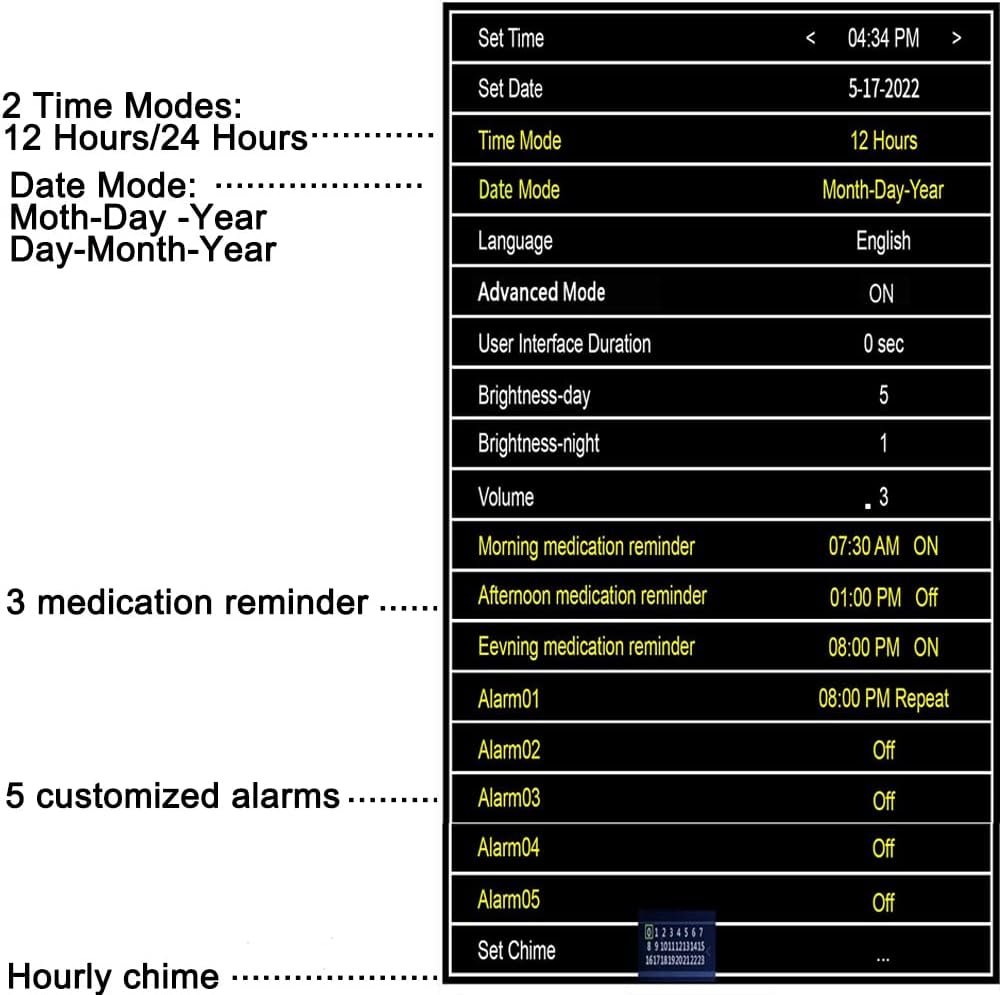
Figure 3.1: The 10-inch large screen display, showing clear time and date information, designed for easy viewing by the aged.
3.2 Alarm Options
The clock features 8 distinct alarm options, including dedicated medication reminders:
- 5 Custom Alarms: Set personalized alarms for any daily activity.
- 3 Medication Alarm Clocks: Pre-set reminders for Morning, Afternoon, and Evening medication, crucial for individuals with memory challenges.
These alarms are highly beneficial for individuals with Dementia, Alzheimer's, Memory Loss, or Vision Impaired Seniors & Elderly to ensure timely medication intake.

Figure 3.2: Visual representation of the three dedicated medicine reminder alarms.
3.3 Auto Dimmer Function
The clock's display automatically dims every night at 7:00 PM (to 10cd/M2) and brightens up during the day at 7:00 AM (to 50cd/M2). This feature ensures comfortable viewing at any time of day or night.
- Turn Off Auto Dimming: Users have the option to disable the auto-dimming function.
- Manual Brightness Adjustment: Adjust the Day or Night brightness manually from level 1-10 to suit your preference.

Figure 3.3: Comparison of the clock's display brightness during day and night, demonstrating the auto-dimming feature.
3.4 Language Settings
The clock supports 8 different languages for broader accessibility:
- English
- French
- German
- Polish
- Italian
- Spanish
- Dutch
- Swedish

Figure 3.4: The clock's display showing the language selection options, including flags for each supported language.
3.5 Menu Navigation
The clock's settings can be accessed and adjusted via the remote control. The menu allows for precise control over time, date, alarms, language, and display brightness.

Figure 3.5: A detailed view of the clock's settings menu, illustrating the various customizable options such as time mode, date mode, language, brightness, and alarm settings.
4. Maintenance
To ensure the longevity and optimal performance of your Aowasi Digital Day Calendar Clock, follow these simple maintenance guidelines:
- Cleaning: Use a soft, dry cloth to gently wipe the screen and body of the clock. Avoid using abrasive cleaners, solvents, or spray cleaners directly on the display.
- Placement: Place the clock in a stable location away from direct sunlight, excessive heat, or moisture. Ensure good ventilation around the unit.
- Power Supply: Always use the original power adapter provided with the clock. Do not use third-party adapters that may not meet the required specifications.
5. Troubleshooting
If you encounter any issues with your Aowasi Digital Day Calendar Clock, please refer to the following common troubleshooting tips:
| Problem | Possible Cause | Solution |
|---|---|---|
| Clock does not power on. | Power adapter not connected or faulty outlet. | Ensure the power adapter is securely plugged into the clock and a working electrical outlet. Try a different outlet. |
| Display is too dim or too bright. | Auto-dimming is enabled or manual brightness needs adjustment. | Adjust the brightness level manually using the remote control (levels 1-10) or disable the auto-dimming function in the settings. |
| Time/Date is incorrect after power outage. | Battery backup may not be functioning or was not fully charged. | The clock has a battery backup feature that should auto-save the date and revert to the correct time when power is reconnected. If not, manually reset the time and date using the remote control. Ensure the clock remains plugged in for the battery backup to charge. |
| Alarms are not sounding. | Alarms are not set correctly or volume is too low. | Check the alarm settings in the menu to ensure they are enabled and set to the desired times. Increase the volume if necessary. |
If the problem persists after trying these solutions, please contact customer support for further assistance.
6. Specifications
Detailed technical specifications for the Aowasi Digital Day Calendar Clock:
| Feature | Detail |
|---|---|
| Brand | Aowasi |
| Model Number | 1000 |
| Color | 10" Black |
| Display Type | Digital |
| Special Feature | Calendar Display, Day Mode, Large Display |
| Product Dimensions | 10.1"W x 7.2"H |
| Power Source | Corded Electric |
| Material | Plastic (Acrylonitrile Butadiene Styrene frame) |
| Mounting Type | Wall Mount or Tabletop |
| Item Weight | 1.65 pounds (0.75 Kilograms) |
| Batteries | 1 Lithium Ion battery required (included) |
| Alarm Clock | Yes |
| Operation Mode | Electrical |
7. Warranty and Support
Aowasi is committed to providing high-quality products and excellent customer service. Your Digital Day Calendar Clock comes with a satisfaction guarantee.
- Satisfaction Guarantee: If you are not completely satisfied with this item, we offer a refund with no questions asked.
- Customer Service: Our dedicated Customer Service team is available to assist you with any questions or concerns you may have about your clock. Please refer to your purchase documentation or the product listing for contact information.