
1. Introduction
The Taramps HV 80000 Chipeo is a high-voltage monoblock amplifier designed for large-scale automotive sound systems. It delivers up to 80,000 Watts RMS at 0.5 Ohm, utilizing a series connection of 14 to 24 batteries to achieve its operational voltage range of 176VDC to 300VDC. This amplifier is engineered for competition-level performance and requires careful installation and handling due to its high power and voltage characteristics.
2. Safety Information
WARNING: This amplifier operates at HIGH VOLTAGE. Improper installation or handling can result in severe injury or death. Installation should only be performed by qualified professionals.
- Always disconnect the vehicle's battery before performing any electrical work.
- Ensure all wiring is correctly sized and insulated to handle high current and voltage.
- Use appropriate circuit breakers and fuses as specified in the installation guidelines.
- Install the amplifier in a well-ventilated area to prevent overheating.
- Avoid contact with internal components when the amplifier is powered on.
- Keep liquids away from the amplifier.
3. Package Contents
Verify that all items are present in the package:
- Taramps HV 80,000 CHIPEO Automotive Sound Amplifier
- User Manual (this document)
- Mounting Hardware (if included)
4. Product Overview
The Taramps HV 80000 Chipeo amplifier features a robust design with specific inputs, outputs, and indicators for optimal performance and monitoring.

Image 4.1: Front view of the Taramps HV 80000 Chipeo High Voltage Amplifier, showing the Taramps logo, model number HV80.000, and LED indicators for PROT, CLIP, ON, and HV.
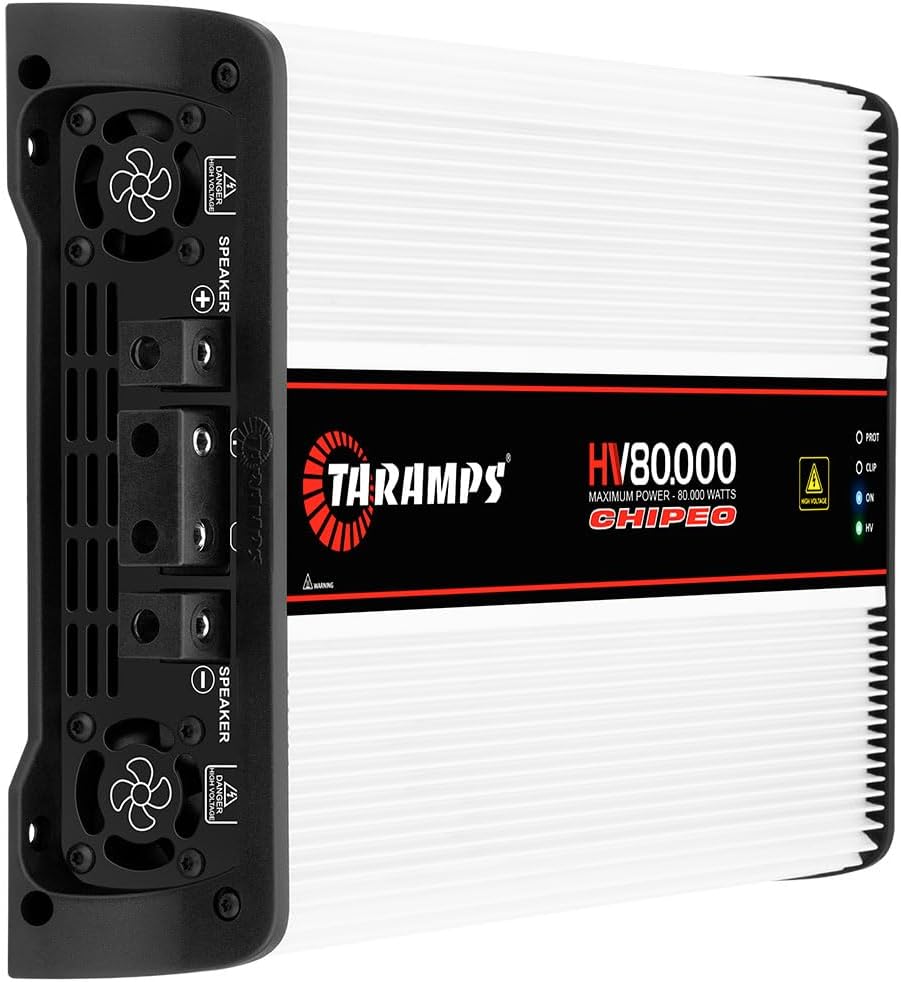
Image 4.2: Side view of the amplifier, highlighting the speaker output terminals (positive and negative) and integrated cooling fans for heat dissipation. A high voltage warning is visible.

Image 4.3: Opposite side view of the amplifier, displaying the RCA input, THRU OUT, level control, monitor port, and 12.6 VDC positive terminal for remote power.
4.1. Features and Controls
- RCA Input: For connecting audio signal from the head unit or pre-amplifier.
- THRU OUT: Allows passing the audio signal to another amplifier.
- Level Control: Adjusts the input sensitivity of the amplifier.
- Monitor Port: For connecting external monitoring devices.
- 12.6 VDC Positive Terminal (1.5A): Requires an exclusive 12.6V battery and relay, driven by the remote signal from the head unit.
- Speaker Terminals: High voltage output terminals for connecting speakers.
- Cooling Fans: Four internal ventilation fans ensure proper heat dissipation.
4.2. LED Indicators
- PROT (Protection): Illuminates when the amplifier is in protection mode due to overheating, short circuit, or low/high voltage.
- CLIP (Clipping): Indicates that the audio signal is clipping, suggesting the input level is too high or the amplifier is overdriven.
- ON: Illuminates when the amplifier is powered on and operating normally.
- HV (High Voltage): Indicates the presence of high voltage.
5. Setup and Installation
Proper installation is critical for the performance and safety of the HV 80000 Chipeo amplifier. Consult a professional for installation if you are not experienced with high-voltage automotive audio systems.
5.1. Power Supply Requirements
This amplifier requires a high-voltage power supply, typically achieved by connecting 14 to 24 batteries in series. The total voltage range should be between 176VDC and 300VDC. A separate 12.6VDC battery and relay are needed for the remote turn-on signal.

Image 5.1: Table illustrating the relationship between the number of 12.6V batteries connected in series and the maximum power output (in kW) at different impedance levels (0.5 Ohm, 1 Ohm, 2 Ohms).
5.2. Wiring Diagrams
The following diagrams illustrate typical wiring configurations. Always ensure correct polarity and secure connections.

Image 5.2: Wiring diagram showing the connection of the car alternator, original car battery, power battery, main unit, preamplifier, and the Taramps HV 80000 amplifier. It details the use of circuit breakers and 4 AWG wiring for power and 1.5A for the 12.6VDC remote signal.

Image 5.3: Wiring diagram illustrating the connection from the Taramps HV 80000 amplifier to multiple speakers. It shows the use of a 130A circuit breaker and 4 AWG wiring for speaker connections, with a high voltage warning.

Image 5.4: Example connection diagram for twelve 8-Ohm speakers connected to the Taramps HV 80000 amplifier, also showing integration with a Taramps PRO 2.6S DSP for signal processing. Note: Oxygen Free Copper (OFC) cables are recommended; Copper-clad aluminum wire (CCAW) must not be used.

Image 5.5: Example connection diagram for eight 4-Ohm speakers connected to the Taramps HV 80000 amplifier, integrated with a Taramps PRO 2.6S DSP. Note: Oxygen Free Copper (OFC) cables are recommended; Copper-clad aluminum wire (CCAW) must not be used.
5.3. Cable Recommendations
For optimal performance and safety, use Oxygen Free Copper (OFC) cables for all power and speaker connections. Copper-clad aluminum wire (CCAW) is not recommended for this high-power application.
6. Operation
Once properly installed, the amplifier will power on when the remote signal is received from the head unit. Monitor the LED indicators for normal operation and potential issues.
- Power On: The 'ON' LED will illuminate.
- High Voltage Indication: The 'HV' LED will illuminate, indicating the high voltage power supply is active.
- Adjusting Level: Slowly increase the 'Level' control to achieve the desired volume without causing the 'CLIP' LED to illuminate consistently. Occasional flashes of the 'CLIP' LED are acceptable during peak audio signals, but constant illumination indicates distortion.
- Protection Mode: If the 'PROT' LED illuminates, the amplifier has entered protection mode. Turn off the audio system immediately and troubleshoot the cause (e.g., overheating, short circuit, incorrect voltage).
7. Specifications
Detailed technical specifications for the Taramps HV 80000 Chipeo amplifier:
| Feature | Value |
|---|---|
| Maximum Output Power @ 300VDC - 0.5 Ohm | 80,000W RMS (Competition) |
| Maximum Output Power @ 300VDC - 1 Ohm | 40,000W RMS |
| Product Dimensions | 9.41 x 2.87 x 14.09 inches |
| Item Weight | 10.14 pounds |
| Item Model Number | HV80.000 |
| Color | White |
| Manufacturer | TARAMPS |
| Date First Available | November 7, 2023 |
8. Troubleshooting
If you encounter issues with your amplifier, refer to the following common problems and solutions:
- No Power / ON LED Off:
- Check all power connections, including the main high-voltage supply and the 12.6VDC remote terminal.
- Verify fuses and circuit breakers are intact and not tripped.
- Ensure the remote turn-on signal from the head unit is active.
- No Sound Output:
- Check RCA input cables for secure connection and integrity.
- Verify speaker connections are secure and not shorted.
- Ensure the head unit is providing an audio signal.
- Adjust the amplifier's 'Level' control.
- Distorted Sound / CLIP LED Constantly On:
- Reduce the input 'Level' on the amplifier.
- Check the output level from the head unit; it may be too high.
- Ensure speaker impedance matches the amplifier's capabilities.
- PROT LED On / Amplifier Shuts Off:
- Overheating: Ensure adequate ventilation around the amplifier. Allow it to cool down.
- Short Circuit: Inspect speaker wires and connections for any shorts.
- Voltage Issues: Check the high-voltage battery bank for correct voltage (176-300VDC).
9. Maintenance
To ensure the longevity and optimal performance of your Taramps HV 80000 Chipeo amplifier, follow these maintenance guidelines:
- Cleaning: Periodically clean the amplifier's exterior with a soft, dry cloth. Ensure cooling fins and fan vents are free from dust and debris. Do not use liquid cleaners.
- Ventilation: Ensure the amplifier is installed in a location with sufficient airflow. Do not block the cooling fans or vents.
- Connection Checks: Regularly inspect all power, ground, and speaker connections for tightness and corrosion. Loose connections can lead to power loss or overheating.
10. Warranty and Support
For warranty information, please refer to the documentation provided at the time of purchase or contact your authorized Taramps dealer. Support inquiries can be directed to the seller or the official Taramps website.
Visit the Taramp's Store for more products and information.