
Hama 00184196
Hama Freedom Lit II Bluetooth® Headphones
Instruction Manual
Product Overview
The Hama Freedom Lit II Bluetooth® Headphones are designed for wireless music enjoyment and hands-free calling. Featuring an on-ear, foldable design, these headphones offer comfort and portability. They include an integrated microphone and volume controls directly on the earcup for convenient operation.
Key features include:
- Wireless Bluetooth® stereo audio.
- Up to 15 hours of music playback on a full charge.
- Integrated microphone for calls.
- Direct volume control on the headphones.
- Foldable design for compact storage.
- Compatibility with Siri and Google Assistant.
- Padded headband for comfortable extended use.
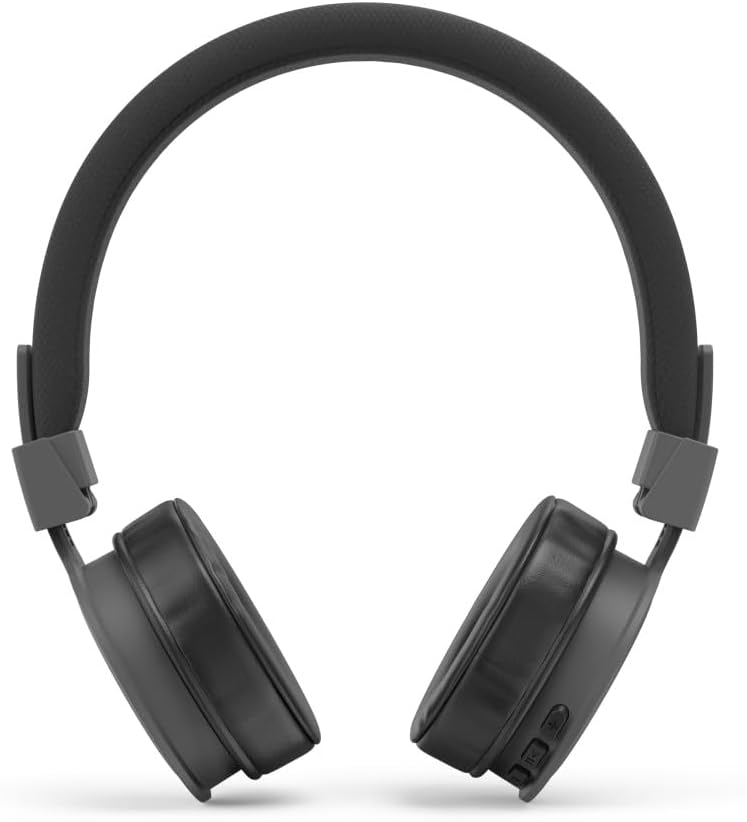
Image: Front view of the Hama Freedom Lit II Bluetooth Headphones, showcasing the overall design.
Setup
1. Charging the Headphones
Before first use, fully charge the headphones. Use the included USB-C charging cable.
- Connect the USB-C end of the charging cable to the charging port on the headphone earcup.
- Connect the USB-A end of the cable to a compatible USB power source (e.g., computer USB port, USB wall adapter).
- The charging indicator light will illuminate. A full charge takes approximately 3 hours.
- Once fully charged, the indicator light will change or turn off (refer to specific LED behavior in the quick guide). Disconnect the charging cable.
2. Bluetooth Pairing
To connect the headphones to your device (smartphone, tablet, computer), follow these steps:
- Ensure the headphones are turned off.
- Press and hold the Power/Multi-function button on the headphones until the LED indicator flashes blue and red alternately, indicating pairing mode.
- On your device, go to Bluetooth settings and ensure Bluetooth is enabled.
- Search for available devices. Select "Hama Freedom Lit II" from the list.
- Once connected, the LED indicator on the headphones will typically flash blue slowly or turn solid blue.
- If prompted for a passcode, enter "0000" (four zeros).

Image: Angled view of the Hama Freedom Lit II headphones, highlighting the Hama branding on the headband.
Operating Instructions
Power On/Off
- To Power On: Press and hold the Power/Multi-function button for approximately 3 seconds until the LED indicator flashes blue.
- To Power Off: Press and hold the Power/Multi-function button for approximately 5 seconds until the LED indicator flashes red and then turns off.
Music Playback

Image: Close-up view of the right earcup, showing the control buttons for volume, track control, and power/multi-function.
- Play/Pause: Press the Power/Multi-function button once.
- Volume Up: Press the "+" button.
- Volume Down: Press the "-" button.
- Next Track: Press and hold the "+" button.
- Previous Track: Press and hold the "-" button.
Call Management
- Answer/End Call: Press the Power/Multi-function button once.
- Reject Call: Press and hold the Power/Multi-function button for approximately 2 seconds.
- Redial Last Number: Double-press the Power/Multi-function button.
Voice Assistant Activation
- Activate Voice Assistant (Siri/Google Assistant): Triple-press the Power/Multi-function button.
Folding for Storage
The headphones feature a foldable design for easy portability and compact storage.

Image: The Hama Freedom Lit II headphones shown in their folded configuration, demonstrating their compact storage capability.
Gently fold the earcups inwards towards the headband until they lock into place. To unfold, reverse the process.
Maintenance
- Clean the headphones only with a slightly damp, lint-free cloth. Do not use aggressive cleaning agents.
- Avoid exposing the headphones to extreme temperatures, direct sunlight, or high humidity.
- Store the headphones in a dry, dust-free environment when not in use.
- Do not attempt to disassemble or repair the headphones yourself. This will void the warranty.
Troubleshooting
| Problem | Possible Cause | Solution |
|---|---|---|
| Headphones do not turn on. | Battery is depleted. | Charge the headphones fully. |
| Cannot pair with device. | Headphones not in pairing mode; Device Bluetooth off; Too far from device. | Ensure headphones are in pairing mode (flashing blue/red). Turn device Bluetooth off and on. Move headphones closer to device. Clear previous pairings on device. |
| No sound or low volume. | Volume too low on headphones or device; Not properly connected. | Increase volume on both headphones and device. Re-pair the headphones. |
| Poor sound quality. | Interference; Device too far; Low battery. | Move away from sources of interference. Move closer to device. Charge headphones. |
Specifications
- Brand: Hama
- Model Name: Freedom Lit II
- Model Number: 00184196
- Connectivity Technology: Wireless (Bluetooth)
- Ear Placement: On Ear
- Form Factor: On-Ear, Foldable
- Color: Black
- Noise Control: Passive Noise Cancellation
- Music Playback Time: Up to 15 hours
- Talk Time: Up to 15 hours
- Charging Time: Approximately 3 hours
- Charging Port: USB-C
- Included Components: 1 x Bluetooth Headset, 1 x USB-C Charging Cable, 1 x Quick Guide, 1 x Safety Instructions.
Warranty and Support
For detailed warranty information and technical support, please refer to the included Quick Guide and Safety Instructions, or visit the official Hama website. Keep your proof of purchase for warranty claims.
Manufacturer: Hama
ASIN: B0CMTSNVFQ
Ask a question about this manual
Ask about setup, troubleshooting, compatibility, parts, safety, or missing instructions. Manuals+ will review the question and use this page’s manual context to help answer it.