
REACHER C15
REACHER Sunrise Lamp with Dual Alarm Clock User Manual
Model: C15
Introduction
The REACHER Sunrise Lamp with Dual Alarm Clock is designed to enhance your daily routine by providing a gentle, natural wake-up experience and versatile lighting options. This device combines a sunrise simulation alarm clock, a dimmable and colorful touch table lamp, and a nightlight with an auto-off timer. It aims to improve your sleep environment and provide a comfortable viewing experience.

Image: The REACHER Sunrise Lamp highlighting its dual functionality as a sunrise alarm clock and a bedside table lamp.
Package Contents
- REACHER Sunrise Lamp Unit
- Power Adapter
- User Manual (this document)
Product Overview
Familiarize yourself with the components of your REACHER Sunrise Lamp.
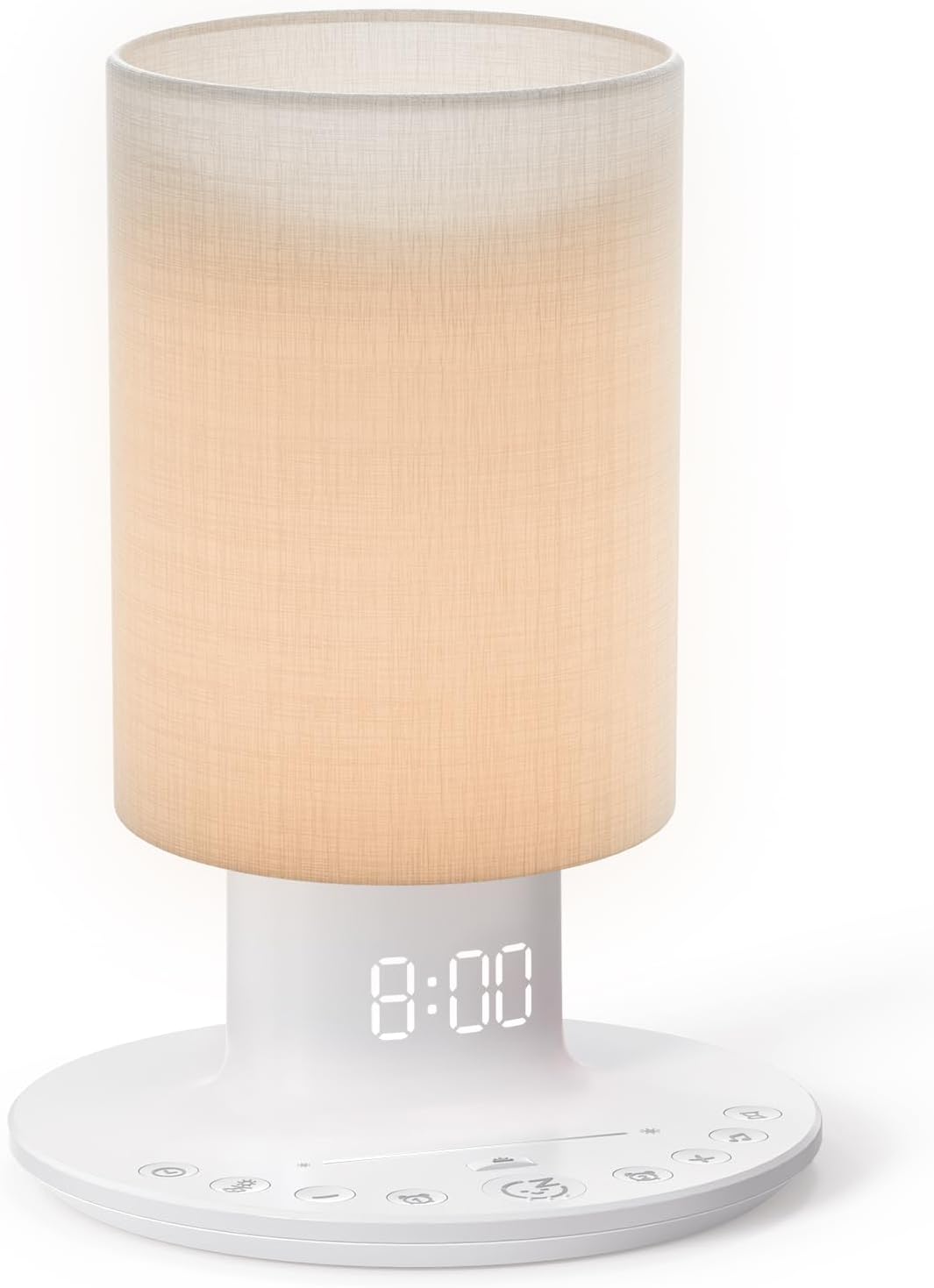
Image: Front view of the REACHER Sunrise Lamp, showing the cylindrical lamp shade, the base with the digital time display, and various control buttons.
Key Components:
- Lamp Shade: Provides diffused light for sunrise simulation and ambient lighting.
- Digital Display: Shows current time and alarm settings.
- Control Buttons: Located on the base for setting time, alarms, light modes, and volume.
- Touch Sensor Panel: Integrated into the lamp shade for brightness and color adjustment.
- Dimmer Wheel: Located on the side of the base for adjusting the digital display brightness.
- Power Port: For connecting the power adapter.
Setup
1. Power Connection
Connect the provided power adapter to the power port on the back of the lamp base. Plug the adapter into a standard electrical outlet. The digital display will illuminate, indicating the device is powered on.
2. Initial Time Setting
Upon first power-up or after a power outage, the clock may need to be set. Refer to the "Setting Time" section under Operating Instructions for detailed steps.
Operating Instructions
Setting Time
- Press the "Time Set" button (usually indicated by a clock icon) on the base.
- Use the "+" and "-" buttons to adjust the hour. Press "Time Set" again to confirm.
- Use the "+" and "-" buttons to adjust the minute. Press "Time Set" again to confirm.
- The time is now set.
Setting Alarms (Dual Alarms)
The lamp supports two independent alarms. Both alarms share the same selected alarm sound.

Image: The REACHER Sunrise Lamp illustrating the dual alarm feature, allowing for two distinct alarm times to be set.
- Press the "Alarm 1" button (usually indicated by an alarm clock icon with '1'). The alarm time will flash.
- Use the "+" and "-" buttons to adjust the hour for Alarm 1. Press "Alarm 1" again to confirm.
- Use the "+" and "-" buttons to adjust the minute for Alarm 1. Press "Alarm 1" again to confirm.
- To select an alarm sound, use the "Sound" button (often a music note icon) to cycle through the 5 available ringtones: Flute, Bird, Cuckoo, Light Music, and Forest sounds.
- To adjust alarm volume, use the "Volume" buttons (often speaker icons). Volume is adjustable from 0 to 30 levels (95dB max).
- Repeat steps for "Alarm 2" using the "Alarm 2" button.
- To activate/deactivate an alarm, press its respective alarm button briefly. An icon on the display will indicate if the alarm is active.
- Snooze Function: When an alarm sounds, press the "Snooze" button (often a 'Zz' icon) to pause the alarm for 9 minutes. The alarm will sound again after the snooze period.
Sunrise Simulation
The sunrise simulation feature gradually brightens the lamp to mimic a natural sunrise, helping you wake up gently.
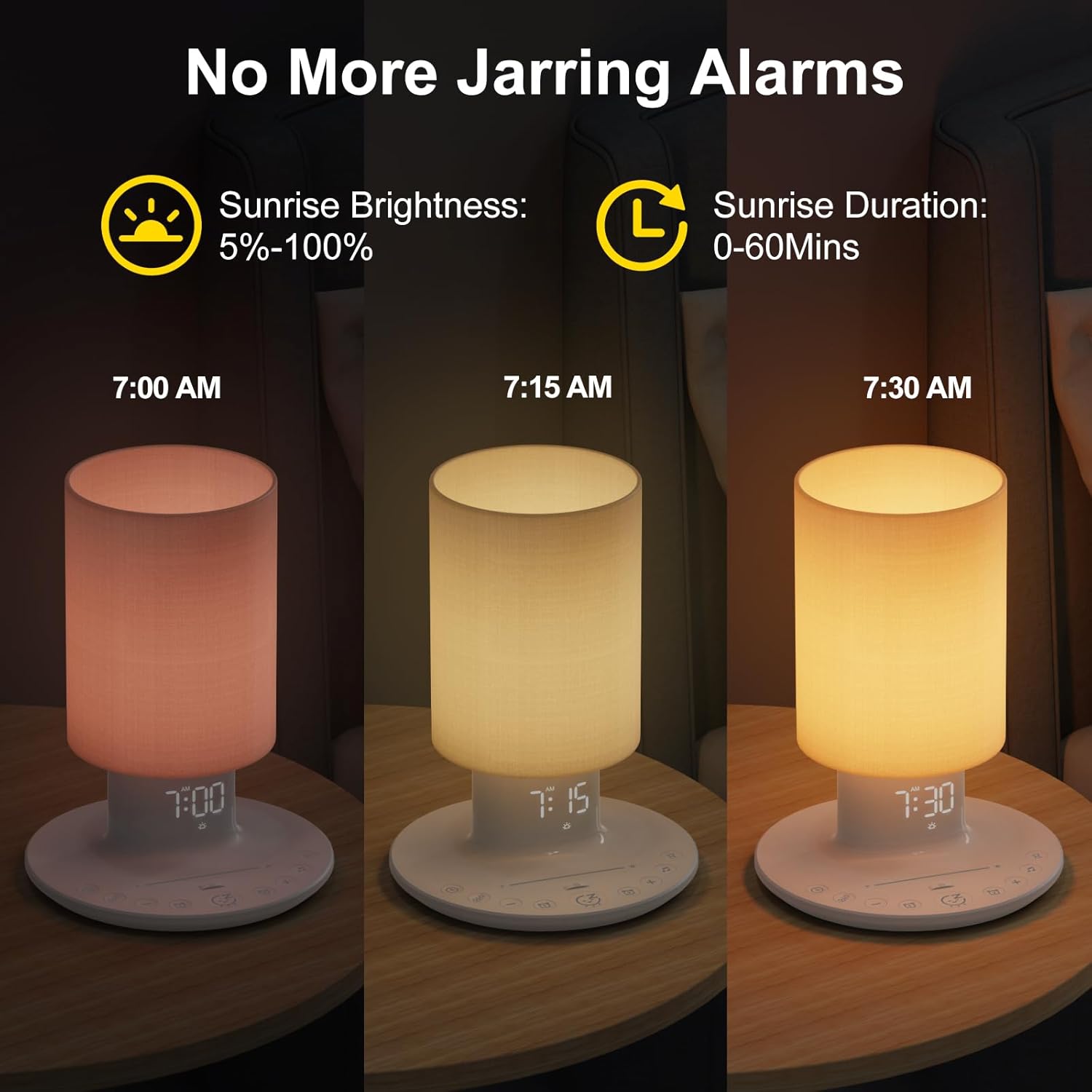
Image: Visual representation of the sunrise simulation, demonstrating the gradual change in light color and intensity from a soft red to a bright yellow over a set duration.
- The sunrise simulation begins 0-60 minutes before your set alarm time, gradually increasing in brightness from 5% to 100%.
- To adjust the duration of the sunrise simulation, refer to the manual's specific settings for this feature (often combined with alarm settings).
- If the alarm volume is set to "0", only the sunrise simulation will activate, providing a silent wake-up.
Dimmable Table Lamp (Color & Brightness)
The lamp functions as a versatile table lamp with adjustable brightness and multiple color options.

Image: The REACHER Sunrise Lamp demonstrating its capability to display a range of colors and adjust brightness from 5% to 100%, suitable for different lighting needs.
- Brightness Adjustment: Tap or slide your finger on the touch sensor panel (located on the lamp shade) to adjust the brightness from 5% to 100%. This is suitable for reading or general illumination.
- Color Selection: The lamp offers 12 different colors. Press the "Color" button (often a rainbow icon) to cycle through the available colors.

Image: The REACHER Sunrise Lamp functioning as an eye-caring reading lamp, providing non-dazzling, flicker-free illumination for reading.
Digital Clock Dimmer
Adjust the brightness of the digital time display to suit your preference, especially for night-time use.

Image: The digital clock display of the REACHER Sunrise Lamp, demonstrating its adjustable brightness from 0% (off) to 100% for optimal eye comfort.
- Locate the dimmer wheel on the right side of the lamp's base.
- Rotate the dimmer wheel to adjust the display brightness from 0% (off) to 100%. This allows for a clear display during the day and a non-dazzling environment at night.
Auto-Off Nightlight Timer
Set the lamp to automatically turn off after a specified duration, ideal for falling asleep with a gentle light.

Image: The REACHER Sunrise Lamp illustrating its auto-off nightlight timer function, with options for 15, 30, 45, 60, 120, or 180 minutes before automatic shutdown.
- Press the "Timer" button (often an hourglass icon) to activate the auto-off function.
- Each press will cycle through the available timer durations: 15, 30, 45, 60, 120, or 180 minutes.
- The lamp will automatically turn off once the selected timer expires.
Maintenance
Cleaning
- Ensure the lamp is unplugged from the power outlet before cleaning.
- Use a soft, dry, lint-free cloth to wipe the exterior surfaces of the lamp.
- Do not use abrasive cleaners, solvents, or strong chemicals, as these may damage the finish.
- Avoid getting moisture into any openings of the device.
Storage
- If storing the lamp for an extended period, unplug it and store it in a cool, dry place, away from direct sunlight and extreme temperatures.
- It is recommended to keep the original packaging for safe storage.
Troubleshooting
Refer to the table below for common issues and their solutions.
| Problem | Possible Cause | Solution |
|---|---|---|
| Lamp does not turn on. | No power connection. | Ensure the power adapter is securely plugged into the lamp and the wall outlet. Check the power outlet. |
| Alarm does not sound. | Alarm not activated or volume too low. | Verify the alarm is set and activated (icon displayed). Increase the alarm volume. |
| Sunrise simulation not working. | Sunrise duration not set or alarm not active. | Ensure the alarm is active and the sunrise duration is configured correctly. |
| Digital display is too bright/dim. | Dimmer wheel setting. | Adjust the dimmer wheel on the side of the base to your desired brightness. |
| Lamp light not changing color/brightness. | Incorrect touch panel usage or mode. | Ensure you are tapping/sliding on the touch sensor panel correctly. Check if the lamp is in a specific mode that restricts color changes. |
Specifications
| Feature | Detail |
|---|---|
| Brand | REACHER |
| Model Number | C15 |
| Product Dimensions | 18.01 x 18.01 x 25.02 cm (7.09 x 7.09 x 9.85 inches) |
| Item Weight | 712.14 g (1.57 Pounds) |
| Lamp Type | Wake Up Light, Bedside Lamp |
| Brightness | 5-100% adjustable |
| Sunrise Simulation Duration | 0-60 minutes |
| Alarm Ringtones | 5 (Flute, Bird, Cuckoo, Light Music, Forest) |
| Alarm Volume | 0-30 levels (95dB max) |
| Snooze Duration | 9 minutes |
| Digital Display Dimmer | 0-100% adjustable |
| Auto-Off Timer | 15/30/45/60/120/180 minutes |
| Base Material | Plastic |
| Shade Material | Plastic |

Image: Dimensional diagram of the REACHER Sunrise Lamp, indicating its width, depth, and height measurements.
Warranty and Support
REACHER products are manufactured with high-quality standards. For information regarding warranty coverage and customer support, please refer to the warranty card included in your product packaging or visit the official REACHER website. Please retain your proof of purchase for any warranty claims.
For technical assistance or inquiries, please contact REACHER customer support through the contact information provided on the official website or your purchase platform.
Ask a question about this manual
Ask about setup, troubleshooting, compatibility, parts, safety, or missing instructions. Manuals+ will review the question and use this page’s manual context to help answer it.