
1. Overview
The HFS TMT-JP Digital Rotation Meter is a versatile 2-in-1 handheld device designed for accurate measurement of rotational speed. It supports both contact and non-contact measurement methods, making it suitable for a wide range of industrial and automotive applications. This meter features a clear LCD display, high measurement accuracy, and a compact, lightweight design for portability.
Key measurement ranges include: Non-contact from 3 to 100,000 RPM, and Contact from 3 to 19,999 RPM. The optimal measurement distance for non-contact mode is between 50mm and 500mm (2.0 to 19.7 inches). The device has a sampling time of 0.8 seconds for speeds above 60 RPM.
2. Product Components
The HFS TMT-JP Digital Rotation Meter package typically includes the following items:
- HFS TMT-JP Digital Rotation Meter
- Contact Measurement Adapter (with cone and funnel tips)
- Reflective Tape (for non-contact measurements)
- User Manual (this document)
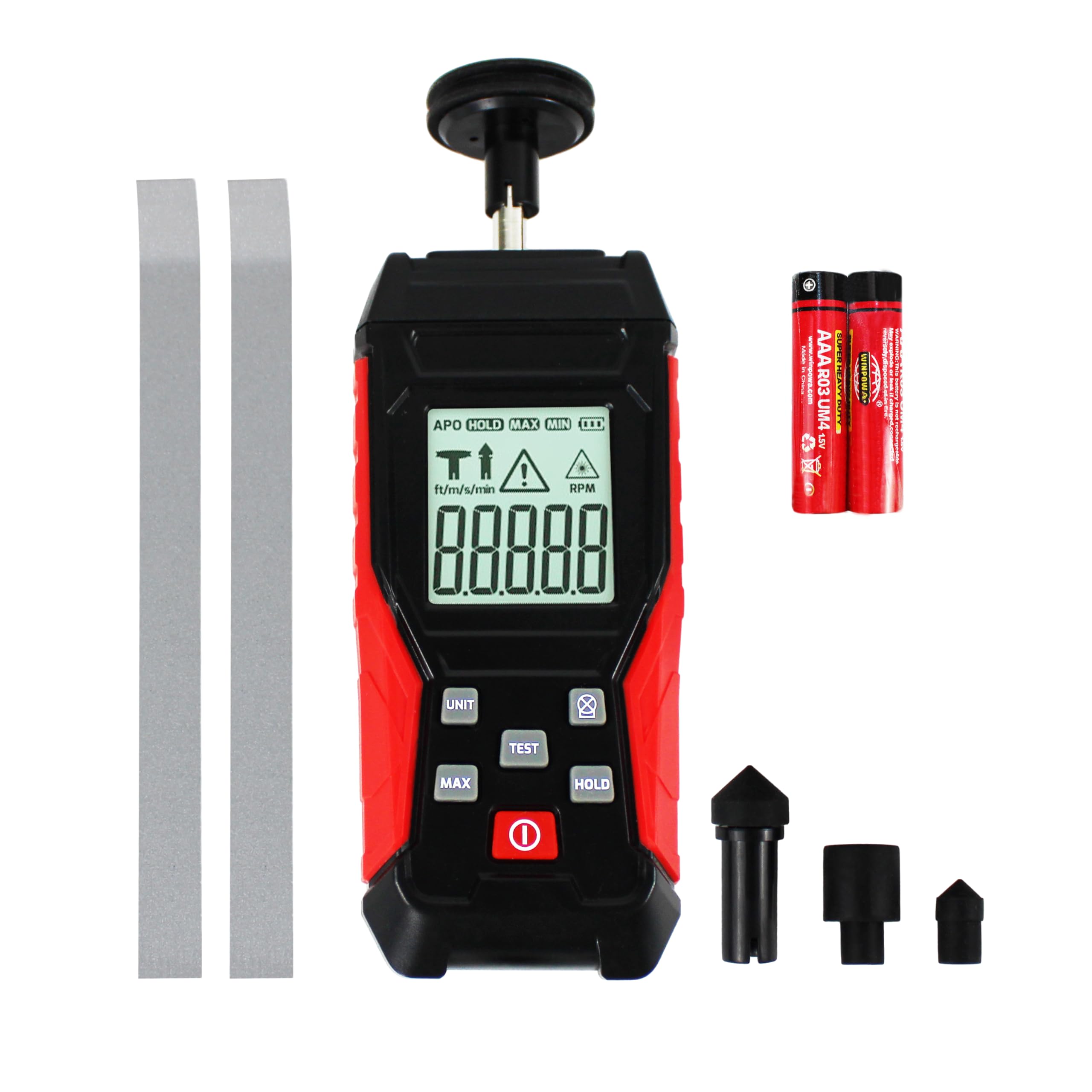
Figure 2.1: HFS TMT-JP Digital Rotation Meter and its contact measurement adapter.
3. Setup
3.1 Battery Installation
- Locate the battery compartment cover on the back of the meter.
- Slide or unclip the cover to open the compartment.
- Insert two (2) AAA batteries, ensuring the correct polarity (+/-) as indicated inside the compartment.
- Close the battery compartment cover securely.
3.2 Contact Measurement Preparation

Figure 3.1: Meter with contact adapter attached for contact measurements.
- To perform contact measurements, securely attach the contact adapter to the sensor shaft located at the top of the meter.
- Select the appropriate contact tip (cone or funnel) based on the shape of the rotating object's surface and attach it to the adapter.
3.3 Non-Contact Measurement Preparation

Figure 3.2: Meter without contact adapter, ready for non-contact measurements.
- For non-contact measurements, ensure the contact adapter is removed from the meter.
- Apply a small piece of the provided reflective tape to the surface of the rotating object you wish to measure. Ensure the tape is clean, flat, and securely adhered.
4. Operating Instructions
4.1 Power On/Off
Press the POWER button (red button with circle and line symbol) to turn the meter on or off.
4.2 Measurement Mode Selection
The meter automatically detects the measurement mode. If the contact adapter is attached, it will operate in contact mode. If the contact adapter is removed, it will operate in non-contact mode.
4.3 Non-Contact Measurement
- Ensure the meter is in non-contact mode (contact adapter removed).
- Point the laser beam from the meter towards the reflective tape on the rotating object.
- Maintain a measurement distance between 50mm and 500mm (2.0 to 19.7 inches).
- Press and hold the TEST button. The RPM reading will appear on the LCD display.
- Release the TEST button to stop measurement.
4.4 Contact Measurement
- Ensure the contact adapter with the appropriate tip is securely attached.
- Gently press the contact tip against the center of the rotating shaft or surface of the object.
- Press and hold the TEST button. The RPM reading will appear on the LCD display.
- Release the TEST button to stop measurement.
4.5 Button Functions
- MAX: Press this button to display the maximum measured RPM value recorded during the current measurement session.
- HOLD: Press this button to freeze the current reading on the display. Press it again to release the hold and resume live readings.
- UNIT: Press this button to cycle through available display modes or measurement units. (Note: This model primarily measures in RPM).
- TEST: Press and hold this button to initiate a measurement. Release it to stop the measurement.

Figure 4.1: Examples of the HFS TMT-JP meter being used for both contact and non-contact measurements on different rotating objects.
5. Maintenance
- Cleaning: Keep the device clean and dry. Use a soft, dry cloth to wipe the exterior. Do not use abrasive cleaners or solvents.
- Storage: Store the meter in a cool, dry place, away from direct sunlight and extreme temperatures.
- Battery Replacement: If the low battery indicator appears on the display, replace the batteries promptly to ensure accurate readings. Remove batteries if the device will not be used for an extended period to prevent leakage.
- Reflective Tape: For non-contact measurements, ensure the reflective tape is clean and free from damage. Replace worn or dirty tape for optimal performance.
6. Troubleshooting
- No Reading or Erratic Reading:
- Check battery level and replace if low.
- For non-contact mode, ensure the laser is accurately aimed at the reflective tape and the measurement distance (50-500mm) is maintained.
- Verify that the reflective tape is clean, securely attached, and not damaged.
- For contact mode, ensure firm and stable contact between the tip and the rotating object.
- Check for any obstructions between the meter and the target in non-contact mode.
- Display Not Working:
- Ensure the device is powered on.
- Check and replace batteries if necessary.
7. Specifications
| Non-Contact Measurement Range | 3 - 100,000 RPM |
| Contact Measurement Range | 3 - 19,999 RPM |
| Measurement Distance | 50 - 500 mm (2.0 - 19.7 inches) |
| Sampling Time | 0.8s (for 60+ RPM) |
| Product Dimensions | 7.76 x 2.95 x 1.54 inches |
| Item Weight | 7 ounces |
| Manufacturer | HFS |
| Model Number | TMT-JP |
| ASIN | B0CMTL8LKC |
8. Warranty and Support
For warranty information, technical assistance, or customer support regarding your HFS TMT-JP Digital Rotation Meter, please refer to the documentation included with your purchase or visit the official HFS website. You may also contact HFS customer service directly for further assistance.