
OTREN LCLSSWJMBDCFX
OTREN Dimmable LED Ceiling Light User Manual
Model: LCLSSWJMBDCFX
1. Product Overview
The OTREN Dimmable LED Ceiling Light (Model: LCLSSWJMBDCFX) is a modern, energy-efficient lighting solution designed for various indoor spaces such as offices, living rooms, bedrooms, kitchens, and garages. This rectangular LED panel offers adjustable brightness and color temperature, providing versatile illumination to suit your needs.
Key features include an ultra-slim design, high energy efficiency, and a long service life. With a high Color Rendering Index (CRI) of 80+, it accurately displays the true colors of objects. The light provides a soft, dimmable output of 3200 lumens, with color temperature adjustable from 3000K (warm white) to 6000K (cool white).

Figure 1.1: OTREN Dimmable LED Ceiling Light in an office environment, showcasing its sleek design and remote control functionality.

Figure 1.2: Illustration of the high CRI 80+ feature, demonstrating how it enhances the true colors of objects compared to lower CRI lighting.
2. Safety Information
Please read all safety instructions carefully before installation and use. Failure to follow these instructions may result in electric shock, fire, or other injuries.
- Always turn off the main power supply at the circuit breaker before installing, cleaning, or servicing the fixture.
- Installation should be performed by a qualified electrician in accordance with all local electrical codes.
- Do not install in wet locations or areas exposed to direct water spray. This product is designed for indoor use only.
- Ensure the mounting surface can support the weight of the fixture.
- Do not attempt to modify the fixture. Any modifications may void the warranty and pose a safety risk.
- Keep packaging materials away from children.
3. Package Contents
Verify that all components are present and undamaged before beginning installation. If any parts are missing or damaged, contact customer support.
- LED Ceiling Panel (1 unit)
- Remote Control (1 unit)
- Mounting Accessories (screws, anchors, wire connectors)
- User Manual (this document)

Figure 3.1: The product packaging box, indicating the model number and manufacturer information.
4. Specifications
| Parameter | Value |
|---|---|
| Brand | OTREN |
| Model | LCLSSWJMBDCFX |
| Power | 36 Watts |
| Luminous Flux | 3200 LM (as per description), 3600 LM (as per specifications) |
| Color Temperature | 3000K - 6000K (Dimmable) |
| CRI (Color Rendering Index) | 80+ (as per description), 85.00 (as per specifications) |
| Dimensions (L x W x H) | 100 cm x 25 cm x 4 cm |
| Material | Aluminium |
| Voltage | 220 Volts |
| Average Duration | 20,000 hours |
| Indoor/Outdoor Usage | Indoor use only |
| Area Lighting Classification | IP20 |
For detailed product information and energy efficiency data, please refer to the official EPREL database:
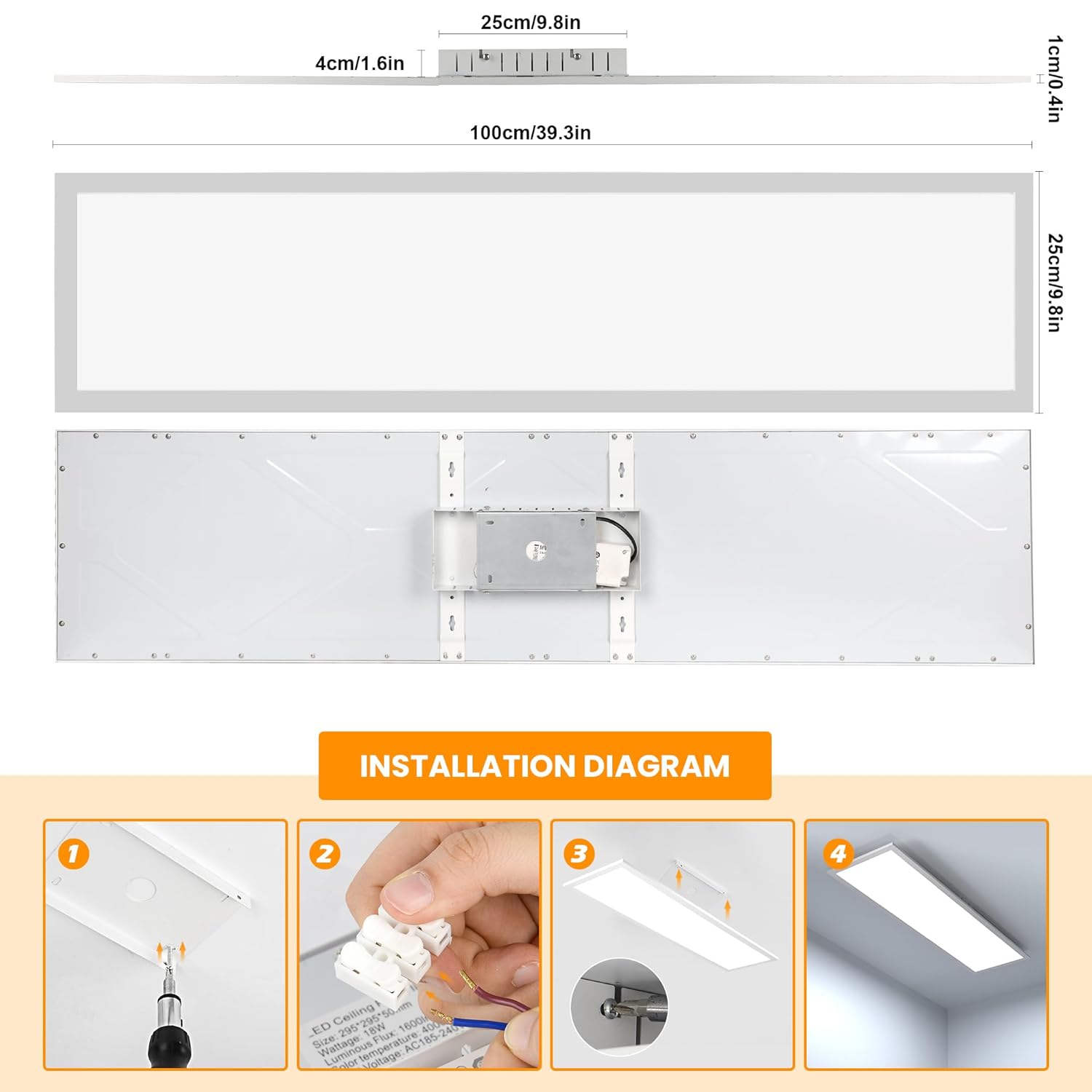
Figure 4.1: Detailed dimensions of the LED ceiling light (100cm x 25cm x 4cm).
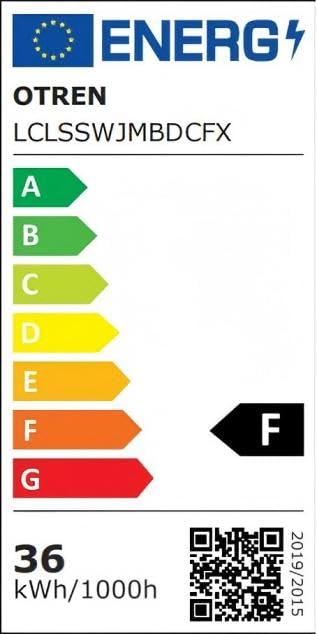
Figure 4.2: EU Energy Efficiency Label, showing an 'F' rating and 36 kWh/1000h consumption.
5. Installation Instructions
Follow these steps carefully to install your OTREN LED Ceiling Light. It is recommended that installation be performed by a qualified electrician.
- Turn off the Main Power Supply: Before starting any electrical work, ensure the main power supply to the installation area is turned off at the circuit breaker to prevent electric shock.
- Prepare the Mounting Base: Lift the base of the light fixture and connect the two electrical wires from the ceiling to the corresponding terminals on the fixture's base using the provided wire connectors. Ensure connections are secure.
- Fix the Base to the Ceiling: Securely fix the light's skirting board (mounting base) to the ceiling using the provided mounting accessories (screws and anchors). Ensure it is firmly attached and level.
- Attach the Ceiling Light: Once the base is securely mounted and wired, carefully attach the main LED ceiling light panel to the base. Ensure it clicks into place or is fastened according to the design, providing a flush and secure fit.
Figure 5.1: Visual guide for the installation process, showing the four main steps: power off, wire connection, base mounting, and light attachment.
6. Operating Instructions
Your OTREN LED Ceiling Light comes with a 2.4G wireless remote control for easy operation of its dimming and color temperature features.
6.1 Remote Control Functions

Figure 6.1: The wireless remote control, illustrating buttons for power, brightness adjustment, and color temperature selection.
- Power On/Off: Use the dedicated power button to turn the light on or off.
- Brightness Adjustment: The light brightness can be adjusted steplessly from 10% to 100%. Use the brightness up/down buttons on the remote control to achieve your desired illumination level.
- Color Temperature Adjustment: The color temperature can be adjusted from 3000K (warm white) to 6000K (cool white). Use the color temperature buttons on the remote to cycle through or fine-tune the warmth of the light.
- Memory Function: The light features a memory function that saves your last used brightness and color temperature settings when the light is turned off and on again.

Figure 6.2: Visual representation of the light's adjustable color temperature, showing warm white (3000K), natural white (4000K), and cold white (6000K) in different environments.
7. Maintenance
To ensure the longevity and optimal performance of your OTREN LED Ceiling Light, follow these simple maintenance guidelines:
- Cleaning: Before cleaning, always turn off the power supply to the fixture. Use a soft, dry, or slightly damp cloth to wipe the surface of the light. Do not use abrasive cleaners, solvents, or harsh chemicals, as these can damage the finish or electrical components.
- Dust Removal: Regularly dust the fixture to prevent accumulation, which can affect light output and heat dissipation.
- Inspection: Periodically inspect the fixture for any signs of damage, loose wiring, or unusual operation. If any issues are observed, turn off the power and consult a qualified electrician.
- The recessed LED design helps prevent insects and dust from entering the holder, simplifying maintenance.
8. Troubleshooting
If you encounter any issues with your OTREN LED Ceiling Light, refer to the following common troubleshooting steps:
- Light does not turn on:
- Check if the main power supply is on at the circuit breaker.
- Ensure the light fixture is properly connected to the power source.
- Verify that the remote control batteries are not depleted and are inserted correctly.
- Light flickers or dims unexpectedly:
- Ensure the light is securely mounted and all wire connections are tight.
- Check for any loose connections at the power source.
- If using a wall dimmer, ensure it is compatible with LED dimmable fixtures. This light is designed for remote control dimming.
- Remote control not responding:
- Replace the batteries in the remote control.
- Ensure there are no obstructions between the remote control and the light fixture.
- Try re-pairing the remote control with the light if applicable (refer to specific pairing instructions if provided with the remote, though not detailed in this manual).
If the problem persists after trying these steps, please contact customer support.
9. Warranty and Support
The OTREN Dimmable LED Ceiling Light comes with a limited warranty. Please retain your proof of purchase for warranty claims.
- Warranty Type: Limited
- For warranty service or technical support, please contact your retailer or the manufacturer directly. Contact information for the manufacturer (OTREN) may be found on the product packaging or the retailer's website.
- Manufacturer: OTREN
- Manufacturer Address (as per packaging): Zhongshan Aixin Lighting Technology Co., Ltd., Address: No. 19-2 Guangfu Central Road, Xiaolan Town, Zhongshan City.
- Email (as per packaging): OTREN002@163.com
Ask a question about this manual
Ask about setup, troubleshooting, compatibility, parts, safety, or missing instructions. Manuals+ will review the question and use this page’s manual context to help answer it.