
E-Ant Q15
E-Ant Q15 Car Battery Jump Starter with Air Compressor User Manual
Model: Q15 | Brand: E-Ant
1. Introduction
Thank you for choosing the E-Ant Q15 Car Battery Jump Starter with Air Compressor. This device is a versatile emergency tool designed to provide reliable jump-starting for vehicles, inflate tires, serve as a portable power bank, and offer illumination. Please read this manual thoroughly before use to ensure proper operation, maximize product lifespan, and guarantee your safety.
2. What's in the Box
Carefully unpack all items and ensure you have received the following:
- E-Ant Q15 Jump Starter with Air Compressor Unit
- Smart Jumper Clamps
- Air Hose with Multiple Nozzles (e.g., for car tires, bike tires, balls, inflatables)
- USB-C Charging Cable
- User Manual (this document)
- EVA Storage Bag
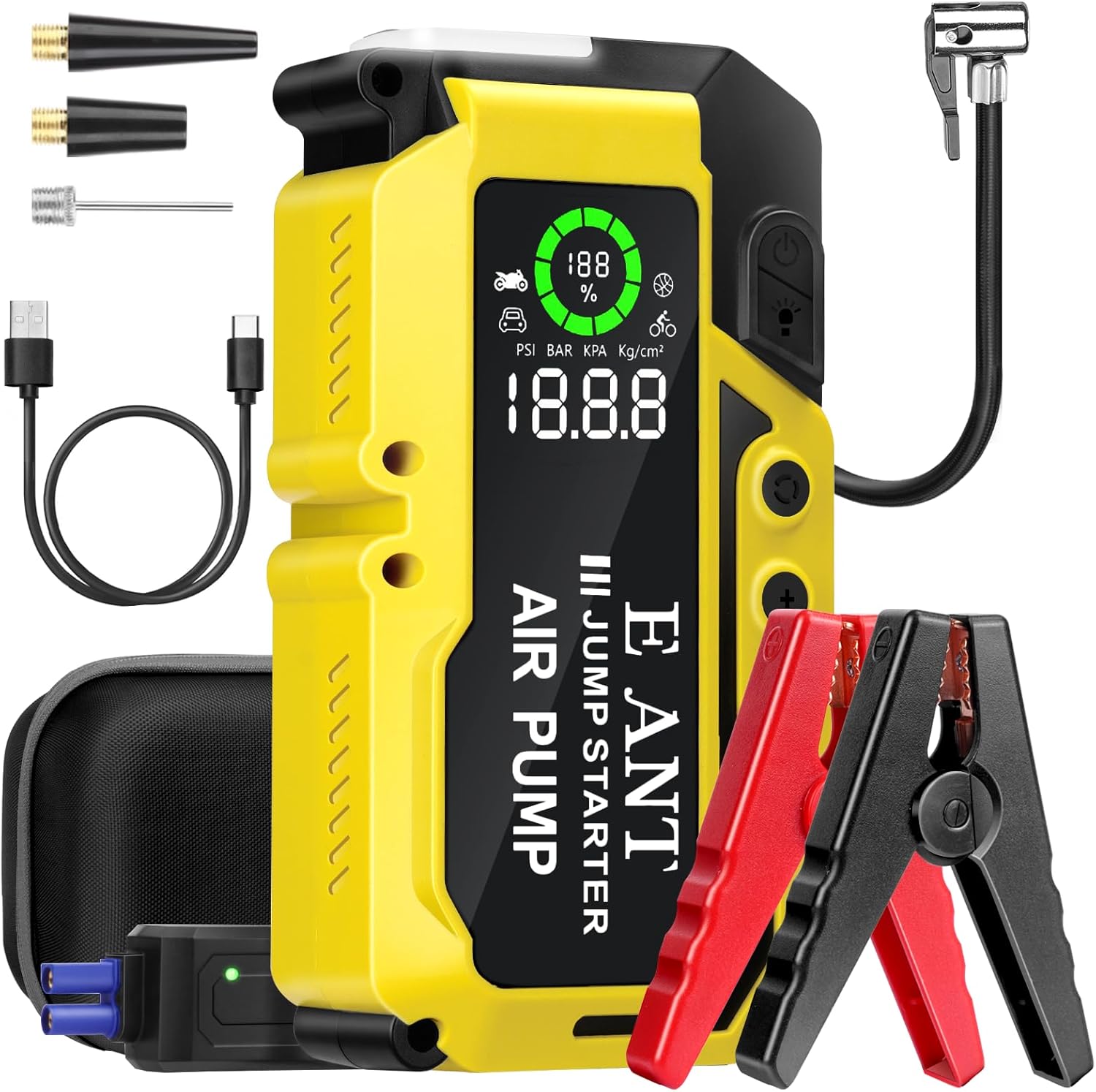
Image: The E-Ant Q15 Jump Starter unit with smart jumper clamps, air hose, various nozzles, and charging cable, all neatly arranged.
3. Product Features
The E-Ant Q15 combines multiple functionalities into one compact device:
- 4-in-1 Functionality: Car Jump Starter, Tire Inflator, Power Bank, and LED Light.
- Powerful Jump Starter: 4000A peak current, capable of starting 12V vehicles with up to 10L gas or 8L diesel engines. Operates in extreme temperatures (-4°F to 140°F).
- Cordless Air Compressor: 150PSI maximum pressure with four preset inflation options for various items (car/bike tires, balls, mattresses). Features auto-stop to prevent over-inflation.
- High-Capacity Power Bank: 22000mAh (80Wh) lithium-ion battery with Type-C input (5V/2A) and two QC3.0 Fast Charging USB output ports (5V/2A) for charging phones, tablets, and other devices.
- Smart LCD Display: 5.1-inch screen shows real-time battery level, pressure values (PSI, BAR, KPA, Kg/cm²), and preset values.
- Intelligent Safety Protection: Smart jumper cables indicate correct connection with a green light. Built-in protections against short-circuit, overheating, reverse polarity, over-current, over-charge, and over-discharge.
- Multi-Mode LED Light: 400 lumen flashlight with Normal, Strobe, and SOS modes for emergencies and general illumination.
- Durable Design: Water-resistant, drop-proof, and dust-proof construction.

Image: An illustration highlighting the various components and features of the E-Ant Q15 unit, including ports, buttons, and display.
4. Important Safety Information
WARNING: Read all safety warnings and instructions before using this product. Failure to follow the warnings and instructions may result in electric shock, fire, and/or serious injury.
- Do not operate the jump starter if it is damaged or has been modified.
- Do not jump start a frozen battery.
- Ensure proper polarity connection (red clamp to positive, black clamp to negative) to avoid sparks or damage.
- Do not connect the positive and negative clamps together.
- Keep out of reach of children.
- Use in a well-ventilated area.
- Do not expose the device to rain or wet conditions.
- Do not disassemble the unit. Refer all servicing to qualified personnel.
- When using the air compressor, do not over-inflate. Follow recommended pressure levels for your items.
- Remove the jump starter from the vehicle battery within 30 seconds after the vehicle starts.

Image: Visual representation of the E-Ant Q15's built-in safety features, including protection against short-circuit, overheating, and reverse polarity, along with its wide operating temperature range.
5. Setup and Initial Charging
5.1 Charging the Jump Starter
Before first use, fully charge the E-Ant Q15 unit. It is recommended to charge the device every 3-6 months to maintain battery health, even when not in use.
- Connect the provided USB-C charging cable to the Type-C input port on the jump starter.
- Connect the other end of the USB-C cable to a USB wall adapter (not included) or a car charger.
- The LCD display will show the charging status and battery percentage. The unit is fully charged when the display shows 100%.
- A full charge typically takes 4-5 hours using a 3A Type-C input.

Image: The E-Ant Q15 unit demonstrating two charging methods: connected to a wall charger and connected to a car charger.
6. Operating Instructions
6.1 Jump Starting a Vehicle
Ensure the jump starter has at least 20% battery charge before attempting to jump start a vehicle.
- Connect Clamps: Attach the red (+) clamp to the positive terminal of the vehicle's dead battery. Attach the black (-) clamp to the negative terminal of the vehicle's dead battery.
- Insert Jumper Cable: Insert the smart jumper cable connector into the jump starter's jump cable interface.
- Check Indicator: The smart clip's indicator light should turn green, indicating a correct and safe connection. If it's red or flashing, check connections and battery condition.
- Start Vehicle: Start your vehicle's engine.
- Remove Jumper Cable: Once the vehicle starts, immediately remove the smart jumper cable connector from the jump starter unit.
- Remove Clamps: Then, disconnect the black (-) clamp, followed by the red (+) clamp from the vehicle battery.
Attention: Do not leave the jump starter connected to the vehicle battery for more than 30 seconds after the vehicle starts.

Image: A visual step-by-step guide illustrating how to use the E-Ant Q15 to jump start a vehicle, from connecting clamps to starting the engine.
6.2 Using the Air Compressor
- Connect Air Hose: Screw the air hose onto the inflatable mouth of the jump starter. Attach the appropriate nozzle to the air hose for your item (e.g., car tire valve).
- Power On: Press and hold the power button for 2 seconds to turn on the unit. The LCD display will activate.
- Select Mode: Press the 'M' (Mode Selection) button to cycle through preset modes (car, motorcycle, bicycle, ball) or to manually set the desired pressure.
- Adjust Pressure (if needed): Use the '+' and '-' buttons to adjust the target pressure.
- Start Inflation: Press the power button again to start the air compressor. It will automatically stop once the preset pressure is reached.
- Disconnect: Remove the air hose and nozzle from your item.

Image: The E-Ant Q15 unit connected to a car tire, demonstrating its air compressor function in action.

Image: A visual guide detailing the steps to connect the air hose, select inflation mode, and start the air compressor function of the E-Ant Q15.
6.3 Using as a Power Bank
The E-Ant Q15 can charge various electronic devices via its USB output ports.
- Connect your device's USB charging cable to one of the two QC3.0 USB output ports on the jump starter.
- The jump starter will automatically begin charging your device.
- Monitor your device's charging status.

Image: The E-Ant Q15 unit connected via USB cables to a smartphone and a tablet, demonstrating its function as a portable power bank.
6.4 Using the LED Light
The built-in LED flashlight offers three modes for different situations.
- Turn On/Cycle Modes: Press the LED light button to turn on the light. Press again to cycle through Normal, Strobe, and SOS modes.
- Turn Off: Press the button until the light turns off, or hold the button for a few seconds.

Image: The E-Ant Q15 unit's LED light illuminating the engine bay of a car, showcasing its utility in low-light conditions.
7. Maintenance
- Cleaning: Wipe the unit with a dry, soft cloth. Do not use harsh chemicals or abrasive materials.
- Storage: Store the jump starter in a cool, dry place, away from direct sunlight and extreme temperatures.
- Battery Care: For optimal battery life, fully charge the unit every 3-6 months, even if not in use. Do not store the unit with a completely depleted battery.
- Check Cables: Periodically inspect the jumper cables and air hose for any signs of damage or wear. Replace if necessary.
8. Troubleshooting
| Problem | Possible Cause | Solution |
|---|---|---|
| Vehicle does not start | Low battery on jump starter Incorrect clamp connection Vehicle battery completely dead/damaged | Recharge jump starter to over 20% Ensure clamps are connected correctly (red to +, black to -) Consult a mechanic if vehicle battery is severely damaged |
| Smart clip indicator is red/flashing | Reverse polarity Short circuit Battery voltage too low | Check and correct clamp connections Ensure clamps are not touching each other Try again after a few minutes; if issue persists, vehicle battery may be beyond jump-starting |
| Air compressor not inflating | Air hose not securely connected Target pressure not set Unit battery too low | Ensure air hose is tightly screwed on Set desired pressure using 'M' and '+/-' buttons Recharge the jump starter |
| Device not charging from USB ports | USB cable faulty Device not compatible Jump starter battery low | Try a different USB cable Ensure your device is compatible with 5V/2A USB charging Recharge the jump starter |
9. Specifications
| Feature | Detail |
|---|---|
| Model | Q15 |
| Peak Current | 4000 Amps |
| Engine Compatibility | Up to 10L Gas / 8L Diesel (12V vehicles) |
| Air Compressor Pressure | Max 150 PSI |
| Battery Capacity | 22000 mAh (80Wh) Lithium Polymer |
| USB-C Input | 5V/2A |
| USB Output (QC3.0) | 2 x 5V/2A |
| LED Light Output | 400 Lumens (Normal, Strobe, SOS modes) |
| Operating Temperature | -4°F to 140°F (-20°C to 60°C) |
| Dimensions | 7.8 x 2.4 x 4.2 inches |
| Weight | 3.63 pounds (1.65 Kilograms) |
10. Warranty and Customer Support
10.1 Warranty Information
The E-Ant Q15 Car Battery Jump Starter with Air Compressor comes with a 12-month warranty from the date of purchase, covering manufacturing defects. This warranty does not cover damage caused by misuse, accidents, unauthorized modifications, or normal wear and tear.
10.2 Customer Support
For any questions, technical assistance, or warranty claims, please contact E-Ant customer support. We offer lifetime customer and technical support to ensure your satisfaction.
Please refer to your purchase platform or the E-Ant official website for contact details.
Related Documents - Q15
 |
KOPUO 6000A Peak Car Jump Starter with Air Compressor - User Manual Comprehensive user manual for the KOPUO 6000A Peak 7-in-1 Car Jump Starter and 150PSI Air Compressor. Learn how to jump-start vehicles (up to 10L Gas/8L Diesel), inflate tires, use the LED flashlight, emergency hammer, and compass. Includes safety instructions, specifications, and troubleshooting. |
 |
GOOLOO A5 Jump Starter with Inflator User Manual User manual for the GOOLOO A5 Jump Starter with Inflator, featuring 4000A and 150PSI. Includes operation instructions, product highlights, technical specifications, safety warnings, and warranty information. |
 |
NEXPOW AP1 Jump Starter with Air Compressor User Manual Comprehensive user manual for the NEXPOW AP1 Jump Starter and Air Compressor. Learn about its features, specifications, operation, safety warnings, and troubleshooting. |
 |
Trekure Beta06 Jump Starter Quick-Start Guide This guide provides essential information for the Trekure Beta06 Jump Starter, including safety warnings, specifications, and operating instructions for jump-starting vehicles, charging devices, and inflating tires. |
 |
KOPUO 4000A 9-in-1 Jump Starter with Air Pump User Manual Comprehensive user manual for the KOPUO 4000A, a 9-in-1 jump starter and 150PSI air pump. Features include support for 9.0L gas/8.0L diesel engines, -40°C cold start capability, 3-mode LED light, and power bank functionality. Learn how to safely jump-start vehicles, use the air pump, and maintain your device. |
 |
FiiO Q15 DAC and Headphone Amplifier User Guide User guide for the FiiO Q15 DAC and Headphone Amplifier, detailing its buttons, ports, charging, modes, and precautions. Includes technical specifications and environmental compliance information. |
Ask a question about this manual
Ask about setup, troubleshooting, compatibility, parts, safety, or missing instructions. Manuals+ will review the question and use this page’s manual context to help answer it.