
DOMMIA DS-40WD
DOMMIA 40W Linkable Grow Lights User Manual
Model: DS-40WD
1. Introduction
Thank you for choosing DOMMIA 40W Linkable Grow Lights. This product is designed to provide optimal lighting conditions for your indoor plants, promoting healthy growth across all stages. Featuring full-spectrum LED technology, dimmable settings, and a built-in timer, these ultra-thin panels offer versatile and efficient plant illumination.
Please read this manual thoroughly before installation and operation to ensure proper use and maximize the lifespan of your grow lights.
2. Important Safety Instructions
- Ensure the power supply voltage matches the product's requirements (120 Volts AC).
- Do not disassemble or modify the product. This may cause damage and void the warranty.
- Keep the grow lights away from water or high humidity environments to prevent electrical shock.
- Do not look directly into the LED lights when they are on, as this may cause eye strain.
- Install in a well-ventilated area to ensure proper heat dissipation.
- This product is designed for indoor use only.
3. What's in the Box
Upon opening your DOMMIA Grow Lights package, you should find the following components:
- 4 x Ultra-thin LED Grow Light Panels (10W each, total 40W)
- 1 x Smart Controller with 3 timing settings (6/12/16H) and 4 dimming levels (25%/50%/75%/100%)
- 1 x Power Adapter
- 3 x Light Panel Connecting Wires (for linking panels)
- 3 x Light Panel Connecting Pins (for direct linking of panels)
- Sticky Pads (for mounting)
- User Manual
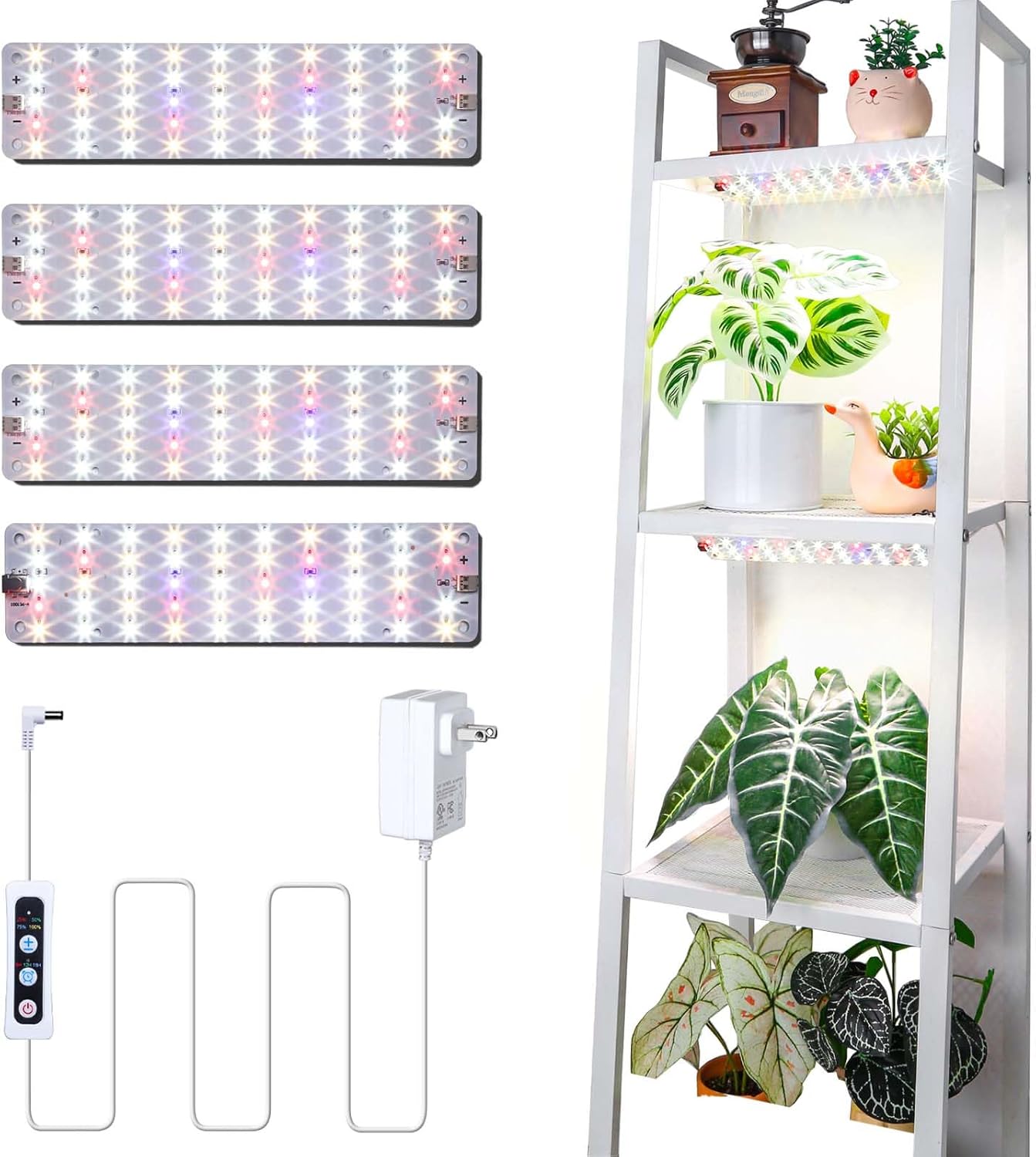
Image: Overview of the DOMMIA 40W Grow Light kit components.

Image: DOMMIA 40W Plant Grow Lights in use, highlighting UL certification.
4. Setup and Installation
The DOMMIA Grow Lights offer flexible installation options to suit your plant setup. You can link up to four panels in series using either the provided connecting wires or direct connecting pins.
4.1 Connecting the Light Panels
You have two primary methods for connecting the light panels:
- Using Connecting Wires: For setups requiring spacing between panels, use the provided connecting wires. Simply plug one end of the wire into the output port of the first panel and the other end into the input port of the next panel. Repeat for additional panels.
- Using Connecting Pins: For a seamless, continuous light strip, use the connecting pins to directly link panels end-to-end. Align the input/output ports and gently push the pins to secure the connection.

Image: Connection and installation methods for the grow light panels.
4.2 Mounting the Light Panels
The ultra-thin design allows for discreet installation. Use the included sticky pads for easy mounting under shelves, cabinets, or on any flat surface. Ensure the surface is clean and dry before applying the pads for optimal adhesion.

Image: Applying sticky pads for mounting the grow light panels.

Image: Example installation of grow lights under a shelf.
5. Operating Instructions
The DOMMIA Grow Lights are controlled via a smart controller, allowing for easy adjustment of light intensity and timing.
5.1 Smart Controller Functions

Image: DOMMIA Smart Controller with dimming and timing options.
- Power Button: Press to turn the lights ON or OFF.
- Dimming Options: Use the '+' and '-' buttons to adjust light intensity. Available levels are 25%, 50%, 75%, and 100%.
- Timing Options: Select from 6-hour, 12-hour, or 16-hour circular memory timers. Once set, the lights will automatically turn on and off at the same time each day.
5.2 Full Spectrum Lighting
These grow lights emit a full spectrum of wavelengths (380nm to 780nm), crucial for all stages of plant development. This includes red LEDs for flowering and fruiting, blue LEDs for growth and chlorophyll synthesis, and white LEDs for overall seedling growth and chlorophyll synthesis.

Image: Full Spectrum LED explanation and light intensity at different heights.
6. Maintenance
- Cleaning: Ensure the lights are unplugged before cleaning. Gently wipe the panels with a soft, dry cloth to remove dust and debris. Do not use liquid cleaners or abrasive materials.
- Storage: If storing the lights for an extended period, unplug them and store in a cool, dry place away from direct sunlight and moisture.
- Heat Dissipation: The ultra-thin design ensures good heat dissipation. Avoid covering the panels or installing them in enclosed spaces without adequate airflow to prevent overheating.
7. Troubleshooting
| Problem | Possible Cause | Solution |
|---|---|---|
| Lights do not turn on. | No power, loose connection, faulty power adapter. | Check power outlet, ensure all connections are secure. Test with another outlet. Contact support if adapter is suspected faulty. |
| Lights flicker or dim unexpectedly. | Unstable power supply, loose connection, timer setting. | Ensure stable power. Check all connections. Verify timer settings are not causing the dimming. |
| Timer function not working. | Incorrect timer setting, power interruption. | Re-set the timer. Ensure continuous power supply to maintain timer memory. |
| Panels not linking properly. | Incorrect pin/wire insertion, damaged ports. | Ensure pins/wires are fully inserted and correctly aligned. Inspect ports for damage. |
8. Product Specifications
| Feature | Detail |
|---|---|
| Model Number | DS-40WD |
| Power | 40 Watts (4 x 10W panels) |
| Light Source Type | LED (Full Spectrum: 380nm-780nm) |
| Color Temperature | 4465 Kelvin |
| Brightness | 4800 Lumen |
| Voltage | 120 Volts (AC) |
| Material | Aluminum |
| Product Dimensions | 10.24"L x 3.54"W x 0.2"H (per panel) |
| Item Weight | 1.1 Pounds |
| Timer Settings | 6H / 12H / 16H (Circular Memory) |
| Dimming Levels | 25%, 50%, 75%, 100% |
| Average Life | 25000 Hours |
9. Warranty and Support
DOMMIA products are manufactured with high-quality standards. For warranty information, technical support, or any inquiries regarding your grow lights, please contact DOMMIA customer service through the retailer where you purchased the product or visit the official DOMMIA store online.
DOMMIA Store: https://www.amazon.com/stores/DommiaBuynow/page/30B0F98C-D638-4D31-9CB0-E8AB706B154F
Please have your model number (DS-40WD) and purchase details ready when contacting support.
10. Product Videos
Watch the official product videos for a visual guide on unboxing and installation.
10.1 40W Grow Light Unboxing Video
Description: This video provides an unboxing experience for the DOMMIA 40W Grow Light, showcasing all included components and a brief overview of their appearance. It demonstrates the four ultra-thin light panels, the smart controller with timing and dimming functions, sticky pads for mounting, connecting wires, and connecting pins. The video also briefly shows the lights installed in a plant setup.
Related Documents - DS-40WD
 |
Dommia SlimGrow LED Grow Light User Guide and Specifications Comprehensive guide to the Dommia SlimGrow LED grow light, detailing its features, spectrum designs, and usage instructions. Learn about its 4-step dimmer, timer functions, and compatibility with USB chargers. |
 |
Hikvision Indoor Station Firmware Release Notes: Comprehensive Update History A compilation of release notes for Hikvision Indoor Station firmware, detailing updates, new features, and bug fixes across various versions from V2.1.38 (2022-03-01) to V2.2.108 (2025-07-30). Includes model compatibility and technical specifications. |
 |
Hikvision Network Indoor Station Operation Guide Comprehensive operation guide for the Hikvision Network Indoor Station, covering local and remote operations, safety instructions, regulatory information, and technical specifications for video intercom systems. |
 |
EFPERFECT Limited Warranty Information Details the limited warranty coverage, remedies, exclusions, and service contact information for EFPERFECT products. |
 |
海康威视 9/80/81/70 系列 CVR 快速使用手册 本手册为海康威视 (HIKVISION) 9/80/81/70 系列单机 CVR 存储设备提供安装、基本操作、配置和故障排除的快速入门指南。 |