
1. Introduction
Thank you for choosing the Ferswe F-US014 5W Rechargeable LED Light Bar. This versatile lighting solution is designed to provide adjustable illumination for various indoor spaces, including cabinets, closets, kitchens, bedrooms, and bathrooms. With its touch controls, magnetic installation, and long-lasting battery, it offers convenience and efficiency.
This manual provides essential information for the safe and effective use of your new light bar. Please read it thoroughly before installation and operation.
2. Key Features
- Touch Control: Intuitive touch buttons for power, brightness adjustment, and color temperature selection.
- Adjustable Color Temperature: Choose from 3 color modes: 3000K (Warm White), 4500K (White), and 6000K (Cool White).
- 5 Brightness Levels: Easily adjust the light intensity to suit your needs.
- Magnetic Installation: Simple, tool-free installation with included magnetic mounts.
- Adjustable Lighting Angle: The light bar can pivot up to 135 degrees on its magnetic base, allowing precise light direction.
- Battery Level Display: Digital screen shows the remaining battery percentage.
- Rechargeable Battery: Built-in 2000mAh lithium-ion battery for wireless operation.
- USB-C Charging: Convenient and fast charging via a USB-C port.
- Energy Efficient: Equipped with 120 LEDs for even light distribution and eye protection.
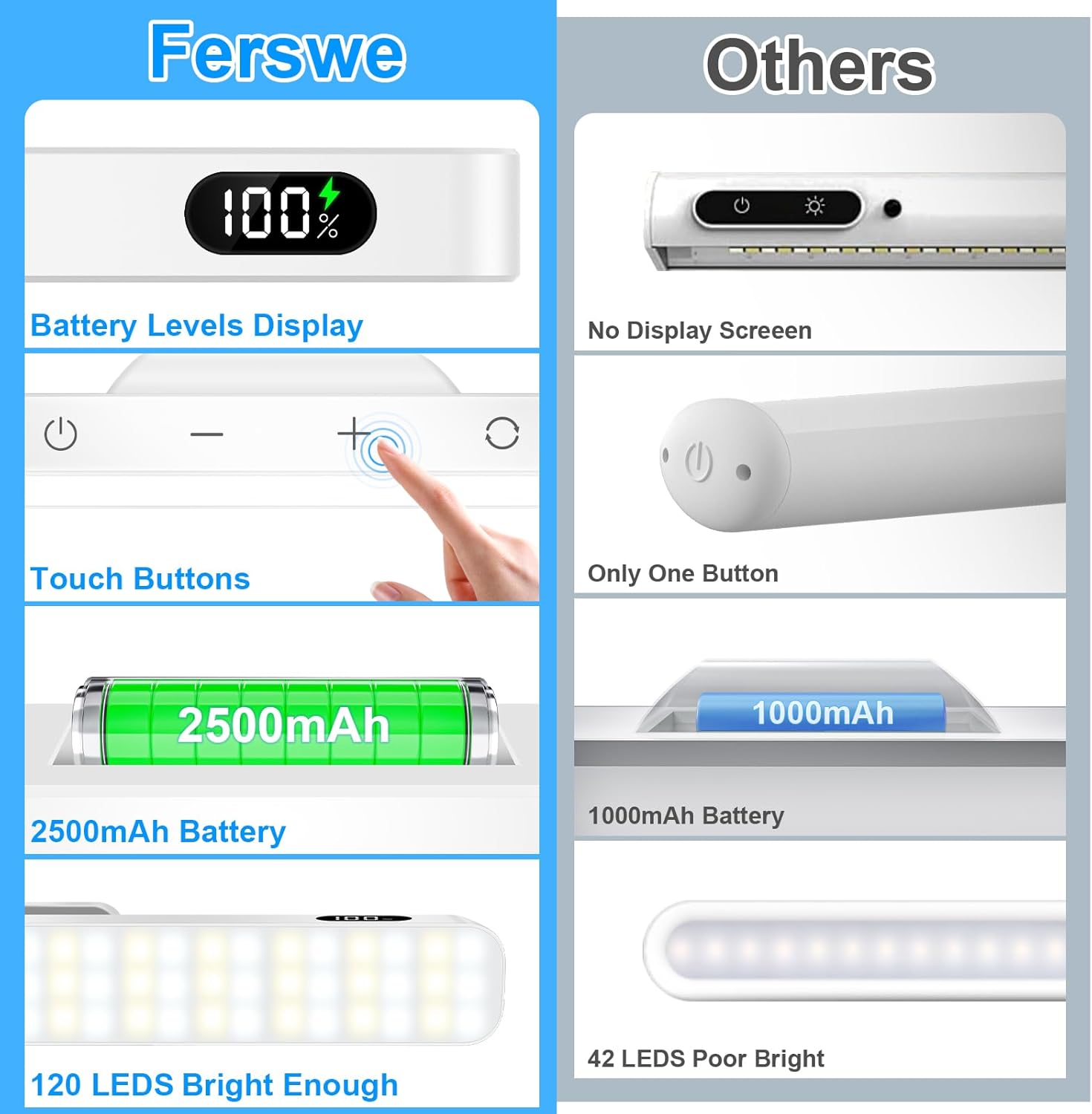
Figure 2.1: Overview of Ferswe Light Bar features including battery display and touch controls.
3. What's in the Box
Please check the package contents upon receipt to ensure all items are present:
- Ferswe 5W Rechargeable LED Light Bar (Model: F-US014)
- Magnetic Base with Adhesive (x2)
- USB-C Charging Cable
- User Manual
4. Setup and Installation
The Ferswe LED Light Bar features a simple magnetic installation process, requiring no tools.
- Choose a Location: Select a clean, smooth, and dry surface for installation. Common areas include under cabinets, inside closets, above mirrors, or near desks.
- Prepare the Surface: Clean the chosen surface thoroughly to ensure optimal adhesion for the magnetic base.
- Attach Magnetic Bases: Peel off the protective film from the adhesive on the back of the magnetic bases. Firmly press each base onto the desired surface. Allow a few moments for the adhesive to set.
- Mount the Light Bar: Align the light bar with the magnetic bases. The strong magnets will securely hold the light bar in place.
- Adjust Angle: Once mounted, the light bar can be easily pivoted up to 135 degrees to direct the light precisely where needed.

Figure 4.1: The light bar offers a 135° adjustable angle for flexible illumination.

Figure 4.2: Versatile placement options for the Ferswe light bar.
5. Operating Instructions
The Ferswe LED Light Bar is operated via intuitive touch controls located on the unit.
5.1 Power On/Off
- Press the Power button (⏻) once to turn the light bar on or off.
5.2 Adjusting Brightness
- While the light is on, tap the + or - buttons to cycle through 5 brightness levels.
- Hold the + or - buttons for continuous brightness adjustment.
5.3 Changing Color Temperature
- Press the Color Mode button (◯) to switch between the 3 available color temperatures: 3000K (Warm White), 4500K (White), and 6000K (Cool White).
5.4 Motion Sensor Mode
The light bar features an automatic motion sensor mode:
- In motion sensor mode, the light will automatically turn on when motion is detected within approximately 12 feet in a dark environment.
- The light will automatically turn off after approximately 20 seconds of no motion detection.
- To activate or deactivate motion sensor mode, refer to the specific instructions provided in the product packaging or quick start guide.

Figure 5.1: Brightness and color temperature adjustments.
Video 5.1: Demonstration of the Ferswe Dimmable Touch Light Bar's features, including touch controls and adjustable lighting.
6. Charging the Light Bar
The Ferswe LED Light Bar is equipped with a built-in 2000mAh rechargeable battery.
- Battery Level Display: The integrated screen displays the current battery percentage, allowing you to monitor charge status.
- Charging: Connect the provided USB-C charging cable to the light bar's USB-C port and plug the other end into a compatible 5V USB power adapter (not included).
- Charging Indicator: The battery display will show charging progress. It is fully charged when the display reaches 100%.
- Battery Life: A full charge provides approximately 4 hours of usage at high brightness and about 30 hours at low brightness.

Figure 6.1: Charging the light bar and monitoring battery levels.
Video 6.1: Product video showcasing the touch light's adjustable 3 colors and 120 LED mirror lights.
7. Maintenance
To ensure the longevity and optimal performance of your Ferswe LED Light Bar, follow these maintenance guidelines:
- Cleaning: Wipe the light bar with a soft, dry cloth. Do not use abrasive cleaners or solvents, as they may damage the surface.
- Storage: When not in use for extended periods, store the light bar in a cool, dry place.
- Battery Care: Avoid fully depleting the battery frequently. Recharge the light bar regularly, even if not in constant use, to maintain battery health.
- Water Resistance: This product is not water resistant. Avoid exposure to water or high humidity.
8. Troubleshooting
If you encounter any issues with your Ferswe LED Light Bar, please refer to the following common solutions:
- Light Not Turning On:
- Check the battery level. If low, recharge the light bar.
- Ensure the power button is pressed firmly.
- Motion Sensor Not Working:
- Verify the light is in motion sensor mode.
- Ensure the environment is dark enough for the sensor to activate.
- Check for obstructions blocking the sensor.
- Light Flickering or Dim:
- Recharge the battery.
- Adjust the brightness settings using the +/- buttons.
- Light Bar Not Sticking to Surface:
- Ensure the surface is clean, smooth, and dry before applying the magnetic bases.
- Allow sufficient time for the adhesive to cure after initial application.
9. Specifications
| Feature | Specification |
|---|---|
| Brand | Ferswe |
| Model Name | Touch Light Bar |
| Part Number | F-US014 |
| Dimensions (L x W x H) | 11.8" x 1.45" x 0.62" |
| Item Weight | 9.6 ounces (272 Grams) |
| Material | Plastic |
| Power Source | Battery Powered (1 Lithium Ion battery included) |
| Battery Capacity | 2000mAh (approximate, based on usage) |
| Control Method | Touch |
| Light Source Type | LED (120 LEDs) |
| Wattage | 5 Watts |
| Brightness | 750 Lumens |
| Efficiency | 150 lm/W |
| Color Temperature | 3000K (Warm White), 4500K (White), 6000K (Cool White) |
| Installation Type | Magnetic |
| Special Features | Adjustable Brightness, Adjustable Color Temperature, Adjustable Lighting Angle, Dimmable, Portable |
| Voltage | 6 Volts (DC) |
| Water Resistance Level | Not Water Resistant |
| UPC | 198168017500 |
10. Warranty and Support
Ferswe offers a one-year free replacement service for any quality issues with your light bar. For support, please contact Ferswe customer service through the retailer where you purchased the product or visit the official Ferswe store online.
Ferswe Store: Visit the Ferswe Store on Amazon