
Introduction
The lanema UD851B Dolby AC3 5.1ch Digital Audio Decoder is designed to enhance your audio experience by converting digital audio signals into high-quality analog 5.1 channel surround sound. This device is ideal for audiophiles and home theater enthusiasts looking to achieve immersive, cinema-quality sound from various sources. It supports multiple input options and offers convenient features like remote control and power-off memory.

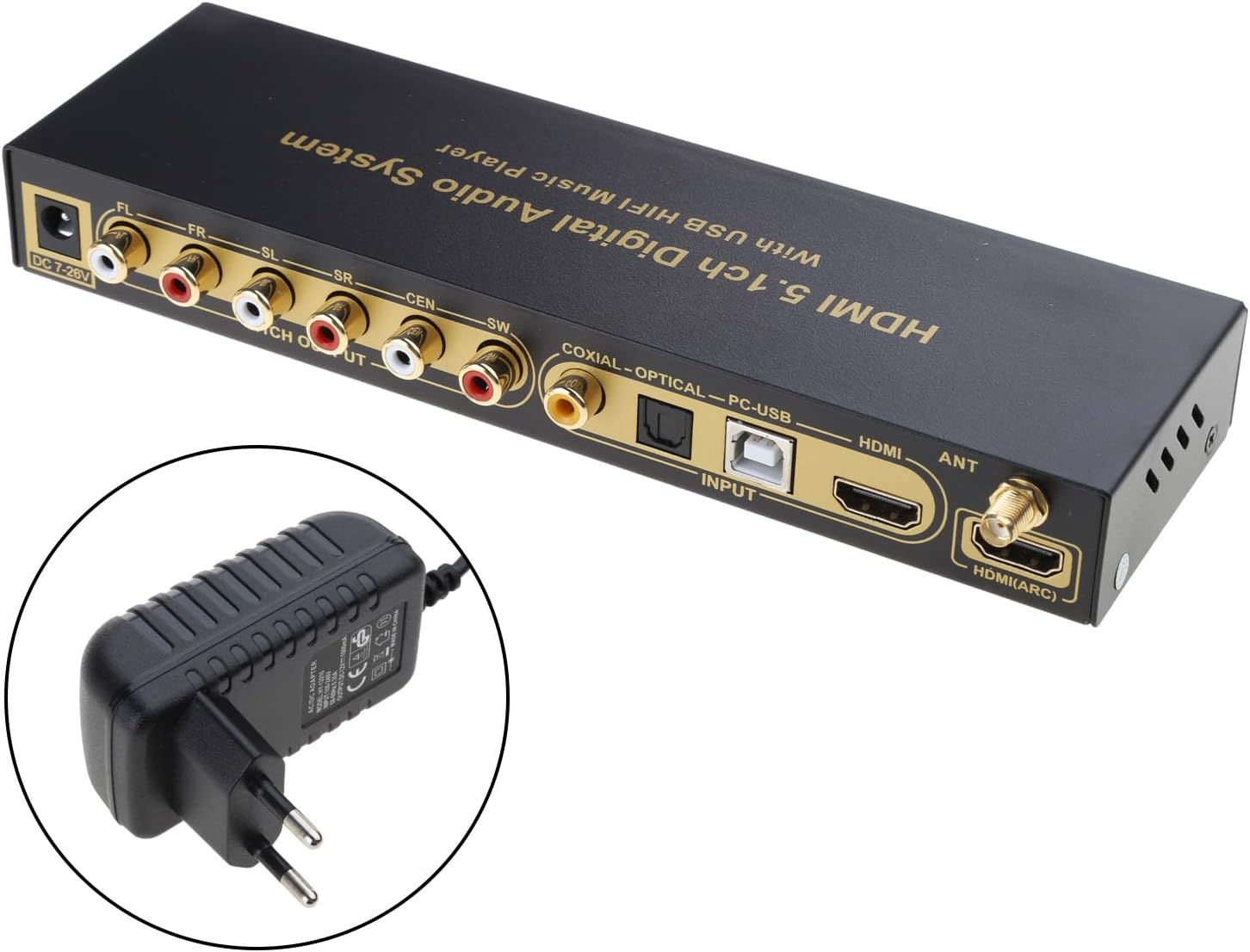
The lanema UD851B digital audio decoder, showcasing its front and rear panels along with the included power adapter.
Package Contents
Please check the package for the following items:
- 1x UD851B Decoder Machine
- 1x Remote Control
- 1x DC12V1A Power Adapter
- 1x Digital Optical Fiber Cable
- 1x Wireless Antenna
- 1x User Manual
Contents of the lanema UD851B package, including the decoder unit, remote control, optical fiber cable, wireless antenna, and power adapter.
Product Overview
Front Panel

Detailed view of the decoder's front panel, featuring input indicators (HDMI, ARC, Coaxial, Optical, PC-USB, USB, BT), 5.1ch/2.0ch mode indicator, power button, volume controls, and track navigation buttons.
- USB Port: For connecting USB storage devices for music playback.
- IR Receiver: For remote control signals.
- Input Indicators: LEDs for HDMI, ARC, Coaxial, Optical, PC-USB, USB, BT.
- 5.1ch/2.0ch Indicator: Shows the current output mode.
- Power Button: Turns the unit on/off.
- Volume Controls (VOL-, VOL+): Adjusts the master volume.
- Track Navigation (Previous, Next): For USB player functionality.
- Input Button: Cycles through available input sources.
Rear Panel

Detailed view of the decoder's rear panel, including DC 7-24V power input, 5.1ch RCA outputs (FL, FR, SL, SR, CEN, SW), Coaxial and Optical digital inputs, PC-USB input, HDMI input, ANT (antenna) port, and HDMI (ARC) input.
- DC 7-24V: Power input port.
- 5.1ch Output (FL, FR, SL, SR, CEN, SW): RCA outputs for Front Left, Front Right, Surround Left, Surround Right, Center, and Subwoofer channels.
- Coaxial Input: Digital coaxial audio input.
- Optical Input: Digital optical audio input.
- PC-USB Input: USB Type-B port for connecting to a computer.
- HDMI Input: HDMI audio input.
- ANT: Antenna port for Bluetooth connectivity.
- HDMI (ARC) Input: HDMI Audio Return Channel input.
Setup
1. Power Connection
Connect the included DC12V1A power adapter to the DC 7-24V input port on the rear panel of the decoder. Plug the adapter into a suitable power outlet. The unit supports a wide voltage range of DC7-24V.
2. Audio Input Connections
Choose one of the following input methods based on your source device:
- HDMI (ARC): Connect an HDMI cable from your TV's HDMI ARC port to the HDMI (ARC) input on the decoder.
- HDMI: Connect an HDMI cable from your source device (e.g., Blu-ray player, game console) to the HDMI input on the decoder.
- Optical: Connect a digital optical fiber cable from your source device to the Optical input on the decoder.
- Coaxial: Connect a digital coaxial cable from your source device to the Coaxial input on the decoder.
- PC-USB: Connect a USB Type-B cable from your computer to the PC-USB input on the decoder.
- USB Player: Insert a USB storage device (e.g., USB flash drive) into the front panel USB port for direct music playback.
- Bluetooth (BT): Attach the wireless antenna to the ANT port on the rear panel. Enable Bluetooth on your source device and pair with the decoder.
3. Audio Output Connections
Connect the 5.1ch RCA outputs (FL, FR, SL, SR, CEN, SW) on the rear panel to your 5.1 channel power amplifier or active speakers using appropriate RCA cables.

Connection diagrams for 5.1 channel audio output. The top diagram shows connecting the decoder to a 5.1ch power amplifier using RCA to RCA cables. The bottom diagram shows connecting to 5.1ch active speakers using 3.5mm to RCA cables.
Operating Instructions
1. Power On/Off
Press the Power button on the front panel or the remote control to turn the unit on or off.
2. Input Source Selection
Press the 'Input' button on the front panel or the remote control to cycle through the available input sources (HDMI, ARC, Coaxial, Optical, PC-USB, USB, BT). The corresponding LED indicator on the front panel will light up.
3. Volume Control
Use the 'VOL-' and 'VOL+' buttons on the front panel or the remote control to adjust the master volume. The remote control also supports individual volume adjustment for each channel.
4. Output Mode Selection
The decoder supports both 5.1ch and 2.0ch output modes. The 2.0ch output mode is active when selected. Use the remote control to switch between these modes if available, or the unit will automatically detect the input signal.
5. USB Player Functionality
When a USB storage device is connected, the decoder can play audio files directly. Use the track navigation buttons (Previous, Next) on the front panel or remote control to manage playback.
6. Power-Off Memory
The unit features a power-off memory function. It will automatically switch to the last used signal channel or USB player memory when powered on again.
Maintenance
Cleaning
To clean the device, use a soft, dry cloth. Do not use liquid cleaners or aerosol sprays, as they may damage the finish or internal components.
Firmware Updates
If the manufacturer provides firmware updates, users may be able to upgrade the firmware via a disk. Refer to the manufacturer's official website or support for specific instructions on firmware updates.
Troubleshooting
If you encounter issues with your lanema UD851B decoder, please refer to the following common problems and solutions:
- No Power:
- Ensure the power adapter is securely connected to the decoder and a working power outlet.
- Verify the power outlet is functional.
- No Sound Output:
- Check all audio cable connections between the source, decoder, and amplifier/speakers.
- Ensure the correct input source is selected on the decoder.
- Verify that the volume is not muted or set too low on both the decoder and your audio system.
- Confirm that your source device is outputting audio in a compatible format (e.g., Dolby AC3).
- If using HDMI ARC, ensure ARC is enabled on your TV and the decoder.
- Distorted Sound:
- Check for loose cable connections.
- Reduce the volume level to see if distortion persists.
- Ensure the audio source is not overdriving the input.
- Remote Control Not Working:
- Check and replace the batteries in the remote control.
- Ensure there are no obstructions between the remote and the decoder's IR receiver.
- Make sure you are within the effective range of the remote control.
- USB Playback Issues:
- Ensure the USB device is formatted correctly and contains compatible audio files.
- Try a different USB device.
If the problem persists after trying these solutions, please contact customer support.
Specifications
| Feature | Description |
|---|---|
| Model | UD851B |
| Brand | lanema |
| Material | High-quality Metal |
| Audio Decoding | Dolby AC3 |
| Input Ports | HDMI, HDMI (ARC), Coaxial, Optical, PC-USB, USB, Bluetooth |
| Output Ports | 5.1ch RCA (FL, FR, SL, SR, CEN, SW) |
| Output Modes | 5.1ch, 2.0ch |
| Power Input | DC 7-24V (DC12V1A adapter included) |
| Features | Power-off memory, Remote control, Individual volume adjustment, Firmware upgradeable (via disk if provided by manufacturer) |
Warranty Information
This product comes with a standard manufacturer's warranty. Please refer to the warranty card included in your package or contact the retailer for specific warranty terms and conditions. Keep your purchase receipt as proof of purchase for any warranty claims.
Customer Support
For technical assistance, troubleshooting, or any questions regarding your lanema UD851B decoder, please contact your retailer or the manufacturer's customer support. Contact information can typically be found on the product packaging, the manufacturer's website, or the warranty card.