Introduction
This manual provides essential information for the safe and efficient operation of your Micromax J3 Keypad Mobile. Please read it thoroughly before using the device.

Image: Front and back view of the Micromax J3 Keypad Mobile, showcasing its sleek blue design.
Package Contents
Ensure all items are present in the package:
- One Micromax J3 Transceiver (Mobile Phone)
- One Battery
- One Charger
- User Manual (this document)
Setup
1. Inserting the Battery and SIM Card
- Carefully remove the back cover of the phone.
- Insert your SIM card(s) into the designated slot(s). Ensure the gold contacts face downwards.
- Insert the 800 mAh Lithium Ion battery into the battery compartment, aligning the contacts.
- Replace the back cover until it clicks securely into place.
2. Charging the Battery
Before first use, fully charge the battery.
- Connect the charger to the phone's charging port.
- Plug the charger into a power outlet.
- The battery indicator on the screen will show charging progress.
- Once fully charged, disconnect the charger.

Image: Graphic illustrating the 800 mAh battery capacity and power saving mode for extended usage.
Operating Instructions
Power On/Off
- To power on, press and hold the Power/End Call button until the screen lights up.
- To power off, press and hold the Power/End Call button until the power off options appear, then select 'Power off'.
Basic Navigation
- Use the Navigation Keys (Up, Down, Left, Right) to move through menus.
- Press the Center/OK button to select an option.
- Press the Back/Clear button to go back to the previous screen or delete characters.
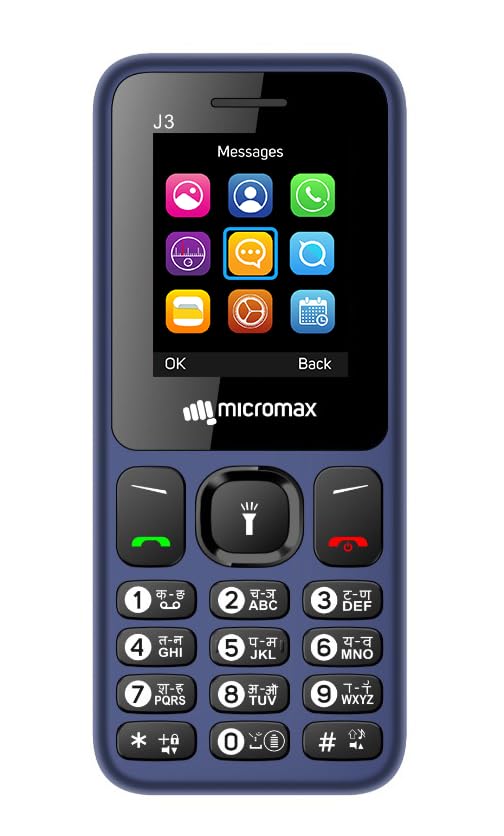
Image: Front view of the Micromax J3, displaying the keypad and the main screen with various application icons.
Making Calls
- Enter the phone number using the keypad.
- Press the Call/Green button to initiate the call.
- To end a call, press the End Call/Red button.
Auto Call Recording
The Micromax J3 supports automatic call recording, organized folder-wise. Refer to the phone's settings menu for activation and management of recorded calls.
Using the Bright Torch
The phone features a built-in bright torch. Typically, this can be activated by long-pressing a specific key (e.g., the '0' key or a dedicated torch button) or through the phone's menu.

Image: Side view of the Micromax J3, highlighting the bright torch feature in operation.
Wireless FM Radio
The Micromax J3 includes a wireless FM radio. Access the FM radio application from the main menu to scan for stations and enjoy listening without needing headphones as an antenna.
Regional Language Support
The device supports 22 regional languages for reading and writing, along with a number talk-back feature. Navigate to the phone's language settings to select your preferred language.
Maintenance
- Keep the phone dry. Liquids can corrode electronic circuits.
- Do not expose the phone to extreme temperatures.
- Clean the phone with a soft, dry cloth. Avoid using harsh chemicals.
- Handle the phone with care to prevent drops and impacts.
- Regularly check for software updates if available, though basic phones typically have limited update cycles.
Troubleshooting
| Problem | Possible Solution |
|---|---|
| Phone does not power on. | Ensure the battery is correctly inserted and fully charged. Try charging the phone for at least 30 minutes. |
| Cannot make or receive calls. | Check if the SIM card is properly inserted. Verify network signal strength. Contact your service provider if issues persist. |
| Poor audio quality during calls. | Ensure the microphone and speaker are not obstructed. Adjust call volume. Move to an area with better network coverage. |
| Battery drains quickly. | Activate power saving mode. Reduce screen brightness. Close unused applications. |
| Torch light not working. | Ensure the torch function is enabled in settings or via the shortcut key. Check battery level. |
Specifications
| Feature | Detail |
|---|---|
| Model | Micromax J3 |
| Operating System | Spreadtrum |
| RAM | 32 MB |
| Internal Storage | (Not specified, typically low for basic phones) |
| Screen Size | 4.49 cm (1.77 inches) |
| Display Resolution | 720p (Note: This resolution typically refers to video playback, not native screen resolution for a basic phone.) |
| Battery Capacity | 800 mAh Lithium Ion |
| Connectivity | Bluetooth, USB |
| Audio Jack | 3.5 mm |
| Special Features | Power Saving Mode, FM Radio (Wireless), Bright Torch, Auto Call Recording (Folder-wise), 22 Regional Language Support, Anti-theft, Number Talk Back |
| Dimensions (LxWxH) | 15 x 0.8 x 5.5 cm |
| Item Weight | 200 g |
| Form Factor | Bar |
| Color | Blue |
| Manufacturer | Bhagwati Products Ltd |

Image: A collage highlighting key features of the Micromax J3, such as screen size, durable battery, wireless FM radio, and multi-language support.
Warranty and Support
Warranty Information
The Micromax J3 Keypad Mobile comes with a 1 Year Warranty from the date of purchase. This warranty covers manufacturing defects. Please retain your purchase receipt as proof of purchase. The warranty does not cover damage caused by misuse, accidents, unauthorized repairs, or normal wear and tear.
Customer Support
For any queries, technical assistance, or warranty claims, please contact Micromax customer support. Refer to the official Micromax website or the packaging for the most current contact information.
Manufacturer: Bhagwati Products Ltd.


