
1. Introduction
This manual provides essential instructions for the safe and efficient operation, installation, and maintenance of your Equator Premium Stackable Washer Dryer Set, comprising the EW 826 Washer and ED 852 Dryer. Please read all instructions carefully before using the appliance to ensure proper function and to prevent injury or damage.

Image 1.1: Front view of the stacked Equator EW 826 Washer and ED 852 Dryer unit. The washer is positioned at the bottom, and the dryer is stacked on top.
2. Safety Instructions
Always follow basic safety precautions when using electrical appliances to reduce the risk of fire, electric shock, or injury to persons.
- Read all instructions before using the appliance.
- Do not wash or dry articles that have been previously cleaned in, washed in, soaked in, or spotted with gasoline, dry-cleaning solvents, or other flammable or explosive substances, as they emit vapors that could ignite or explode.
- Do not allow children to play on or in the appliance. Close supervision of children is necessary when the appliance is used near children.
- Before the appliance is removed from service or discarded, remove the door to the washing or drying compartment.
- Do not reach into the appliance if the tub or drum is moving.
- Do not install or store this appliance where it will be exposed to the weather.
- Do not tamper with controls.
- Do not repair or replace any part of the appliance or attempt any servicing unless specifically recommended in this manual or in published user-repair instructions that you understand and have the skills to carry out.
- Always disconnect the appliance from the power supply before attempting any service.
3. Setup and Installation
3.1 Unpacking
Carefully remove all packaging materials. Inspect the appliance for any shipping damage. Ensure all accessories are present, including the stacking kit and user manual.
3.2 Location Requirements
The appliance should be installed on a firm, level floor. Ensure adequate space for ventilation and access for maintenance. The combined dimensions of the stacked unit are approximately 21.85"D x 23.5"W x 61.5"H.

Image 3.1: Diagram illustrating the dimensions of the stacked washer and dryer unit: Height (H) 61.5 inches, Depth (D) 21.85 inches, and Width (W) 23.5 inches.
3.3 Electrical Connection
Both the washer and dryer operate on 110V electrical supply. Ensure dedicated, properly grounded outlets are available for each unit. Refer to the back panel of the units for specific electrical requirements.
3.4 Water and Drain Connections (Washer)
Connect the cold and hot water hoses (included) to the corresponding inlets on the back of the washer and to your household water supply. Ensure connections are tight to prevent leaks. Securely attach the drain hose to a standpipe or laundry tub, ensuring it is properly routed to prevent kinks.

Image 3.2: Rear view of the stacked washer and dryer, showing the electrical cords, water inlet hoses (red for hot, blue for cold), and the drain hose for the washer. The dryer's exhaust vent is visible at the top.
3.5 Ventilation (Dryer)
The ED 852 is a vented dryer. Connect the exhaust connector (included) to the dryer's exhaust outlet and route it to an external vent. Ensure the vent path is clear and unobstructed for efficient drying and to prevent lint buildup.
3.6 Stacking Instructions
The EW 826 washer and ED 852 dryer are designed to be stackable. Use the provided stacking kit (RSK 3080) to securely mount the dryer on top of the washer. Follow the instructions included with the stacking kit for proper assembly.
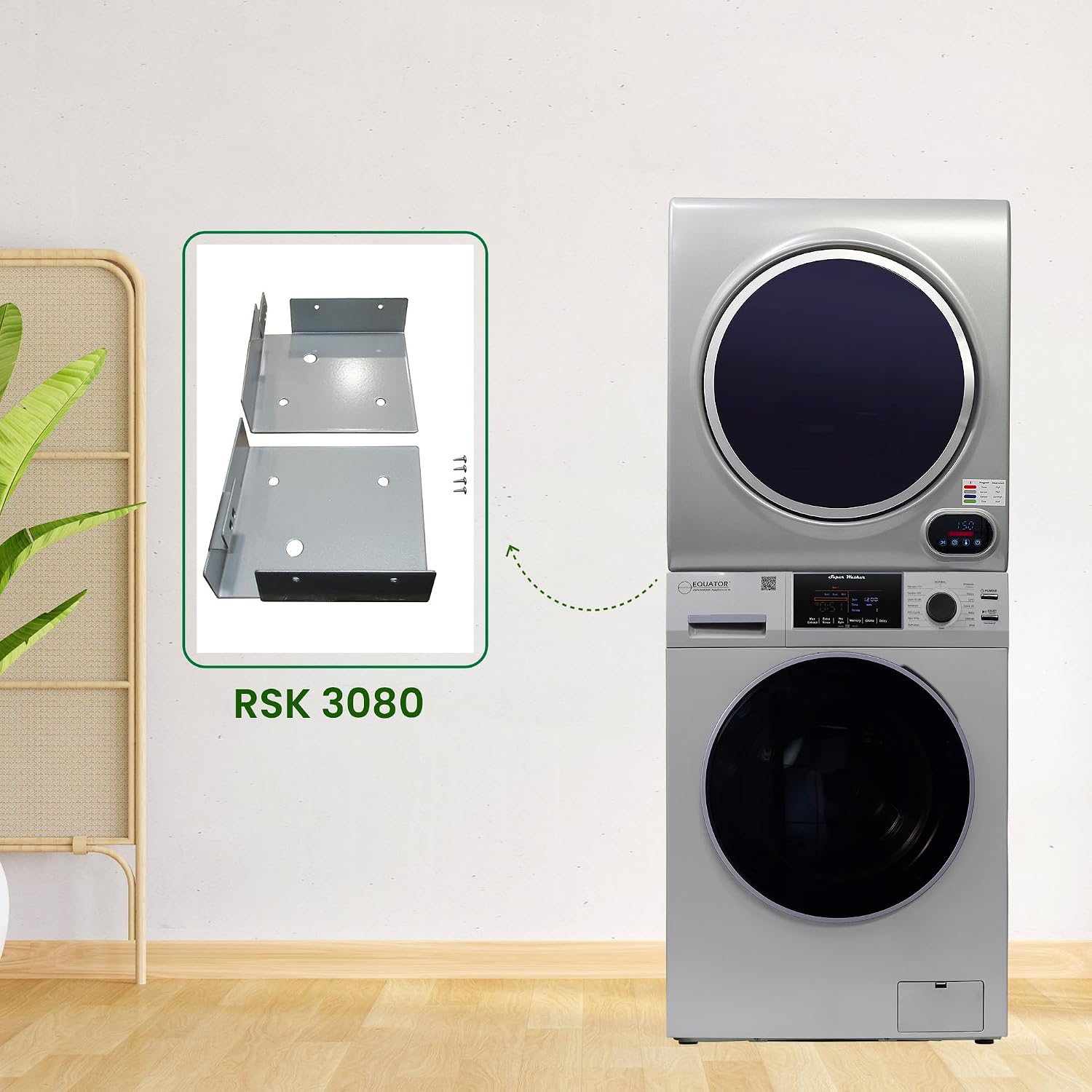
Image 3.3: Diagram showing the RSK 3080 stacking kit components and how they are used to secure the dryer on top of the washer.
3.7 Included Accessories
The following accessories are included with your unit to assist with installation and use:
- Hanging Hooks (2)
- Spacer (Bottom)
- 12 mm Long Screws
- 25 mm Long Screws
- Exhaust Connector
- Cold/Hot Water Hoses

Image 3.4: A visual representation of the accessories included with the washer dryer set, such as hanging hooks, various screws, an exhaust connector, and cold/hot water hoses.
4. Operating Instructions
4.1 Control Panel Overview
The EW 826 Washer and ED 852 Dryer feature intuitive digital control panels with touch buttons for cycle selection and settings adjustment.

Image 4.1: Close-up view of the control panels. The top panel belongs to the ED 852 dryer, showing a digital display and cycle indicators. The bottom panel is for the EW 826 washer, featuring a larger digital display, a cycle selection knob, and touch buttons for various functions like 'Power', 'Start/Pause', and cycle options.
4.2 Washer Cycles (EW 826)
The EW 826 Washer offers 12 wash cycles to accommodate various fabric types and soil levels. Select the desired cycle using the control knob and adjust options with the touch buttons.
- Normal: Standard cycle for everyday laundry.
- Prewash: Adds an initial soak and wash for heavily soiled items.
- ECO: Energy-saving cycle.
- Quick 20: For lightly soiled items requiring a fast wash.
- Quiet: Operates with reduced noise levels.
- PET Cycle: Specifically designed to eliminate pet fur from garments.
- Baby: Gentle wash for baby clothes.
- Delicate: For fragile items requiring a very gentle wash.
- Heavy: For durable, heavily soiled items.
- Sanitize 165°: High-temperature wash for sanitization.
- Winterize: Prepares the machine for cold weather storage.
- Self-clean: Cycle for cleaning the washer drum.
Additional options include Max Extract, Extra Rinse, No Spin, Memory, Chime, and Delay Start.

Image 4.2: An illustration highlighting the 'Pet Cycle' feature of the washer, showing a dog next to the washing machine with clothes inside, indicating its effectiveness in removing pet fur.
4.3 Dryer Cycles (ED 852)
The ED 852 Dryer offers 4 primary drying cycles, with additional heat level and sensor options.
- Hot: High heat for durable fabrics.
- Warm: Medium heat for various fabric types.
- Air Dry: No heat, for delicate items or refreshing clothes.
- Time Dry: Allows manual setting of drying time.
The dryer also features Sensor Dry, which automatically detects moisture levels and adjusts drying time to prevent over-drying and conserve energy.

Image 4.3: A graphic illustrating the five dry cycles available on the dryer: Hot, Warm, Air Dry, Time Dry, and Sensor Dry, each with an icon representing its function.

Image 4.4: An illustration demonstrating the 'Sensor Dry' feature, showing the stacked unit and an icon of a water drop with a clock, indicating energy and time savings by automatically detecting dryness.
4.4 Child Lock Feature
Both units are equipped with a Child Lock feature to prevent unintended operation. Refer to the control panel section for instructions on activating and deactivating this safety feature.
5. Maintenance
5.1 Cleaning the Lint Filter (Dryer)
For optimal drying performance and safety, clean the lint filter before or after every load. Pull out the lint filter, remove accumulated lint, and reinsert it securely.
5.2 Cleaning the Washer Drum
Regularly use the 'Self-clean' cycle on the EW 826 Washer to maintain drum hygiene and prevent odors. Follow the instructions on the control panel for this cycle.

Image 5.1: A cutaway view showing the stainless steel drums of both the ED 852 dryer (top) and the EW 826 washer (bottom), emphasizing their durable construction.
5.3 Exterior Cleaning
Wipe the exterior surfaces of both units with a soft, damp cloth. Avoid abrasive cleaners or solvents that could damage the finish.
5.4 Winterizing
If the appliance is to be stored in an area subject to freezing temperatures, use the 'Winterize' cycle on the washer to drain all water and prevent damage from freezing. Consult the full user manual for detailed winterization steps.
6. Troubleshooting
Before contacting customer support, review the following common issues and their solutions:
| Problem | Possible Cause | Solution |
|---|---|---|
| Unit does not start | No power; Door not closed; Child Lock active | Check power connection; Ensure door is latched; Deactivate Child Lock. |
| Washer not filling with water | Water supply turned off; Hoses kinked; Inlet filter clogged | Turn on water supply; Straighten hoses; Clean inlet filters. |
| Dryer not drying effectively | Lint filter clogged; Exhaust vent blocked; Overloaded dryer | Clean lint filter; Check and clear exhaust vent; Reduce load size. |
| Excessive vibration/noise | Unit not level; Shipping bolts not removed (washer); Uneven load | Adjust leveling feet; Ensure shipping bolts are removed; Redistribute laundry. |
7. Specifications
Key technical specifications for the Equator Premium Stackable Washer Dryer Set:
- Washer Capacity: 1.62 Cubic Feet
- Dryer Capacity: 3.5 Cubic Feet
- Voltage: 110 Volts (for both units)
- Item Weight: 208 Pounds (combined)
- Product Dimensions (Stacked): 21.85"D x 23.5"W x 61.5"H
- Number of Washing Cycles: 12
- Number of Drying Cycles: 4
- Maximum Rotational Speed: 1400 RPM (Washer)
- Drum Material: Stainless Steel
- Control Type: Touch Buttons, Fully Automatic
- Special Features: Child Lock, Sensor Dry, Pet Cycle
- Annual Energy Consumption: 96 Kilowatt Hours Per Year
- Noise Level: 62 Decibels
- Model Numbers: EW 826 (Washer), ED 852 (Dryer)
- UPC: 747037182858
8. Warranty Information
This Equator appliance is covered by a manufacturer's warranty. Specific warranty terms and conditions, including duration and coverage details, are provided in the warranty card included with your product. Please retain your proof of purchase for warranty claims. For extended protection, consider purchasing an optional protection plan.
9. Customer Support
Should you require assistance with your Equator Premium Stackable Washer Dryer Set, please refer to the contact information provided in your product packaging or visit the official Equator website for support resources, FAQs, and service requests.


