
Introduction
Thank you for choosing the VEGGURU Adjustable Thickness Vegetable Slicer. This versatile kitchen tool is designed to simplify your food preparation by allowing you to quickly and safely slice, julienne, and dice various vegetables and fruits. Its innovative design prioritizes user safety and ease of use, making it an essential addition to any kitchen.

Figure 1: The VEGGURU Vegetable Slicer in action, demonstrating its capability to produce different cuts of vegetables.
Safety Instructions
Your safety is paramount. Please read and adhere to the following safety guidelines before operating the VEGGURU Vegetable Slicer:
- Hidden Blades: The blades are intentionally hidden within the body of the slicer to prevent direct contact with your hands during operation. Do not attempt to reach into the blade area.
- Safety Lock Handle: Always ensure the handle is securely locked when not in use or during storage. This prevents accidental deployment of the blade mechanism.
- Food Pusher: Always use the provided food pusher to guide vegetables through the slicer. Never use your bare hands to push food towards the blades.
- Stable Surface: Operate the slicer on a stable, flat, and dry surface to prevent slipping.
- Children and Pets: Keep the slicer out of reach of children and pets.
- Cleaning: Exercise caution when cleaning. Although blades are hidden, use the included brush for crevices and avoid direct hand contact with sharp edges.
Product Components
Familiarize yourself with the main parts of your VEGGURU Vegetable Slicer:
- Main Body: Contains the hidden blade mechanism and adjustment dials.
- Push Handle: Used to operate the slicing mechanism. Features a safety lock.
- Food Chute/Feed Port: Where vegetables are inserted.
- Collection Container: Attaches to the bottom to collect sliced food.
- Thickness Adjustment Dial: Located on the back, used to set slice thickness.
- Blade Mode Buttons: Used to select different cutting styles (e.g., julienne, dice).
- Cleaning Brush: For thorough cleaning of crevices.
- Cover: For the feed port.

Figure 2: Overview of the VEGGURU Vegetable Slicer components and dimensions.
Setup
- Unpack: Carefully remove all components from the packaging.
- Wash: Before first use, wash all parts that will come into contact with food using warm soapy water. Rinse thoroughly and dry.
- Assemble Container: Attach the collection container to the base of the slicer. Ensure it clicks securely into place. You may need to apply slight inward pressure to engage the clips.
- Position: Place the assembled slicer on a clean, stable, and flat countertop.
Operating Instructions
The VEGGURU Slicer offers multiple cutting modes and adjustable thickness for various culinary needs.
1. Adjusting Thickness
To adjust the slice thickness, locate the dial on the back of the slicer. Rotate the dial to your desired thickness setting. The slicer allows for precise adjustments to achieve very thin slices or thicker cuts.

Figure 3: Adjusting the slicing thickness using the rear dial.
2. Selecting Cutting Modes
The slicer can be easily switched between different cutting modes (slicing, julienne, dicing) by adjusting the internal blades. Locate the buttons or levers near the blade area (refer to Figure 4) and adjust them according to the desired cut. There are over 30 cutting modes available.

Figure 4: Different chopping modes and their resulting cuts.
3. Slicing Procedure
- Prepare Food: Cut vegetables or fruits to a size that fits comfortably into the food chute.
- Insert Food: Place the prepared food item into the food chute.
- Use Food Pusher: Position the food pusher firmly on top of the food item.
- Operate Handle: With a firm grip on the main body, press down on the push handle with a consistent motion. The hidden blades will cut the food as it passes through.
- Collect: The cut food will fall into the collection container below.
Examples of cuts you can achieve include julienne carrots, cucumber slices, french fries, and diced tomatoes.
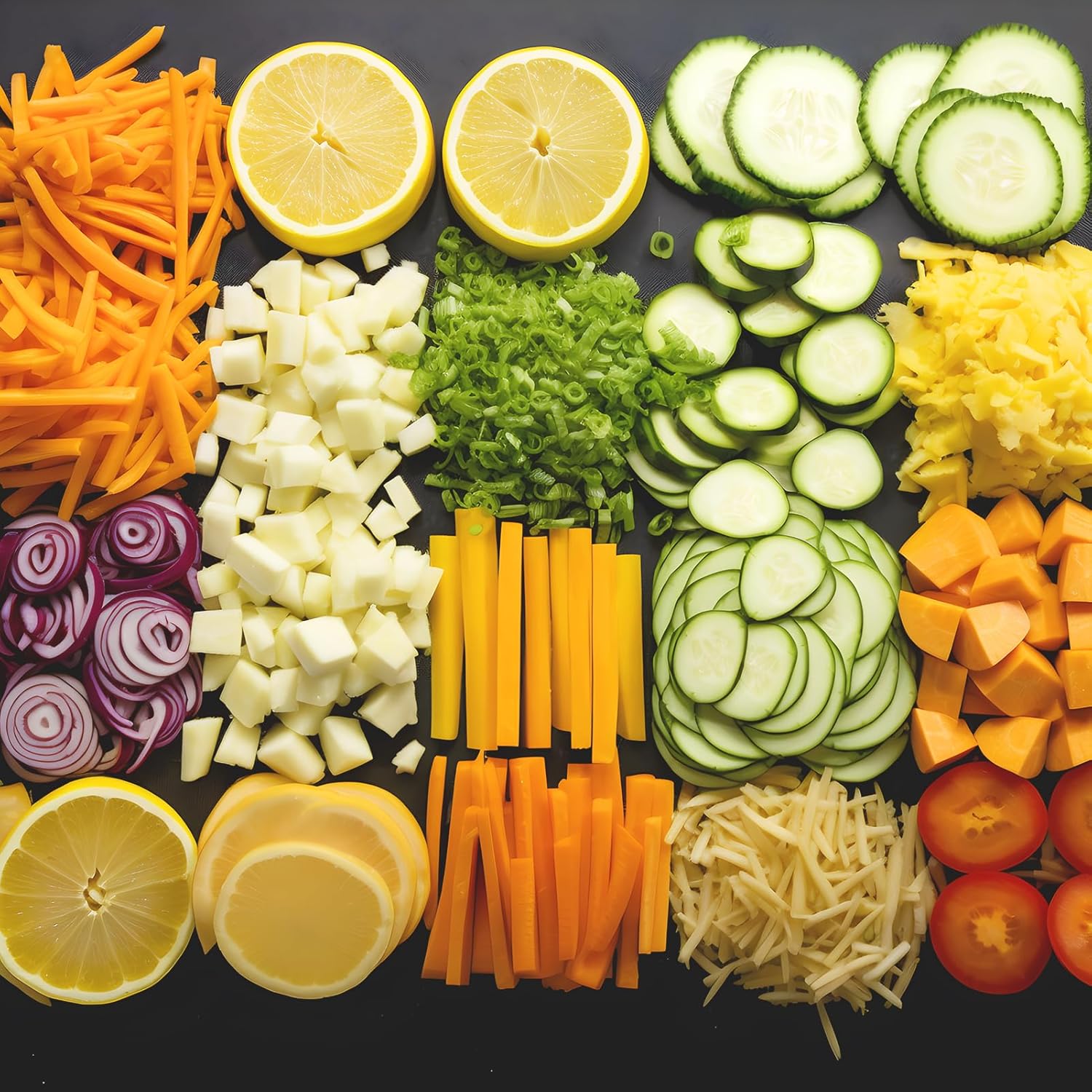
Figure 5: Examples of various cuts achievable with the slicer.
Cleaning and Maintenance
Proper cleaning ensures hygiene and extends the lifespan of your slicer.
- Disassembly: The slicer body is designed to be easily disassembled for cleaning. Press the release button to detach the main components.
- Rinsing: Rinse the slicer components under running tap water immediately after use to prevent food residue from drying.
- Brushing: Use the included cleaning brush to remove any stubborn food particles from crevices and around the blade area. Avoid using your fingers directly on the blades.
- Dishwasher Safe: All removable parts of the VEGGURU Vegetable Slicer are dishwasher safe for convenient cleaning.
- Drying: Ensure all parts are completely dry before reassembling or storing to prevent rust or mildew.

Figure 6: Cleaning the slicer under running water.
Storage
The VEGGURU Vegetable Slicer is designed for compact storage.
- Fold Compactly: The slicer folds down to a compact size, occupying minimal space in your kitchen drawers or cabinets.
- Secure: Ensure the safety lock on the handle is engaged before storing.
- Dry Place: Store in a dry place away from direct sunlight and extreme temperatures.

Figure 7: The slicer folded for easy storage.
Troubleshooting
If you encounter any issues with your VEGGURU Vegetable Slicer, please consider the following:
- Food Not Slicing Properly:
- Ensure the thickness adjustment dial is set correctly.
- Verify that the food item is properly positioned in the chute and the food pusher is applied with adequate pressure.
- Check if the blades are obstructed by dried food residue. Clean thoroughly if necessary.
- Handle Sticking:
- Ensure the safety lock is fully disengaged.
- Clean any debris or food particles that might be hindering the handle's movement.
For further assistance, please refer to the "Warranty and Support" section.
Specifications
| Attribute | Detail |
|---|---|
| Brand | VEGGURU |
| Model Number | 001 |
| Color | Gray |
| Material | Acrylonitrile Butadiene Styrene (ABS) |
| Blade Material | 420 Stainless Steel |
| Product Dimensions (L x W x H) | 15 x 15.5 x 35 cm (approx. 16.1L x 14.9W x 34.9H centimeters) |
| Item Weight | 907 g (approx. 2 pounds) |
| Special Feature | Dishwasher Safe |
| Recommended Uses | Chopping, Slicing, Julienne, Dicing |
Warranty and Support
Your VEGGURU Vegetable Slicer comes with a satisfaction guarantee. We are committed to providing a safe and easy-to-use product.
If you have any questions or encounter any problems with your slicer, please do not hesitate to contact us. You can send a message via Amazon, and we will respond within 24 hours to assist you.
For support, please visit the product page on Amazon and use the "Contact Seller" option.