1. Introduction
Thank you for choosing the Genpai 48IN Floating Bathroom Vanity. This manual provides essential information for the safe installation, operation, and maintenance of your new bathroom vanity. Please read these instructions carefully before assembly and use, and retain them for future reference.
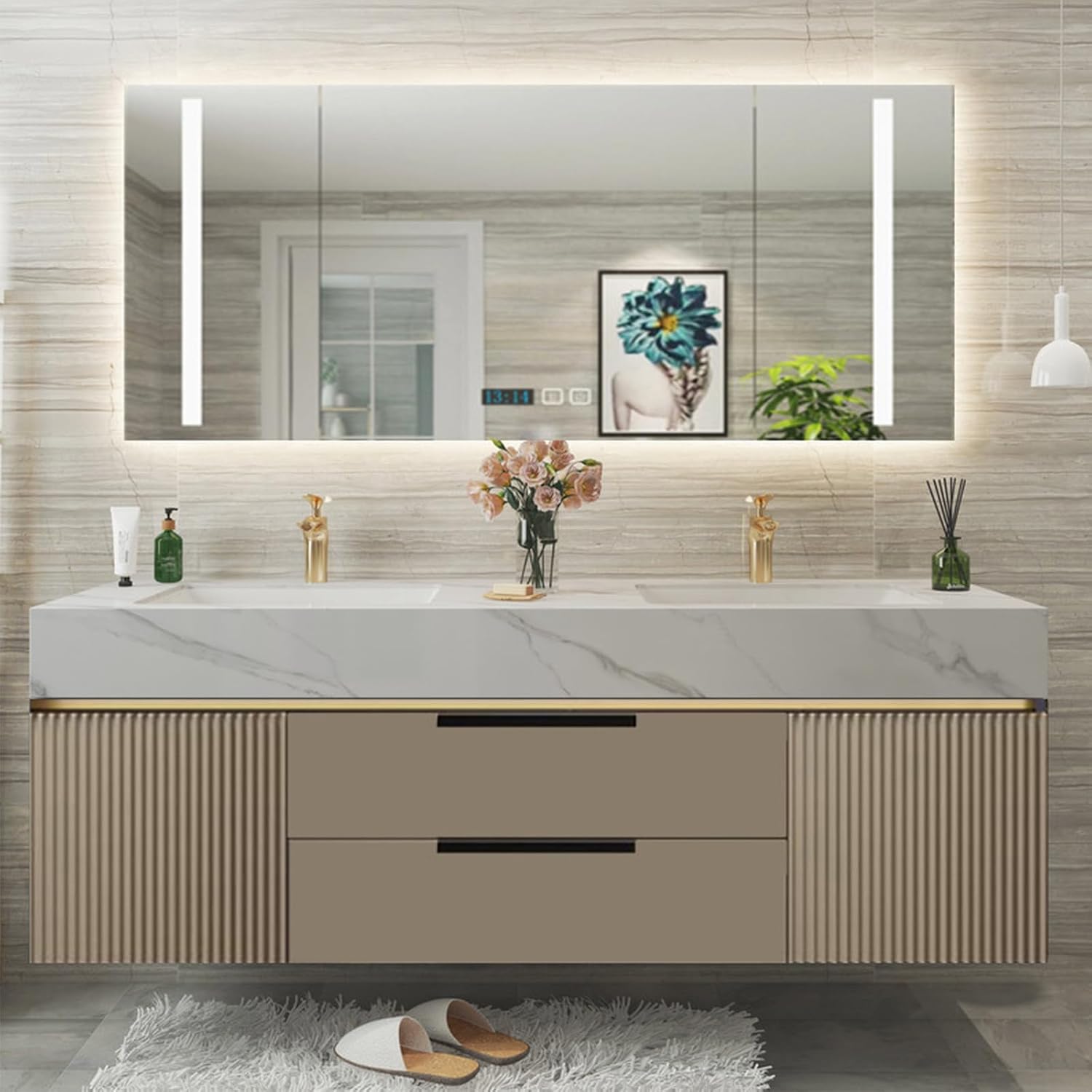
Image 1.1: The Genpai 48IN Floating Bathroom Vanity, featuring a double sink design and an illuminated mirror.
2. Safety Information
To ensure safe handling and use of your bathroom vanity, please adhere to the following guidelines:
- Always follow the assembly instructions precisely.
- Ensure all connections for plumbing and electrical components are performed by a qualified professional.
- Do not overload drawers or cabinets to prevent tipping or damage.
- Keep small children away from the assembly area and ensure all small parts are out of reach.
- Regularly inspect the vanity for any signs of wear or damage. Discontinue use if damage is found and contact customer support.
3. Product Features
The Genpai 48IN Floating Bathroom Vanity is designed with functionality and durability in mind:
- Easy-to-Clean Double Sink: Equipped with two glazed ceramic sinks, offering a smooth, non-porous surface for effortless cleaning and maintenance.
- LED Lighting & One-Touch Defogging Mirror: The integrated smart mirror cabinet features LED lighting for shadow-free illumination and a one-touch defogging function, ensuring a clear reflection at all times.
- Smooth Solid Wood Panels: Constructed from multi-layer solid wood panels, providing resistance to high temperatures and deformation, ensuring a long service life.
- Efficient Storage: Features multiple drawers and cabinets, along with ample countertop space, for organized and accessible storage of bathroom essentials.

Image 3.1: Overview of the vanity's intelligent mirror cabinet storage, table storage, and dual drawer storage.

Image 3.2: Details of the integrated ceramic basin, golden faucet, and the decorative wave-shaped panel design.

Image 3.3: Visual representation of the thickened countertop, deepened ceramic bowl, intelligent mirror, and the durable rubber solid wood construction.
4. Specifications
| Feature | Detail |
|---|---|
| Product Dimensions (L x W x H) | 48 x 21.6 x 19.6 inches |
| Item Weight | 200 pounds |
| Material | Marble (countertop), Multi-layer Solid Wood (cabinet) |
| Number of Drawers | 2 |
| Special Feature | Dent Resistant |
| Color | Khaki |
| Manufacturer | Genpai |

Image 4.1: Detailed dimensions of the vanity and mirror for planning and installation.
5. Setup and Installation
Professional installation is recommended for plumbing and electrical connections. Follow these steps for mounting the vanity:
- Step 1: Determine Cabinet Location. Position the main cabinet against the wall and mark the drilling points for perforation.
- Step 2: Install Basin. Carefully place the basin into the cabinet and secure it with glass glue around the edges.
- Step 3: Measure Mirror Height. Measure the desired height for the mirror and align it with the back hole spacing. Mark the punch holes on the wall.
- Step 4: Secure Mirror. Point the mirror's back holes to the marked positions on the wall and secure it firmly with screws.

Image 5.1: Visual guide illustrating the four main steps for installing the floating bathroom vanity.
6. Operating Instructions
The smart mirror cabinet features intuitive controls for its LED lighting and defogging functions:
- LED Lights: Touch the designated sensor on the mirror to turn the LED lights on or off.
- One-Touch Defogging: Activate the defogging function by touching the corresponding sensor on the mirror. This will clear any fog for a clear reflection.
- Time and Temperature Display: The mirror also displays time and temperature for convenience.

Image 6.1: The intelligent mirror highlighting its LED lights, smart touch controls, one-button defogging, and time/temperature display.

Image 6.2: A detailed view of the touch-sensitive controls on the mirror for activating the defogging and power functions.
7. Maintenance
To maintain the appearance and longevity of your Genpai bathroom vanity, follow these care instructions:
- Cleaning: Wipe surfaces with a damp cloth. Avoid abrasive cleaners or harsh chemicals that may damage the finish or materials.
- Spills: Clean up spills immediately to prevent staining, especially on the marble countertop.
- Mirror Care: Use a soft, lint-free cloth and a non-ammonia glass cleaner for the mirror.

Image 7.1: Demonstrating the recommended method for cleaning the vanity surfaces with a damp cloth.
8. Troubleshooting
If you encounter any issues with your Genpai bathroom vanity, please consider the following:
- LED Lights Not Working: Check the power connection to the mirror. Ensure the power outlet is functional.
- Defogging Not Activating: Verify that the mirror is receiving power and the touch sensor is clean and unobstructed.
- Drawers Sticking: Ensure drawers are not overloaded. Check for any obstructions in the drawer slides.
For persistent problems or issues not listed here, please contact Genpai customer support.
9. Warranty and Support
Genpai is committed to providing high-quality products and excellent customer service. We offer professional after-sales support to ensure your satisfaction.
- Customer Inquiries: For any product-related questions or assistance needed after purchase, our support team will provide detailed responses within 8 hours.
- Contact Information: Please refer to your purchase documentation or the Genpai official website for the most current customer support contact details.