
1. Introduction
This manual provides essential instructions for the installation, operation, and maintenance of your Seplos 3.0 BMS (Battery Management System) 48V 50A 15S Smart Balance Battery Protection Board. Please read this manual thoroughly before using the product to ensure safe and efficient operation. This intelligent BMS is designed for LiFePO4 and NCM battery systems, offering comprehensive protection and monitoring capabilities.
2. Safety Information
Always observe the following safety precautions to prevent injury or damage to the product and connected equipment:
- Installation should only be performed by qualified personnel.
- Ensure all power sources are disconnected before installation or maintenance.
- Verify correct polarity for all connections. Incorrect wiring can cause severe damage.
- Do not expose the BMS to moisture, extreme temperatures, or corrosive environments.
- Use appropriate personal protective equipment (PPE) during installation.
- Refer to local regulations and standards for battery system installation.
3. Product Overview
The Seplos 3.0 BMS is a sophisticated battery management system designed to protect and optimize the performance of 48V (51.2V) 15S LiFePO4 and NCM battery packs. It features advanced communication protocols and robust protection mechanisms.
Key Features:
- Cell Configuration: Supports 15 series (15S) LiFePO4 battery systems.
- Current Rating: 50A continuous discharge current.
- Parallel Operation: Supports up to 16 units in parallel for increased capacity and power.
- Communication: Integrated CANBUS and RS485 communication modules for inverter compatibility and system integration.
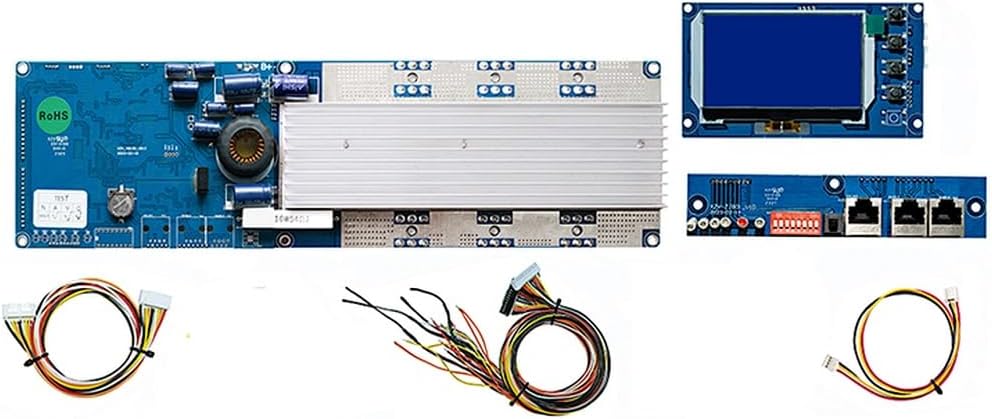
- Monitoring: Bluetooth module for real-time battery data viewing via smartphone application. Includes an LCD screen for local display.
- Protection Functions: Passive balance, individual cell over-voltage protection, overall over-voltage protection, over-temperature protection, over-charge (discharge) protection, over-current protection, and short-circuit protection.
- Inverter Compatibility: Compatible with a wide range of inverters including Growatt, Goodwe, Sofar, SMA, Victron, DEYE, Luxpower, Sermatec, Renac, TBB Power, Solis, Foxess, and IMEON.
Package Contents:
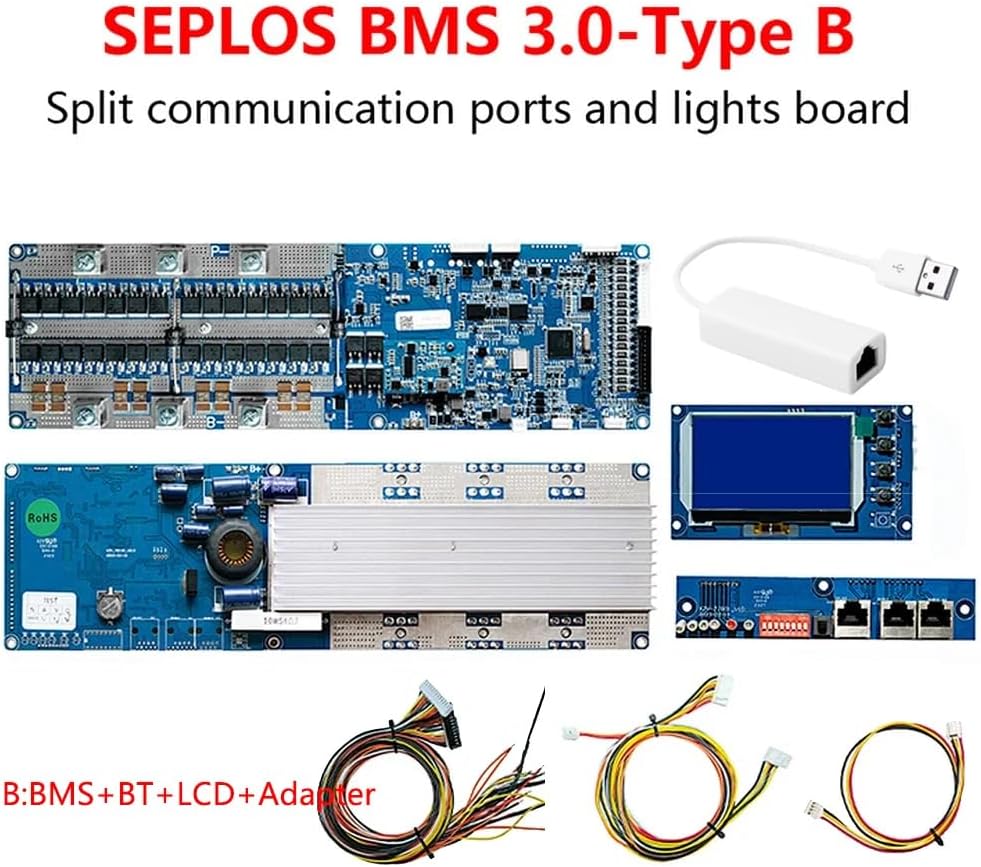
- Seplos 3.0 BMS (with CAN/RS485 and temperature sensor)
- Connection Cable
- LCD Screen
- Bluetooth Module
- Adapter


4. Setup and Installation
Careful installation is crucial for the proper functioning of the BMS. Follow these general steps:
4.1 Wiring Connections
- Balance Wires: Connect the balance wires from your 15S battery pack to the corresponding ports on the BMS. Ensure each cell voltage is correctly connected to its designated pin.
- Power Cables: Connect the main positive (B+) and negative (P-) terminals of the battery pack to the BMS. Observe correct polarity.
- Load/Charger Connections: Connect your load and charger to the appropriate output terminals of the BMS.
- Temperature Sensor: Connect the provided temperature sensor to the BMS and place it near the battery cells for accurate temperature monitoring.
4.2 Communication Setup
- Bluetooth: Power on the BMS. Enable Bluetooth on your smartphone and search for the BMS device. Pair with the device and open the dedicated Seplos app to view real-time battery data.
- CANBUS/RS485: Connect the CANBUS or RS485 communication cables from the BMS to your compatible inverter or monitoring system. Refer to the inverter's manual for specific connection and configuration details. The BMS supports automatic matching or manual switching of inverter protocols.
- PC Connection: For advanced parameter settings and monitoring, connect the BMS to a PC using the provided adapter and software.
4.3 Parallel Operation
The Seplos 3.0 BMS supports parallel operation of up to 16 units. When connecting multiple BMS units in parallel, ensure all units are configured correctly and follow the manufacturer's guidelines for parallel wiring to maintain system balance and safety.
5. Operating Instructions
Once installed and powered on, the BMS will begin monitoring and protecting your battery system.
5.1 Monitoring via LCD and Bluetooth App
- LCD Screen: The integrated LCD screen displays key battery parameters such as voltage, current, temperature, and state of charge (SOC).
- Bluetooth App: Use the Seplos smartphone application (available for Apple/Android) to access detailed real-time data, including individual cell voltages, temperature, current, and protection status. The app supports English and Chinese languages.

5.2 Protection Mechanisms
The BMS continuously monitors the battery and activates protection functions when parameters exceed safe limits. These include:
- Over-voltage Protection: Prevents cells from being charged beyond their safe voltage limit.
- Under-voltage Protection: Prevents cells from being discharged below their safe voltage limit.
- Over-current Protection: Limits current during charge and discharge to prevent damage.
- Over-temperature Protection: Disconnects the battery if temperatures exceed safe operating ranges.
- Short-circuit Protection: Instantly cuts off power in case of a short circuit.
When a protection is triggered, the BMS will typically disconnect the battery from the load or charger. The specific protection status can be viewed on the LCD or via the Bluetooth app.
6. Maintenance
The Seplos 3.0 BMS is designed for minimal maintenance. However, regular checks are recommended:
- Visual Inspection: Periodically inspect the BMS and all connections for any signs of damage, corrosion, or loose wiring.
- Firmware Updates: Check the manufacturer's website or app for any available firmware updates to ensure optimal performance and access to new features.
- Cleaning: Keep the BMS clean and free from dust and debris. Use a dry, soft cloth for cleaning. Do not use liquids or solvents.
7. Troubleshooting
If you encounter issues with your Seplos 3.0 BMS, refer to the following common problems and solutions:
| Problem | Possible Cause | Solution |
|---|---|---|
| BMS not powering on | Incorrect wiring, loose connections, battery discharged. | Check all power connections and polarity. Ensure battery has sufficient charge. |
| No data on LCD/App | Bluetooth not connected, communication cable loose, BMS fault. | Ensure Bluetooth is enabled and paired. Check communication cable connections. Restart BMS. |
| Battery not charging/discharging | Protection triggered (e.g., over-voltage, under-voltage, over-current). | Check BMS status on LCD/App for active protections. Address the underlying cause (e.g., balance cells, reduce load). |
| Inverter not communicating with BMS | Incorrect CANBUS/RS485 wiring, incompatible protocol, inverter settings. | Verify communication cable connections. Ensure BMS protocol matches inverter. Consult inverter manual for settings. |
If the problem persists after attempting these solutions, please contact Seplos customer support.
8. Specifications
| Feature | Detail |
|---|---|
| Brand | Seplos |
| Model Name | seplos BMS 3.0version Type-B |
| Cell Configuration | 15S (Series) |
| Nominal Voltage | 48V (51.2V) |
| Continuous Current | 50A |
| Communication Interfaces | CANBUS, RS485, Bluetooth |
| Display | LCD Screen |
| Parallel Support | Up to 16 units |
| Manufacturer | SEPLOS |
| ASIN | B0CMM3WH13 |
9. Warranty Information
The Seplos 3.0 BMS comes with a 1-year warranty from the date of purchase. This warranty covers defects in materials and workmanship under normal use. It does not cover damage caused by improper installation, misuse, accidents, unauthorized modifications, or natural disasters. Please retain your proof of purchase for warranty claims.
10. Customer Support
For technical assistance, troubleshooting, or warranty inquiries, please contact Seplos customer support through the retailer where the product was purchased or visit the official Seplos website for contact information. When contacting support, please provide your product model (3.0-B 48V 50A 15S) and ASIN (B0CMM3WH13) for faster service.