
Vloee VLOEE-CAB-MOTION-20
Vloee Motion Sensor Magnetic LED Light Bar Instruction Manual
Model: VLOEE-CAB-MOTION-20
1. Introduction
Thank you for choosing the Vloee Motion Sensor Magnetic LED Light Bar. This product is designed to provide convenient, automatic illumination for various indoor spaces such as closets, cabinets, shelves, pantries, and hallways. Featuring motion sensing, adjustable brightness, and a rechargeable battery, this light bar offers versatile lighting solutions. Please read this manual thoroughly before use to ensure proper installation and operation.
2. Package Contents
Verify that all items listed below are included in your package:
- 4 x Vloee Motion Sensor Magnetic LED Light Bars (3000K)
- 8 x Adhesive Magnetic Plates
- 1 x USB-C Charging Cable
- 1 x Remote Control
- 1 x Instruction Manual

An overview of the Vloee Motion Sensor Magnetic LED Light Bar package contents, including four light bars, a remote control, and multiple USB-C charging cables.
3. Product Features
- Dual Sensor Technology: Equipped with both motion and daylight sensors for intelligent operation.
- Adjustable Brightness & Timer: Customize lighting with 5 brightness levels and set automatic shut-off timers (15/30/60 minutes) via the included remote control.
- Rechargeable Battery: Built-in 1200mAh lithium-ion battery provides extended use and is quickly rechargeable via USB-C.
- Easy Installation: Strong built-in magnets allow for quick attachment to magnetic surfaces or use with adhesive magnetic plates for non-magnetic surfaces.
- Versatile Application: Ideal for various locations including closets, cabinets, kitchens, pantries, stairs, and more.
- Warm White Light: Provides 3000K warm white illumination.

The semi-curved lampshade design helps protect eyes and provides a broader illumination angle.
4. Safety Information
- Do not expose the light bar to extreme temperatures or direct sunlight for prolonged periods.
- Avoid disassembling or modifying the device, as this may void the warranty and pose safety risks.
- Keep the light bar away from water and high humidity environments, as it is not water-resistant.
- Use only the provided USB-C cable or a certified equivalent for charging.
- Ensure the installation surface is clean and dry for optimal adhesive performance.
5. Setup and Installation
The Vloee LED Light Bar offers flexible installation options. It can be directly attached to magnetic surfaces or mounted using the included adhesive magnetic plates.
Installation Steps:
- Prepare the Surface: Choose a smooth, clean, and dry surface for installation. Wipe off any dust or debris.
- Attach Magnetic Plate: Peel off the protective liner from the adhesive magnetic plate. Firmly press the plate onto the chosen surface.
- Mount the Light Bar: The light bar has built-in magnets. Simply attach the light bar to the installed magnetic plate. This allows for easy removal for charging.

A visual guide demonstrating the three simple steps for installing the Vloee LED light bar: cleaning the surface, attaching the adhesive magnetic plate, and mounting the light bar.

Illustration detailing two installation methods: direct magnetic attachment to a metallic surface, and using an adhesive magnetic strip for non-magnetic surfaces.
6. Operating Instructions
6.1 Charging the Light Bar
Before first use, fully charge the light bar. Connect the provided USB-C charging cable to the light bar's charging port and to a USB power source (e.g., wall adapter, computer USB port). The indicator light will show charging status (typically red for charging, green for fully charged). A full charge takes approximately 3 hours.

A close-up view of the Vloee LED light bar, highlighting the USB-C charging port and a reminder to fully charge before first use.
6.2 Control Buttons and Indicators
The light bar features a Mode Switch (M) button and a Brightness button for manual control. A PIR Motion Sensor is also integrated.

An image illustrating the physical control buttons on the light bar, including the mode button (M) and brightness button, along with their corresponding functions.

A detailed diagram labeling the Mode Indicator, Dimming Switch, Mode Switch (M), PIR Motion Sensor, and USB-C Fast Charge port on the Vloee LED light bar.
6.3 Operating Modes
Press the 'M' (Mode) button on the light bar or use the remote control to cycle through the following modes:
- Always On Mode: The light remains continuously on.
- Night Mode (Dusk to Dawn Sensor): The light will only activate when motion is detected in a dark environment.
- Day Mode (24 Hours Motion Sensor): The light will activate when motion is detected, regardless of ambient light conditions.
- OFF: The light is turned off.

An image comparing the 'Dusk to Dawn Motion Sensor Mode' (light activates only in darkness) and '24 Hours Motion Sensor Mode' (light activates anytime motion is detected) with a 3-5 meter detection range and 120-degree angle.
6.4 Brightness Adjustment
Use the brightness button on the light bar or the remote control to adjust the light intensity. There are 5 adjustable brightness levels, reaching up to 150 lumens.
6.5 Timer Function (Remote Control Only)
The remote control allows you to set a timer for the lights to automatically turn off after a specified duration:
- 15 minutes
- 30 minutes
- 60 minutes
Press the corresponding timer button on the remote to activate this feature.
7. Maintenance
- Cleaning: Wipe the light bar with a soft, dry cloth. Do not use abrasive cleaners or solvents.
- Battery Care: To prolong battery life, avoid fully discharging the light bar frequently. Recharge when the light output appears dim.
- Storage: If storing the light bar for an extended period, charge it fully every 3 months to maintain battery health.
8. Troubleshooting
| Problem | Possible Cause | Solution |
|---|---|---|
| Light does not turn on. | Battery is depleted. | Charge the light bar using the USB-C cable. |
| Light does not turn on in motion sensor mode. | Incorrect mode selected. | Ensure 'Night Mode' or 'Day Mode' is selected. |
| Insufficient darkness (for Night Mode). | Test in a darker environment or switch to 'Day Mode'. | |
| Motion sensor blocked or out of range. | Ensure the sensor is clear and within 3-5 meters of expected motion. | |
| Light flickers or is dim. | Low battery. | Recharge the light bar. |
| Remote control not working. | Remote battery depleted. | Replace the remote control battery (if applicable, check remote manual). |
| Obstruction between remote and light bar. | Ensure a clear line of sight between the remote and the light bar. |
9. Specifications
| Feature | Detail |
|---|---|
| Model Number | VLOEE-CAB-MOTION-20 |
| Dimensions | 9"L x 1.7"W x 0.7"H |
| Item Weight | 1.43 pounds (for 4-pack) |
| Light Source Type | LED (19 Super Bright LED Lamp Beads) |
| Light Color | Warm White (3000K) |
| Brightness | Up to 150 Lumens |
| Power Source | Battery Powered (Built-in 1200mAh Lithium-ion Battery) |
| Charging Interface | USB-C |
| Voltage | 5 Volts |
| Wattage | 1.5 Watts |
| Control Method | Remote Control, Push Button |
| Motion Sensor Range | Up to 3 meters (10 feet) |
| Motion Sensor Angle | 120 degrees |
| Material | Acrylonitrile Butadiene Styrene |
| Installation Type | Magnetic Strip with Adhesive |
| Indoor/Outdoor Usage | Indoor (Not Water Resistant) |
| Energy Efficiency Class | G |
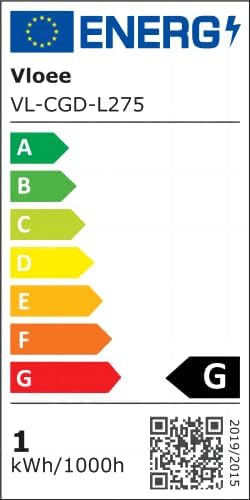
The EU energy label for the Vloee VL-CGD-L275 light, indicating an energy efficiency class of G and 1 kWh/1000h consumption. For more information, visit the EPREL database.
10. Warranty and Support
Vloee provides a 12-month hassle-free replacement service for this product. If you encounter any issues or have questions regarding your Vloee Motion Sensor Magnetic LED Light Bar, please contact Vloee customer support for assistance.
11. Product Application Examples
The Vloee Motion Sensor Magnetic LED Light Bar is versatile and can be used in various locations to enhance visibility and convenience:
- Under kitchen cabinets for task lighting.
- Inside closets and wardrobes for easy item retrieval.
- Along staircases for safety and guidance.
- In pantries, shelves, and drawers.
- As a night light under beds or in bathrooms.

Examples of the Vloee LED light bar in use, providing illumination under a bed, along a staircase, and near a toilet, demonstrating its versatility.
Ask a question about this manual
Ask about setup, troubleshooting, compatibility, parts, safety, or missing instructions. Manuals+ will review the question and use this page’s manual context to help answer it.