
Hot Wheels HTN82
Hot Wheels Let's Race Netflix - City Shark Car Wash Playset Instruction Manual
Model: HTN82
Introduction
Welcome to the Hot Wheels City Shark Car Wash Playset, inspired by the thrilling Netflix series 'Let's Race'! This playset offers an exciting car wash experience where vehicles undergo dramatic color changes. Designed for interactive play, it features a menacing shark, dynamic water effects, and multiple play zones to spark imagination and adventure.

Figure 1: Overview of the Hot Wheels City Shark Car Wash Playset.
Safety Information
WARNING: Not suitable for children under 36 months. Adult assembly is required. This product contains small parts that may pose a choking hazard. Always supervise children during play, especially when water is involved.
What's in the Box
Your Hot Wheels City Shark Car Wash Playset package should contain the following items:
- 1 Hot Wheels City Shark Car Wash Playset
- 1 Hot Wheels Color Reveal vehicle (1:64 scale)
Note: Colors and decorations of the included vehicle may vary.

Figure 2: Product packaging showing included items.
Setup
Adult assembly is required for this playset. Follow these general steps for setup:
- Unpack Components: Carefully remove all parts from the packaging. Refer to Figure 2 for an overview of the main components.
- Assemble Track Sections: Connect the various track pieces and car wash components as indicated in the visual instructions. Ensure all connections are secure.
- Position Shark Mechanism: Attach the shark mechanism to the main car wash structure. Ensure it can move freely as intended.
- Prepare Water Tanks: The playset features designated areas for water. Fill the primary car wash tank with warm water for the initial color reveal. Fill the secondary tank (often for the second color change) with ice-cold water.

Figure 3: Example of playset assembly and initial setup.
Operating Instructions
Experience the dynamic color-changing action of your Hot Wheels City Shark Car Wash Playset:
- Initial Color Reveal:
Drive the included Color Reveal vehicle up the ramp and into the shark's mouth. Press down on the shark's head. This action changes the water color and reveals the car's hidden decoration.

Figure 4: Activating the initial color reveal by pressing the shark's head.
- Shark Track Action:
Lift the shark to allow the car to speed through the track inside its body. An opening in the shark's belly allows you to observe the car's progress.

Figure 5: Car racing through the shark's internal track.
- Second Color Change (Ice Water):
Tap the shark's tail to launch cars from the parking area into the ice-cold water tank. This will trigger another surprising color change on your Color Reveal vehicle.

Figure 6: Using the ice water tank for an additional color transformation.
- Restore Original Color:
To revert the car to its initial appearance, pass it through the car wash section again, ensuring it interacts with the warm water in the primary tank.
- Interactive Features:
Explore the playset's base, which includes realistic details like movable barriers and a roller, enhancing imaginative play scenarios.
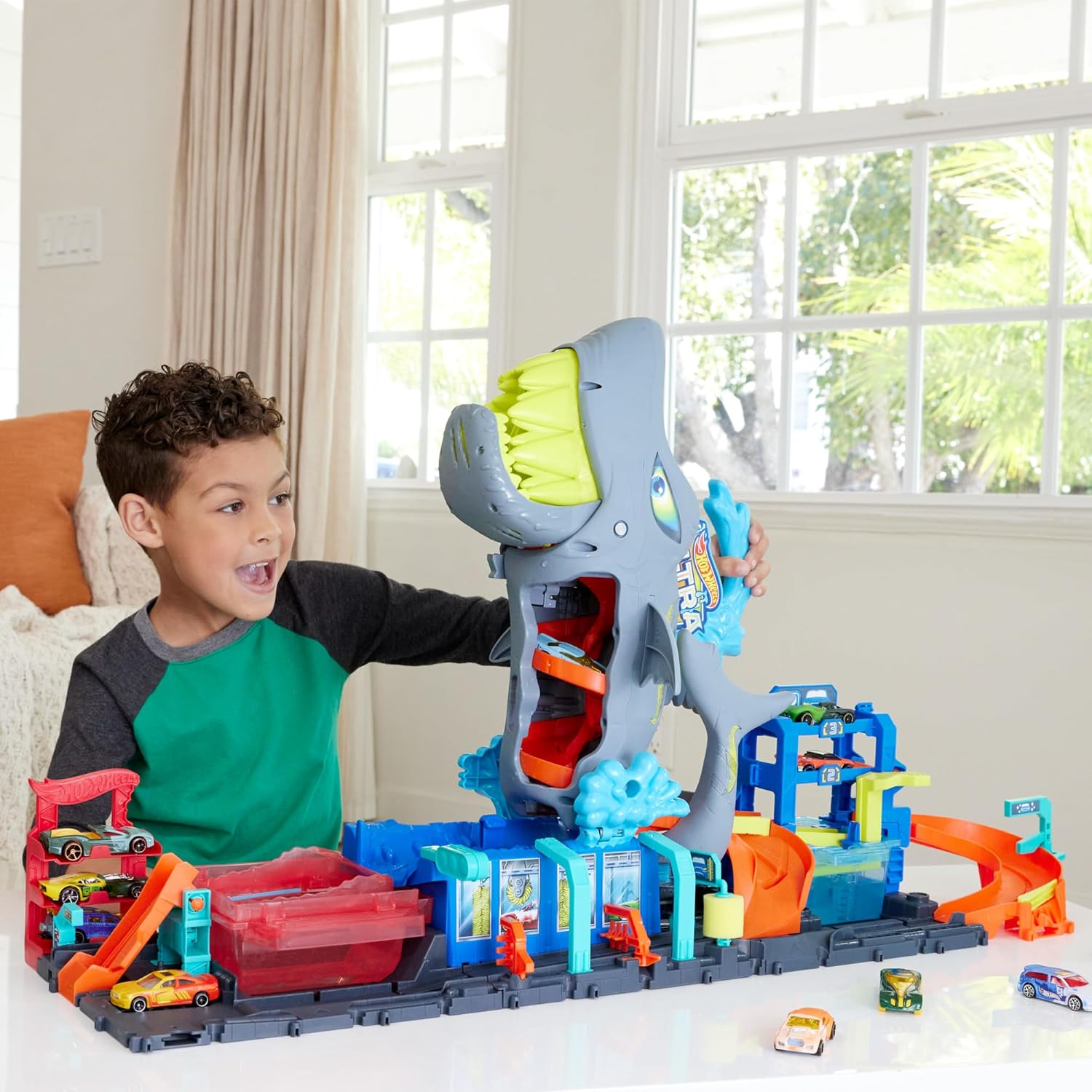
Figure 7: Child engaging with the playset's various features.
Maintenance
Proper maintenance ensures the longevity and optimal performance of your playset:
- Water Drainage: After play, tilt the playset to drain any excess water from the tanks and tracks. The playset includes a specially designed water collector at its base to contain water and prevent spills.
- Cleaning: Wipe down all surfaces with a damp cloth. Do not submerge the entire playset in water. Avoid harsh chemicals or abrasive cleaners.
- Drying: Allow all components to air dry completely before storing to prevent mold or mildew.
- Storage: The kit folds in half for easy storage. Use the integrated handle for convenient transport. Store in a clean, dry place away from direct sunlight and extreme temperatures.

Figure 8: Draining excess water from the playset for storage.
Troubleshooting
If you encounter any issues with your Hot Wheels City Shark Car Wash Playset, refer to the following common solutions:
| Problem | Possible Cause | Solution |
|---|---|---|
| Car does not change color. | Water temperature is incorrect or car is not a Color Reveal vehicle. | Ensure the primary tank has warm water and the secondary tank has ice-cold water. Use only Hot Wheels Color Reveal vehicles for optimal effect. |
| Water spills during play. | Overfilling tanks or vigorous play. | Do not overfill water tanks. Play in an area suitable for water activities, or place a protective mat underneath the playset. Utilize the integrated water collector. |
| Shark mechanism is stuck. | Obstruction or improper assembly. | Check for any debris or misaligned parts. Refer to the assembly instructions to ensure correct setup. |
Specifications
| Feature | Detail |
|---|---|
| Product Dimensions (L x W x H) | 21.18 x 82.55 x 45.72 cm (8.34 x 32.5 x 18 inches) |
| Weight | 2.2 kilograms (4.85 lbs) |
| Recommended Age | 3 years and up |
| Model Number | HTN82 |
| Number of Players | 1 |
| Main Material | Plastic |
| Scale | 1:64 (for included vehicle) |
| Batteries Required | No |
| Power Source | Manual |
Warranty and Support
Information regarding specific warranty details for this product is not available in the provided documentation. For any product support, inquiries, or to report issues, please contact Hot Wheels customer service or refer to the retailer's return policy where the product was purchased.
You can visit the official Hot Wheels brand store for more information and products: Hot Wheels Store
Ask a question about this manual
Ask about setup, troubleshooting, compatibility, parts, safety, or missing instructions. Manuals+ will review the question and use this page’s manual context to help answer it.