
Sharp ES-NIH814BWA-EN
Sharp ES-NIH814BWA-EN Integrated Washing Machine User Manual
Model: ES-NIH814BWA-EN | Capacity: 8kg | Spin Speed: 1400 rpm
1. Introduction
1.1 Product Overview
Thank you for choosing the Sharp ES-NIH814BWA-EN Integrated Washing Machine. This appliance is designed to provide efficient and reliable laundry care for your home. With an 8kg capacity and a 1400 rpm spin speed, it offers powerful cleaning performance while integrating seamlessly into your kitchen or utility space.

Figure 1.1: Front view of the Sharp ES-NIH814BWA-EN Integrated Washing Machine, showing its sleek design and integrated panel.
1.2 Safety Information
Before operating your washing machine, please read all safety instructions carefully. Keep this manual for future reference. Improper installation, maintenance, or use can cause serious injury or damage. Always disconnect the appliance from the power supply before cleaning or maintenance.
- Ensure the appliance is properly earthed.
- Do not allow children to play with the appliance.
- Do not open the detergent dispenser during the wash cycle.
- Do not touch the appliance with wet hands.
- Keep packaging materials out of reach of children.
2. Setup and Installation
2.1 Unpacking
Carefully remove all packaging materials. Check for any transport damage. Remove all transit bolts from the rear of the machine before installation. These bolts are essential for safe transport but must be removed for operation to prevent vibration and damage.
2.2 Location and Levelling
Place the washing machine on a firm, level floor. Adjust the adjustable feet to ensure the machine is perfectly level and stable. This prevents excessive vibration and noise during operation.
2.3 Water Connection
Connect the water inlet hose to a cold water tap with a 3/4-inch thread. Ensure all connections are tight to prevent leaks. The drain hose should be securely placed into a standpipe or connected to a suitable drain system, ensuring it is not kinked.

Figure 2.1: Rear view of the washing machine, illustrating the water inlet and drain hose connections.
2.4 Electrical Connection
Plug the power cord into a grounded electrical outlet. Ensure the voltage and frequency match the specifications on the rating plate of the appliance. Do not use extension cords or multiple adapters.
2.5 First Use
Before the first wash, run an empty cycle with a small amount of detergent at 60°C to clean the drum and remove any manufacturing residues.
3. Operating Instructions
3.1 Control Panel Overview
The control panel consists of a program selection dial, a digital display, and function buttons for customizing your wash cycle.
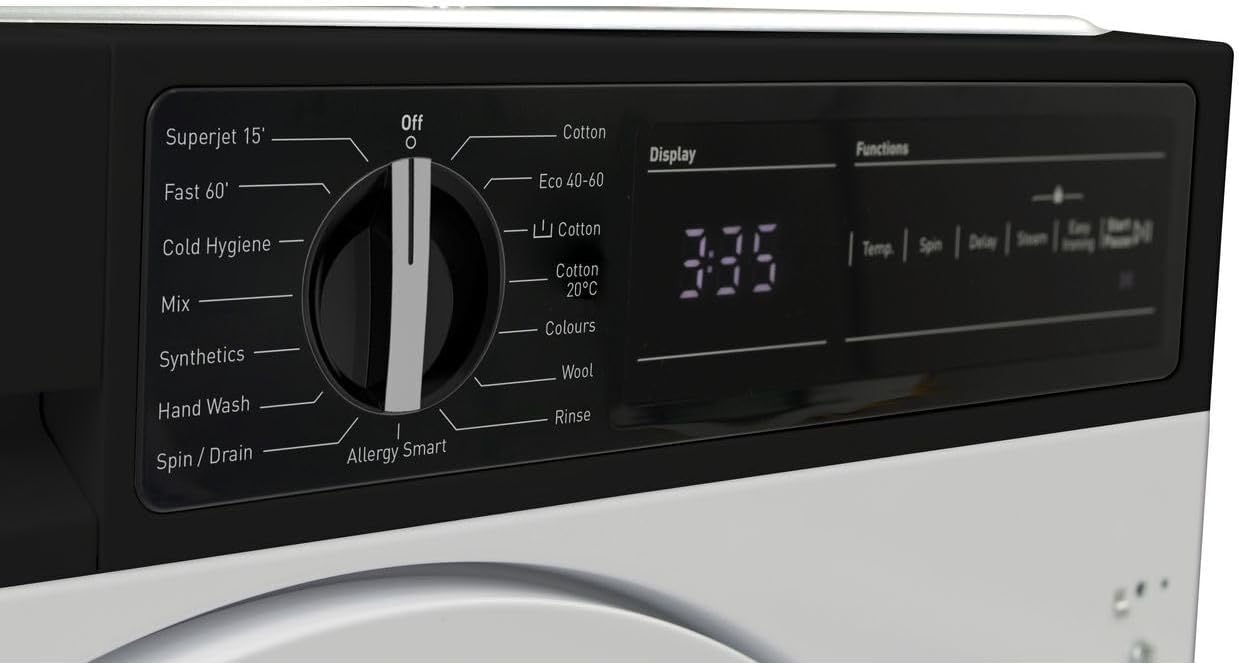
Figure 3.1: Detailed view of the program selection dial and digital display.

Figure 3.2: Close-up of the digital display showing time remaining and function buttons for Temp, Spin, Delay, Steam, and Easy Ironing.
3.2 Loading Laundry
Open the washing machine door and load your laundry. Do not overload the machine; leave enough space for clothes to tumble freely. Close the door firmly until it clicks.

Figure 3.3: The washing machine door open, revealing the drum for loading laundry.

Figure 3.4: An inside view of the stainless steel drum, designed for effective washing.
3.3 Adding Detergent and Additives
Pull out the detergent dispenser drawer. Add the appropriate amount of detergent to the main wash compartment and fabric softener to its designated compartment. Refer to your detergent packaging for dosage recommendations.

Figure 3.5: The detergent dispenser drawer, showing compartments for detergent and fabric softener.
3.4 Selecting a Wash Program
Turn the program selection dial to choose your desired wash program. Available programs include:
- Superjet 15': Quick wash for lightly soiled items.
- Fast 60': A faster cycle for everyday loads.
- Cold Hygiene: For hygienic washing at lower temperatures.
- Mix: For mixed fabric loads.
- Synthetics: For synthetic fabrics.
- Hand Wash: Gentle cycle for delicate items.
- Spin / Drain: To spin and drain water from laundry.
- Allergy Smart: Designed to remove allergens.
- Cotton: Standard program for cotton items.
- Eco 40-60: Energy-efficient program for cottons and mixed items at 40-60°C.
- Cotton 20°C: Low-temperature cotton wash.
- Colours: For colored garments to preserve vibrancy.
- Wool: Gentle program for woolens.
- Rinse: To rinse laundry without washing.
3.5 Adjusting Settings
After selecting a program, you can customize settings using the function buttons:
- Temp: Adjust wash temperature.
- Spin: Change spin speed.
- Delay: Set a delayed start time.
- Steam: Add a steam function for better hygiene or wrinkle reduction.
- Easy Ironing: Reduces creasing for easier ironing.
3.6 Starting a Wash Cycle
Press the Start/Pause button to begin the selected wash cycle. The display will show the remaining time.
3.7 Ending a Wash Cycle
Once the cycle is complete, the machine will signal. The door will unlock after a short delay. Remove your laundry promptly.
4. Maintenance and Care
Regular maintenance ensures optimal performance and extends the lifespan of your washing machine.
4.1 Cleaning the Detergent Dispenser
Periodically remove and clean the detergent dispenser drawer under running water to prevent detergent residue buildup.
4.2 Cleaning the Drum
Run a maintenance wash (e.g., a hot cycle with a washing machine cleaner or vinegar) monthly to clean the drum and remove any odors or residue.
4.3 Cleaning the Filter
Locate the drain pump filter, usually at the bottom front of the machine. Open the cover, drain any residual water, and carefully remove and clean the filter. This should be done regularly to prevent blockages.
4.4 Cleaning the Exterior
Wipe the exterior surfaces with a soft, damp cloth. Do not use abrasive cleaners or solvents.
5. Troubleshooting
If you encounter issues with your washing machine, refer to the following common problems and solutions before contacting customer service.
| Problem | Possible Cause | Solution |
|---|---|---|
| Machine does not start | No power; Door not closed; Program not selected; Start/Pause not pressed. | Check power supply; Ensure door is latched; Select a program; Press Start/Pause. |
| No water intake | Water tap closed; Inlet hose kinked; Water pressure too low. | Open water tap; Straighten hose; Check household water pressure. |
| Water not draining | Drain hose kinked; Drain pump filter blocked. | Straighten drain hose; Clean drain pump filter. |
| Excessive vibration/noise | Transit bolts not removed; Machine not level; Uneven load. | Remove transit bolts; Adjust feet to level machine; Redistribute laundry. |
| Detergent residue in dispenser | Too much detergent; Low water pressure; Dispenser blocked. | Reduce detergent amount; Check water pressure; Clean dispenser. |
6. Technical Specifications
| Feature | Specification |
|---|---|
| Brand | Sharp |
| Model | ES-NIH814BWA-EN |
| Capacity | 8 Kilograms |
| Maximum Rotational Speed | 1400 RPM |
| Installation Type | Integrated |
| Control Console | Buttons, Dial, Digital Display |
| Access Location | Front Load |
| Material (Drum) | Stainless Steel |
| Voltage | 2.2E+2 Volts (AC) |
| Colour | White |
7. Warranty and Customer Support
Your Sharp ES-NIH814BWA-EN Washing Machine comes with a manufacturer's warranty. Please refer to the separate warranty card provided with your appliance for specific terms and conditions, including warranty period and coverage.
For technical assistance, spare parts, or to schedule a service appointment, please contact Sharp customer support. Contact details can typically be found on the Sharp official website or in your warranty documentation.
When contacting support, please have your model number (ES-NIH814BWA-EN) and serial number ready. The serial number is usually located on a sticker inside the door frame or on the back of the appliance.
Ask a question about this manual
Ask about setup, troubleshooting, compatibility, parts, safety, or missing instructions. Manuals+ will review the question and use this page’s manual context to help answer it.