
Introduction
The roiesvry S23 Pro Mini Smartphone is designed for convenience and portability, offering essential smartphone functionalities in a compact form factor. Its lightweight construction makes it an ideal companion for travel or daily activities. Featuring a 3.0-inch HD touch display, it provides clear visuals for browsing, streaming, and gaming. Powered by Android 8.1 with 2GB RAM and 16GB ROM, it ensures smooth performance for multitasking and various applications. The device also includes dual cameras for capturing moments and a 1000mAh battery for extended use.
What's in the Box
- S23 Pro Mini Smartphone
- Phone Case
- User Manual
- Card Removal Pin
- Protective Film
- USB-C Cable
- Power Adapter
- Lanyard (Gift)
Setup
1. Inserting SIM Card and Powering On
Locate the SIM card slot on the side of the device. Use the provided card removal pin to open the tray. Insert your Nano-SIM card(s) and/or microSD card (if applicable) into the tray, ensuring correct orientation. Gently push the tray back into the slot until it clicks into place. To power on the device, press and hold the power button located on the side until the screen illuminates. Follow the on-screen prompts for initial setup, including language selection and network connection.

Figure 1: Inserting SIM card into the S23 Pro Mini Smartphone.
2. Charging the Device
Before first use, fully charge the S23 Pro Mini Smartphone. Connect the USB-C cable to the phone's charging port and the other end to the power adapter. Plug the power adapter into a wall outlet. The charging indicator will appear on the screen. A full charge typically takes approximately 2-3 hours. Ensure to use the provided power adapter and USB-C cable for optimal charging performance.

Figure 2: Charging the S23 Pro Mini Smartphone.
3. Initial Software Overview
The S23 Pro runs on Android 8.1, providing a user-friendly interface. Upon startup, you will see the home screen with pre-installed applications. You can customize your home screen by adding widgets and app shortcuts. Navigate through menus by swiping and tapping. The device supports various applications, ensuring smooth operation for daily tasks.

Figure 3: S23 Pro Mini Smartphone home screen with app icons.
Operating Instructions
1. Basic Navigation and App Usage
The S23 Pro features a 3.0-inch touch screen for intuitive navigation. Swipe left or right to access different home screens, and swipe down from the top for notifications and quick settings. Tap on app icons to open them. The 2GB RAM and 16GB ROM ensure efficient multitasking and storage for your essential applications. The Android 8.1 system supports a wide range of applications available for download.

Figure 4: S23 Pro Mini Smartphone displaying a selection of applications.
2. Making Calls and Network Connectivity
This mini smartphone supports 3G cellular technology for clear and stable calls. To make a call, open the 'Phone' app, dial the number, and press the call button. The device also supports Wi-Fi connectivity for internet access and Bluetooth for connecting to wireless accessories like headphones.
Video 1: Overview of the S23 Pro Mini Phone's features, including its compact size, Android 8.1 system, app compatibility, 3G network, and camera capabilities. This video is provided by the seller, Truely.
3. Camera Functionality
The S23 Pro is equipped with both front and rear cameras, allowing you to capture photos and videos. Open the 'Camera' app to switch between modes (photo, video) and cameras (front, rear). The rear camera features a 2-megapixel lens with high-speed autofocus and a 105° ultra-wide angle lens for a broader field of view. Optimize imaging algorithms enhance photo quality.

Figure 5: Detailed view of the S23 Pro Mini Smartphone's camera features.
4. Media Consumption and Hotspot
Enjoy multimedia content on the 3.0-inch HD display. The phone is suitable for watching videos and listening to music. You can also use the S23 Pro as a mobile hotspot to share its internet connection with other devices, enabling you to work or stay connected anywhere.
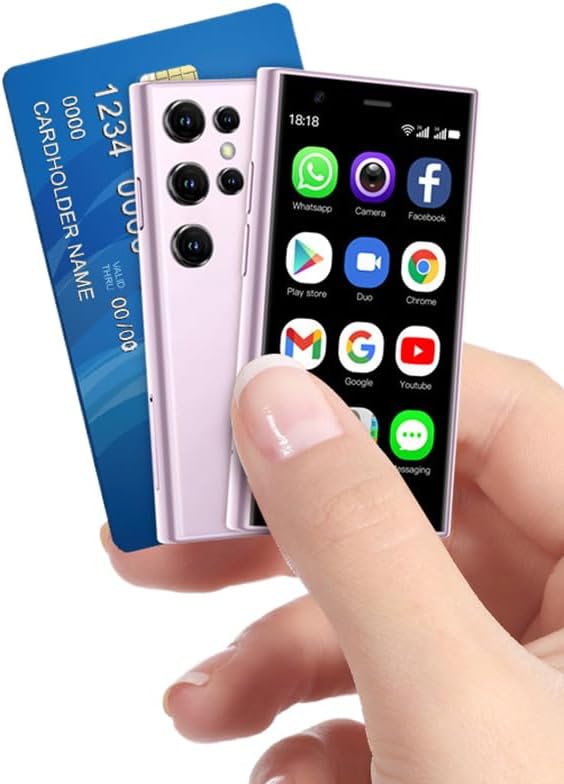
Figure 6: The compact size of the S23 Pro Mini Smartphone.
Maintenance
1. General Care
To ensure the longevity of your S23 Pro Mini Smartphone, keep it away from extreme temperatures, direct sunlight, and moisture. Clean the screen and body with a soft, dry cloth. Avoid using harsh chemicals or abrasive materials. The included transparent case provides additional protection against scratches and minor impacts.
2. Battery Optimization
The 1000mAh battery provides sufficient power for daily use. To optimize battery life, reduce screen brightness, close unused applications running in the background, and disable Wi-Fi or Bluetooth when not in use. Avoid fully discharging the battery frequently, as this can reduce its overall lifespan.
Troubleshooting
| Problem | Possible Cause | Solution |
|---|---|---|
| Device does not power on | Low battery; software issue | Charge the device for at least 30 minutes. If still unresponsive, perform a forced restart (refer to device-specific instructions for button combination). |
| Poor network signal | Weak signal area; SIM card issue | Move to an area with better signal. Check if the SIM card is properly inserted. Restart the device. |
| Applications crashing or freezing | Insufficient memory; app incompatibility | Close background apps. Clear app cache. Ensure apps are updated. If problem persists, uninstall and reinstall the app. |
| Battery drains quickly | High screen brightness; excessive app usage; background processes | Reduce screen brightness. Disable unnecessary features like GPS, Wi-Fi, Bluetooth when not in use. Limit background app refresh. |
Specifications
| Feature | Detail |
|---|---|
| Model Name | S23 Pro |
| Operating System | Android 8.1 |
| Screen Size | 3.0 Inches |
| Resolution | 480 x 854 |
| RAM | 2 GB |
| Memory Storage Capacity | 16 GB |
| Battery Capacity | 1000 Milliamp Hours |
| Cellular Technology | 3G |
| Connectivity Technology | Wi-Fi, Bluetooth, Cellular, NFC |
| Camera Features | Front, Rear (2 Megapixel rear lens) |
| Audio Jack | 3.5 mm |
| Item Weight | 8.1 ounces |
| Color | Purple |
Warranty and Support
For warranty information and technical support, please refer to the contact details provided by the manufacturer or seller at the point of purchase. Keep your proof of purchase for any warranty claims.