
B0CMHN9RJR
User Manual
Generic Replacement Remote Control for Grundig Smart 4K Ultra HD LED HDTV
1. Introduction
This manual provides essential information for the proper use and maintenance of your new Generic Replacement Remote Control. This remote is designed as an infrared (IR) replacement for various Grundig Smart 4K Ultra HD LED HDTV models, including 43GFB6100, 32-GHB-6100-MADRID, TS8187R11, 50GFU7800B, 43GFU7800, 43GFU7800B, and 50GFU7990B. Please ensure your original remote matches the appearance of this replacement remote for compatibility.
2. Product Overview
The replacement remote control features a standard layout for easy navigation and control of your compatible Grundig television. It includes dedicated buttons for popular streaming services and essential TV functions.
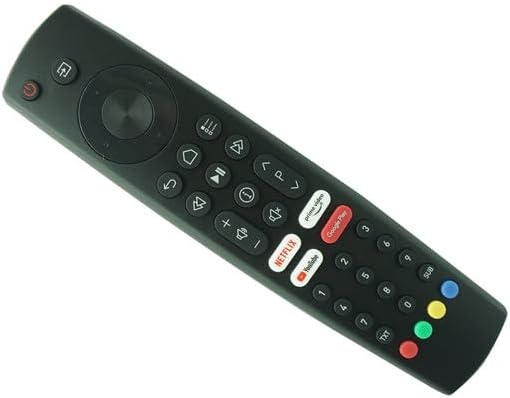
Figure 2.1: Front view of the remote control, highlighting the button layout.
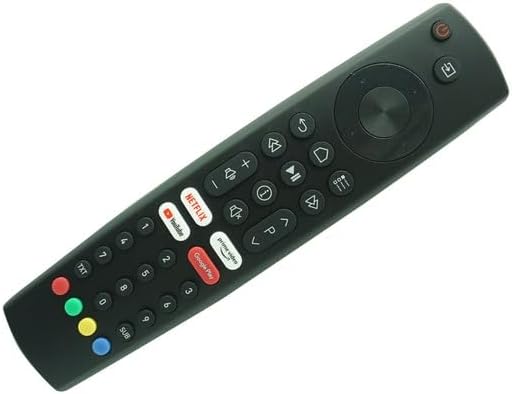
Figure 2.2: Angled view of the remote control, illustrating its ergonomic shape.
Key features include:
- Power Button: Located at the top left, used to turn the TV on or off.
- Navigation Pad: Central circular pad for menu navigation (Up, Down, Left, Right, OK).
- Volume Control: Buttons for increasing (+) and decreasing (-) volume.
- Channel Control: Buttons for changing channels (P+ / P-).
- Dedicated App Buttons: Quick access buttons for Netflix, Prime Video, YouTube, and Google Play.
- Numeric Keypad: For direct channel input and other numerical functions.
3. Setup
3.1 Battery Installation
The remote control requires two (2) AAA batteries (not included). Follow these steps to install the batteries:
- Locate the battery compartment cover on the back of the remote control.
- Gently slide the battery compartment cover downwards to open it.
- Insert two AAA batteries, ensuring the positive (+) and negative (-) terminals align correctly with the markings inside the compartment.
- Slide the battery compartment cover back into place until it clicks securely.
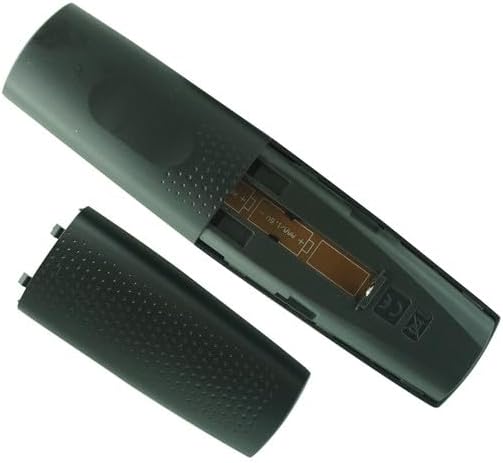
Figure 3.1: Battery compartment with cover removed.
3.2 Initial Pairing / Setup
This replacement remote control is an infrared (IR) type and typically requires no setup or code programming. Once batteries are installed, it should function directly with compatible Grundig TV models. No additional pairing steps are needed.
4. Operating Instructions
To operate your television using this remote control, point the remote directly at the TV's IR receiver. Ensure there are no obstructions between the remote and the TV.
- Power On/Off: Press the Power button (red button at the top left) to turn the TV on or off.
- Channel Selection: Use the P+ and P- buttons to cycle through channels. Alternatively, use the numeric keypad to enter a channel number directly.
- Volume Adjustment: Press the Vol+ to increase volume and Vol- to decrease volume.
- Menu Navigation: Use the directional arrow buttons (Up, Down, Left, Right) around the OK button to navigate through TV menus. Press OK to confirm selections.
- App Access: Press the dedicated buttons for Netflix, Prime Video, YouTube, or Google Play to launch these applications directly (requires internet connection and app installation on your TV).
- Input Selection: Look for a button labeled Source or Input (often represented by an arrow pointing into a rectangle) to change video inputs (HDMI, AV, etc.).
5. Maintenance
5.1 Cleaning
To maintain the remote control's appearance and functionality:
- Wipe the surface with a soft, dry cloth.
- For stubborn dirt, slightly dampen the cloth with water or a mild, non-abrasive cleaner. Do not spray cleaner directly onto the remote.
- Avoid using harsh chemicals, solvents, or abrasive cleaning pads.
5.2 Battery Replacement
Replace batteries when the remote control's response becomes sluggish or stops working. Always replace both batteries at the same time with new AAA batteries. Do not mix old and new batteries, or different types of batteries.
6. Troubleshooting
| Problem | Possible Cause | Solution |
|---|---|---|
| Remote control is not working. |
|
|
| Some buttons are not responding. |
|
|
If issues persist, please refer to your television's original user manual for specific remote control requirements or contact the seller for further assistance.
7. Specifications
| Feature | Detail |
|---|---|
| Brand | Generic |
| Model (ASIN) | B0CMHN9RJR |
| Compatible Devices | Grundig Smart 4K Ultra HD LED HDTV (Specific models: 43GFB6100, 32-GHB-6100-MADRID, TS8187R11, 50GFU7800B, 43GFU7800, 43GFU7800B, 50GFU7990B) |
| Connectivity Technology | Infrared (IR) |
| Batteries Required | 2 x AAA (not included) |
| Color | Black |
| Special Feature | Ergonomic design, direct replacement (no setup needed) |
| Max Number of Supported Devices | 1 (specific TV models) |
8. Warranty and Support
As a generic replacement product, specific warranty details may vary. Please refer to the purchase terms and conditions provided by the seller, SZHKHXD, for information regarding returns, refunds, or product support.
For any operational issues or questions not covered in this manual, it is recommended to contact the seller directly or consult the original user manual for your Grundig television.
Ask a question about this manual
Ask about setup, troubleshooting, compatibility, parts, safety, or missing instructions. Manuals+ will review the question and use this page’s manual context to help answer it.