
1. Introduction
This manual provides instructions for the CLNCBJ RMT-JR01 remote control. This remote is designed as a direct replacement for various JVC TV models, offering immediate functionality without the need for programming or pairing. Please read this manual carefully to ensure proper use and to understand the features of your new remote control.

Image 1.1: The CLNCBJ RMT-JR01 remote control, a direct replacement for JVC TV models.
2. Setup
2.1 Battery Installation
The RMT-JR01 remote control requires two (2) AA 1.5V alkaline batteries for operation. Batteries are not included with the remote control.
- Locate the battery compartment on the back of the remote control.
- Slide the battery compartment cover downwards to open it.
- Insert two (2) AA 1.5V alkaline batteries, ensuring that the positive (+) and negative (-) terminals align correctly with the markings inside the compartment.
- Slide the battery compartment cover back into place until it clicks securely.

Image 2.1: Proper insertion of AA batteries into the remote control's battery compartment.
2.2 Initial Use
Once batteries are correctly installed, the CLNCBJ RMT-JR01 remote control is ready for immediate use. No programming or pairing is required. Point the remote control towards your JVC TV and begin operation.
3. Operating Instructions
The RMT-JR01 remote control features a standard layout for easy navigation and control of your JVC TV. Below is a general overview of the key functions.

Image 3.1: Diagram illustrating the main buttons and their functions on the RMT-JR01 remote control.
- Power Button (●): Turns the TV on or off.
- Sleep Button: Activates the TV's sleep timer function.
- Input Button: Cycles through available input sources (HDMI, AV, etc.).
- Menu Button: Accesses the TV's main menu.
- Info Button: Displays information about the current program or input.
- Navigation Keys (Up, Down, Left, Right) & OK Button: Used to navigate menus and confirm selections.
- Return Button: Goes back to the previous menu or screen.
- Volume Up/Down (VOL +/-): Adjusts the TV's volume level.
- Mute Button: Mutes or unmutes the TV's audio.
- Channel Up/Down (CH +/-): Changes the TV channel.
- Number Keys (0-9): Directly enter channel numbers.
- Media Playback Controls (Play, Pause, Stop, Rewind, Fast Forward): Control media playback if supported by the TV and source.
- Dedicated Input Buttons (HDMI, PC, TV, Video, Comp, Music): Directly select specific input sources.
For specific functions related to your JVC TV model, refer to your TV's original user manual.
4. Maintenance
4.1 Cleaning the Remote Control
To clean the remote control, use a soft, dry cloth. For stubborn dirt, lightly dampen the cloth with water or a mild, non-abrasive cleaner. Avoid using harsh chemicals, solvents, or abrasive materials, as these can damage the remote's surface or internal components.
4.2 Battery Replacement
Replace batteries when the remote control's responsiveness decreases or if it stops functioning. Always replace both batteries at the same time with new AA 1.5V alkaline batteries. Do not mix old and new batteries, or different types of batteries, as this can lead to leakage or malfunction. Dispose of used batteries according to local regulations.
5. Troubleshooting
If you experience issues with your CLNCBJ RMT-JR01 remote control, please refer to the following common solutions:
- Remote not responding:
- Ensure the remote has fresh AA 1.5V alkaline batteries installed correctly (check polarity).
- Verify there are no obstructions between the remote control and the TV's infrared sensor.
- Make sure you are within the effective operating range (up to 10 meters / 30 feet) and pointing the remote directly at the TV.
- Test the remote by pointing it at a smartphone camera; if you see a light flashing from the remote's IR emitter when pressing buttons, the remote is likely transmitting a signal.
- Specific buttons not working:
- This remote is a direct replacement and should function identically to the original. If a specific button does not work, ensure your TV model supports that function.
- Clean the remote control, especially around the buttons, to ensure no debris is preventing proper contact.
- Intermittent operation:
- This could indicate low battery power. Replace both batteries with new ones.
- Check for strong light sources (e.g., direct sunlight, fluorescent lights) that might interfere with the infrared signal.
If problems persist after attempting these solutions, please contact customer support.
6. Specifications
| Model Name: | RMT-JR01 |
| Brand: | CLNCBJ |
| Connectivity Technology: | Infrared (IR) |
| Compatible Devices: | Television (JVC TVs) |
| Number of Batteries Required: | 2 AA batteries |
| Maximum Range: | 10 Meters (approximately 30 feet) |
| Item Weight: | 0.19 Pounds |
| Dimensions (L x W x H): | 8.58"L x 2.55"W x 1.14"H (217mm x 64.8mm x 29mm) |
| Special Feature: | Ergonomic design |
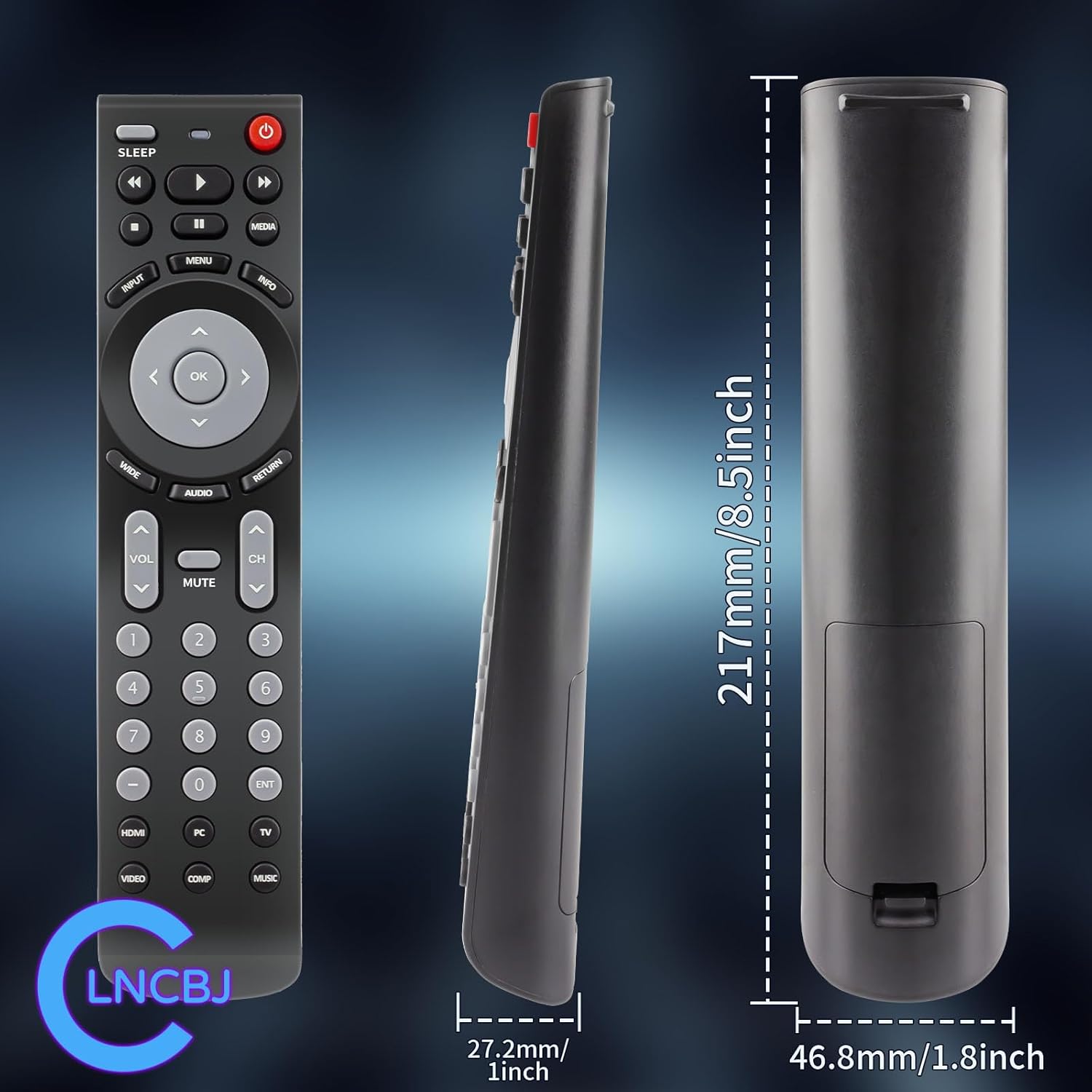
Image 6.1: Physical dimensions of the CLNCBJ RMT-JR01 remote control.
7. Compatible JVC TV Models
The CLNCBJ RMT-JR01 remote control is compatible with the following JVC TV models:
- BC50R
- EM28T
- EM32FL
- EM32T
- EM32TS
- EM37T
- EM39FT
- EM39T
- EM55FT
- JLC32BC3000
- JLC32BC3002
- JLC37BC3000
- JLC37BC3002
- JLC42BC3000
- JLC42BC3002
- JLC47BC3000
- JLC47BC3002
- JLE32BC3001
- JLE37BC3001
- JLE42BC3001
- JLE42BC3500
- JLE47BC3001
- JLE47BC3500
This list is based on the provided product information. If your model is not listed but is a JVC TV, the remote may still be compatible as a direct replacement for the RMT-JR01 original remote.
8. Warranty and Support
8.1 Return Policy
This product is subject to a 30-day return policy for refund or replacement, as per the retailer's terms and conditions.
8.2 Customer Support
For any questions, concerns, or issues regarding your CLNCBJ RMT-JR01 remote control, please contact the seller directly through the platform where the purchase was made. Providing your order details will help expedite the support process.