
CLNCBJ RC311S
User Manual for CLNCBJ RC311S Remote Control
Model: RC311S | Brand: CLNCBJ
Introduction
This manual provides essential information for the proper setup, operation, and maintenance of your new CLNCBJ RC311S Remote Control. This remote is designed as a direct replacement for various TCL LED LCD TV models, ensuring seamless compatibility without the need for complex programming.
Compatible TCL LED LCD TV models include, but are not limited to: 40D1600, 49D1620, LT-32KB45, 32A6000, RLED-L32A600, RLED-L32D1200SMT, 32D1202, G-L32S12, 32D1200, TOKTCLED32SM-N, 32WIFI, H-40, LED3250SMR, 32D1240, LED-32SSTV, 32D1241, 32MV1800S, 32D1291, MS32-T100, JA32HD218S, 32SHD, 32D1360, MGS3202X, 32D1510, DO-1607740, LED3233SMR, 32D1530, L32D1530S, TVJ LED S32 D1530, QE170003, 32D1570, HK32G1680, TOKTCLED32S, H-35, 32GA1600, 32D1600, SMART, LED32HDTS, LEDM-322NIP, DO-1612754, TVJ LED S32 D1600, DO-1614601, 32D1620, RLED-L32D1620SMT, IMP32SMT, JA32SHD500, LED32DTV2-SMT, 32D1700, 32F1800, RQE180236, ES-TL3204, G-L40S12, 40D1200, 40D1240.
1. Setup
1.1. Battery Installation
The CLNCBJ RC311S remote control operates on two (2) 1.5V AAA alkaline batteries. Batteries are not included with the remote control and must be purchased separately.
- Locate the battery compartment on the back of the remote control.
- Press down on the tab and slide the battery cover downwards to open it.
- Insert two (2) AAA batteries, ensuring the positive (+) and negative (-) terminals align correctly with the markings inside the compartment.
- Slide the battery cover back into place until it clicks securely.
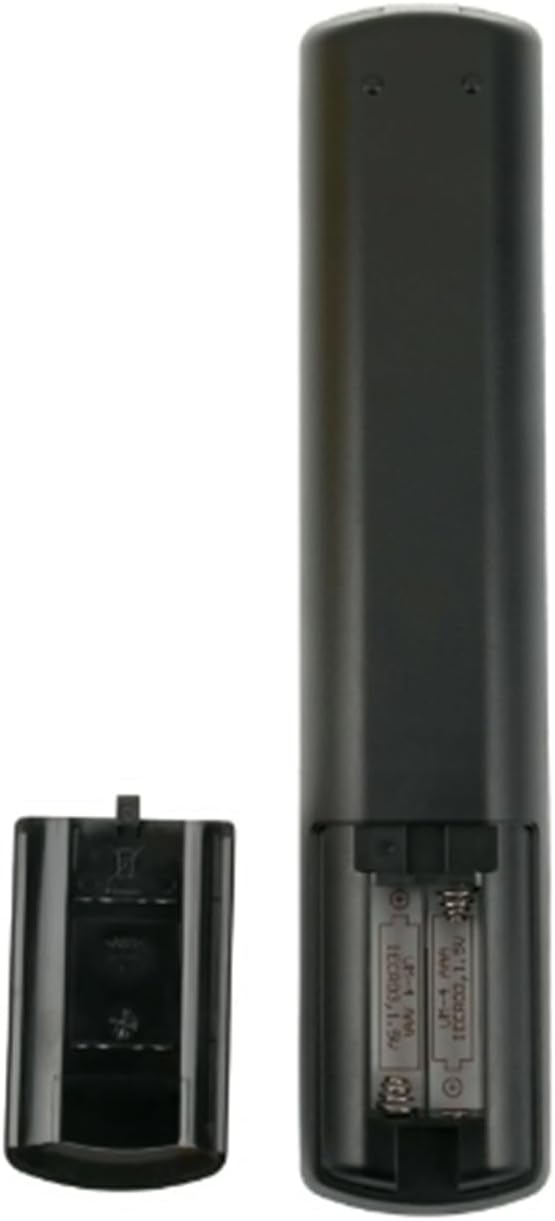
Figure 1: Rear view of the remote control with the battery cover removed, illustrating the correct orientation for AAA battery insertion.
Once batteries are correctly installed, the remote control is ready for immediate use with compatible TCL LED LCD TVs. No additional setup or programming is required.
2. Operating Instructions
The RC311S remote control provides full functionality for your compatible TCL LED LCD TV. Ensure a clear line of sight between the remote control's infrared (IR) emitter and the TV's IR receiver for optimal performance.

Figure 2: Front view of the RC311S remote control, highlighting key functional buttons.
2.1. Key Functions
| Button | Function |
|---|---|
| Power (●) | Turns the TV on or off. |
| Tuner / Source | Selects input source (HDMI, AV, TV, etc.). |
| Number Buttons (0-9) | Direct channel selection. |
| Volume (+/-) | Adjusts the volume level. |
| Channel (+/-) | Changes TV channels. |
| Mute | Mutes or unmutes the TV audio. |
| Netflix / YouTube | Direct access buttons for Netflix and YouTube applications. |
| Navigation (Up, Down, Left, Right, OK) | Navigates menus and confirms selections. |
| Back / Exit | Returns to the previous screen or exits a menu. |
| Info / Menu / Guide | Accesses information, TV menus, or the program guide. |
| Colored Buttons (Red, Green, Yellow, Blue) | Context-sensitive functions within menus or applications. |
| Media Playback Controls | Play, Pause, Stop, Fast Forward, Rewind, Skip functions for media playback. |
3. Maintenance
3.1. Cleaning the Remote Control
To maintain the performance and appearance of your remote control, follow these cleaning guidelines:
- Use a soft, dry cloth to wipe the surface of the remote control.
- For stubborn dirt, lightly dampen the cloth with water or a mild, non-abrasive cleaner. Ensure no liquid enters the remote control.
- Avoid using harsh chemicals, abrasive cleaners, or solvents, as these can damage the remote's finish or internal components.
3.2. Battery Replacement
Replace batteries when the remote control's response becomes sluggish or stops working. Always replace both batteries simultaneously with new 1.5V AAA alkaline batteries. Do not mix old and new batteries, or different types of batteries.
3.3. Storage
When not in use for extended periods, it is recommended to remove the batteries from the remote control to prevent potential leakage and damage. Store the remote in a cool, dry place away from direct sunlight and extreme temperatures.
4. Troubleshooting
If you experience issues with your RC311S remote control, refer to the following common troubleshooting steps:
| Problem | Possible Cause / Solution |
|---|---|
| Remote control is not working. |
|
| Specific buttons are not responding. |
|
| Remote works intermittently. |
|
5. Specifications
- Model: RC311S
- Brand: CLNCBJ
- Compatible Devices: TCL LED LCD Televisions
- Power Source: 2 x 1.5V AAA Alkaline Batteries (not included)
- Color: Black
- Product Dimensions: 9.5 x 2 x 0.79 inches (approximately 24.13 x 5.08 x 2.01 cm)
- Item Weight: 3.52 ounces (approximately 99.79 grams)
- Special Feature: Ergonomic design
- Max Number of Supported Devices: 1 (dedicated to one TV)
6. Customer Support
For any questions, concerns, or issues regarding your CLNCBJ RC311S Remote Control, please do not hesitate to contact the seller or manufacturer. We are committed to providing assistance and resolving any problems you may encounter.
Please refer to your purchase documentation or the online product listing for specific contact information for the seller, "Lian Guang".
no relevant documents