
1. Important Safety Instructions
Please read all instructions carefully before using this treadmill. Keep this manual for future reference. Failure to follow these instructions may result in injury or damage to the product.
- Always attach the safety key clip to your clothing before starting the treadmill. The treadmill will not operate without the safety key in place.
- Consult your physician before starting any exercise program, especially if you have pre-existing health conditions.
- Keep children and pets away from the treadmill during operation.
- Place the treadmill on a flat, stable surface with adequate clearance around it (at least 2 meters behind and 0.6 meters on each side).
- Wear appropriate athletic footwear and clothing. Avoid loose clothing that could get caught in moving parts.
- Do not operate the treadmill if it has a damaged cord or plug, or if it is not working properly.
- Never step on or off the treadmill while the belt is moving.
- Use the handrails for balance, but do not lean heavily on them.
- Unplug the treadmill from the power outlet when not in use or before cleaning and maintenance.

Figure 1.1: The treadmill supports both running (with handrail up, 1-10 km/h) and walking (with handrail down, 1-6 km/h). Note the critical red safety lock that must be installed for operation.
2. Product Overview and Components
2.1 Included Components
The Tvdugim TL1 Treadmill comes fully assembled. Please check the package contents upon arrival to ensure all items are present:
- Tvdugim TL1 Treadmill Unit
- Safety Key
- Power Cord
- User Manual (this document)
- Tool Kit (e.g., Allen wrench)
- Remote Control
- Silicone Oil (for lubrication)
- CR2032 Lithium Cell Battery (for remote control)

Figure 2.1: All components included with your Tvdugim TL1 Treadmill.
3. Setup
3.1 Unpacking and Placement
- Carefully remove the treadmill from its packaging. The unit comes fully assembled.
- Place the treadmill on a firm, level surface. Ensure there is at least 2 meters (6.5 feet) of clear space behind the treadmill and 0.6 meters (2 feet) on each side for safe operation.
- Ensure the power cord is not obstructed or placed in a high-traffic area where it could be tripped over.
3.2 Power Connection
- Plug the power cord into a grounded electrical outlet.
- Turn on the main power switch, usually located near the front of the treadmill base.
3.3 Handrail Position (2-in-1 Functionality)
The Tvdugim TL1 offers two modes of operation based on the handrail position:
- Walking Pad Mode (Handrail Down): For speeds between 1-6 km/h. In this mode, the treadmill functions as a walking pad, ideal for use under a standing desk. The remote control is primarily used for speed adjustment.
- Running Mode (Handrail Up): For speeds between 1-10 km/h. With the handrail raised, the treadmill provides support for running. Speed can be adjusted via the control panel buttons.
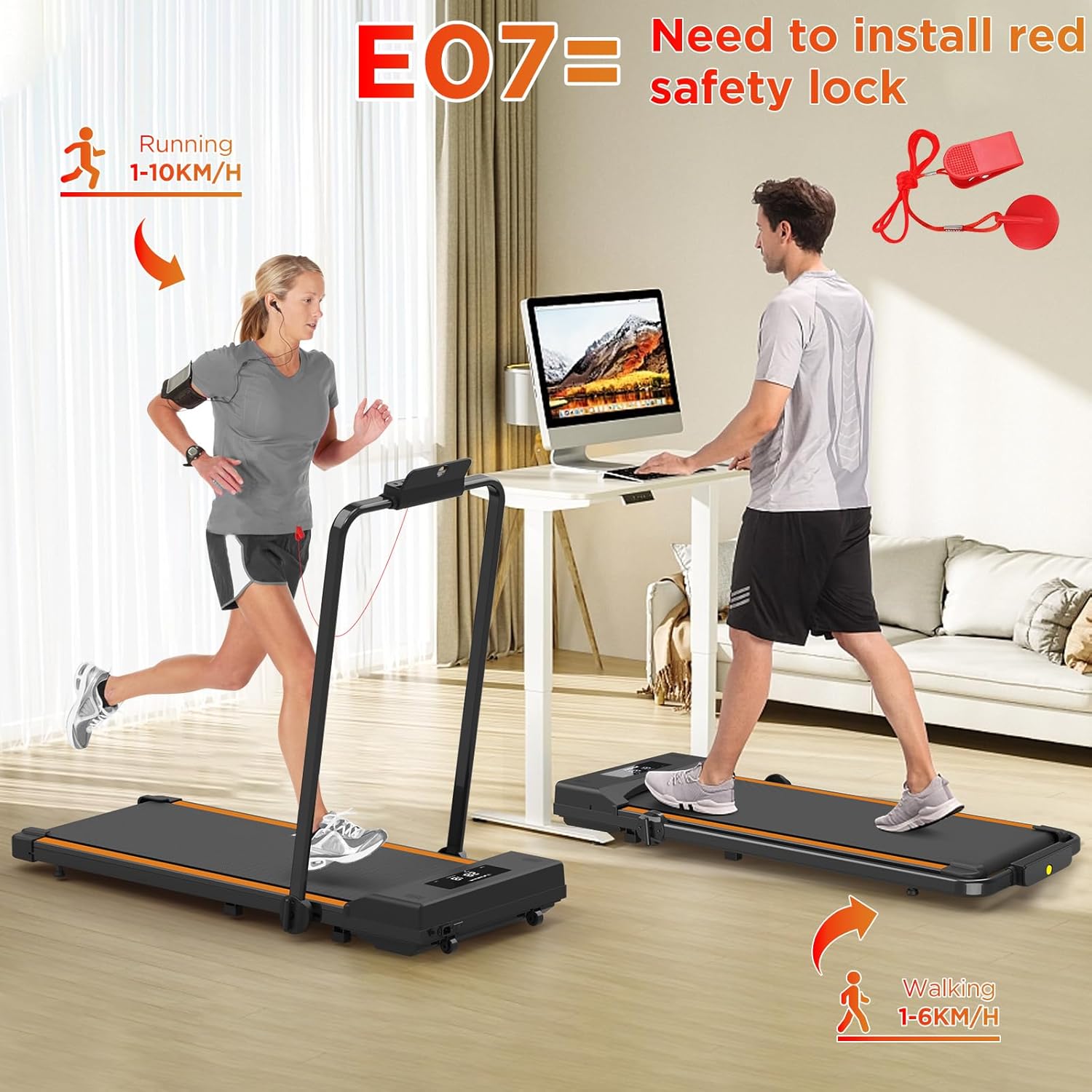
Figure 3.1: The treadmill's 2-in-1 design allows for both walking pad and running modes.
4. Operating Instructions
4.1 Starting the Treadmill
- Ensure the treadmill is plugged in and the main power switch is ON.
- Attach the safety key clip to your clothing and insert the safety key into its designated slot on the control panel. The treadmill will not start without the safety key.
- Press the START button on the control panel or remote control. The treadmill will typically begin with a short countdown before the belt starts moving at a low speed.
4.2 Adjusting Speed
Speed can be adjusted using the control panel or the remote control:
- Control Panel: Use the '+' and '-' buttons to increase or decrease speed.
- Remote Control: Use the '+' and '-' buttons. The remote control is most effective in walking pad mode (handrail down).
4.3 Monitoring Your Workout
The integrated LED display shows key workout metrics:
- Time: Duration of your workout.
- Speed: Current speed in km/h.
- Distance: Total distance covered.
- Calories: Estimated calories burned.

Figure 4.1: The LED display provides real-time workout data, and the remote control offers convenient speed adjustments.
4.4 Stopping the Treadmill
- Press the STOP button on the control panel or remote control. The belt will gradually slow down and stop.
- In case of emergency, pull the safety key from its slot. The treadmill will stop immediately.
- After your workout, turn off the main power switch and unplug the treadmill.
5. Maintenance
Regular maintenance ensures the longevity and optimal performance of your treadmill.
5.1 Cleaning
- Always unplug the treadmill before cleaning.
- Wipe down the treadmill surfaces with a damp cloth after each use to remove sweat and dust. Avoid abrasive cleaners or solvents.
- Periodically vacuum underneath the treadmill to prevent dust buildup from affecting motor performance.
5.2 Running Belt Lubrication
The running belt requires periodic lubrication to reduce friction and extend its lifespan. Use the provided silicone oil.
- Unplug the treadmill.
- Loosen the rear roller bolts slightly to lift the belt.
- Apply a small amount of silicone oil evenly under the center of the running belt.
- Tighten the rear roller bolts.
- Plug in the treadmill and run it at a low speed (e.g., 3 km/h) for 5 minutes to distribute the lubricant.
Frequency: Lubricate every 3-6 months, depending on usage.

Figure 5.1: The treadmill features a 5-layer running belt designed for durability and comfort.
5.3 Belt Tension and Alignment
If the running belt feels loose or slips, or if it drifts to one side, it may need adjustment. Refer to the detailed instructions in the full user manual for precise belt tensioning and alignment procedures using the provided tool kit.
6. Troubleshooting
If you encounter issues with your treadmill, refer to the following common problems and solutions:
| Problem | Possible Cause | Solution |
|---|---|---|
| Treadmill does not start | 1. Power cord not plugged in 2. Main power switch OFF 3. Safety key not inserted | 1. Ensure power cord is securely plugged into a grounded outlet. 2. Turn the main power switch ON. 3. Insert the safety key into its slot and ensure the clip is attached to your clothing. |
| Running belt slips or hesitates | 1. Belt too loose 2. Insufficient lubrication | 1. Adjust belt tension (refer to full manual). 2. Lubricate the running belt with silicone oil (see Section 5.2). |
| Unusual noise during operation | 1. Loose components 2. Belt rubbing against frame 3. Motor issue | 1. Check and tighten any visible loose bolts or screws. 2. Adjust belt alignment (refer to full manual). 3. If noise persists, contact customer support. |
| Remote control not working | 1. Battery depleted 2. Remote out of range 3. Remote only works in walking pad mode | 1. Replace the CR2032 battery. 2. Ensure you are within close proximity to the treadmill. 3. Confirm the handrail is folded down for walking pad mode. |
For issues not listed here or if problems persist, please contact Tvdugim customer support.
7. Specifications
| Feature | Specification |
|---|---|
| Model Number | TL1 |
| Brand | Tvdugim |
| Dimensions (Unfolded) | 102 x 49 x 101 cm (40.1 x 19.3 x 39.8 inches) |
| Dimensions (Folded) | 137.2 x 63.5 x 17 cm (54 x 25 x 6.7 inches) |
| Product Weight | 22 kg (49 lbs) |
| Maximum User Weight | 110 kg (242 lbs) |
| Speed Range (Walking Pad Mode) | 1 - 6 km/h |
| Speed Range (Running Mode) | 1 - 10 km/h |
| Running Belt Width | 41 cm (16.1 inches) |
| Display Type | LED |
| Main Material | Acrylonitrile Butadiene Styrene (ABS) |
| Power Source | Electric Cable |
| Special Features | Foldable, 2-in-1 Design, Remote Control |

Figure 7.1: Key dimensions and weight capacity of the Tvdugim TL1 Treadmill.

Figure 7.2: The treadmill is equipped with a powerful and quiet motor for smooth operation.
8. Storage and Portability
The Tvdugim TL1 Treadmill is designed for easy storage and portability.
- Folding: The treadmill can be easily folded to a compact size (137.2 x 63.5 x 17 cm) for storage under a sofa or bed.
- Transport Wheels: Integrated transport wheels allow for convenient movement of the treadmill when folded.

Figure 8.1: The treadmill features transport wheels for easy relocation.
9. Warranty and Support
For warranty information, please refer to the documentation included with your purchase or contact Tvdugim customer service. If you have any questions, require technical assistance, or need to report a problem, please reach out to our support team through the retailer where you purchased the product.