
Product Overview
The Fisher-Price Soothe & Settle Bunny is a soft, portable plush sound machine designed to calm and comfort infants. It features rhythmic head nodding motion, various soothing sounds, music, and a soft glowing light. This toy is intended to engage developing senses and provide a sense of security for newborns.

Figure 1: The Soothe & Settle Bunny with a baby.
Key Features:
- Plush bunny design with rhythmic head nodding motion.
- Five customizable soothing sound options: music with gentle yawns & snores, deep breathing, shushing, nature sounds, and white noise.
- Plays for up to 30+ minutes.
- Adjustable settings for head nodding (on or off) and glowing heart light (on, slow fade, or off).
- Soft, machine-washable fabric (with electronics removed).
Setup
The Fisher-Price Soothe & Settle Bunny comes ready for use with included batteries. No assembly is required.
What's in the Box:
- 1 electronic soother bunny plush toy with motion, light, and sounds.
- 3 AA batteries (included).
- Instruction manual.

Figure 2: Product packaging showing the Soothe & Settle Bunny.
Operating Instructions
Follow these steps to operate your Soothe & Settle Bunny:
- Activate Sounds and Motion: Press the toy's tummy (the embroidered heart) to activate the sounds, music, and head nodding motion. The heart will glow softly.
- Adjust Settings: Locate the control panel on the back of the bunny, accessible by opening the fabric flap. Use the buttons to adjust the settings:
- Head Nodding: Turn the rhythmic head nodding motion on or off.
- Glowing Heart Light: Set the light to on, slow fade, or off.
- Sound Options: Cycle through the 5 different soothing sound options.
- Volume Control: Adjust the sound volume as desired.
- Soothing Experience: The bunny will play selected sounds and perform motions for over 30 minutes to help calm your baby.
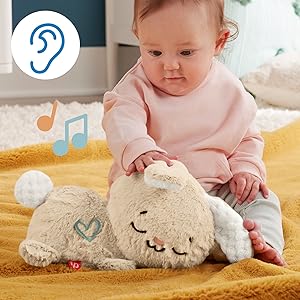
Figure 3: Activating the bunny by pressing the heart.

Figure 4: Control panel for adjusting sound, light, and motion settings.
Video 1: Demonstration of the Fisher-Price Soothe & Settle Bunny's features, including sound, light, and motion.
Maintenance
To ensure the longevity and hygiene of your Soothe & Settle Bunny, follow these cleaning instructions:
- Remove Electronics: Before washing, carefully remove the electronic module from inside the plush toy. This module contains the batteries and control panel.
- Machine Wash: The plush bunny fabric is machine washable. Use a gentle cycle with cold water.
- Air Dry: Allow the plush toy to air dry completely before reinserting the electronic module.

Figure 5: The plush bunny is machine washable after removing electronics.
Troubleshooting
If you encounter any issues with your Soothe & Settle Bunny, please refer to the following common solutions:
- No Sound/Motion: Check if the batteries are correctly installed and not depleted. Replace with new AA batteries if necessary. Ensure the toy is turned on by pressing the heart on its tummy.
- Intermittent Operation: This could indicate low battery power. Replace the batteries.
- Light Not Working: Verify that the light setting on the control panel is not set to 'off'.
- Unusual Sounds: If the toy produces unexpected sounds, try turning it off and on again. If the issue persists, replace the batteries.
Specifications
| Model Number | HXG97 |
| Product Dimensions | 5.91 x 5.91 x 13.19 inches |
| Item Weight | 15.8 ounces |
| Material Type | Polyester (fabric), Plastic (electronics) |
| Power Source | Battery-Operated |
| Batteries Required | 3 AA batteries (included) |
| Target Gender | Unisex |
Warranty and Support
For warranty information or product support, please refer to the contact details provided on the product packaging or visit the official Fisher-Price website. Keep your purchase receipt as proof of purchase.