
Introduction
The Samsung Galaxy S24 is an advanced AI smartphone designed to enhance daily mobile experiences. This manual provides essential information for setting up, operating, maintaining, and troubleshooting your device. It covers key features such as the AI-powered camera, fast processor, and long-lasting battery, ensuring you can maximize the capabilities of your Galaxy S24.
What's in the Box
Upon unboxing your Samsung Galaxy S24, verify that all components are present:
- Samsung Galaxy S24 Device
- USB Cable (USB-C)
- SIM Tray Ejector
- Quick Start Guide

Image: Samsung Galaxy S24 packaging and device.
Setup
1. Initial Power On
Press and hold the Power/Side key located on the right side of the device until the Samsung Galaxy logo appears. Follow the on-screen prompts to select your language and region.
2. SIM Card Installation
Locate the SIM tray on the side of your device. Insert the SIM tray ejector tool into the small hole next to the tray and push gently until the tray pops out. Place your Nano-SIM card(s) into the tray with the gold contacts facing down. Carefully reinsert the tray into the device.
3. Basic Setup
Connect to a Wi-Fi network, review and accept the End User License Agreement, and sign in with your Google or Samsung account. You can transfer data from a previous device using Samsung Smart Switch during this process.
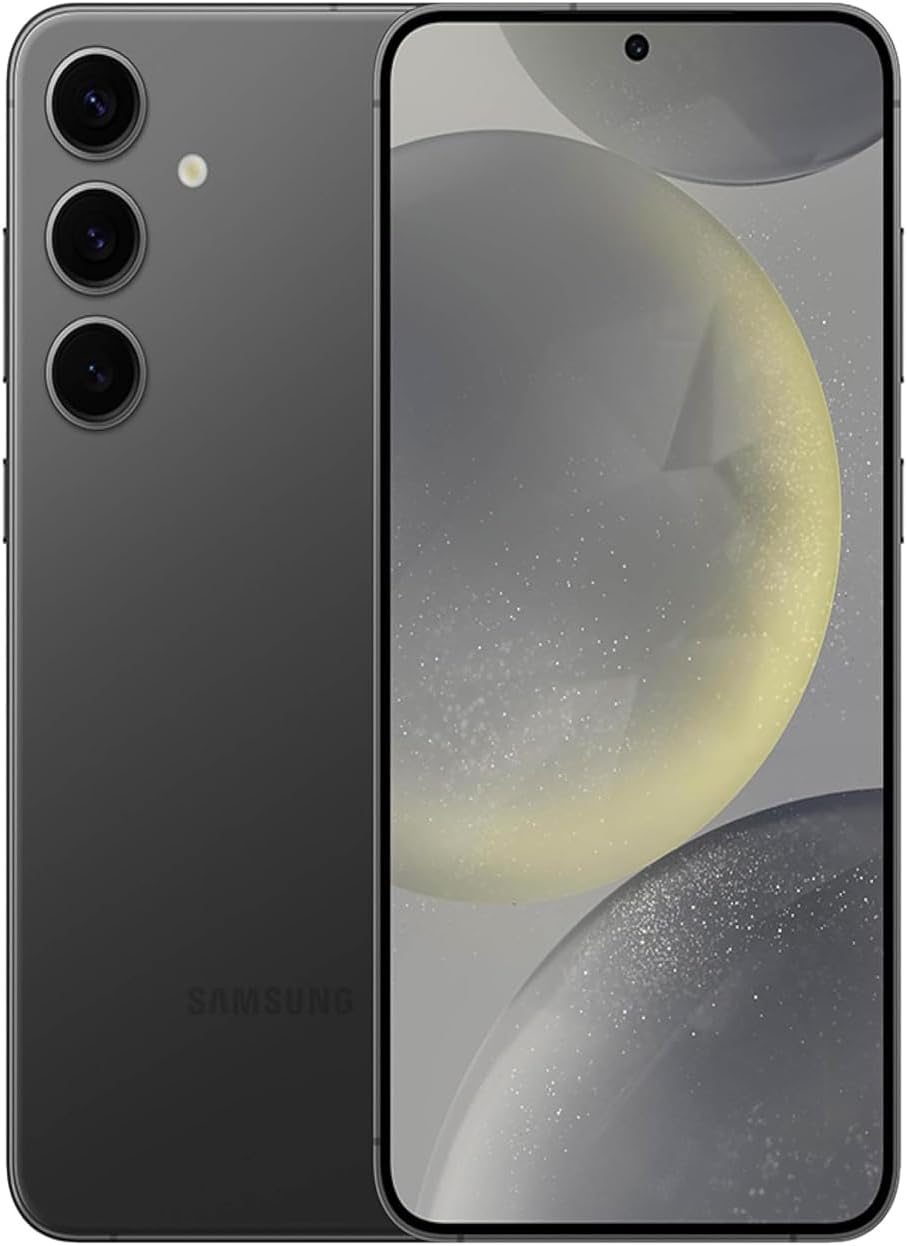
Image: Front and back view of the Samsung Galaxy S24.
Key Features
- Circle to Search with Google: Quickly search for information by circling any object or text on your screen.
- Live Translate: Experience near real-time voice translations during phone calls directly through the Samsung Phone app.
- Note Assist: Summarize, format, and translate notes in Samsung Notes for improved organization and efficiency.
- Generative Edit: Enhance photos by moving or removing objects and filling in empty spaces using AI.
- 50MP Camera: Capture high-resolution photos with natural, true-to-life colors.
- Snapdragon 8 Gen 3 for Galaxy Processor: Enjoy seamless multitasking and high-quality content with enhanced speed and performance.
- Chat Assist: Receive real-time tone suggestions for professional or conversational writing and correct typos.
- Brighter AMOLED Display: A 6.2-inch adaptive display with up to 2600 nits peak brightness for clear viewing in various lighting conditions.
- Dual Recording: Capture video with both the main and selfie cameras simultaneously.
- Super Fast Charging: Quickly recharge your device to minimize downtime.
Operating Your Device
Display and Navigation
The 6.2-inch Full HD+ Dynamic AMOLED 2X display offers a resolution of 2340 x 1080 pixels with an adaptive refresh rate of up to 120 Hz for smooth scrolling and responsiveness. The display is exceptionally bright, making it easy to read even in direct sunlight.
Performance
Equipped with the Snapdragon 8 Gen 3 for Galaxy processor and 8 GB of RAM, the Galaxy S24 delivers exceptional performance for multitasking, gaming, and demanding applications. The device runs on Android 14 with One UI 6.1, ensuring a smooth and optimized user experience.
Camera Usage
The rear camera system includes a 50MP primary sensor, a 12MP ultra-wide lens, and a 10MP telephoto lens with 3x optical zoom. The front camera is 12MP. Utilize AI Photo Edits for quick enhancements, object removal, and lighting adjustments. Dual Recording allows simultaneous capture from front and rear cameras.

Image: Overview of Samsung Galaxy S24 camera capabilities.
Battery Management
The 4000 mAh battery provides long-lasting power, typically lasting more than a full day with moderate to heavy use. Super Fast Charging ensures your device is quickly ready for use. The device also supports wireless charging.
Maintenance
Charging
Use only Samsung-approved chargers and cables for optimal performance and safety. Avoid using worn or damaged accessories. The device supports Super Fast Charging, reaching 50% battery in approximately 30 minutes.
Software Updates
Samsung provides 7 years of software support, including security updates, to keep your device secure and up-to-date. Regularly check for and install available updates via Settings > Software update.
Cleaning and Care
Clean your device regularly with a soft, lint-free cloth. Avoid harsh chemicals or abrasive materials. The device is water and dust resistant (IP68 rating), but avoid intentional submersion in water.
Troubleshooting
- Device not responding: Press and hold the Power/Side key and Volume Down key simultaneously for more than 7 seconds to restart the device.
- Battery draining quickly: Adjust screen brightness, disable unnecessary background apps, and check battery usage in Settings > Battery.
- Connectivity issues: Toggle Wi-Fi or Bluetooth off and on. For mobile data, ensure your SIM card is properly inserted and your plan is active.
- App crashes: Clear the app's cache or data via Settings > Apps > [App Name] > Storage. If the issue persists, uninstall and reinstall the app.
Specifications
| Feature | Detail |
|---|---|
| Model Name | Galaxy S24 |
| Item Model Number | SM-S921UZKEXAA |
| Product Dimensions | 5.79 x 2.78 x 0.3 inches |
| Item Weight | 5.9 ounces (168 Grams) |
| Operating System | Android 14, One UI 6.1 |
| CPU Model | Snapdragon 8 Gen 3 for Galaxy |
| RAM | 8 GB |
| Memory Storage Capacity | 256 GB |
| Screen Size | 6.2 Inches |
| Resolution | 2340 x 1080 |
| Refresh Rate | 120 Hz |
| Battery Power Rating | 4000 Milliamp Hours |
| Phone Talk Time | 35 Hours |
| Charging Time | 59 minutes (for full charge) |
| Connectivity Technologies | 5G, Bluetooth, NFC, USB, Wi-Fi |
| Special Features | Always On Display, Built-In GPS, Fast Charging Support, Water Resistant, Wireless Charging |
| Color | Onyx Black |
| Manufacturer | Samsung Electronics |
| Date First Available | January 17, 2024 |
Warranty and Support
The Samsung Galaxy S24 comes with a standard manufacturer's warranty. For detailed warranty information, please refer to the documentation included with your device or visit the official Samsung support website. Samsung offers 7 years of software support, including security updates, ensuring long-term device functionality and security.
Additional protection plans like Samsung Care+ Device Protection and Asurion Complete Protect are available for extended coverage. Please check with your retailer or Samsung for details on these plans.
Official Product Videos
The following videos provide additional information and demonstrations of the Samsung Galaxy S24:
Samsung Galaxy S24 Series Sizzle Video
Description: An official sizzle reel showcasing the key features and design of the Samsung Galaxy S24 series.
Galaxy S24 Series | How to Photo Assist
Description: A tutorial demonstrating how to use the Photo Assist features on the Samsung Galaxy S24 series.