
1. Introduction
This manual provides detailed instructions for the installation, operation, and maintenance of your ZJWZJH 10Amp 16mm Latching Push Button Switch. Designed for durability and reliability, this switch is suitable for a wide range of applications requiring a robust and waterproof control solution.

Figure 1: ZJWZJH 10Amp 16mm Latching Push Button Switch with wire connector.
2. Product Features
- High Current Capacity: Rated for 10 Amp at 250V, compatible with 5V, 12V, 24V, 110V, 120V, and 250V DC/AC systems.
- Latching Operation: Push the button once to turn ON and it stays on; push it again to turn OFF.
- Durable Construction: Features a high-quality 304 stainless steel shell for enhanced longevity.
- Waterproof & Impact Resistant: IP66 rated for head waterproofing and IK10 rated for shell anti-collision protection, making it suitable for wet or dusty environments.
- Long Lifespan: Boasts a mechanical life of 1,000,000 cycles and an electrical life of 100,000 cycles.
- Easy Installation: Includes a 140mm (5.5 inch) wire connector socket for convenient wiring.
- Standard Contact: SPST (Single Pole, Single Throw) with 1 Normally Open (1NO) contact.

Figure 2: IP66 Waterproof and IK10 Impact Protection.
3. Package Contents
- 1 x 10A Push Button Switch
- 1 x Wire connector socket (length: 140mm)
4. Safety Information
Please read and understand all safety warnings and instructions before installing or operating the switch. Failure to do so may result in electric shock, fire, or serious injury.
- Always disconnect power before installing or servicing the switch.
- Ensure the switch's voltage and current ratings are compatible with your application.
- Installation should be performed by a qualified electrician if you are unsure about electrical wiring.
- Do not exceed the specified current or voltage ratings.
- Protect wiring from sharp edges, heat, and moving parts.
5. Setup and Installation
5.1 Mounting
- Determine the desired mounting location. The switch requires a 16mm (5/8") diameter mounting hole.
- Drill a precise 16mm hole in the mounting surface.
- Insert the switch into the drilled hole from the front.
- Secure the switch from the rear using the provided retaining nut. Ensure it is tightened firmly to prevent rotation.

Figure 3: Switch Dimensions and Mounting Hole Size.
5.2 Wiring
The switch features 1 Normally Open (1NO) SPST contacts and comes with a wire connector socket for simplified wiring.
- Identify the terminals on the back of the switch. The contact type is 1NO SPST.
- Connect your circuit wires to the provided wire connector socket. The terminal pins are 4.8mm wide and 0.8mm thick.
- Plug the wire connector socket onto the corresponding terminals of the switch. Ensure a secure connection.
- Verify all connections are correct and secure before restoring power.
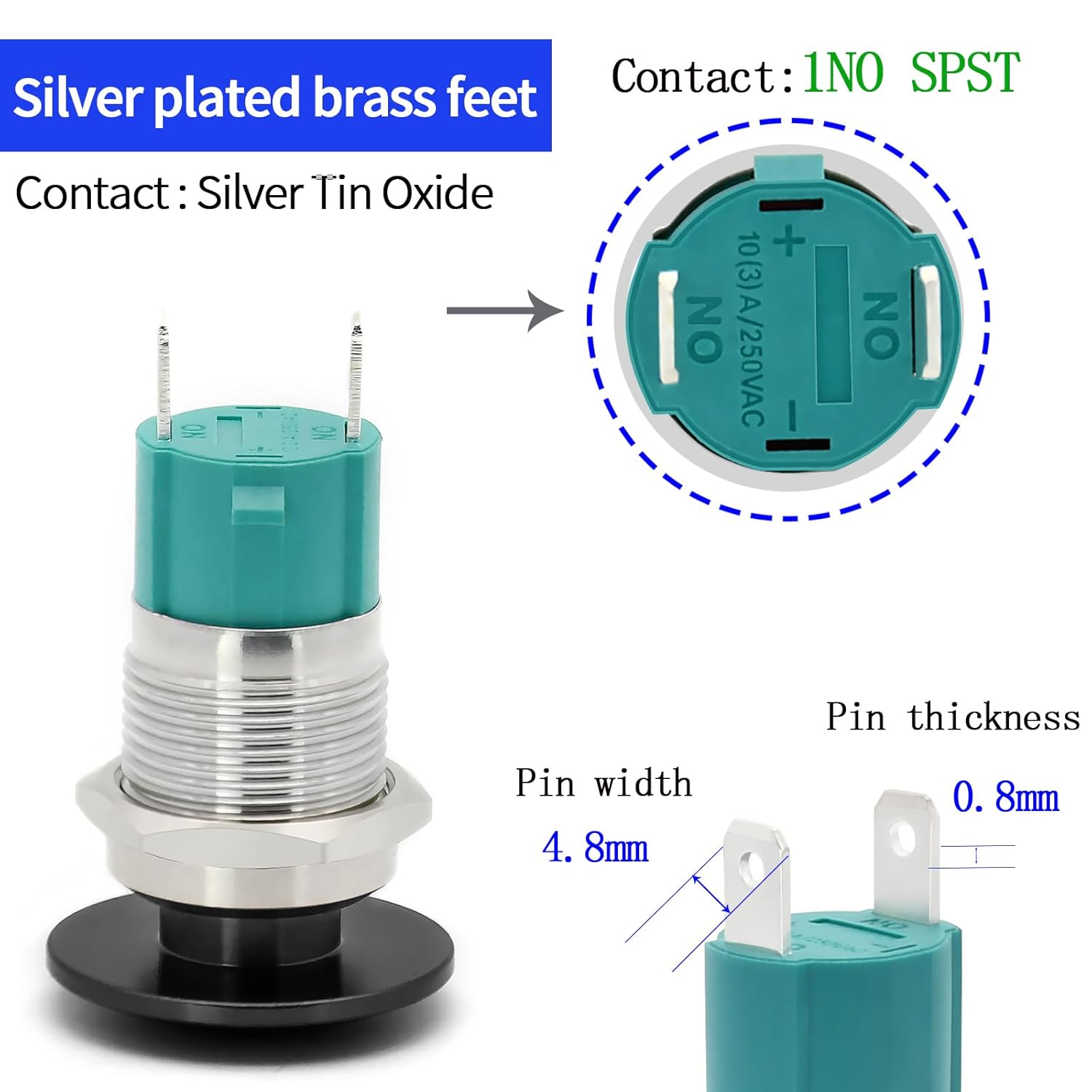
Figure 4: Terminal Pin Dimensions and Contact Type.

Figure 5: Wire Socket Plug for Easy Connection.
6. Operating Instructions
The ZJWZJH 10Amp 16mm Push Button Switch operates with a latching mechanism:
- To turn the connected device ON, press the mushroom head button firmly. The button will click and remain in the depressed position, maintaining the circuit.
- To turn the connected device OFF, press the mushroom head button again. The button will release to its original position, breaking the circuit.
This latching functionality is ideal for applications where a persistent ON/OFF state is required without continuous pressure on the button.

Figure 6: Available colors and sizes of the mushroom head button.

Figure 7: Example application in a vehicle dashboard.
7. Maintenance
The ZJWZJH push button switch is designed for minimal maintenance due to its robust construction. However, periodic inspection and cleaning can help ensure optimal performance and longevity.
- Cleaning: Use a soft, damp cloth to wipe the exterior of the switch. Avoid abrasive cleaners or solvents that could damage the finish or seals.
- Inspection: Periodically check the wiring connections for tightness and signs of corrosion. Ensure the mounting nut remains secure.
- Environmental Protection: While the switch is IP66 and IK10 rated, avoid prolonged submersion or exposure to extremely harsh chemicals if possible, to maximize its lifespan.
8. Troubleshooting
If you encounter issues with your ZJWZJH push button switch, refer to the following troubleshooting steps:
| Problem | Possible Cause | Solution |
|---|---|---|
| Switch does not activate device. | No power to the circuit. Loose or incorrect wiring. Faulty switch. | Check power supply to the circuit. Verify all wiring connections are secure and correct according to your circuit diagram. Test the switch with a multimeter for continuity. If no continuity, replace the switch. |
| Switch activates intermittently. | Loose wiring connections. Corrosion on terminals. Internal switch issue. | Tighten all wiring connections. Clean any corrosion from terminals (ensure power is off). If problem persists, the switch may be faulty and require replacement. |
| Button does not latch or release properly. | Debris in mechanism. Mechanical damage. | Ensure no foreign objects are obstructing the button mechanism. Do not force. If physically damaged, the switch needs to be replaced. |
If the problem persists after following these steps, please contact ZJWZJH customer support for further assistance.
9. Specifications
| Attribute | Value |
|---|---|
| Model Number | SJ16-C-341K+ |
| Operation Mode | Latching (ON-OFF) |
| Current Rating | 10 Amps |
| Operating Voltage | 5V/12V/24V/110V/120V/250V DC/AC |
| Contact Type | Normally Open (1NO SPST) |
| Connector Type | Plug In (Wire Socket) |
| Terminal Type | Solder (for wire socket) |
| Mounting Hole Size | 16mm (5/8") |
| Shell Material | 304 Stainless Steel |
| Protection Degree | IP66 (Waterproof), IK10 (Anti-collision) |
| Mechanical Life | 1,000,000 cycles |
| Electrical Life | 100,000 cycles |
| Working Temperature | -25°C to +55°C |
| Product Dimensions (L x W x H) | 1.7 x 1 x 1.7 inches |
| Item Weight | 0.96 ounces |
10. Warranty Information
ZJWZJH provides a warranty for this product. If the switch is not man-made broken within 3 years from the date of purchase, you are eligible for a replacement.
Please retain your proof of purchase for warranty claims.
11. Customer Support
For any questions, technical assistance, or warranty claims, please contact ZJWZJH customer support through the following channels:
- Visit the official ZJWZJH Store on Amazon: ZJWZJH Amazon Store
- Refer to your purchase platform for direct messaging options with the seller.


