
1. Introduction
This manual provides comprehensive instructions for the Ubden 2.4G NRF 24L 01 Wireless Digital Audio Transceiver Module. This product consists of one transmitter and one receiver, designed for high-fidelity digital audio transmission over a 2.4GHz wireless link. It is suitable for various applications requiring reliable wireless audio connectivity.
2. Product Overview
The NRF 24L 01 module offers robust wireless audio transmission capabilities. Key features include:
- Voltage: 5V operation.
- Sampling Rate: 44.1K sampling rate with 16-bit AD sampling for non-reversible high fidelity digital audio.
- Channels: 16 optional operating channels.
- Range: Maximum distance of 100 meters (328.4 ft) in open areas.
- Current: Operating current of 50 mA.
- Input Impedance: 600 Ohm.
- Audio Output: Signal amplitude of 0.3-1V.
- Frequency Response: 20 Hz-20 kHz.
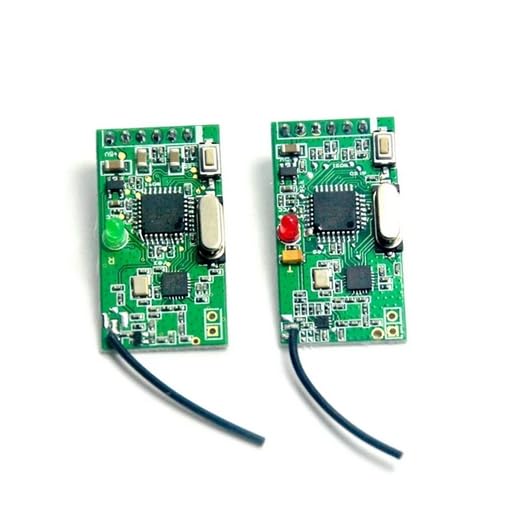
Figure 2.1: Ubden 2.4G NRF 24L 01 Wireless Digital Audio Transceiver Modules (Transmitter and Receiver).
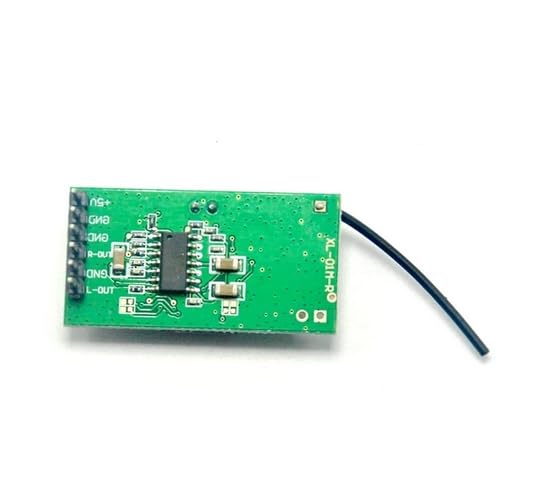
Figure 2.2: Rear view of a single NRF 24L 01 module, highlighting connection pins.
3. Setup
Setting up the Ubden NRF 24L 01 modules involves connecting power, audio input to the transmitter, and audio output from the receiver. Ensure all connections are secure before applying power.
- Power Connection: Connect a stable 5V DC power supply to the designated +5V and GND pins on both the transmitter and receiver modules. Refer to Figure 2.2 for pin identification.
- Transmitter Audio Input: Connect your audio source (e.g., line-out from an audio device) to the audio input pins on the transmitter module. Ensure correct left and right channel connections if applicable.
- Receiver Audio Output: Connect the audio output pins (R-OUT, L-OUT, GND) of the receiver module to your audio amplifier or speaker system.
- Antenna Placement: Ensure the small black antenna wires are not obstructed and are positioned for optimal signal reception. Avoid placing modules near large metal objects that could interfere with the 2.4GHz signal.
- Channel Selection: The modules operate on 16 optional channels. While typically auto-pairing, if interference occurs, manual channel selection might be possible depending on the specific module's configuration (not detailed in product description, assume auto for basic manual).
4. Operating Instructions
Once the modules are correctly wired and powered, they are designed for straightforward operation.
- Power On: Apply 5V power to both the transmitter and receiver modules. Indicator LEDs (red/green as seen in images) should illuminate, indicating power.
- Signal Pairing: The modules are designed to automatically establish a wireless connection. The indicator LEDs may change state (e.g., solid vs. blinking) to indicate a successful link.
- Audio Transmission: Play audio through the source connected to the transmitter. The digital audio signal will be wirelessly transmitted to the receiver.
- Audio Reception: The receiver module will output the received digital audio signal to the connected amplifier/speakers.
- Range Considerations: For optimal performance, keep the transmitter and receiver within the specified 100-meter range in open areas. Obstacles like walls and other electronic devices can reduce effective range.
5. Specifications
Detailed technical specifications for the Ubden NRF 24L 01 Wireless Digital Audio Transceiver Module:
| Parameter | Value |
|---|---|
| Operating Voltage | 5V DC |
| Sampling Rate | 44.1 KHz |
| AD Sampling | 16-bit (non-reversible high fidelity) |
| Operating Channels | 16 CH (optional) |
| Maximum Transmission Distance | 100 meters (328.4 ft) in empty area |
| Operating Current | 50 mA |
| Input Impedance | 600 Ohm |
| Audio Signal Output Amplitude | 0.3-1 V |
| Frequency Response | 20 Hz - 20 KHz |
| Model Number | NRF 24L 01 |
6. Maintenance
The Ubden NRF 24L 01 modules are designed for durability and require minimal maintenance. Following these guidelines will help ensure their longevity:
- Keep Dry: Protect the modules from moisture and liquids. Water damage can severely affect electronic components.
- Avoid Extreme Temperatures: Do not expose the modules to excessively high or low temperatures.
- Handle with Care: Avoid dropping or subjecting the modules to strong impacts, which can damage internal components or solder joints.
- Cleanliness: If necessary, gently clean the modules with a dry, soft cloth. Do not use harsh chemicals or abrasive materials.
- Ventilation: Ensure adequate airflow around the modules if they are enclosed in a casing, to prevent overheating.
7. Troubleshooting
If you encounter issues with your Ubden NRF 24L 01 modules, refer to the following common problems and solutions:
- No Power Indicator:
- Check the 5V DC power supply connection to ensure it is secure and providing the correct voltage.
- Verify the polarity of the power connection (+5V and GND).
- No Audio Output from Receiver:
- Ensure the transmitter module is powered on and receiving audio input.
- Verify that the receiver module is powered on and its indicator LED shows a successful link.
- Check all audio connections from the receiver to your amplifier/speakers.
- Ensure the audio source connected to the transmitter is playing and its volume is adequate.
- Try repositioning the modules to improve wireless signal strength, especially if they are far apart or obstructed.
- Poor Audio Quality / Interference:
- Move the modules away from other 2.4GHz devices (Wi-Fi routers, cordless phones, microwaves) that might cause interference.
- Ensure the modules are within the optimal operating range and not experiencing signal degradation due to distance or obstacles.
- Check the audio input signal quality to the transmitter. A noisy input will result in noisy output.
- If the modules support manual channel selection (check advanced documentation if available), try switching to a different channel.
- Intermittent Connection:
- This often indicates a weak signal. Reduce the distance between the transmitter and receiver, or remove obstructions.
- Ensure power supply is stable and not fluctuating.
8. Warranty and Support
For specific warranty information, please refer to the purchase documentation or contact your retailer. Ubden is committed to providing quality products. For technical support or further assistance, please contact Ubden customer service through the official channels provided at the point of purchase or on the Ubden brand website.
Please have your product model number (NRF 24L 01) and purchase details ready when contacting support.