
1. Introduction
Thank you for choosing the Heelay Smart Electric Dehumidifier. This compact and efficient appliance is designed to remove excess moisture from the air, creating a more comfortable and healthier environment in your home. It is ideal for small spaces such as bedrooms, bathrooms, closets, RVs, and basements, covering areas up to 320 sq ft. This manual provides essential information for the safe and effective operation, maintenance, and troubleshooting of your new dehumidifier.

Figure 1: Front view of the Heelay Smart Electric Dehumidifier.
2. Safety Instructions
To ensure safe operation and prevent damage, please read all instructions carefully before use. Keep this manual for future reference.
- Always place the dehumidifier on a stable, level surface.
- Do not block the air inlet or outlet. Maintain at least 4 inches (10 cm) of space around the unit for proper airflow.
- Do not immerse the unit, power cord, or plug in water or other liquids.
- Unplug the dehumidifier before cleaning, moving, or performing any maintenance.
- Keep out of reach of children and pets.
- Do not operate the unit if the power cord or plug is damaged, or if the unit malfunctions or has been dropped.
- Use only the power adapter supplied with the unit.
- Ensure the water tank is correctly seated before operating.
3. Product Overview
The Heelay Smart Electric Dehumidifier is designed for user-friendly operation and effective moisture removal. Key features include a visible water tank, simple controls, and a portable design.
3.1 Components
- Dehumidifier Unit (main body)
- Removable Water Tank (1200ml capacity)
- Power Adapter
- Washable Filter (located at the rear)
3.2 Control Panel and Indicators
The control panel is located on the top front of the unit, featuring two buttons and indicator lights.
- Power Button: Press to turn the unit On or Off.
- Light Button: Press to cycle through 7 colorful night light options or turn them off.
- Power Indicator: Illuminates when the unit is powered on.
- Full Water Tank Indicator: A red light will flash when the water tank is full, and the unit will automatically shut off.

Figure 2: Control panel and water tank details.
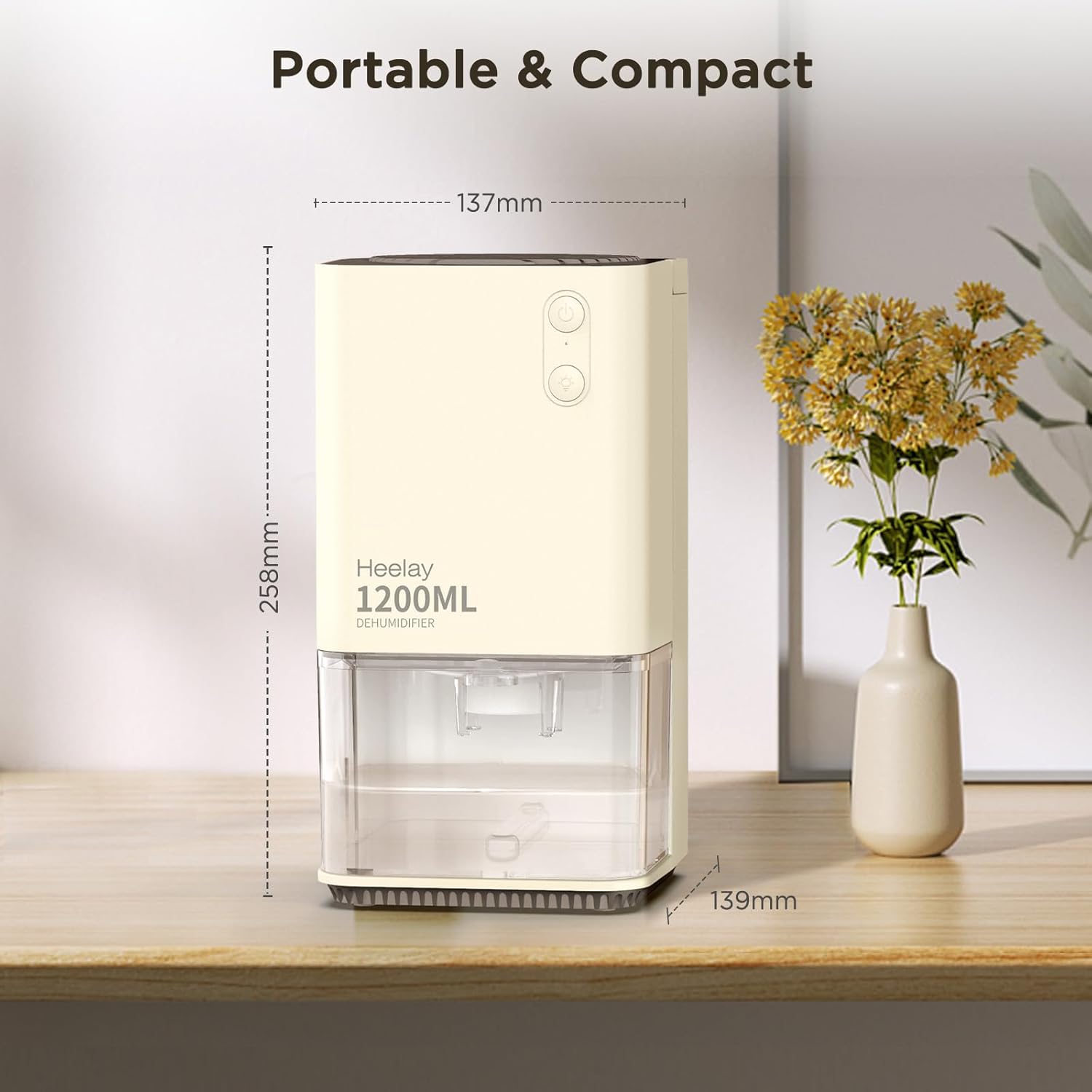
Figure 3: Compact dimensions of the dehumidifier.
4. Setup
Follow these steps to set up your dehumidifier for the first time:
- Unpack: Carefully remove the dehumidifier and all accessories from the packaging. Retain the packaging for future storage or transport.
- Placement: Place the unit on a firm, level surface in the desired location. Ensure there is at least 4 inches (10 cm) of clear space around all sides for optimal air circulation. Avoid placing it directly against walls or furniture. This unit is suitable for small rooms between 50-320 sq ft, such as closets, RVs, bedrooms, and bathrooms.
- Power Connection: Connect the power adapter to the DC input port on the back of the dehumidifier, then plug the adapter into a suitable electrical outlet.
5. Operating Instructions
Operating your Heelay dehumidifier is simple and straightforward.
5.1 Power On/Off
- To turn the dehumidifier ON, press the Power Button once. The power indicator light will illuminate.
- To turn the dehumidifier OFF, press the Power Button again. The power indicator light will turn off.
5.2 Colorful Night Lights
- Press the Light Button to activate the colorful night lights.
- Each press will cycle through the 7 available colors.
- Pressing the button after the last color will turn the lights off.
5.3 Water Tank Management
The dehumidifier features a 1200ml (40 OZ) water tank. When the tank is full, the unit will automatically shut off, and the red indicator light will flash to alert you.
- Remove Tank: Gently pull out the water tank from the front of the unit.
- Empty Water: Discard the collected water.
- Reinsert Tank: Slide the empty water tank back into the unit until it clicks securely into place. The unit will resume operation if the power is on.
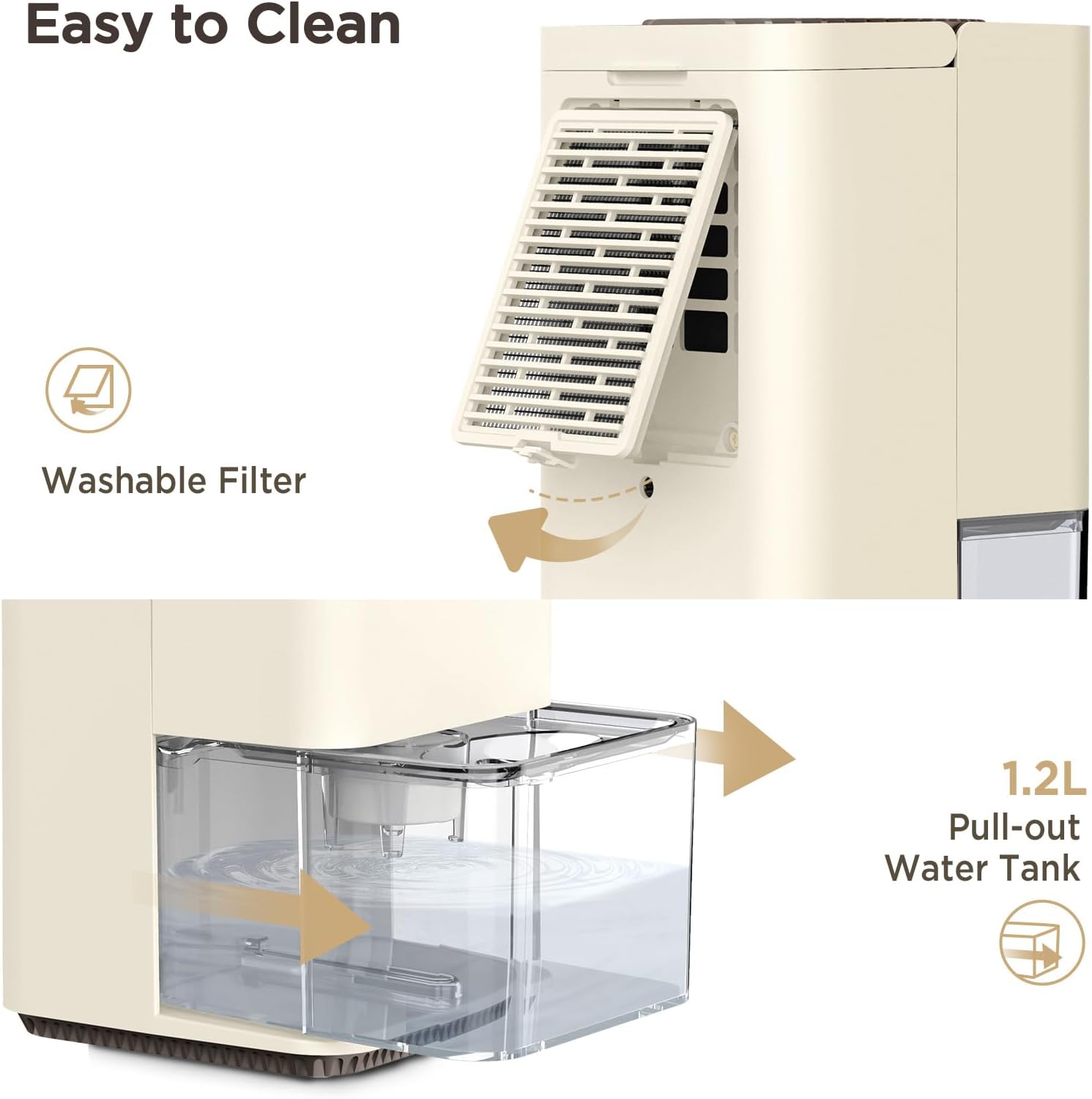
Figure 4: Easy removal of the water tank for emptying.
6. Maintenance
Regular maintenance ensures optimal performance and extends the lifespan of your dehumidifier.
6.1 Cleaning the Water Tank
Clean the water tank regularly to prevent mold and bacteria growth.
- Remove the water tank as described in Section 5.3.
- Rinse the tank with clean water. For thorough cleaning, use a mild detergent and a soft brush, then rinse thoroughly.
- Dry the tank completely before reinserting it into the unit.
6.2 Cleaning the Air Filter
The dehumidifier features a detachable and washable filter to maintain air quality and unit efficiency.
- Turn off and unplug the dehumidifier.
- Locate the filter cover at the rear of the unit. Gently pull it out to remove the filter.
- Rinse the filter under running water to remove dust and debris. If heavily soiled, use a mild detergent.
- Allow the filter to air dry completely before placing it back into the unit.
- Reinsert the filter cover until it snaps into place.
7. Troubleshooting
If you encounter issues with your dehumidifier, please refer to the following common problems and solutions:
| Problem | Possible Cause | Solution |
|---|---|---|
| Dehumidifier does not turn on. | No power supply; Power adapter not connected; Water tank full or not properly seated. | Check power outlet and connection; Ensure water tank is empty and correctly inserted. |
| Unit is running but not collecting water. | Room temperature too low (below 59°F/15°C); Humidity level too low; Air filter blocked. | Dehumidification efficiency decreases in low temperatures; Ensure humidity is above 50% RH for optimal performance; Clean the air filter. |
| Red indicator light flashing. | Water tank is full. | Empty the water tank and reinsert it properly. |
| Unit is noisy. | Unit not on a level surface; Obstruction in fan. | Place on a stable, level surface; Check for any foreign objects near the fan. |
If the problem persists after trying these solutions, please contact customer support.
8. Specifications
| Feature | Specification |
|---|---|
| Brand | Heelay |
| Model Name | KW-CS01 |
| Capacity (Water Collection) | Max 14 OZ (400ml) per day (at 86°F, 80% RH) |
| Water Tank Volume | 40 OZ (1200ml) |
| Recommended Coverage Area | 50-320 sq ft |
| Noise Level | Less than 35 dB |
| Power Consumption | 0.79 kWh / 24 hours (approx. 33W) |
| Product Dimensions | 5.43"D x 5.39"W x 10.04"H |
| Material | Plastic |
| Special Feature | Portable, Auto Shut-off, 7 Colorful Lights, Washable Filter |
9. Warranty and Support
Heelay stands behind the quality of its products. Your Heelay Smart Electric Dehumidifier is covered by an 18-Month Quality Promise from the date of purchase.
This warranty covers defects in materials and workmanship under normal use. It does not cover damage resulting from misuse, accident, alteration, neglect, or unauthorized repair.
For warranty claims, technical support, or any questions regarding your product, please contact Heelay customer service through the retailer's platform or the official brand website. Please have your model number (KW-CS01) and purchase details ready when contacting support.