
1. Introduction
Thank you for choosing the WOOVIVS LED Study Desk with Hutch and Drawer. This manual provides essential information for the safe assembly, operation, and maintenance of your new desk. Please read these instructions carefully before use and retain them for future reference.
2. Important Safety Information
Failure to follow these safety instructions may result in injury or damage to the product.
- Always assemble the desk according to the provided instructions.
- Ensure the desk is properly anchored to the wall or floor to prevent tipping, especially when using the electrical components.
- Do not overload the desk or place heavy objects on the shelves or top cabinet.
- Keep the electrical components dry and away from heat sources.
- Always unplug the desk when not in use or when leaving the room.
- Keep small parts and packaging materials away from children.
3. Product Overview
The WOOVIVS LED Study Desk is designed for home office and study environments, offering integrated lighting, charging capabilities, and ample storage. Its modern design makes it suitable for various room types.

Figure 3.1: The WOOVIVS LED Study Desk with Hutch and Drawer, showcasing its design and integrated lighting.
Key Features:
- LED Lights Strip: Features 3 color options (white, yellow, white+yellow) with dimming and sensor functions for eye protection and convenience.
- Built-in Charging Station: Equipped with 2 standard AC outlets, 1 USB Port, and 1 Type-C port for charging electronic devices.
- Spacious Storage: Includes five drawers, two display shelves, and a top storage cabinet to organize your workspace.
- Multi-purpose Design: Constructed from high-quality MDF with rounded corners, suitable for use as an office desk, study table, or workstation.

Figure 3.2: Visual representation of the desk's main functionalities, including power outlets, LED lighting, and storage options.
4. Setup and Assembly
Assembly of the WOOVIVS LED Study Desk requires careful attention to detail. All necessary tools and detailed instructions are included with your product. It is recommended that two people assemble this desk.
Dimensions:

Figure 4.1: A technical drawing illustrating the overall width (39.4"), depth (21.7"), and height (70.7") of the desk, including the hutch, along with the weight (112.4 lbs).
Assembly Video Guide:
Video 4.1: This video provides a step-by-step visual guide for assembling the WOOVIVS LED Study Desk, demonstrating how to put together each component.
For detailed, step-by-step assembly instructions, please refer to the included printed manual and the video guide above. Ensure all parts are accounted for before beginning assembly.
5. Operating Instructions
5.1 LED Lighting System
The desk features an integrated LED light strip with adjustable colors and brightness, as well as a human body induction sensor.
- Color Change: Short press the "light" button to cycle through white, warm white, and yellow light options.
- Brightness Adjustment: Long press the "light" button to dim or brighten the selected light color.
- Sensor Mode: Activate the human body induction mode via the dedicated button. The lights will automatically turn on when you approach and off when you leave.

Figure 5.1: A series of images showing the desk's LED lighting in different color temperatures and illustrating the brightness adjustment function.
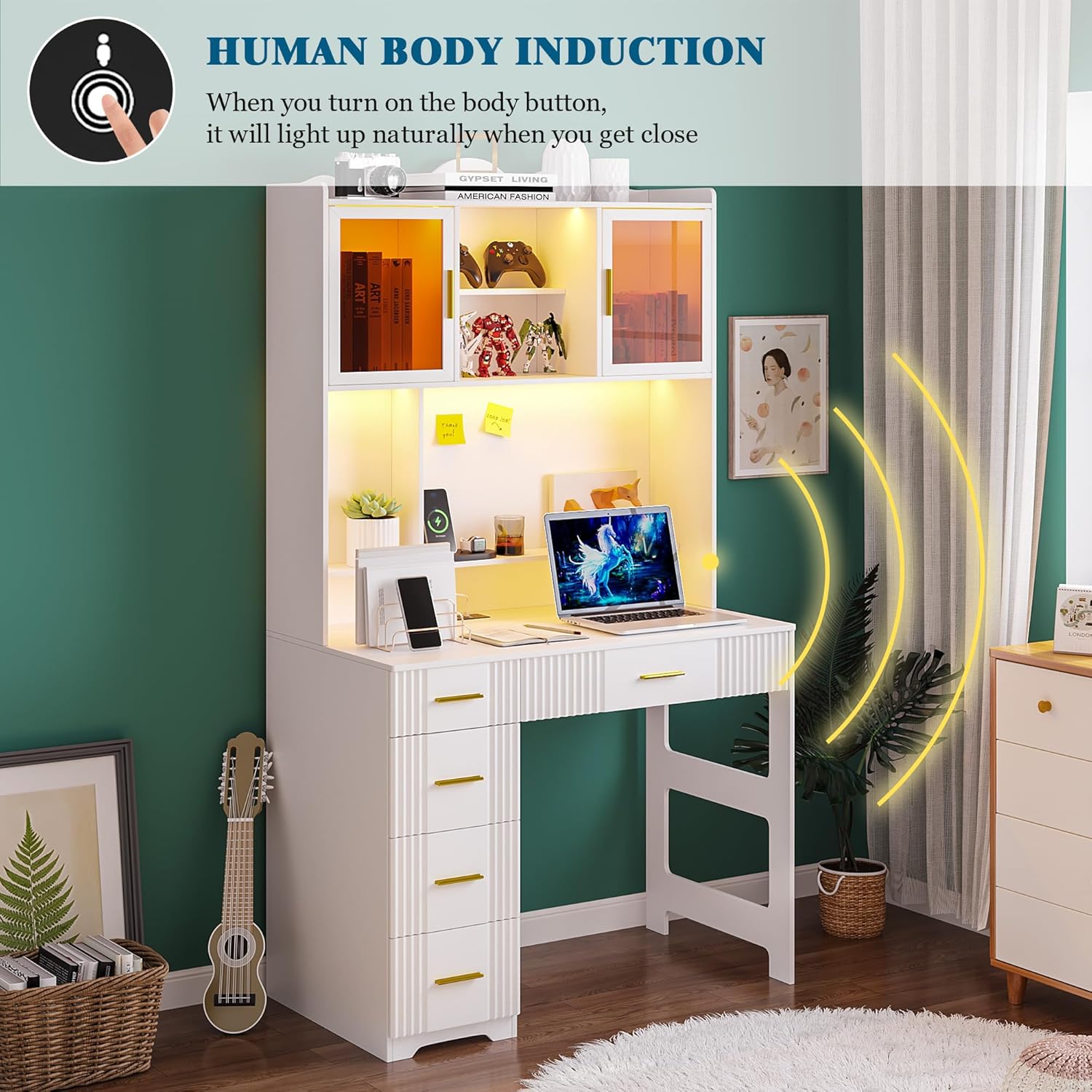
Figure 5.2: An image depicting the desk's sensor mode, where the LED lights automatically illuminate when a person approaches the desk.
5.2 Built-in Charging Station
The desk includes a convenient charging station to power your electronic devices directly from your workspace.
- AC Outlets: Two standard AC outlets (120V/12A) are available for laptops, monitors, or other powered devices.
- USB Ports: One USB-A port (5V/2.1A) and one USB-C port (5V/2.1A) are provided for charging smartphones, tablets, and other compatible devices.
- Ensure devices are compatible with the provided voltage and current specifications.

Figure 5.3: A detailed view of the integrated power strip, highlighting the two AC outlets, one USB port, and one Type-C port for convenient device charging.
Video 5.1: A short video showcasing the functionality of the built-in charging station on the WOOVIVS desk, including the AC outlets and USB/Type-C ports.
6. Maintenance and Care
Proper care will extend the life and appearance of your WOOVIVS LED Study Desk.
- Cleaning: Wipe surfaces with a soft, damp cloth. Avoid harsh chemicals or abrasive cleaners that may damage the finish.
- Spills: Immediately wipe up any spills to prevent moisture damage to the wood or electrical components.
- Electrical Components: Ensure the charging station and LED lights are kept dry. Do not attempt to repair electrical components yourself; contact qualified personnel.
- Drawer Functionality: Periodically check drawer slides for smooth operation. If drawers become stiff, clean the tracks and apply a silicone-based lubricant if necessary.
- General Inspection: Regularly check all screws and fasteners to ensure they are tight. Re-tighten if necessary.
7. Troubleshooting
If you encounter issues with your WOOVIVS LED Study Desk, refer to the following common problems and solutions:
| Problem | Possible Cause | Solution |
|---|---|---|
| LED lights not turning on. | Power cable disconnected, faulty power source, LED strip issue. | Check if the power cable is securely plugged into the wall outlet and the desk. Test the outlet with another device. Ensure the light button is pressed correctly. |
| Charging station not working. | Desk not plugged in, device not compatible, internal wiring issue. | Verify the desk is plugged into a live outlet. Ensure your device is compatible with the charging station's specifications. Try a different device or cable. |
| Drawers are stiff or not closing properly. | Obstruction in the drawer slide, loose screws, misaligned tracks. | Remove the drawer and check for any obstructions. Tighten all screws on the drawer slides. Ensure the drawer tracks are correctly aligned during assembly. |
| Desk feels unstable. | Loose fasteners, uneven floor, improper assembly. | Check and tighten all assembly screws. Ensure the desk is on a level surface. If necessary, re-level the desk using adjustable feet (if present) or shims. |
If the problem persists after attempting these solutions, please contact WOOVIVS customer support.
8. Specifications
| Feature | Detail |
|---|---|
| Brand | WOOVIVS |
| Model Number | 9138 |
| Product Dimensions (D x W x H) | 21.6"D x 39.4"W x 70.7"H |
| Color | White |
| Material | Engineered Wood |
| Item Weight | 112 Pounds |
| Number of Drawers | 5 |
| Number of Shelves | 2 (open) + 2 (enclosed in hutch) |
| Charging Station | 2 AC Outlets (120V/12A), 1 USB Port (5V/2.1A), 1 Type-C Port (5V/2.1A) |
| LED Lighting | 3 colors (white, warm white, yellow), dimmable, sensor mode |
| Assembly Required | Yes (Includes all assembly tools) |
| Recommended People for Assembly | 2 |
9. Warranty and Support
9.1 Warranty Information
The WOOVIVS LED Study Desk comes with a Limited Warranty. For specific details regarding warranty coverage, terms, and conditions, please refer to the warranty card included with your product or contact WOOVIVS customer support directly.
9.2 Customer Support
If you have any questions, require assistance with assembly, or need to report a missing/damaged part, please contact WOOVIVS customer support. You can typically find contact information on the product packaging, the included manual, or the WOOVIVS brand store on Amazon.
Visit the WOOVIVS Store: WOOVIVS Amazon Store